VOGONS


First post, by retro games 100

User metadata
Rank l33t
Rank
l33t

Please can someone remind me what utility I can run, in Windows 98, that can adjust the R 9800's clock and RAM speed? The problem is that the card displays corrupted graphics all the time. That's everywhere, including in the BIOS screens. After only 5 minutes of idle desktop use, all of the RAM's heatsinks feel hot, and I just wondered if it's been overclocked too much by the previous owner. Thanks a lot.


Reply 3 of 13, by MatthewBrian

User metadata
Rank Member
Rank
Member

I had ever had two of that exact card before with the exact same problem. Radeon 9800 cards had their weakness at the BGA (Ball Grid Array) soldering on the bottom of the graphics processor.

As soon as I gave it to my friend, he dismantled the cooler, put a ball of aluminium foil above the GPU, then burned the alumunium foil. Then he put it back on his PC, tried to play some games at full resolution.

The problem is fixed! 😀

Reply 4 of 13, by retro games 100

User metadata
Rank l33t
Rank
l33t

Very interesting. So this problem sounds fixable! Do you think I should attempt to remove the cooler? Unfortunately, I haven't got a soldering iron, for the "burn aluminium foil" operation. But I could clean up the GPU, perhaps? And then how about I buy a 3rd party cooler, like an Accelero? Thanks for any info.

Edit: I could put it in the oven?

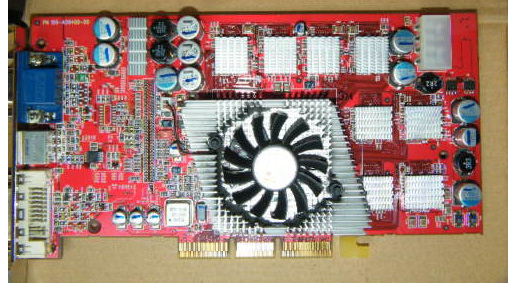
Here it is:
r9800.jpg

Reply 5 of 13, by retro games 100

User metadata
Rank l33t
Rank
l33t

I have removed the cooler, and I think I can see a possible design fault. There's a ridge going around the GPU, and that ridge might be fractionally too high. If it is too high, it will prevent the cooler from making good contact with the GPU. I wonder if the Accelero heatsink can sit "inside" this outer ridge area? If it can, it will make perfect contact with the GPU. If it is quite large and sits "on top of" this outer ridge, then it might not work.

Reply 6 of 13, by Mau1wurf1977

User metadata
Rank l33t++
Rank
l33t++

I believe that back in they day, they just put so much paste on the die, that the gap was covered...

Another thing you can do, is check that the clocks are the defaults and not modified through a BIOS flash. GPU-Z should be able to do that!

My website with reviews, demos, drivers, tutorials and more...
My YouTube channel

Reply 7 of 13, by retro games 100

User metadata
Rank l33t
Rank
l33t

Thanks for the idea, but unfortunately I don't think GPU-Z works on Windows 98. I don't have a spare Windows XP "test box", because that operating system requires registration, and as I am constantly changing hardware, it might "lock me out" very quickly. BTW, is that the case? I think that's true for the OEM version, where you are allowed 3 hardware changes and then that's it - no more, but can I change the hardware lots of times, for the retail version of Windows XP?

Reply 8 of 13, by MatthewBrian

User metadata
Rank Member
Rank
Member

Putting it in an oven should be the last resort. I've seen some parts would just explode when they're heated.. so I think I would just concentrate the heat on the processor.

If you wanted to test it, why don't you just install a trial version of Windows XP? Or make a BartPE disk from it (www.nu2.nu/pebuilder), it should be fine because you already had a lisence of it.

Reply 10 of 13, by Dominus

User metadata
Rank DOSBox Moderator
Rank
DOSBox Moderator

About XP, after some hardware changes you will be required to manually reactivate XP by calling a (toll free, I think) phone number. It's a bit of a hassle but you should be able to keep on reactivating it. Also, later service packs reduced the hardware changes that cause the need for reactivation, again not 100% sure though.

Windows 3.1x guide for DOSBox
60 seconds guide to DOSBox
DOSBox SVN snapshot for macOS (10.4-11.x ppc/intel 32/64bit) notarized for gatekeeper

Reply 11 of 13, by Mau1wurf1977

User metadata
Rank l33t++
Rank
l33t++

There is always W7 right? Does it work with AGP systems?

You don't need a key for installing and even after the activation period it fully works (black screen and a pop up once in a while). Great for testing!

My website with reviews, demos, drivers, tutorials and more...
My YouTube channel

Reply 12 of 13, by MatthewBrian

User metadata
Rank Member
Rank
Member

Of course AGP works with Windows 7 😀 I had a Pentium 4 notebook here with an AGP-connected VGA card (soldered to the m/b) which runs Windows 7 😀

Reply 13 of 13, by retro games 100

User metadata
Rank l33t
Rank
l33t

Thanks a lot people. W7 for testing purposes sounds like it needs testing!