VOGONS


First post, by retro games 100

User metadata
Rank l33t
Rank
l33t

I'm going to test a socket 7 MS5158 mobo. This link goes to a Stason webpage, where it says this 512Kb of cache model mobo will accept up to 256MB of RAM. It uses the Intel PCIset 82439TX chipset. What is the maximum amount of RAM that this mobo is able to fully cache? I notice that this mobo accepts both 72-pin memory and SDRAM. Does this make any difference to the amount of RAM that this mobo is able to fully cache? Thanks a lot.
Reply 1 of 7, by Old Thrashbarg

User metadata
Rank Oldbie
Rank
Oldbie

The 430TX will cache 64MB... it's a hard limit of the chipset and the only way to bypass it is to use a K6-III or K6+ series chip with its own on-chip L2 cache. The type of RAM you use makes no difference.

Reply 2 of 7, by retro games 100

User metadata
Rank l33t
Rank
l33t

Thanks a lot for the info. Would you recommend that I get one stick of 64MB SDRAM, or a couple of 32MB sticks of SDRAM? Or doesn't it make a jot of difference? Also, what "PC speed" would you suggest? I can see some PC-133 speed-rated sticks on ebay at the moment, but as the mobo can only go up to 83MHz bus speed, I guess it doesn't matter at all.

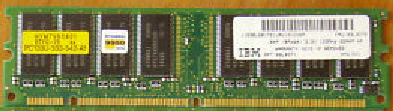
Sorry, one last thing please - when I look at these 64MB SDRAM sticks on ebay (pic below), they look a little bit "tall", and also they've got notches on their sides. And they've got an even number of chips on them - 8. Should I be particularly aware about these attributes, and also another attribute: chips on one side or chips on both sides - should that be a purchasing concern too? (Am I right in thinking that this single or double sided chips issue is of no importance to 72-pin memory, but it is for SDRAM?) Thanks very much!

ram.jpg

BTW, on a completely unrelated theme, here's a big socket A cooler I managed to squeeze on to this MS5158 socket 7 mobo. Even the fan works, when I plugged its "more modern looking" plug on to the "cheap looking" 3 pins labelled "fan" on this mobo.

Image1.jpg

Reply 3 of 7, by SavantStrike

User metadata
Rank Member
Rank
Member

Heh heh heh. I had this same problem a week ago, and the same problem 13 years ago. I recently bought a 430HX chipset based mobo which would cache a generous 512mb, but the tag ram in the board wouldn't support it, and it wasn't upgradeable.

True story though, back in the day our family computer had a 166mhz mmx overdrive chip in it sitting on the 430TX chipset. We had 48MB of EDO ram in that board until we changed it out for a 233mhz mmx chip. A few months later, we added another 128MB of SDRAM as well. I saw more of a performance improvement from that uncached ram than I did from the faster CPU. Even uncached, ram is still dramatically faster than a hard disk is, and we had a 20GB 7200 rpm 2mb cache drive (smokin fast at the time).

As for single or double sided ram, I doubt the chipset can recognize high density stuff, so I would say double sided 128mb or single sided 64mb would be ideal. Any SDRAM from PC100 on up should be fine for the 88mhz bus. A single 64mb stick is probably all you need

Reply 4 of 7, by sliderider

User metadata
Rank l33t++
Rank
l33t++
retro games 100 wrote:
Thanks a lot for the info. Would you recommend that I get one stick of 64MB SDRAM, or a couple of 32MB sticks of SDRAM? Or doe […]
Show full quote

Thanks a lot for the info. Would you recommend that I get one stick of 64MB SDRAM, or a couple of 32MB sticks of SDRAM? Or doesn't it make a jot of difference? Also, what "PC speed" would you suggest? I can see some PC-133 speed-rated sticks on ebay at the moment, but as the mobo can only go up to 83MHz bus speed, I guess it doesn't matter at all.

Sorry, one last thing please - when I look at these 64MB SDRAM sticks on ebay (pic below), they look a little bit "tall", and also they've got notches on their sides. And they've got an even number of chips on them - 8. Should I be particularly aware about these attributes, and also another attribute: chips on one side or chips on both sides - should that be a purchasing concern too? (Am I right in thinking that this single or double sided chips issue is of no importance to 72-pin memory, but it is for SDRAM?) Thanks very much!

ram.jpg

BTW, on a completely unrelated theme, here's a big socket A cooler I managed to squeeze on to this MS5158 socket 7 mobo. Even the fan works, when I plugged its "more modern looking" plug on to the "cheap looking" 3 pins labelled "fan" on this mobo.

Image1.jpg

You're probably looking at server memory if it is taller than other RAM sticks of the same type. You'd have to find out specifically if your motherboard supports that type of memory because it isn't always interchangeable. Try inputting any numbers you find on the stickers into Google and see if you get a description.

Reply 5 of 7, by Tetrium

User metadata
Rank l33t++
Rank
l33t++
retro games 100 wrote:
Thanks a lot for the info. Would you recommend that I get one stick of 64MB SDRAM, or a couple of 32MB sticks of SDRAM? Or doe […]
Show full quote

Thanks a lot for the info. Would you recommend that I get one stick of 64MB SDRAM, or a couple of 32MB sticks of SDRAM? Or doesn't it make a jot of difference? Also, what "PC speed" would you suggest? I can see some PC-133 speed-rated sticks on ebay at the moment, but as the mobo can only go up to 83MHz bus speed, I guess it doesn't matter at all.

Sorry, one last thing please - when I look at these 64MB SDRAM sticks on ebay (pic below), they look a little bit "tall", and also they've got notches on their sides. And they've got an even number of chips on them - 8. Should I be particularly aware about these attributes, and also another attribute: chips on one side or chips on both sides - should that be a purchasing concern too? (Am I right in thinking that this single or double sided chips issue is of no importance to 72-pin memory, but it is for SDRAM?) Thanks very much!

ram.jpg

That 64MB module looks like the typical 64MB module, I got tons of those with the notches. Nothing to worry about 😉
I'd say just get PC-133 and (if the mobo supports this) set it to cl2 instead of cl3.
Single sided or double sided makes a difference with DIMM's. Usually
double sided DIMM's are basically 2 SIMM's stuck together back-to-back 😜
And usually a double sided (I'll do DS or SS, types faster 😜)DIMM will be seen by the mobo as 2 32bit sticks basically (the mobo should tell you it uses 2 banks, a SS module usually shows 1 bank).

What I mean by usually, usually a DIMM with chips on both sides fill 2 banks and a DIMM with chips on 1 side fill 1 bank, but now and again a DIMM manufacturer may end up making a DIMM with chips on only 1 side but will connect half the chips to the pins on the reverse side so the mobo sees it as a DIMM filling up 2 banks.
The same can be applied to DIMM's with chips on both sides. They "may" be wired to the pins on one side only.

Btw, I once found a DIMM which was oxidized on one side and I tried to get half of it to work by putting a piece of tape on the pins on the oxidized side. Didn't post...oh well 😜

retro games 100 wrote:
BTW, on a completely unrelated theme, here's a big socket A cooler I managed to squeeze on to this MS5158 socket 7 mobo. Even t […]
Show full quote

BTW, on a completely unrelated theme, here's a big socket A cooler I managed to squeeze on to this MS5158 socket 7 mobo. Even the fan works, when I plugged its "more modern looking" plug on to the "cheap looking" 3 pins labelled "fan" on this mobo.

Image1.jpg

I think I have the same cooler 😁
Love those coolers with 8cm fans 😁

Edit:Btw, not hooked up the HSF to the socket tabs I see? For testing only of course 😜

Whats missing in your collections?
My retro rigs (old topic)
Interesting Vogons threads (links to Vogonswiki)
Report spammers here!

Reply 6 of 7, by retro games 100

User metadata
Rank l33t
Rank
l33t

Thanks a lot for the info, people. BTW, that cooler is attached very firmly. It doesn't look like it is, looking at the photo, but it is. There are only 2 CPU cooler "lugs" protruding from the side of the CPU socket. There's one in the middle, and one on the right. (On the other side of the CPU socket, there's one in the middle, and one on the left.)

The cooler's clamp is firmly attached to these 4 lugs, but as there is a lug missing on each side, the clamp doesn't appear to be level. I've got paste on the CPU's heatspreader too, and the fan spins quickly, so the CPU will be kept cool.

Reply 7 of 7, by feipoa

User metadata
Rank l33t++
Rank
l33t++

I just ran an AMD K6-III+/500 MHz on my non-super socket7 with 2x128MB PC100 DIMMs on the 83.3 MHz setting. It was blazing fast in Windows2000, probably about as fast as a PII/III-450 or 500. CTCM shows all the RAM as cacheable.

Cachechk7 shows L2 to 256KB and L3 to 512KB, L3 being the MB's cache. Maybe you can downclock a K6-II/III+ if you want to run slower and have all RAM cacheable?

NOTE: System BIOS cacheable must be set off for many non-super 7 boards to work with an AMD K6 II/III+.

Plan your life wisely, you'll be dead before you know it.


