VOGONS


First post, by retro games 100

User metadata
Rank l33t
Rank
l33t

I've just ordered a bunch of cheap oscillators: 10, 16, 20, 24, 32 and 40 MHz speeds. These silver "tin cans" plug in to my 386 Contaq chipset-based mobo, and affect the CPU's clock speed, like this -
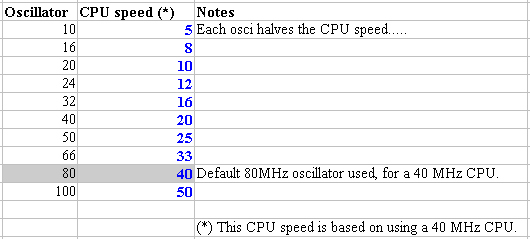
osci.jpg

Well, I haven't tested them all yet, so the "blue data column" values are what I am hoping to see on the BIOS POST screen. I have successfully tested the 50, 66, 80 and 100 oscis, and the CPU speeds obtained were 25, 33, 40 and 50.

So, what are some good tests to run? I was thinking of doing a big speed test table. How about Norton SysInfo.exe? I've got version 8.1 somewhere. Any other ideas people? Thanks a lot.


Reply 1 of 15, by retro games 100

User metadata
Rank l33t
Rank
l33t

Unfortunately, my tests weren't successful. I tried the 32 MHz osci to make the CPU run at 16 MHz, and that worked OK. But all of the other slower oscis did not work. The 24 MHz osci (12 MHz CPU speed) was OK, but would not work if the cache was enabled. - And for all slower oscis, I had to disable the cache. The 20MHz osci (10 MHz CPU speed) caused instability. The 16 MHz osci (8 MHz CPU speed) and the 10 MHz osci (5 MHz CPU speed) would not POST.

That's a pity. It looks like the board can't simply be slowed down to a crawl, based on the oscillator. There appears to be an acceptable working range that the osci must run at. It seems that this range is 100 MHz down to 32 MHz. This gives a CPU speed of 50 MHz down to 16 MHz, if you are using a 40 MHz CPU.

I wonder if this working osci speed range "rule" discovered above would change, if I used a slower CPU?

Reply 2 of 15, by Markk

User metadata
Rank Oldbie
Rank
Oldbie

I wonder if you need to adjust the at bus clock speed. However, I believe that at any given speed, the results won't be comparable to the actual older cpus. A 16MHz 386dx should be faster than a 286 running at the same speed. Also a 10MHz 286 is faster than an 8088/10.

Reply 3 of 15, by elianda

User metadata
Rank l33t
Rank
l33t

Identical speed is not possible, since more complex instructions are carried out a lot faster on a 386 on per MHz basis. So even if you get down to 8086 level by MHz it still depends on the benchloop you test if speed is equal or not. Just check the cycle requirements for certain often used instructions for 8086 and 80386. Also keep in mind that the system backend of a 8086 is different.
There is already a difference if you use f.e. a 386DX-16 or a 386-16.

Retronn.de - Vintage Hardware Gallery, Drivers, Guides, Videos. Now with file search
Youtube Channel
FTP Server - Driver Archive and more
DVI2PCIe alignment and 2D image quality measurement tool

Reply 4 of 15, by retro games 100

User metadata
Rank l33t
Rank
l33t

Yep, I understand that a 386 will be faster than a "same speed" 286, etc. But hey Markk! Your advice worked great - thanks a lot! 😁 Check this out. That's using a 10 MHz osci, with a 40 MHz CPU, giving a CPU speed of ~5 MHz. OK, sure the system won't behave in the same way as an old IBM PC running at 4.77, but it will be reasonably close in terms of slowing down a 386, to play a super-ancient old PC game.

I'll continue to mess about with bus speeds etc, and see what else I can find. BTW, the system featured in the screenshot below has its cache enabled, and turbo set to "on / normal / turbo" - in other words, it is not set to "slow down" mode. The mobo bus speed jumpers are set to "maximum speed".

477.JPG

Reply 5 of 15, by Markk

User metadata
Rank Oldbie
Rank
Oldbie

Nice! What version of SI is that? I found and old version, (I think 5) of norton utilities on the disk of an ancient 8086-10 laptop I bought. There, the fastest machine to compare to is a Compaq 386/33 which has a score of 34,7, and it says that number means how many times faster it is compared to an 8088/4.77. So as the 386/33 score on that later version is close, it might mean the same thing.

Btw, I've got the best 386/40 board, 😜 It scores 43,2, and when I deactivate the turbo function, it goes down to 5.4. That's slower than my 286, hehe!

Reply 6 of 15, by retro games 100

User metadata
Rank l33t
Rank
l33t

It's part of NU version 8.1. I think the way SysInfo.exe works in various versions is the same. Sure, different versions will have different spec PCs for comparisons, but the way it calculates your score is the same. So, I don't think it matters that you have version ~5, and I have version ~8.

I wonder if Vogons users Jorpho and Gemini000 are reading this, because in this thread, they suggest these 3 games to try for "speed testing" : Janitor Joe, Striker, and FlightMare. Also, you suggest the game Zaxxon to try, but I am having trouble finding it at the moment...

Well, I tried these 3 games on the "regular speed" 386, and they were unplayable. I then removed the "factory supplied" oscillator, and replaced it with a 20 MHz osci, making the CPU run at 10 MHz. And that made all 3 games perfectly playable! No turbo button toggling, or cache disabling - just pure CPU slowdown.

Reply 7 of 15, by retro games 100

User metadata
Rank l33t
Rank
l33t

I've done some more testing. I appreciate that the column on the right called "Very close to" is a bit meaningless, because of the comments made earlier. For example, I know that in the first row, "4.6 is very close to 4.77" is not really valid, because I am using a "down clocked" 386, and that's different to using a real old IBM PC CPU. It's just a rough and ready comparison, and not to be taken too seriously. The main thing is that you can slow down this 386 mobo, and that's good news for playing some really ancient games.

The game suggested by vogons user Jorpho called "Striker" is a really good example. I am going to dig out my crappy camera, and try and do a video of this game, then upload it to YouTube. Here's a suggestion - download this old freeware game, and play it on your old machine(s), and see how fast it is! See if you can slow it down somehow.

I picked some "landmark" speeds for the "Very close to" column. These speeds are familiar to old IBM PC, 80286 and some early 80386 owners.
osciB.jpg

Reply 8 of 15, by elianda

User metadata
Rank l33t
Rank
l33t

Hmm you are going after the guessed MHz, so do you know that a score of 1.0 should equal the performance of a PC-XT ?
This is what the so called computing index tells you - by what factor your PC is faster than the original PC-XT.
So wouldn't it be more senseful to target a score of 1.0? 😀

Retronn.de - Vintage Hardware Gallery, Drivers, Guides, Videos. Now with file search
Youtube Channel
FTP Server - Driver Archive and more
DVI2PCIe alignment and 2D image quality measurement tool

Reply 9 of 15, by retro games 100

User metadata
Rank l33t
Rank
l33t

That's a good idea. I might have to get a couple more oscillators! 😀 In the meantime, I have uploaded a couple of crappy videos to YouTube, recorded using my very crappy camera. I included a detailed summary for each video on that website.

http://youtu.be/oLP6y58RyRM (Striker, 5 MHz CPU, cache disabled, OK speed)
http://youtu.be/yTSKuRU1Y0I (Striker, 5 MHz CPU, cache enabled, too fast)

Reply 10 of 15, by sliderider

User metadata
Rank l33t++
Rank
l33t++

Have you tried it with a 386SX motherboard? Even at the same clock speed they tend to run slower than a 386DX.

Reply 11 of 15, by retro games 100

User metadata
Rank l33t
Rank
l33t

I'm sure a 386SX mobo will be slower, because I think it's 16-bit. BTW, I tried some more oscis: 6 and 4 MHz. They made the game Striker run too slowly. That was with cache enabled, and the bus speed to maximum. As 10 MHz makes this game run too quickly, I'll buy a cheap 8MHz osci on ebay, and test it as soon as it arrives...

Reply 12 of 15, by sliderider

User metadata
Rank l33t++
Rank
l33t++
retro games 100 wrote:

I'm sure a 386SX mobo will be slower, because I think it's 16-bit. BTW, I tried some more oscis: 6 and 4 MHz. They made the game Striker run too slowly. That was with cache enabled, and the bus speed to maximum. As 10 MHz makes this game run too quickly, I'll buy a cheap 8MHz osci on ebay, and test it as soon as it arrives...

Seems a lot easier to me to just find an 8088/8086 motherboard than to keep buying and swapping all these oscillators.

Reply 13 of 15, by retro games 100

User metadata
Rank l33t
Rank
l33t

Once I've discovered which oscis work at whatever speed I want, it allows me to use this 386 mobo for a decade's worth of old software ranging from about '81 - '90, without the need for any extra crusty old hardware. I'm confident that this is an acceptable solution. It's not perfect, but it'll do. Besides, an 8088 mobo requires all of its 8-bit only gear to get it all working, and that old hardware is getting hard to find now.

Reply 14 of 15, by Markk

User metadata
Rank Oldbie
Rank
Oldbie

Last week I tested 2 boards I have. One has an amd386sx-25 and the other an intel386dx-25. I used only 3dbench. The dx-25 was less than 1fps faster, something I expected, as it has 64kb cache memory. The sx has none. And also the early dos games, if they are 16bit software, wouldn't it be expected to run almost at the same speed? Then I tried doom2, which would run on the dx(very slow, ok), but on the sx it would crash when loading. I think that's 32bit software.

Reply 15 of 15, by retro games 100

User metadata
Rank l33t
Rank
l33t

I think Doom 2 requires a DX CPU. 😉
