VOGONS


First post, by MaxWar

User metadata
Rank Oldbie
Rank
Oldbie

Hey there guys, i have a strange issue with my win98 rig no longer producing any sound with its Sound blaster live. It used to work just fine and suddenly, nothing.

I tried reinstalling drivers, switching PCI slots, i even tried switching with another sound blaster live ( i have several ) and nothing works. I tried the sound card in another rig and it works fine.

Funny thing is how it happened, i was comparing sound quality of two different mixers, to decide which one i would use for my soon to be operational Retro computing post. I was using a 1/8 - RCA cable to connect sound card to mixers and was switching from one mixer to the other while sound was playing. At some point, i plug the RCA connectors in one of the mixer and ... no sound. I went from ( This stuff is awesome to ... WTF ?! ). First time i rebooted the computer after that, i could hear a murmur of the sound playing, but it was highly distortioned, with popping sounds and very low volume. Then after that nothing... After batteries of test i can confirm nothing is coming out of the line out of the card.

I first suspected i had shorted the lineout or somehow sent a static discharge in the card when manipulating the rca connectors, but new sound card wont fix problem, and suspected sound card works in other computer.

Windows 98 acts as though everything is fine, sees the card, peak meter in volume control is showing activity etc. As i said no amount of reinstalling drivers, sound card switching, pci slot switching is changing anything. I dont feel like reinstalling win98 because im finally just done setting it up and configuring it the way i want.

It is the first time i experience something quite like it... I think im gonna go and try deactivate ACPI and play some with Irqs but if you guys have ideas that would be very welcome.

Reply 1 of 10, by MaxWar

User metadata
Rank Oldbie
Rank
Oldbie

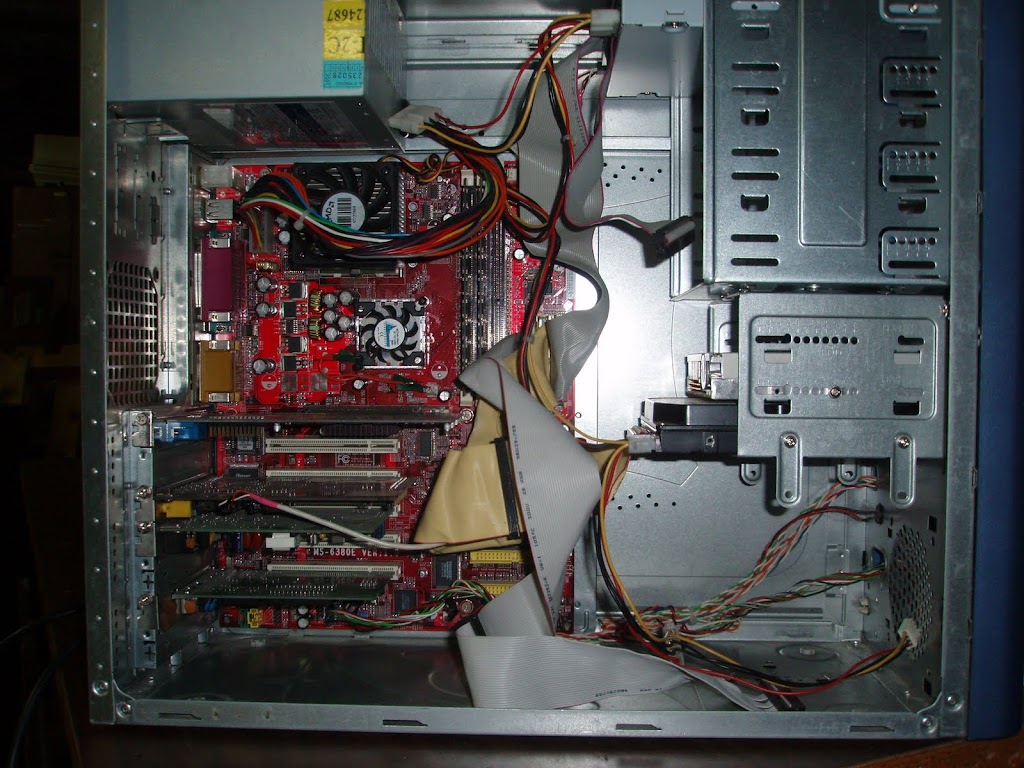
Just realized i did not specify the system specs, sry about that:

Win 98 SE SP2
Athlon XP 1800+
MicroStar MSI KT3 Ultra (MS-6380E v1.0)
A dubious L&C 300w psu ( i changed leaking caps in it a month ago )
Samsung 120gb 5200 rpm
1 gb ram ( pc 3200 )
Voodoo3 2000
Sound blaster live!
Dlink network adapter.

P1010315.JPG

There is a 56k modem in that pic, removed it since.

Reply 2 of 10, by MaxWar

User metadata
Rank Oldbie
Rank
Oldbie

All right, i did the next smart thing to do and booted my machine with a Ubuntu live cd that i know for a fact can automatically detect and use the sb live!.

Result is : Sound works

Now i know that the hardware is ok and the problem is Win98.

Reply 3 of 10, by MaxWar

User metadata
Rank Oldbie
Rank
Oldbie

Allright... Ended up getting it to work again...

-Remove all hardware,
-uninstall everything,
-pulled yet another SB live! from the stack,
-reinstall from original 11 years old cd-rom

Works!

The second card i tried is a CT4780 OEM, which apparently is somewhat different from other sb live! and is a bitch with windows 9x ( for some reason ) .

Now why did the first sblive stopped working to begin with?
Go figure...

This thread ended up being no more than a log of my troubleshooting, and a souvenir of the 4 hours of my life i wasted trying to figure this out.
I hope its at least a good read!

Reply 4 of 10, by Chewhacca

User metadata
Rank Member
Rank
Member

Windows 98 + Sound Card. Happens every now and then.

Reply 5 of 10, by Tetrium

User metadata
Rank l33t++
Rank
l33t++

Odd...but I remember a similar thing happening to me once.
I don't know yet about the OEM Live! cards, I'd need to check my own stack of Live!'s

Whats missing in your collections?
My retro rigs (old topic)
Interesting Vogons threads (links to Vogonswiki)
Report spammers here!

Reply 6 of 10, by MaxWar

User metadata
Rank Oldbie
Rank
Oldbie

I dont know to what extend the ct4780 issues with w98 are true but i was hinted by a thread in this very forum.

CT4780 with Win98SE

In my case it appears regular sb live drivers from creative did not work.

Reply 7 of 10, by Jorpho

User metadata
Rank l33t++
Rank
l33t++

The SB Live has both VxD and WDM drivers, doesn't it? Maybe that has something to do with it. Which one are you using?

Reply 8 of 10, by Tetrium

User metadata
Rank l33t++
Rank
l33t++

I went through my stack of live!'s with like 6 different part numbers. I'm gonna go give the OEM's the first go and see how ME handles them. If they handle them well, I'll post it here 😉

ME has the drivers build-in iirc

Whats missing in your collections?
My retro rigs (old topic)
Interesting Vogons threads (links to Vogonswiki)
Report spammers here!

Reply 10 of 10, by MaxWar

User metadata
Rank Oldbie
Rank
Oldbie
Jorpho wrote:

The SB Live has both vxd and WDM drivers, doesn't it? Maybe that has something to do with it. Which one are you using?

This is interesting. I do not know about the drivers i was using with the first card ( the one that suddenly stopped working ), but they were the latest w9x drivers from Creative . I am fairly confident the drivers i am using now ( from an original live! value install cd ) are vxd. I checked driver details in device manager and the files are .vxd. I just hope the bug does not come back.

DosFreak wrote:

Have you tried the Live in DOS using the emulation drivers? If that works then you know it's something in Windows that is screwed up

I did not try that, a good test idea. Used ubuntu live cd instead.
Now problem is fixed though.

Btw, this original Sb live! value cd is quite incredible. They packed some awesome goodies in there for w9x. The SB Live! is i believe Creative labs greatest moment and is my favourite sound blaster.
When they released this card back then it amazed me. Onboard DSP and the the ability to load sound fonts into ram. It was awesome. The following audigy is not as good as the live! for sound font management.

