VOGONS


Which GIGABYTE GA-60XE Is this?

Topic actions

First post, by AlphaWing

User metadata
Rank Oldbie
Rank
Oldbie

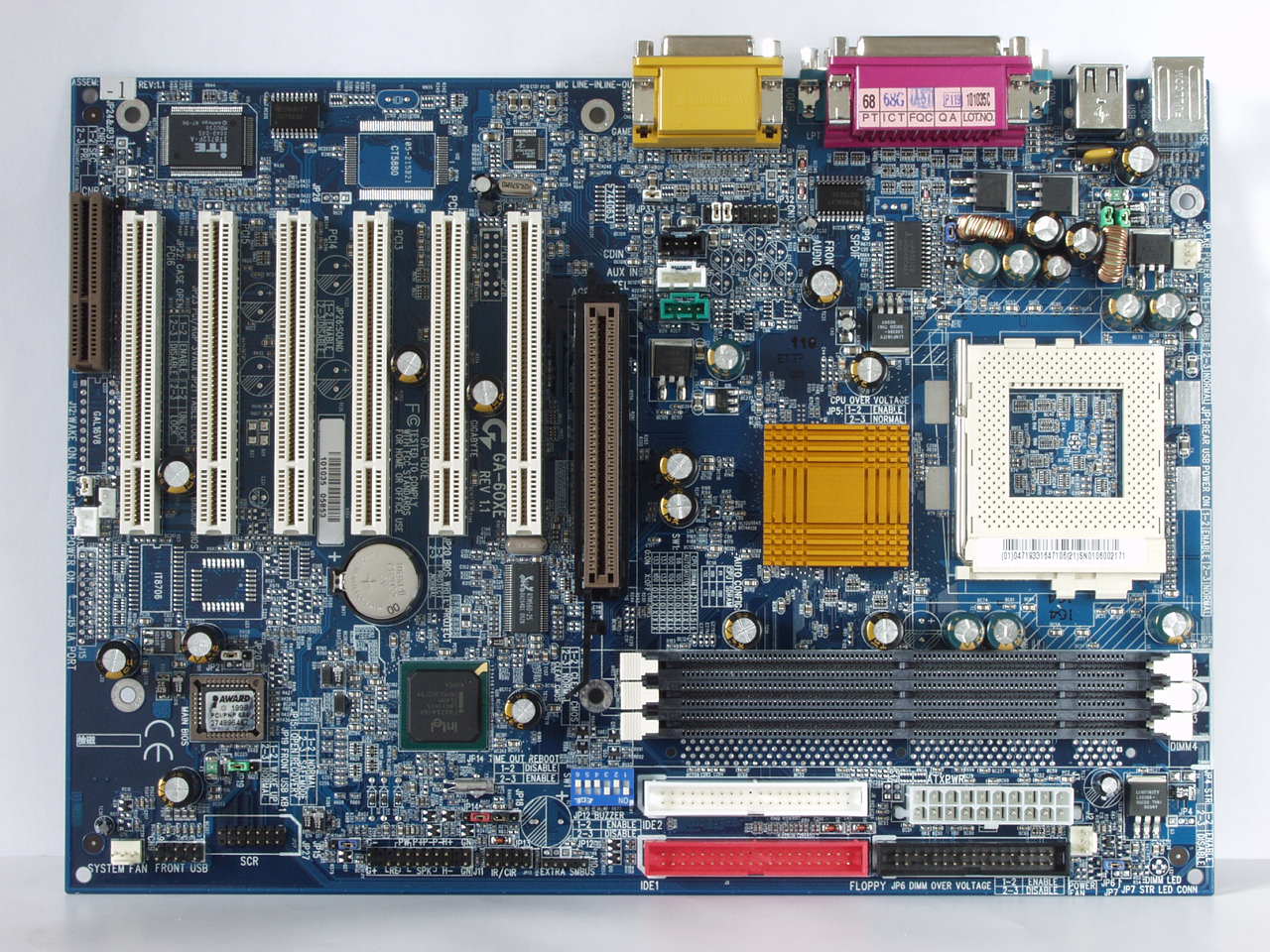
Just got this board today.
Trying to figure out which board this is, so I can flash the correct bios to it.
There are multiple versions of it on gigabytes legacy page, and none of them have it's northbridge sink thermal taped on like this one.
I'm leaning toward the GA-6OXET-C (rev. 1.x) but Not sure, the original owner never flashed it once. It doesn't say which particular model it is.
Anyone own this board, and is that the correct model?

Heres some pictures of it.
GA60XE_id2_zps6f75ea8f.jpg

2nd
GA60XE_id1_zps1658d862.jpg

3rd
GA60XE_id3_zpsa6ae3d7f.jpg

Reply 1 of 20, by Kahenraz

User metadata
Rank l33t
Rank
l33t

It says "REV 1.1" right there on the board. So it would indeed use a 1.x bios.

Reply 2 of 20, by AlphaWing

User metadata
Rank Oldbie
Rank
Oldbie

There are bunch of different versions of the same model with the same revision of the board on gigabytes socket 370 legacy pages.
http://www.gigabyte.com/products/list.aspx?s=42&ck=2&lgc=1

A few of them have a creative sound chip integrated into them surprisingly, I ruled those out since the chip is obviously missing 🤣 .

I think I figured it out tho, its the stock 60XE-1 that is lacking the picture of itself, google images seem to give me a similar picture to the board above with GA-60XE-1 as a search result. Just would like confirmation, don't wanta trash a capable Tualatin board with a bad flash. Tho since this is a gigabyte board, and I have bad luck, dual flash 🤣.
Except this gigabyte board is missing the backup bios chip\rom 😢 .

Reply 3 of 20, by Kahenraz

User metadata
Rank l33t
Rank
l33t

Oh, I see now. Are you certain that there isn't a sticker on the side of the ATX connector on the board? Sometimes they're hidden like that.

Reply 5 of 20, by AlphaWing

User metadata
Rank Oldbie
Rank
Oldbie

If it had a sticker its long gone.
Prob fell off, I got this board at an open flea market type sale.

Thanks Mau1wuf1977 US site did not have that manual, now I have a manual.

Thats a little bit of a help 🤣.
Would all the bios's be compatible with each other for all the various models of this board? you think? cause... Theres alot of them. 6 or 7 very closely related boards going by the US legacy socket 370 choices.

Board is still drying, it was really dirty when I got it, so I got some time to figure this out 🤣.

Reply 6 of 20, by AlphaWing

User metadata
Rank Oldbie
Rank
Oldbie

Some more google searching and I found a couple of closer pics of the GA-6OXET-C
That board clearly states the T part with the name under the PCI slot and has a Blue socket.
I'm thinking its the 60XE-1 for sure now.
But if they are basically the same board, safe to use the T-C's bios? I've never tried flashing another boards bios before in another board.
The 60XE-1 is listing Tualatin support up to 1.266ghz, the GA-6OXET-C 1.4ghz 512kb.
But what is the real difference between these boards?? the T-C has the 2nd bios thats all I see, maybe another revision in the i815?

Reply 7 of 20, by shamino

User metadata
Rank l33t
Rank
l33t

It looks like Gigabyte's site only has thumbnails of those board pictures, but maybe my browser just isn't rendering it correctly (very likely).
I have some older, reasonably sized pictures of the GA-60XE and GA-60XET, but not the GA-60XE-1.
The component layout in the VRM area of the board matches a GA-60XE, not XET. But in the area between the northbridge and the AGP slot, it doesn't match the 6OXE anymore either.

There's a board in this article:
http://ixbtlabs.com/articles/i815moboroundupjun2k1/
whose picture is located here:
http://www.ixbt.com/mainboard/images/roundup- … e-ga-6oxe-1.jpg
and it looks like a perfect match, but check if you agree.
The article doesn't state clearly which version of the 6OXE is photographed. The only clue is the filename, which says "ga-6oxe-1.jpg".

Whatever you do, make sure you make a backup copy of the original BIOS before you flash it. That way you'll at least have a known good image to revert to. If it gets to that point you could get a chip made by somebody, or hotflash one yourself with another board (kind of tricky with PLCCs but possible). DualBIOS would have been nice, but at least they had the decency to give you a socket.

PS: I find it terribly perverse that Gigabyte used a letter "O" in these board names. That's what it seems to be from the font anyway.

Reply 8 of 20, by Mau1wurf1977

User metadata
Rank l33t++
Rank
l33t++

Here the GB link to vanilla GA-6OXE:

http://www.gigabyte.com/products/product-page … spx?pid=1395#dl

What I do with BIOS updates on precious motherboards is, if the BIOS is socketed, source a replacement Flash, remove the original and bag and tag it. Then I use an external flash programmer and write the new BIOS on the replacement Flash and insert it into the motherboard.

My website with reviews, demos, drivers, tutorials and more...
My YouTube channel

Reply 9 of 20, by raymangold

User metadata
Rank Member
Rank
Member

You also might want to recap it with some good quality capacitors.
The ones presently on there may give you a headache down the road.

EDIT:

The AGP universal is definitely nice for the 2x cards, like a 2x Voodoo 5500.

Reply 10 of 20, by AlphaWing

User metadata
Rank Oldbie
Rank
Oldbie

I agree with the O font. Think its a Zero most of the time.
The Stock 6OXE is using the same exact bios updates as the 6OXE-1 all the updates file sizes\names are identical.
So I would assume thats safe to flash to it. Currently with its current bios it does not see Tualatins. It just beeps at boot 🤣. Probably needs the beta bios which is claiming it'll see the 256k L2 Tualatins.

Its rare for me to come across full atx Tualatin capable socket 370 boards so I don't want to ruin it.
The Caps on the board are in really good shape too, no visible bulging or burst caps.
It looks like it'll make a nice stable system once I get it updated.
Which I'll give a go today as its dry by now.

Reply 11 of 20, by AlphaWing

User metadata
Rank Oldbie
Rank
Oldbie

Just an update Flashed it with the F7b beta Bios the 6OXE and 6OXE-1 are sharing on the gigabyte site.
Worked OK, recognizes a 1.2ghz Celeron Tualatin just fine. 😀 !

Reply 12 of 20, by Kahenraz

User metadata
Rank l33t
Rank
l33t

Yaay! Glad to hear it work out. BIOS flashing always gives me butterflies in my stomach; especially for very old hardware.

Reply 13 of 20, by AlphaWing

User metadata
Rank Oldbie
Rank
Oldbie

Yea I don't like flashing old hardware, but its sometimes mandatory.
Not sure what I'm gonna use this board for yet. As I gota get another case for it 🤣.

Reply 15 of 20, by AlphaWing

User metadata
Rank Oldbie
Rank
Oldbie
Mau1wurf1977 wrote:

Nice 😀

You could build a V2 or V3 machine with this board?

Possibly, problem is have enough machines with the V3\VB already.
I might stick the Geforce 256 DDR in this as its permanent machine and a Voodoo 2.
Good fit for it.

I also have a V5 5500 agp that needs to be recapped that I keep putting off.
Got it free last year but 3 or 4 of the Caps were knocked off it from being stored poorly by the previous owner.
Would also be a good fit.

Reply 17 of 20, by raymangold

User metadata
Rank Member
Rank
Member
AlphaWing wrote:

I also have a V5 5500 agp that needs to be recapped that I keep putting off.
Got it free last year but 3 or 4 of the Caps were knocked off it from being stored poorly by the previous owner.
Would also be a good fit.

Just get some 10uF through hole caps (like Rubycon YXF), bend the leads, and solder the bent leads on the surface pads. It's much easier and allows them to be removed without much of a problem. You will want solder wick, 60/40 leaded solder, and a basic iron. I like using chisel tips, but I am sure conicals will do just as well.
Be careful when wicking the surface mount pads, do not drag the wick around. The 5500's have very strong solder pads thankfully.

AlphaWing wrote:

The Caps on the board are in really good shape too, no visible bulging or burst caps.

Those are *Very very* low quality bottom of the barrel electrolytic capacitors. They are already not performing to their claimed uF out of the box, and will most likely leak excess voltage. I would be surprised if you got more than 3 years out of it with minimal use.

Reply 18 of 20, by AlphaWing

User metadata
Rank Oldbie
Rank
Oldbie

Here is a Picture of the V5 in question.
V5AGP_MissingCaps_zps7f85d553.jpg

Theres 1 Small cap on the Powerside, and 1 Big cap Missing. The Big Cap has some of the left part of its solder pad knocked off too.
The other one missing Is a small one above the left memory chips gpu\vpu\whatever.

I'm all thumbs when it comes to soldering why I keep putting it off.
Don't know the ratings for them either.

Reply 19 of 20, by raymangold

User metadata
Rank Member
Rank
Member
AlphaWing wrote:
Theres 1 Small cap on the Powerside, and 1 Big cap Missing. The Big Cap has some of the left part of its solder pad knocked off […]
Show full quote

Theres 1 Small cap on the Powerside, and 1 Big cap Missing. The Big Cap has some of the left part of its solder pad knocked off too.
The other one missing Is a small one above the left memory chips gpu\vpu\whatever.

I'm all thumbs when it comes to soldering why I keep putting it off.
Don't know the ratings for them either.

All of the small ones are 10uF (anything 16V and above will work for the voltage tolerance). The 'big one' that was knocked off is 100uF / 16V. The big one was a polymer (oscon), so something like rubycon ZLH would be an appropriate substitute, or another sanyo oscon.