VOGONS


SD Card as Hard Drive

Topic actions

First post, by rick12373

User metadata
Rank Oldbie
Rank
Oldbie

I have one of those adapters that lets me connect an SD Card to the IDE for my Compaq Presario CDS 520. It works well but the SD Cards I use with it at the moment are 256MB and 512MB. I need a bit more storage space. The drive has to be formatted FAT16 in order to work. I think the largest drive FAT16 can provide is 2GB. I am going to buy a 1GB SD Card but it means ordering it online because none of the stores close to here have SD Cards that small anymore. I have a 16GB SD Card spare right now, is there a way to format it to 2GB or less using FAT 16. If so, how?

486 DX4-100 (overdrive)
16MB 72-pin SIMM RAM (2x8MB)
1MB Diamond Speedstar Pro VLB video card
SB 16 Value CT2770
AOpen VI15G Socket 3 Motherboard
HDD/FDD VLB controller card


Reply 1 of 30, by alexanrs

User metadata
Rank l33t
Rank
l33t

Once connected to the PC, FDISK itself should be able to do it.

Reply 2 of 30, by PhilsComputerLab

User metadata
Rank l33t++
Rank
l33t++

Yup. MS-DOS 6.22's FDISK creates max. partitions of 2 GB. Four of them at the most.

You can enter smaller sized though 😀

YouTube, Facebook, Website

Reply 3 of 30, by rick12373

User metadata
Rank Oldbie
Rank
Oldbie

I found a 2GB card anyway and FDISK was able to see it. The machine would not even detect the 16GB one. All running nicely so far.

486 DX4-100 (overdrive)
16MB 72-pin SIMM RAM (2x8MB)
1MB Diamond Speedstar Pro VLB video card
SB 16 Value CT2770
AOpen VI15G Socket 3 Motherboard
HDD/FDD VLB controller card

Reply 4 of 30, by rick12373

User metadata
Rank Oldbie
Rank
Oldbie

I think I spoke to soon 🤣. I used FDISK to create a primary DOS partition and then it says "system will now restart". The computer restarts and it has not created the partition. It is a 2GB SD Card. I even tried making the partition 1GB instead. It can see the disk, it just won't create a partition. It doesn't give any error messages, it just says "system will restart" and when it does, there is no disk.

Any ideas?

486 DX4-100 (overdrive)
16MB 72-pin SIMM RAM (2x8MB)
1MB Diamond Speedstar Pro VLB video card
SB 16 Value CT2770
AOpen VI15G Socket 3 Motherboard
HDD/FDD VLB controller card

Reply 5 of 30, by brostenen

User metadata
Rank l33t++
Rank
l33t++

"Format c: /u /s" and then reboot to do the OS installation part.

Don't eat stuff off a 15 year old never cleaned cpu cooler.
Those cakes make you sick....

My blog: http://to9xct.blogspot.dk
My YouTube: https://www.youtube.com/user/brostenen

001100 010010 011110 100001 101101 110011

Reply 6 of 30, by swaaye

User metadata
Rank l33t++
Rank
l33t++
rick12373 wrote:

The machine would not even detect the 16GB one.

Is the 16GB card SDHC / SDXC? What about the 2GB card? Older readers won't read those newer types of cards.

Reply 7 of 30, by rick12373

User metadata
Rank Oldbie
Rank
Oldbie
brostenen wrote:

"Format c: /u /s" and then reboot to do the OS installation part.

I can't, after asking FDISK to make a primary DOS partition it says it is restarting the computer. After it restarts there is no hard drive to format. FDISK detects 1 fixed drive but will not create a partition, it just says restarting computer and I am back to square one.

486 DX4-100 (overdrive)
16MB 72-pin SIMM RAM (2x8MB)
1MB Diamond Speedstar Pro VLB video card
SB 16 Value CT2770
AOpen VI15G Socket 3 Motherboard
HDD/FDD VLB controller card

Reply 8 of 30, by rick12373

User metadata
Rank Oldbie
Rank
Oldbie
swaaye wrote:
rick12373 wrote:

The machine would not even detect the 16GB one.

Is the 16GB card SDHC / SDXC? What about the 2GB card? Older readers won't read those newer types of cards.

The 16GB is an SDHC, so this is probably why that one does not work. The 2GB does not say SDHC or SDXC.

486 DX4-100 (overdrive)
16MB 72-pin SIMM RAM (2x8MB)
1MB Diamond Speedstar Pro VLB video card
SB 16 Value CT2770
AOpen VI15G Socket 3 Motherboard
HDD/FDD VLB controller card
Reply 9 of 30, by rick12373

User metadata
Rank Oldbie
Rank
Oldbie

I found the problem. I am using a SD Card extender cable thing so that I can replace cards easily without having to open the case. When I plug the card directly in to the IDE interface board it works. Annoying...

486 DX4-100 (overdrive)
16MB 72-pin SIMM RAM (2x8MB)
1MB Diamond Speedstar Pro VLB video card
SB 16 Value CT2770
AOpen VI15G Socket 3 Motherboard
HDD/FDD VLB controller card

Reply 10 of 30, by retrofanatic

User metadata
Rank Oldbie
Rank
Oldbie

Nice to hear that you figured it out. Sucks that the SD extender doesn't work...will using a 40pin IDE cable extender cause the same issue I wonder?

Reply 11 of 30, by rick12373

User metadata
Rank Oldbie
Rank
Oldbie
retrofanatic wrote:

Nice to hear that you figured it out. Sucks that the SD extender doesn't work...will using a 40pin IDE cable extender cause the same issue I wonder?

Not sure on that.

It detected and formatted the 2GB card, installed DOS 6.22 and then when it had finished and said to remove all floppies and restart, it hangs on boot...

486 DX4-100 (overdrive)
16MB 72-pin SIMM RAM (2x8MB)
1MB Diamond Speedstar Pro VLB video card
SB 16 Value CT2770
AOpen VI15G Socket 3 Motherboard
HDD/FDD VLB controller card

Reply 12 of 30, by alexanrs

User metadata
Rank l33t
Rank
l33t

Try FDISK /MBR and see if it boots

Reply 13 of 30, by rick12373

User metadata
Rank Oldbie
Rank
Oldbie
alexanrs wrote:

Try FDISK /MBR and see if it boots

Holy crap! That worked! Thank you so much. I had actually partitioned it to 1GB this time. I think I will try again now but try 2GB.

** Edit - The SD Card extension works now as well. Nice 😀

486 DX4-100 (overdrive)
16MB 72-pin SIMM RAM (2x8MB)
1MB Diamond Speedstar Pro VLB video card
SB 16 Value CT2770
AOpen VI15G Socket 3 Motherboard
HDD/FDD VLB controller card

Reply 14 of 30, by retrofanatic

User metadata
Rank Oldbie
Rank
Oldbie
rick12373 wrote:
alexanrs wrote:

Try FDISK /MBR and see if it boots

Holy crap! That worked! Thank you so much. I had actually partitioned it to 1GB this time. I think I will try again now but try 2GB.

** Edit - The SD Card extension works now as well. Nice 😀

Nice indeed! Get to hear it works now.

Reply 15 of 30, by Thraka

User metadata
Rank Member
Rank
Member

So I was just thinking about this too..

SDHC are getting dirt cheap.. $7 for a class 4 which isn't too bad especially using it in an old PC where you're not reading/writing tons of data as fast as possible. If you mount it so that it is easily accessible you can easily pull the card and replace it which is great for swapping out entire systems on old PCs and not having to redo partitions.

Also, Instead of booting to the PC, hooking up network, copying files over that which is pretty slow on old systems, you can just plug it into your PC with the appropriate adapter, copy the files you want, and plug it back into the system and boot.

It seems lower sized SSDs are going to get harder to find as they start manufacturing the bigger ones, but SD cards are still going to be readily available in these smaller sizes.

Reply 16 of 30, by rick12373

User metadata
Rank Oldbie
Rank
Oldbie

Yep, it is nice. I have the SD extender mounted on the outside of the case and can switch SD cards in and out. It is very convenient.

486 DX4-100 (overdrive)
16MB 72-pin SIMM RAM (2x8MB)
1MB Diamond Speedstar Pro VLB video card
SB 16 Value CT2770
AOpen VI15G Socket 3 Motherboard
HDD/FDD VLB controller card

Reply 17 of 30, by PhilsComputerLab

User metadata
Rank l33t++
Rank
l33t++
Thraka wrote:

So I was just thinking about this too..

Same!

And I can buy them at the super market 😀

I've bought two models from eBay, but they haven't arrived yet.

YouTube, Facebook, Website

Reply 18 of 30, by alexanrs

User metadata
Rank l33t
Rank
l33t

Just beware that, unlike CF cards, SD cards do not have the IDE logic built in. Therefore you are entirely reliant on the adapter's chip itself, which can be a problem with cheap stuff from China and more care and research should be put into choosing a good adapter.

Reply 19 of 30, by tayyare

User metadata
Rank Oldbie
Rank
Oldbie

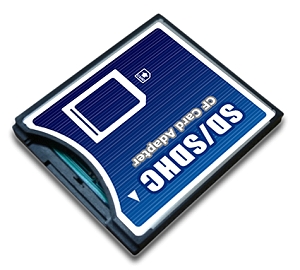
What about this one?

SDCFA_C01_1.jpg

http://www.ebay.com/itm/NEW-SD-SDHC-SDXC-To-C … 5oAAOSwHnFV2AaL

Anybody has any experience on these adapters? It will probably enable us to use SD cards in standard cheap CF to IDE adapters.

GA-6VTXE PIII 1.4+512MB
Geforce4 Ti 4200 64MB
Diamond Monster 3D 12MB SLI
SB AWE64 PNP+32MB
120GB IDE Samsung/80GB IDE Seagate/146GB SCSI Compaq/73GB SCSI IBM
Adaptec AHA29160
3com 3C905B-TX
Gotek+CF Reader
MSDOS 6.22+Win 3.11/95 OSR2.1/98SE/ME/2000