VOGONS


First post, by King_Corduroy

User metadata
Rank Oldbie
Rank
Oldbie

Hey guys, I just picked up this Packard Bell Legend 845 from a recycling centre and I'd love to get an optical drive on it to play some vintage games but I'm not actually sure how to go about that with a computer of this particular vintage. It doesn't give an option for CD drive in BIOS and came only with a 5.25" drive and a 3.5" drive so I'm thinking I'm probably gonna need to install a soundcard (which I would anyway since it has none) and attach the drive to that? Or is there another way? I've never actually installed a CD-ROM drive on anything older than a Pentium machine so this is gonna be interesting. 🤣 Assume nothing. 🤣
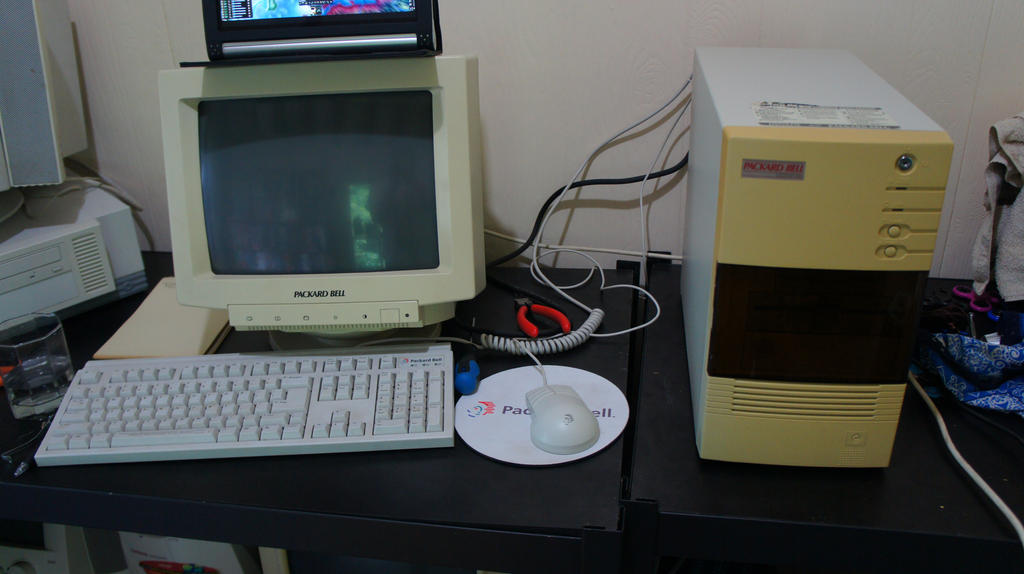
untitled_by_mad_king_corduroy-dbd1qd7.jpg

untitled_by_mad_king_corduroy-dbd1qeq.jpg

Check me out at Transcendental Airwaves on Youtube! Fast-food sucks!

Reply 1 of 8, by TheMobRules

User metadata
Rank Oldbie
Rank
Oldbie

You've got a few options.

If you go with a standard, IDE/ATAPI CD-ROM drive, you can install it:

- As a slave on the primary IDE channel, with the hard drive as master (they will share the cable, but you need to set the jumpers in the drives)
- On its own cable in a secondary IDE channel. A motherboard that old probably doesn't have more than one IDE channel, so you would need to add one of those E-IDE controller cards
- Using the CD-ROM connector from a sound card (but make sure that it is an IDE/ATAPI connector and not an older proprietary connection - see below)

In all of these cases you will have to load a CD-ROM driver in CONFIG.SYS (a generic CD-ROM driver should work in most cases, though I'm not sure with the sound card connector option) and MSCDEX or equivalent in AUTOEXEC.BAT.

The other option is to use one of those older Sony/Panasonic/Creative/etc. CD-ROM drives, but those do not conform to the IDE/ATAPI standard and you are stuck with connecting them to sound cards or specific controller cards (as well as a special driver in CONFIG.SYS).

Reply 2 of 8, by K1n9_Duk3

User metadata
Rank Member
Rank
Member

A sound card or a dedicated CD-ROM extension card should work. I added a CD-ROM drive to a 386 DX 40 using an ISA extension card (not a sound card) back in the late 90's or early 2000's. Sadly, I trashed that PC a few years later, so I can't tell you anything more specific about that. From what I remember, the extension card would only allow up to 4x speed and I never tried using a faster CD drive with that card, so I can't say if faster drives would have worked (at slower speed, of course) or if it wouldn't work at all.

I don't think I had to set up some special settings in the BIOS to get the drive working. Loading the (correct) driver for the CD drive in CONFIG.SYS and running MSCDEX should be all you need to do.

Reply 3 of 8, by jesolo

User metadata
Rank l33t
Rank
l33t

Just like to add that older BIOSes did not allow you to boot from CD-ROM or, identified a CD-ROM drive in the Standard CMOS settings (or when you "auto detected" your hard drive).
However, if you install the CD-ROM drive as already described and load the relevant drivers in your Autoexec.bat & Config.sys files, then you should be all ready to go.

Also take note that older CD-ROM drives have trouble reading CD-R/RW media. In such a case, go with a later model CD-ROM drive (32x or higher) or, just plug in a CD-R/RW or DVD writer. All of them should work perfectly on a 486.

Reply 4 of 8, by jheronimus

User metadata
Rank Oldbie
Rank
Oldbie

Also, just a small tip: if you plan to use CD-R or CD-RW then you'd definitely need at least a late 90s CD-ROM. Any CD-RW, combo DVD/CD-ROM or a 52x CD-ROM drive will do, but definitely stay away from those old non-IDE drives.

MR BIOS catalog
Unicore catalog

Reply 5 of 8, by Jo22

User metadata
Rank l33t++
Rank
l33t++
jheronimus wrote:

but definitely stay away from those old non-IDE drives.

The funny thing is, that our Mitsumi LU005S could read troublesome CD-ROMs (mixed-mode, Kodak Photo CD, etc.),
while my later drives had issues with them (one of them beeing a SCSI drive!) 🤣
But I would have to check again how good it handles modern CD-Rs. Back in the day I had not owned a CD writer..

"Time, it seems, doesn't flow. For some it's fast, for some it's slow.
In what to one race is no time at all, another race can rise and fall..." - The Minstrel

//My video channel//

Reply 6 of 8, by cj_reha

User metadata
Rank Oldbie
Rank
Oldbie
jheronimus wrote:

Also, just a small tip: if you plan to use CD-R or CD-RW then you'd definitely need at least a late 90s CD-ROM. Any CD-RW, combo DVD/CD-ROM or a 52x CD-ROM drive will do, but definitely stay away from those old non-IDE drives.

In my experience, early 90s drives are weird with CD-Rs. I had a quad speed Creative drive from 1994 that read Verbatim CD-Rs fine, but no other brand. Specifically those CD-Rs. (Of course, it read CD-ROMs fine.)

At least until it smoked itself and never worked again after that. (smoke literally came out of the back IDE port, and I've no clue how as nothing else was killed in the machine I was using it in. I suspect a short inside the drive.)

Join the Retro PC Discord! - https://discord.gg/UKAFchB
My YouTube Channel - https://www.youtube.com/channel/UCDJYB_ZDsIzXGZz6J0txgCA

Reply 7 of 8, by chinny22

User metadata
Rank l33t++
Rank
l33t++

Agree with everything above, only thing I would add is setting it up as a slave will probably be easier, As the Win9x bootdisks will detect the drive no problem. Don't think it works when connected to the soundcard? (not sure on that though so feel free to correct me if I'm wrong anyone)

More important, love that tinted door hiding the drives, that's 1 cool looking system you have 😀

Reply 8 of 8, by King_Corduroy

User metadata
Rank Oldbie
Rank
Oldbie

Thanks guys! I've currently run into another little problem concerning the floppy drives but hopefully I'll be able to sort that out.

Also @Chinny22 Thanks! I was pretty excited to see it, I'm a Packard Bell collector so always happy to have one more scratched off the list. 😁

Check me out at Transcendental Airwaves on Youtube! Fast-food sucks!