VOGONS


Reply 80 of 94, by shevalier

User metadata
Rank Oldbie
Rank
Oldbie
The Serpent Rider wrote on 2025-12-17, 05:41:

with AMD's recent meteoric rise in gaming hardware builds

People don't buy AMD. Not GPUs anyway.

I took your advice and switched to an NVIDIA graphics card for the first time in 20 years.
Just one question: will NVIDIA ever release DLSS for video (24fps at x2/3/4. The equivalent of AMD’s Fluid Motion, starting with the GCN family)? 🙁
And I’ve never seen such ridiculous graphics card fan settings.

Aopen MX3S, PIII-S Tualatin 1133, Radeon 9800Pro@XT BIOS, Audigy 4 SB0610
JetWay K8T8AS, Athlon DH-E6 3000+, Radeon HD2600Pro AGP, Audigy 2 Value SB0400
Gigabyte Ga-k8n51gmf, Turion64 ML-30@2.2GHz , Radeon X800GTO PL16, Diamond monster sound MX300

Reply 81 of 94, by SScorpio

User metadata
Rank Oldbie
Rank
Oldbie
shevalier wrote on 2026-05-22, 04:41:

I took your advice and switched to an NVIDIA graphics card for the first time in 20 years.
Just one question: will NVIDIA ever release DLSS for video (24fps at x2/3/4. The equivalent of AMD’s Fluid Motion, starting with the GCN family)? 🙁
And I’ve never seen such ridiculous graphics card fan settings.

You want to bring video playback "soap opera effect" stuff that everyone complains about to the PC?

The jutter is because 24hz video does 3-2 pull down. Where one frame is shown for three frames, and the next for two, then three, then two, etc.

The smoothing option you are looking for creates fake smeared frames between the two. So rather than looking razor sharp you get real frames, then soft blurred frames.

Modern video players can do the processing themselves, or even better sync playback to the refresh rate of the display. Or just run things at 120hz and the problems all go away 24x5 = 120.

Reply 82 of 94, by shevalier

User metadata
Rank Oldbie
Rank
Oldbie
SScorpio wrote on 2026-05-22, 11:59:
You want to bring video playback "soap opera effect" stuff that everyone complains about to the PC? […]
Show full quote
shevalier wrote on 2026-05-22, 04:41:

I took your advice and switched to an NVIDIA graphics card for the first time in 20 years.
Just one question: will NVIDIA ever release DLSS for video (24fps at x2/3/4. The equivalent of AMD’s Fluid Motion, starting with the GCN family)? 🙁
And I’ve never seen such ridiculous graphics card fan settings.

You want to bring video playback "soap opera effect" stuff that everyone complains about to the PC?

The jutter is because 24hz video does 3-2 pull down. Where one frame is shown for three frames, and the next for two, then three, then two, etc.

The smoothing option you are looking for creates fake smeared frames between the two. So rather than looking razor sharp you get real frames, then soft blurred frames.

Modern video players can do the processing themselves, or even better sync playback to the refresh rate of the display. Or just run things at 120hz and the problems all go away 24x5 = 120.

Utilities that can smooth out video
- SVP — a paid utility developed by a Russian team.
- Some sort of experimental version of a local neural network, which is paid and already outdated.
- BlueskyFRC, completely free and ad-free,which utilises a special Fluid Motion engine in AMD graphics cards without placing a load on the processor (and something similar in the latest versions of Intel).
https://bluesky-soft.com/en/BlueskyFRC.html

72 frames per second — that’s my personal request to the developer, as it’s a simple multiple of 3 for monitors with a 75 Hz refresh rate. Combined with AMD FreeSync, it looks defenetly good. Any film turns into a ‘documentary’, and Cameron’s Avatar becomes a fu.... cartoon.

Do you think that if I write to Jensen Huang, just as I wrote to the developer of the BlueskyFRC filter, he might also create an easy-to-use filter that’s compatible with the MPC-HC player?
P.S. To be honest, I haven’t actually written any letters to Mr Huang yet. But who knows?

Aopen MX3S, PIII-S Tualatin 1133, Radeon 9800Pro@XT BIOS, Audigy 4 SB0610
JetWay K8T8AS, Athlon DH-E6 3000+, Radeon HD2600Pro AGP, Audigy 2 Value SB0400
Gigabyte Ga-k8n51gmf, Turion64 ML-30@2.2GHz , Radeon X800GTO PL16, Diamond monster sound MX300

Reply 83 of 94, by willow

User metadata
Rank Member
Rank
Member
shevalier wrote on 2026-05-22, 04:41:
I took your advice and switched to an NVIDIA graphics card for the first time in 20 years. Just one question: will NVIDIA ever r […]
Show full quote
The Serpent Rider wrote on 2025-12-17, 05:41:

with AMD's recent meteoric rise in gaming hardware builds

People don't buy AMD. Not GPUs anyway.

I took your advice and switched to an NVIDIA graphics card for the first time in 20 years.
Just one question: will NVIDIA ever release DLSS for video (24fps at x2/3/4. The equivalent of AMD’s Fluid Motion, starting with the GCN family)? 🙁
And I’ve never seen such ridiculous graphics card fan settings.

dlss for 24fps video is not usefull because there aren't enough frame. You will have ghosting and lots of artefact.

dlss for video would be usefull only if video were 60 fps native.

Reply 84 of 94, by SScorpio

User metadata
Rank Oldbie
Rank
Oldbie
shevalier wrote on 2026-05-22, 14:04:
Utilities that can smooth out video - SVP — a paid utility developed by a Russian team. - Some sort of experimental version of a […]
Show full quote

Utilities that can smooth out video
- SVP — a paid utility developed by a Russian team.
- Some sort of experimental version of a local neural network, which is paid and already outdated.
- BlueskyFRC, completely free and ad-free,which utilises a special Fluid Motion engine in AMD graphics cards without placing a load on the processor (and something similar in the latest versions of Intel).
https://bluesky-soft.com/en/BlueskyFRC.html

72 frames per second — that’s my personal request to the developer, as it’s a simple multiple of 3 for monitors with a 75 Hz refresh rate. Combined with AMD FreeSync, it looks defenetly good. Any film turns into a ‘documentary’, and Cameron’s Avatar becomes a fu.... cartoon.

Do you think that if I write to Jensen Huang, just as I wrote to the developer of the BlueskyFRC filter, he might also create an easy-to-use filter that’s compatible with the MPC-HC player?
P.S. To be honest, I haven’t actually written any letters to Mr Huang yet. But who knows?

NVIDIA offers RTX Video Super Resolution and RTX Video HDR. Both which improve how videos look.

But they aren't for refresh rate. That can be handled by the player. You're asking for the wrong thing.

Reply 85 of 94, by shevalier

User metadata
Rank Oldbie
Rank
Oldbie
willow wrote on 2026-05-22, 18:08:

dlss for 24fps video is not usefull because there aren't enough frame. You will have ghosting and lots of artefact.
dlss for video would be usefull only if video were 60 fps native.

Just avoid holding it in that way
Do you remember who said this viral line and what it was about?

SScorpio wrote on 2026-05-22, 19:36:

That can be handled by the player.

And could you perhaps recommend a free media player like that?
I’m a new owner of an NVIDIA graphics card. 😀

We’re not going to judge other people’s tastes, are we?
I’ve been using video smoothing for over 10 years, ever since the Radeon HD 7870. I like it.
NVIDIA graphics cards don’t have this feature, and there are no plans to add it. That’s a fact.
That said, I’ve already finished all three single-player games with RTX (the ones I was interested in).
But I need to smooth videos every day....
It’s the best purchase of the century, for goodness’ sake.

Aopen MX3S, PIII-S Tualatin 1133, Radeon 9800Pro@XT BIOS, Audigy 4 SB0610
JetWay K8T8AS, Athlon DH-E6 3000+, Radeon HD2600Pro AGP, Audigy 2 Value SB0400
Gigabyte Ga-k8n51gmf, Turion64 ML-30@2.2GHz , Radeon X800GTO PL16, Diamond monster sound MX300

Reply 86 of 94, by shevalier

User metadata
Rank Oldbie
Rank
Oldbie

By the way, before the AMD fanboys start flooding in, let’s have a chat amongst ourselves—us owners of those divine NVIDIA cards with their brilliant drivers.
Just between us and the whole internet.
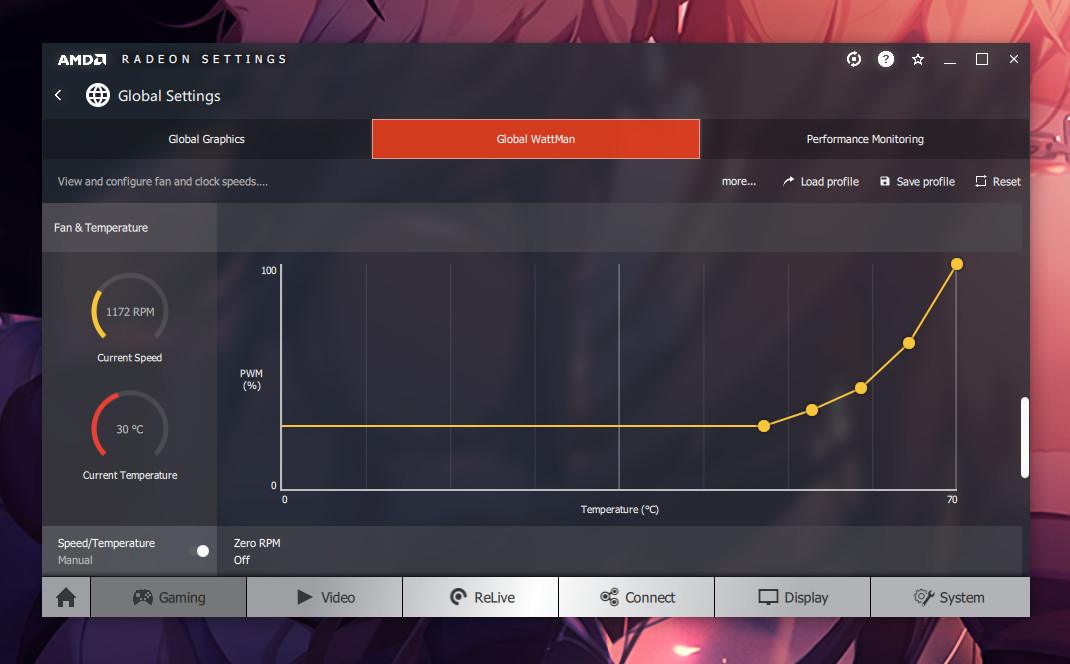
How do I adjust the fan curve in the NVIDIA app?
In the buggy AMD drivers, open the Adrenalin tab and move it manually as shown in the screenshot.
c2290080517be164568053090132473f770a2264.jpeg

Since Mr Huang Jensen only cares about the quality of his own leather jacket, nVidia’s partners are churning out utter rubbish.

What exactly is the problem?

When the temperature reached 45 degrees, the fans on the same Sapphire RX580 graphics card revved up to 900 rpm (out of a possible 3,500), continued to run until the temperature had dropped by 5 degrees (within 10–30 seconds), and then switched off. The cycle lasted around 20 minutes.

The current RTX, upon reaching 45 degrees, attempts to start the fans at 30% speed. As NVIDIA’s BIOS has long since moved away from percentage values in favour of absolute RPM values, the controller has to synchronise with the fans after they start.
At low speeds, it does not have time to do this.
The result is something like this: the fans start spinning (2–3 revolutions), no synchronisation, the fans stop. Repeat.
As a result of these three attempts, the card cools down by 1 degree.
In other words, the BIOS doesn’t think the fan has started up; it thinks the card has magically cooled down all by itself.
The cycle repeats every 2-3 minutes.

file.php?id=241418&mode=view

If the heat build-up is more intense and the start occurs at 45–50% speed, the fan control algorithm behaves just like the bugged AMD cards, i.e. normally.

Aopen MX3S, PIII-S Tualatin 1133, Radeon 9800Pro@XT BIOS, Audigy 4 SB0610
JetWay K8T8AS, Athlon DH-E6 3000+, Radeon HD2600Pro AGP, Audigy 2 Value SB0400
Gigabyte Ga-k8n51gmf, Turion64 ML-30@2.2GHz , Radeon X800GTO PL16, Diamond monster sound MX300

Reply 87 of 94, by SScorpio

User metadata
Rank Oldbie
Rank
Oldbie
shevalier wrote on 2026-05-23, 04:52:
And could you perhaps recommend a free media player like that? I’m a new owner of an NVIDIA graphics card. :-) […]
Show full quote

And could you perhaps recommend a free media player like that?
I’m a new owner of an NVIDIA graphics card. 😀

We’re not going to judge other people’s tastes, are we?
I’ve been using video smoothing for over 10 years, ever since the Radeon HD 7870. I like it.
NVIDIA graphics cards don’t have this feature, and there are no plans to add it. That’s a fact.
That said, I’ve already finished all three single-player games with RTX (the ones I was interested in).
But I need to smooth videos every day....
It’s the best purchase of the century, for goodness’ sake.

Perhaps this little known player called VLC? https://download.videolan.org/testing/vlc-rtx-upscaler/

You've really gotten off topic as this thread is about 32-bit PhysX. You may want to start a few thread to dig into this more.

Reply 88 of 94, by shevalier

User metadata
Rank Oldbie
Rank
Oldbie
SScorpio wrote on 2026-05-23, 14:24:

Perhaps this little known player called VLC? https://download.videolan.org/testing/vlc-rtx-upscaler/

Oh, thank you very much, it works perfectly.
It launches, tries to open an .mkv video file, and then closes.

You've really gotten off topic as this thread is about 32-bit PhysX. You may want to start a few thread to dig into this more.

You may not have noticed, but I replied to that post.

The Serpent Rider wrote on 2025-12-17, 05:41:

People don't buy AMD. Not GPUs anyway.

And the most interesting thing is that I followed that advice to the letter.
And ‘Houston, I've got a problem’ 😀

PS. If anyone doubts that I belong to the elite circle of NVIDIA users, here’s a screenshot.
What’s more, I’ve got a graphics card from the future, unlike all those losers.
I’ve already got mine, whereas deliveries are only scheduled for June.

Aopen MX3S, PIII-S Tualatin 1133, Radeon 9800Pro@XT BIOS, Audigy 4 SB0610
JetWay K8T8AS, Athlon DH-E6 3000+, Radeon HD2600Pro AGP, Audigy 2 Value SB0400
Gigabyte Ga-k8n51gmf, Turion64 ML-30@2.2GHz , Radeon X800GTO PL16, Diamond monster sound MX300

Reply 89 of 94, by The Serpent Rider

User metadata
Rank l33t++
Rank
l33t++

Low effort. Do better.

I must be some kind of standard: the anonymous gangbanger of the 21st century.

Reply 90 of 94, by Joseph_Joestar

User metadata
Rank l33t++
Rank
l33t++
shevalier wrote on 2026-05-23, 15:07:

What’s more, I’ve got a graphics card from the future, unlike all those losers.

The RTX 3060 is a good card, I have one of those as well.

If you need help with tweaking some settings, you may want to open a new thread. I or someone else might be able to help with that. First thing I'd suggest is to undervolt the card, so that it runs cooler and quieter. As for the fan profile, that's typically handled by MSI Afterburner. But as others have said, that is kinda off-topic for this thread.

My retro stuff

Reply 91 of 94, by shevalier

User metadata
Rank Oldbie
Rank
Oldbie
The Serpent Rider wrote on 2026-05-23, 18:27:

Low effort. Do better.

Be careful what advice you give. People might actually follow it...

Aopen MX3S, PIII-S Tualatin 1133, Radeon 9800Pro@XT BIOS, Audigy 4 SB0610
JetWay K8T8AS, Athlon DH-E6 3000+, Radeon HD2600Pro AGP, Audigy 2 Value SB0400
Gigabyte Ga-k8n51gmf, Turion64 ML-30@2.2GHz , Radeon X800GTO PL16, Diamond monster sound MX300

Reply 92 of 94, by The Serpent Rider

User metadata
Rank l33t++
Rank
l33t++

Only you somehow mistook simple observation for advice.

I must be some kind of standard: the anonymous gangbanger of the 21st century.

Reply 93 of 94, by robertmo3

User metadata
Rank Oldbie
Rank
Oldbie

i wonder if there is still a chance for a 1620/1610/1605

Reply 94 of 94, by RetroGamer4Ever

User metadata
Rank Oldbie
Rank
Oldbie
robertmo3 wrote on 2026-05-24, 12:48:

i wonder if there is still a chance for a 1620/1610/1605

Definitely not. Nvidia wants RTX-only and they want a certain level of performance and compatibility, so older generations are out. The 3000-series is likely as far back as they will go for re-manufacturing and it checks all the boxes that they want checked, while meeting consumer's basic gaming needs for current titles.