VOGONS


Best WinXP laptop

Topic actions

First post, by Intel486dx33

User metadata
Rank l33t++
Rank
l33t++

Hi Guys,
I want to build a Very Good Windows XP laptop
I want it for playing Win95 games and Newer.
Microsoft Office and programs.

I have a couple WinXP laptops already but I want one with a good display
Sound card, and Upgradable RAM, Battery, Sata SSD, with built in NIC and USB
Ports. DVD or Bluray

I want it to support up to 4gb RAM or more.
Quad core Intel CPU or better
Good GPU for gaming
Sound blaster compatible sound card.
Support for 256gb or 500gb Sata SSD or better.

Last edited by Intel486dx33 on 2025-12-25, 20:05. Edited 1 time in total.

Reply 1 of 19, by Falcosoft

User metadata
Rank l33t
Rank
l33t
Intel486dx33 wrote on 2025-12-25, 18:43:
Hi Guys, I want to build a Very Good Windows XP laptop I want it for playing Win95 games ans Newer. […]
Show full quote

Hi Guys,
I want to build a Very Good Windows XP laptop
I want it for playing Win95 games ans Newer.

I have a couple WinXP laptops already but I want one with a good display
Sound card, and Upgradable RAM, Battery, Sata SSD, with built in NIC and USB
Ports. DVD or Bluray

I want it to support up to 4gb RAM or more.
Quad core Intel CPU or better
Good GPU for gaming
Sound blaster compatible sound card.
Support for 256gb or 500gb Sata SSD or better.

Some requirements cannot be achieved together.
E.g. No laptops (even desktops) exist that have 'Quad core Intel CPU or better' and 'Sound blaster compatible sound card'.
Even the 1st Core2 based quad core Intel CPUs were released in the HD Audio era and no HD Audio codecs are Sound Blaster compatible.

Website, Youtube
Falcosoft Soundfont Midi Player + Munt VSTi + BassMidi VSTi
VST Midi Driver Midi Mapper
x86 microarchitecture benchmark (MandelX)

Reply 2 of 19, by Intel486dx33

User metadata
Rank l33t++
Rank
l33t++

Well, I had an HP z800 workstation that supported WinXP
It was the Best WinXP desktop I ever had.

It supported over 64gb ECC Memory
Dual Hex core Xeons ( 12-cores, 24-threads )
6 Sata hard drives or SSD
Nvidia GTX 960 or 1080 Video cards.
It had everything I need but its too BIG

I am looking for a laptop.

Reply 3 of 19, by Falcosoft

User metadata
Rank l33t
Rank
l33t
Intel486dx33 wrote on 2025-12-25, 20:11:
Well, I had an HP z800 workstation that supported WinXP It was the Best WinXP desktop I ever had. […]
Show full quote

Well, I had an HP z800 workstation that supported WinXP
It was the Best WinXP desktop I ever had.

It supported over 64gb ECC Memory
Dual Hex core Xeons ( 12-cores, 24-threads )
6 Sata hard drives or SSD
Nvidia GTX 960 or 1080 Video cards.
It had everything I need but its too BIG

I am looking for a laptop.

Supporting WinXP and having a Sound blaster compatible sound card is not the same thing. Both AC97 and HD Audio based sound cards are supported by WinXP but neither is Sound blaster compatible.
I doubt your HP z800 workstation PC had a Sound blaster compatible sound card. According to its datasheet it also had a HD Audio compatible integrated sound card (High Definition integrated audio with internal speaker):
https://www.hp.com/canada/products/landing/wo … es/13278_na.pdf

A Sound Blaster compatible sound card is actually only important for DOS era software, not for WinXP.
To make things clear, you wrote this:

I want it to support up to 4gb RAM or more. Quad core Intel CPU or better Good GPU for gaming Sound blaster compatible sound car […]
Show full quote

I want it to support up to 4gb RAM or more.
Quad core Intel CPU or better
Good GPU for gaming
Sound blaster compatible sound card.
Support for 256gb or 500gb Sata SSD or better.

Last edited by Falcosoft on 2025-12-25, 20:54. Edited 1 time in total.

Website, Youtube
Falcosoft Soundfont Midi Player + Munt VSTi + BassMidi VSTi
VST Midi Driver Midi Mapper
x86 microarchitecture benchmark (MandelX)

Reply 4 of 19, by theelf

User metadata
Rank Oldbie
Rank
Oldbie
Falcosoft wrote on 2025-12-25, 20:46:
Supporting WinXP and having a Sound blaster compatible sound card is not the same thing. Both AC97 and HD Audio based sound card […]
Show full quote
Intel486dx33 wrote on 2025-12-25, 20:11:
Well, I had an HP z800 workstation that supported WinXP It was the Best WinXP desktop I ever had. […]
Show full quote

Well, I had an HP z800 workstation that supported WinXP
It was the Best WinXP desktop I ever had.

It supported over 64gb ECC Memory
Dual Hex core Xeons ( 12-cores, 24-threads )
6 Sata hard drives or SSD
Nvidia GTX 960 or 1080 Video cards.
It had everything I need but its too BIG

I am looking for a laptop.

Supporting WinXP and having a Sound blaster compatible sound card is not the same thing. Both AC97 and HD Audio based sound cards are supported by WinXP but neither is Sound blaster compatible.
I doubt your HP z800 workstation PC had a Sound blaster compatible sound card. According to its datasheet it also had a HD Audio compatible integrated sound card (High Definition integrated audio with internal speaker):
https://www.hp.com/canada/products/landing/wo … es/13278_na.pdf

A Sound Blaster compatible sound card is actually only important for DOS era software not for WinXP.
To make things clear, you wrote this:

I want it to support up to 4gb RAM or more. Quad core Intel CPU or better Good GPU for gaming Sound blaster compatible sound car […]
Show full quote

I want it to support up to 4gb RAM or more.
Quad core Intel CPU or better
Good GPU for gaming
Sound blaster compatible sound card.
Support for 256gb or 500gb Sata SSD or better.

Latest laptops with SB compatible chipsets are more or less first pentium 3 ones, and very few models have one, and fewer a good one, like Yamaha chipset

Reply 5 of 19, by RetroPCCupboard

User metadata
Rank Oldbie
Rank
Oldbie
Falcosoft wrote on 2025-12-25, 19:13:

Some requirements cannot be achieved together.
E.g. No laptops (even desktops) exist that have 'Quad core Intel CPU or better' and 'Sound blaster compatible sound card'.
Even the 1st Core2 based quad core Intel CPUs were released in the HD Audio era and no HD Audio codecs are Sound Blaster compatible.

Can't you use SBEmu to get DOS Compatability with HD Audio? I haven't personally tried, but it sounds like it's supported.

Reply 6 of 19, by Falcosoft

User metadata
Rank l33t
Rank
l33t
RetroPCCupboard wrote on 2025-12-25, 21:03:
Falcosoft wrote on 2025-12-25, 19:13:

Some requirements cannot be achieved together.
E.g. No laptops (even desktops) exist that have 'Quad core Intel CPU or better' and 'Sound blaster compatible sound card'.
Even the 1st Core2 based quad core Intel CPUs were released in the HD Audio era and no HD Audio codecs are Sound Blaster compatible.

Can't you use SBEmu to get DOS Compatability with HD Audio? I haven't personally tried, but it sounds like it's supported.

Of course you can, but not because the sound card is Sound blaster compatible but because it is AC97 or HD Audio compatible 😀

Website, Youtube
Falcosoft Soundfont Midi Player + Munt VSTi + BassMidi VSTi
VST Midi Driver Midi Mapper
x86 microarchitecture benchmark (MandelX)

Reply 7 of 19, by Intel486dx33

User metadata
Rank l33t++
Rank
l33t++

I like the IBM Thinkpad T60p but I want a better display and graphics chip ?

Reply 8 of 19, by Falcosoft

User metadata
Rank l33t
Rank
l33t
Intel486dx33 wrote on 2025-12-25, 21:16:

I like the IBM Thinkpad T60p but I want a better display and graphics chip ?

If you like Thinkpads then it's worth noting that the T430/T530 series is the last one that supports WinXP.
You can install quad core 3rd Gen Ivy Bridge CPUs even on the smaller T430. Unfortunately by default they do not have great displays, but aftermarket solutions exist:
https://medium.com/@n4ru/the-definitive-t430- … de-3dff3f6a8e2e

The integrated graphics is better than what the T60p has (HD Graphics 4000 series) but still not great. Even the ones with dedicated NVIDIA GPUs (NVS 5400M) are rather slow for graphics heavy tasks/games.
But you can use an eGPU which has WinXP driver through the express card slot. (NVIDIA 9xx/Maxwell II series is the last one with WinXP drivers).
This series has Realtek HD Audio that is also supported by WinXP.
You can use any SATA 3 SSD with them (and you get also an mSATA port with SATA 2 speed).
Maximum supported RAM is 16 GB DDR3 in case of the T430.

Website, Youtube
Falcosoft Soundfont Midi Player + Munt VSTi + BassMidi VSTi
VST Midi Driver Midi Mapper
x86 microarchitecture benchmark (MandelX)

Reply 9 of 19, by theelf

User metadata
Rank Oldbie
Rank
Oldbie
Falcosoft wrote on 2025-12-25, 23:49:
If you like Thinkpads then it's worth noting that the T430/T530 series is the last one that supports WinXP. You can install quad […]
Show full quote
Intel486dx33 wrote on 2025-12-25, 21:16:

I like the IBM Thinkpad T60p but I want a better display and graphics chip ?

If you like Thinkpads then it's worth noting that the T430/T530 series is the last one that supports WinXP.
You can install quad core 3rd Gen Ivy Bridge CPUs even on the smaller T430. Unfortunately by default they do not have great displays, but aftermarket solutions exist:
https://medium.com/@n4ru/the-definitive-t430- … de-3dff3f6a8e2e

The integrated graphics is better than what the T60p has (HD Graphics 4000 series) but still not great. Even the ones with dedicated NVIDIA GPUs (NVS 5400M) are rather slow for graphics heavy tasks/games.
But you can use an eGPU which has WinXP driver through the express card slot. (NVIDIA 9xx/Maxwell II series is the last one with WinXP drivers).
This series has Realtek HD Audio that is also supported by WinXP.
You can use any SATA 3 SSD with them (and you get also an mSATA port with SATA 2 speed).
Maximum supported RAM is 16 GB DDR3 in case of the T430.

Love the T430 i had one with dual boot XP and macos Ventura

Reply 10 of 19, by MikeSG

User metadata
Rank Oldbie
Rank
Oldbie
Intel486dx33 wrote on 2025-12-25, 21:16:

I like the IBM Thinkpad T60p but I want a better display and graphics chip ?

All laptop displays up to the Dual Core era have relatively bad LCDs... High blacks, lowish response rate. Laptops in the first/second gen Intel Core i5/i7 series are much better, but completely erase the retro experience.

Reply 11 of 19, by megatron-uk

User metadata
Rank l33t
Rank
l33t

Whilst sbemu / vsbhda work well on modern laptops, if you want to use one for native DOS gaming you also need to consider the screen aspect ratio.

Almost all modern laptops from Core / Core2 onwards have wide-screen displays. You have to be looking an Pentium-M or P4-M to get 4:3 / 5:4 aspect ratios.

There might be a unicorn that is newer and still has the older aspect ratio but they effectively don't exist.

Vsbhda does work really well though; it's highly recommended.

My collection database and technical wiki:
https://www.target-earth.net

Reply 12 of 19, by kotel

User metadata
Rank Oldbie
Rank
Oldbie

The best laptop which still "seems" to have some 9x support, is the fujitsu amilo m3438g or similar. Big screen, GPU enough to play XP titles, good cooling for the AMD beast under the hood and great speakers, at least from the data online. You could also use a similar to satellite pro p100 if you wanna sacrifice 9x support for a better GPU and CPU.

You say you've got me outnumbered
I say you've evened the odds
You doubt the strength I hold within
Just one bounce back is all I need to win!

Reply 13 of 19, by Takino-42

User metadata
Rank Newbie
Rank
Newbie
MikeSG wrote on 2025-12-26, 14:01:
Intel486dx33 wrote on 2025-12-25, 21:16:

I like the IBM Thinkpad T60p but I want a better display and graphics chip ?

All laptop displays up to the Dual Core era have relatively bad LCDs... High blacks, lowish response rate. Laptops in the first/second gen Intel Core i5/i7 series are much better, but completely erase the retro experience.

Rather more of a concern would be CCFLs, since if they been used heavily, then they could die off soon. But I do have some c2d laptops that have cool screens

Reply 14 of 19, by RandomStranger

User metadata
Rank Oldbie
Rank
Oldbie

I have a HP Elitebook 8470p
The specs are decent, Core i5-3320M upgradeable to quad core i7 with Radeon HD 7570M 1GB. Based on specs it should perform around a high-end desktop Core2 Duo with a HD4650 which is a fine performance for XP in 900p. Theoretically it should be able to made work with XP though getting the drivers might be difficult.

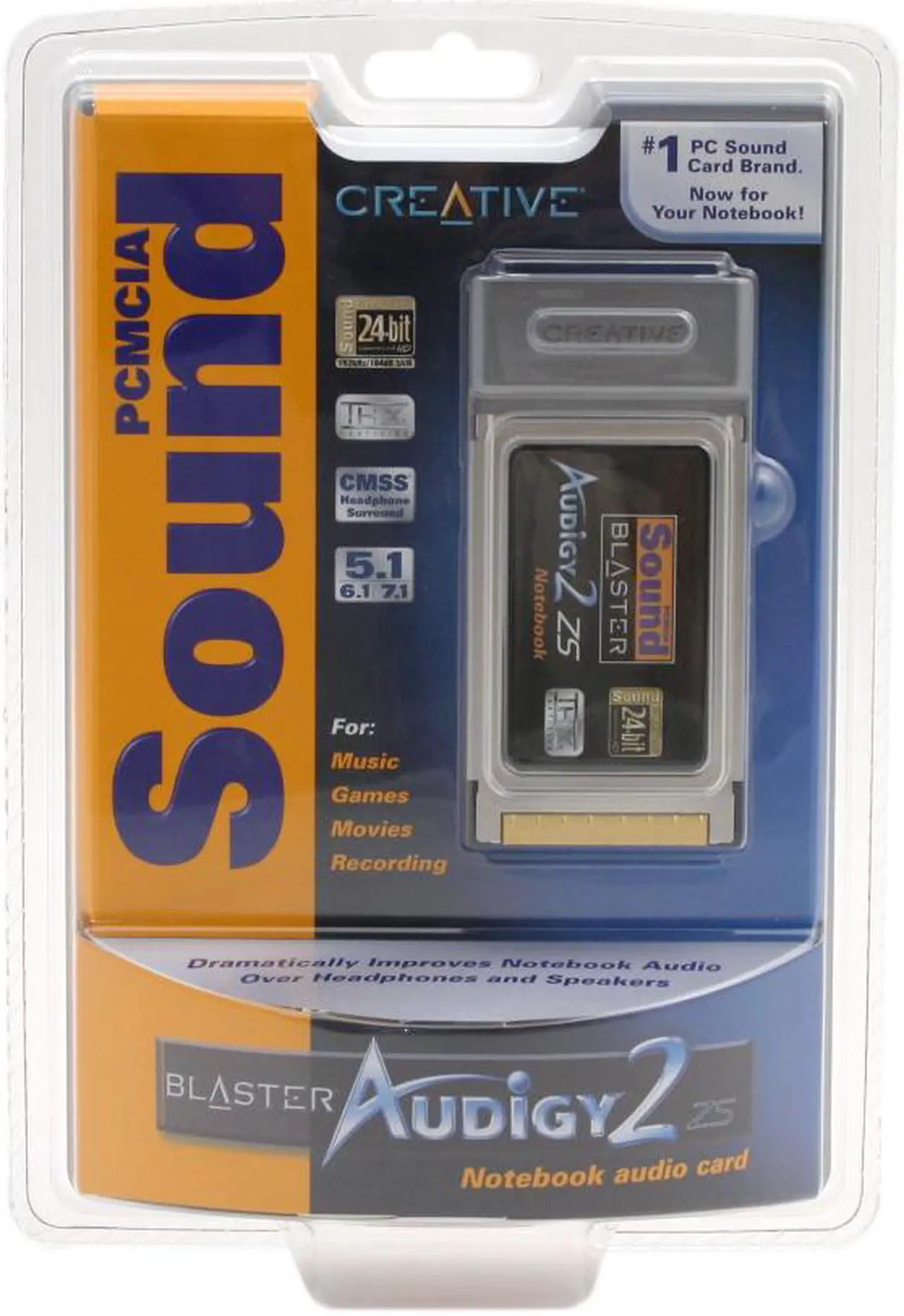
There are also PCMCIA and express card versions of sound blaster cards:

29-102-185-01.jpg93462-5-placa_de_som_expresscard_creative_x_fi_notebook_sb0950_box-5.jpg?v=636529305081030000

I have no experience with them, but I assume they should help with EAX support. If so, then the things to get right are sufficient CPU and GPU power.

sreq.png retrogamer-s.png

Reply 15 of 19, by Yedi

User metadata
Rank Newbie
Rank
Newbie

Try Lenovo Y580 with i7 3gen + gtx 660M. Its not 100% solid - sometimes You will see dedicated GPU and all will be fine , some time not 😀

Reply 16 of 19, by cyclone3d

User metadata
Rank l33t++
Rank
l33t++

I've got a Dell Precision Workstation 7710 with a Quadro M5000M that I have been meaning to try with XP. The Quadro card is the equivalent of the GTX980m.

Probably one of the best XP compatible laptops provided I can get it working with XP.

I would be putting XP x64 on it most likely.

Yamaha modified setupds and drivers
Yamaha XG repository
YMF7x4 Guide
Aopen AW744L II SB-LINK

Reply 17 of 19, by lti

User metadata
Rank Member
Rank
Member

I don't know why people are hung up on DOS compatibility and a multi-core CPU at the same time. All of the other requirements are things from the transition between "Vista with XP downgrade" and Windows 7. 32-bit XP can't use 4GB or more of RAM, so that's another requirement that you can loosen unless you're planning on running x64 edition. Late Core 2 chipsets could support 8GB of RAM, and anything newer can support more (my old i3-2330M could support 16GB).

There's a narrow range of XP-compatible laptops with quad-core CPUs. I'd say that you should go for a workstation laptop from 2010-2012 (late Core 2 to 3rd-gen Core) for best XP support and reliability. Anything older is in the bumpgate era, and newer stuff won't have good XP driver support. I had some strange performance problems with 2nd-gen (Sandy Bridge), but everyone else seems to like them. If you look at older Core 2 systems, look for an AMD GPU or an honest seller who can prove that any Nvidia chips were manufactured after bumpgate was fixed (not just some kitchen-oven "reflow" that occurred far below the melting temperature of solder).

MikeSG wrote on 2025-12-26, 14:01:

All laptop displays up to the Dual Core era have relatively bad LCDs... High blacks, lowish response rate. Laptops in the first/second gen Intel Core i5/i7 series are much better, but completely erase the retro experience.

My experience back then was that the transition from CCFL to LED backlights resulted in some terrible displays for a few years, and that coincided with first/second-gen Core CPUs. I don't know how black level and contrast ratio (real measured contrast, not the marketing number that kept developing extra zeros) got so much worse in those early LED-backlit LCDs at the same time, but it did. Color quality was bad enough (due to bad backlight LED choice) to make them suck for basic office/school use because what might appear to be blue or cyan on-screen would turn out to be green when you printed a document or connected an external display. You had no choice but to get a gaming or workstation laptop to get a decent display back then (including resolution - in that era, the most common resolution decreased from 1440x900 to 1366x768 on regular consumer/business laptops), while C2D and earlier consumer laptops were at least reasonable for office use.

Reply 18 of 19, by Takino-42

User metadata
Rank Newbie
Rank
Newbie
lti wrote on 2025-12-31, 02:11:
I don't know why people are hung up on DOS compatibility and a multi-core CPU at the same time. All of the other requirements ar […]
Show full quote

I don't know why people are hung up on DOS compatibility and a multi-core CPU at the same time. All of the other requirements are things from the transition between "Vista with XP downgrade" and Windows 7. 32-bit XP can't use 4GB or more of RAM, so that's another requirement that you can loosen unless you're planning on running x64 edition. Late Core 2 chipsets could support 8GB of RAM, and anything newer can support more (my old i3-2330M could support 16GB).

There's a narrow range of XP-compatible laptops with quad-core CPUs. I'd say that you should go for a workstation laptop from 2010-2012 (late Core 2 to 3rd-gen Core) for best XP support and reliability. Anything older is in the bumpgate era, and newer stuff won't have good XP driver support. I had some strange performance problems with 2nd-gen (Sandy Bridge), but everyone else seems to like them. If you look at older Core 2 systems, look for an AMD GPU or an honest seller who can prove that any Nvidia chips were manufactured after bumpgate was fixed (not just some kitchen-oven "reflow" that occurred far below the melting temperature of solder).

MikeSG wrote on 2025-12-26, 14:01:

All laptop displays up to the Dual Core era have relatively bad LCDs... High blacks, lowish response rate. Laptops in the first/second gen Intel Core i5/i7 series are much better, but completely erase the retro experience.

My experience back then was that the transition from CCFL to LED backlights resulted in some terrible displays for a few years, and that coincided with first/second-gen Core CPUs. I don't know how black level and contrast ratio (real measured contrast, not the marketing number that kept developing extra zeros) got so much worse in those early LED-backlit LCDs at the same time, but it did. Color quality was bad enough (due to bad backlight LED choice) to make them suck for basic office/school use because what might appear to be blue or cyan on-screen would turn out to be green when you printed a document or connected an external display. You had no choice but to get a gaming or workstation laptop to get a decent display back then (including resolution - in that era, the most common resolution decreased from 1440x900 to 1366x768 on regular consumer/business laptops), while C2D and earlier consumer laptops were at least reasonable for office use.

About ATI/AMD gpus and chipsets... they can die just like nvidia too but mostly I think it was the chipsets that died (also I had a laptop with dead AMD chipset). So I would just recommend starting from late (with gm45, pm45 chipsets) core 2 duos if you want em instead of core i3s, i5s, and i7s, since they do not should have these nasty 8000, 7000 or even 6000 geforces that burn like matches. And yeah I'd recommend 2-3 gen i5 laptops, they do can have some of that xp support while also providing some of that modern stuff and they still have good perfomance in modern basic tasks. But... on my experience, they tend to heat a bit more extra than core 2 duos so be mindful if you pick these with discrete gpus tho I'd say the same with ALL laptops that got discretes.

Reply 19 of 19, by gerry

User metadata
Rank l33t
Rank
l33t
Intel486dx33 wrote on 2025-12-25, 18:43:
Hi Guys, I want to build a Very Good Windows XP laptop I want it for playing Win95 games and Newer. Microsoft Office and program […]
Show full quote

Hi Guys,
I want to build a Very Good Windows XP laptop
I want it for playing Win95 games and Newer.
Microsoft Office and programs.

I have a couple WinXP laptops already but I want one with a good display
Sound card, and Upgradable RAM, Battery, Sata SSD, with built in NIC and USB
Ports. DVD or Bluray

I want it to support up to 4gb RAM or more.
Quad core Intel CPU or better
Good GPU for gaming
Sound blaster compatible sound card.
Support for 256gb or 500gb Sata SSD or better.

there may be lots of options but i never experienced a better XP laptop than one i owned - a pavilion "desktop replacement" type with 17' screen, P4 3ghz HT, 512mb ram and a radeon card (cant remember, but 128mb ram). It all seems modest but i recall it could play GTA 3,VC,SA very well and a whole bunch of early to mid 2000's games. I suppose that leaves a small 2005-2007 gap for some games but why not fill that with a later win 7 laptop that will chew through those games (and most xp era ones too with few if any issues) , be fine with all the sata stuff and provide more than enough spare computing power for dosbox and even some VMs for early 9x stuff. quad core not really needed. You could downgrade to xp if wanted, but not much reason to imo