VOGONS


First post, by dionb

User metadata
Rank l33t++
Rank
l33t++

Recently I got my hands on an interesting hard card - basically a steel frame with a WD1002-27X card at one end and a WD344R RLL drive at the other.

The WD1002-27X gives it an 8b interface and it's designed for an XT, i.e. with BIOS ROM and presumably DMA transfers. I have an XT, but it's a bit built-in so I decided to try to test this combo. My assumption was that I could disable the BIOS, set drive geometry in system BIOS and work with it like that. Unfortunately, doing that gives a HDC error. If I enable the BIOS, POST hangs when it would be initialized.

The controller is set to default settings, i.e. primary controller at 0xC800, primary address 0x320. The only other device on the motherboard is a VGA card.

I have another similar controller, an OMTI 5527, and it gives me exactly the same behaviour - HDC error with BIOS disabled, hanging POST with BIOS enabled. So I don't think the WD controller itself is the issue.

Knowing that HDC work rather differently between XT and AT architectures, is this fundamentally incompatible - or should it be possible to get one of these controllers to work in an AT-system?


Reply 1 of 6, by Grzyb

User metadata
Rank l33t
Rank
l33t

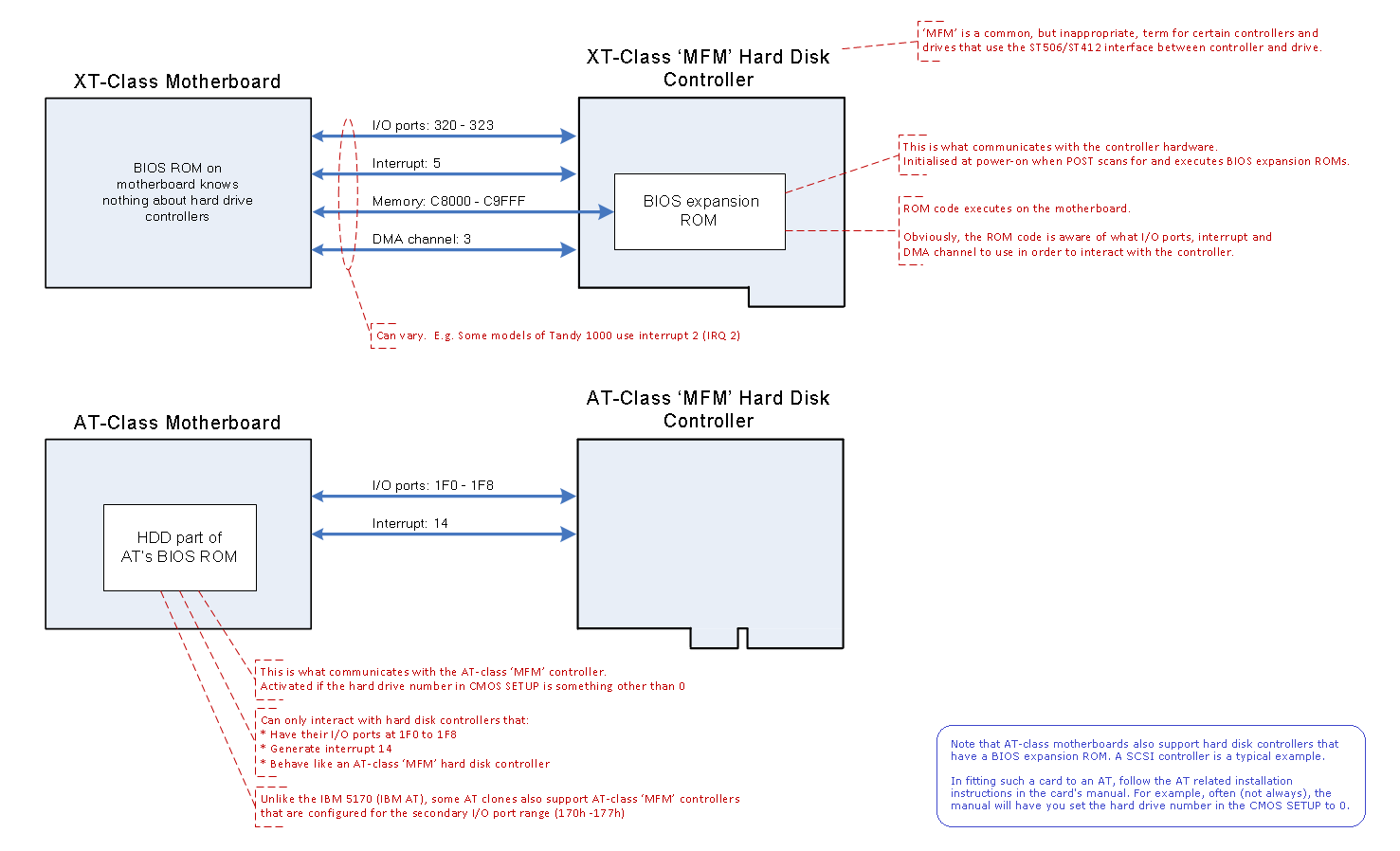
You have two pieces of software that are known to conflict with each other:
- HDD code in the AT BIOS
- BIOS extension on the XT controller

As you already know, you can disable the latter - but the AT BIOS only supports AT-style controllers.

So, the solution is:
- disable the AT BIOS HDD code, by setting all HDDs to "none" in CMOS Setup
- enable the BIOS extension on the XT card

https://www.minuszerodegrees.net/hdd/HDD%20co … versus%20AT.png

Nie rzucim ziemi, skąd nasz root!

Reply 2 of 6, by BitWrangler

User metadata
Rank l33t++
Rank
l33t++

You might be able to leave your secondary controller on to have something to dump the XT drive to, but it's probably going to want to boot from it. So might wanna have some tools on a boot floppy and boot that and deal with it.

Unicorn herding operations are proceeding, but all the totes of hens teeth and barrels of rocking horse poop give them plenty of hiding spots.

Reply 3 of 6, by dionb

User metadata
Rank l33t++
Rank
l33t++
Grzyb wrote on 2026-01-11, 02:54:
You have two pieces of software that are known to conflict with each other: - HDD code in the AT BIOS - BIOS extension on the XT […]
Show full quote

You have two pieces of software that are known to conflict with each other:
- HDD code in the AT BIOS
- BIOS extension on the XT controller

As you already know, you can disable the latter - but the AT BIOS only supports AT-style controllers.

So, the solution is:
- disable the AT BIOS HDD code, by setting all HDDs to "none" in CMOS Setup
- enable the BIOS extension on the XT card

https://www.minuszerodegrees.net/hdd/HDD%20co … versus%20AT.png

Tnx, disable HDD settings in AT BIOS did the trick: after quite a long wait the drive chugged and I was presented with a C> prompt and what looks like a clean install of Compaq PC DOS 3.31 (which actually sounds like an MS-DOS version...)

BitWrangler wrote on 2026-01-11, 04:58:

You might be able to leave your secondary controller on to have something to dump the XT drive to, but it's probably going to want to boot from it. So might wanna have some tools on a boot floppy and boot that and deal with it.

If there had been anything I needed to dump, I'd have fiddled around with it - although I'd have handled booting from floppy/Gotek. As it is, there's nothing on it worth dumping; Compaq DOS 3.31 is already on Winworld.

Reply 4 of 6, by BitWrangler

User metadata
Rank l33t++
Rank
l33t++

Though being Compaq DOS, the io.sys and msdos.sys might be unique to the machine it was installed for. Not much point saving them if you don't have that machine and can't figure out what it was.

Compaq and other early clones were not quite 100% BIOS and hardware compatible with IBM PC and needed those file to patch the last 0.1% or whatever it was to be 100% DOS compatible.

Unicorn herding operations are proceeding, but all the totes of hens teeth and barrels of rocking horse poop give them plenty of hiding spots.

Reply 5 of 6, by Grzyb

User metadata
Rank l33t
Rank
l33t
BitWrangler wrote on 2026-01-11, 15:13:

Though being Compaq DOS, the io.sys and msdos.sys might be unique to the machine it was installed for. Not much point saving them if you don't have that machine and can't figure out what it was.

Compaq and other early clones were not quite 100% BIOS and hardware compatible with IBM PC and needed those file to patch the last 0.1% or whatever it was to be 100% DOS compatible.

Compaq MS-DOS 3.31 is from 1988 - I believe all those "MS-DOS compatible, but not fully IBM compatible" oddballs were already extinct by then.

I've recently experimented with Compaq MS-DOS 3.31 on a generic 486, and it worked fine.

Nie rzucim ziemi, skąd nasz root!

Reply 6 of 6, by BitWrangler

User metadata
Rank l33t++
Rank
l33t++

Compaq carried some quirks through for full Compaq backward compatibility.

AT clone BIOSes got smarter, it can probably handle Compaq and IBM modes of i/o.

However you might not have tested it to where you would have seen the difference, often it was in the serial and parallel port interrupts and behavior.

edit: Though Compaq was very close, there were some MSDOS compatibles that were miles away, figuratively. Then there were some others that were tiny amounts different like Compaq.

editII: even with this, there was a point in time, the IBMs that followed on from the original AT, early PS/2, where Compaq looked more "IBM Compatible" than IBM did due to their quirks.

Unicorn herding operations are proceeding, but all the totes of hens teeth and barrels of rocking horse poop give them plenty of hiding spots.