VOGONS


First post, by oogYBA

User metadata
Rank Newbie
Rank
Newbie

Hello everyone, so I'm trying to get audio working on a retro Windows 98 SE build, but it seems like no matter what I do, there is no sound output even if drivers appear to be installed and have no errors. Volume mixer can open even when I disconnect my headphones/speakers entirely as well.

Hardware:
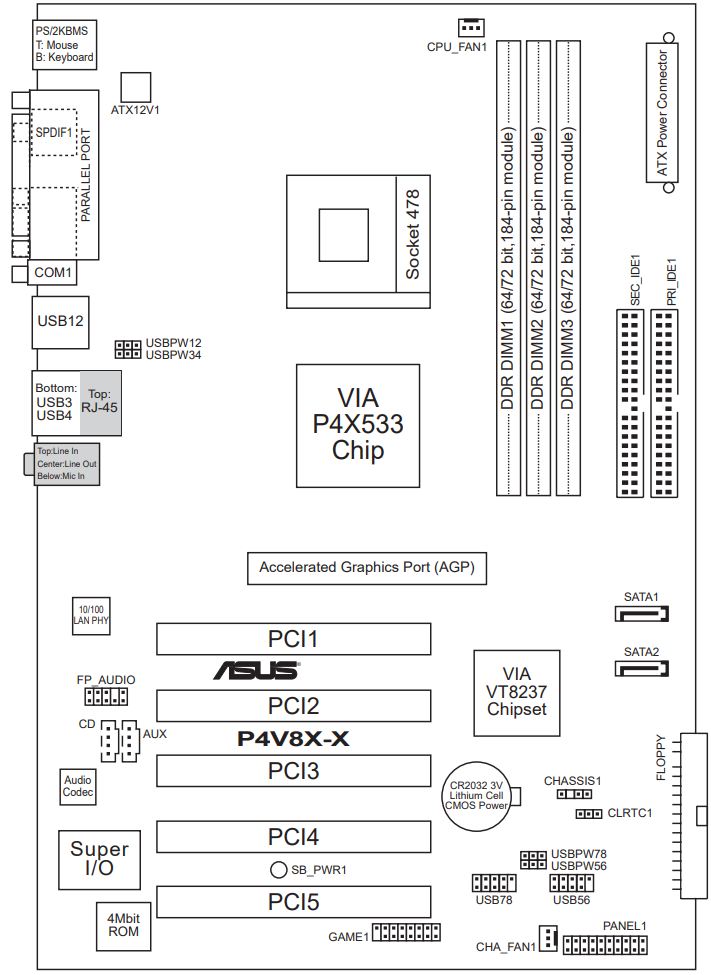
Motherboard: ASUS P4V8X-X (VIA PT800 / VT8237 chipset)
CPU: Pentium 4
Audio: Realtek AC’97 (ALC655-type onboard)
Sound used to work in Windows XP on the same PC

Things I already tried:
Different Realtek AC’97 WDM driver versions
Reinstalling drivers multiple times

Now from what I've read, this might be related to VIA chipset issues but I'm new to all of this so I'm not even completely sure what that means.
Could the DirectX version be causing issues? (Currently running DirectX 9)
P.S. sorry if this is the wrong place to ask!
Reply 1 of 22, by tomcattech

User metadata
Rank Member
Rank
Member

I think you are on the right track.... the Via 4 in 1 pack, the realtek drivers.... both?
Are you just using what you've found on the interwebs or are you using the Asus driver cd?
(Assuming there are 9x drivers on there)

https://archive.org/details/cd-driver-support-asus-p4v8x-x

yoda.jpg
I either fix it or break it permanently... there is no try.

Reply 2 of 22, by oogYBA

User metadata
Rank Newbie
Rank
Newbie
tomcattech wrote on 2026-02-19, 20:27:
I think you are on the right track.... the Via 4 in 1 pack, the realtek drivers.... both? Are you just using what you've found o […]
Show full quote

I think you are on the right track.... the Via 4 in 1 pack, the realtek drivers.... both?
Are you just using what you've found on the interwebs or are you using the Asus driver cd?
(Assuming there are 9x drivers on there)

https://archive.org/details/cd-driver-support-asus-p4v8x-x

Thanks for the quick reply!
I was using what I found online, and tried the CD after that.
When I run that .exe from the CD, after extracting some files, it opens a small window titled “Information” but the window is completely blank (no text, just an OK button).
Do you think I should reinstall 98 and try running the CD before installing anything else?

Reply 3 of 22, by tomcattech

User metadata
Rank Member
Rank
Member
oogYBA wrote on 2026-02-19, 20:38:
Thanks for the quick reply! I was using what I found online, and tried the CD after that. When I run that .exe from the CD, afte […]
Show full quote

Thanks for the quick reply!
I was using what I found online, and tried the CD after that.
When I run that .exe from the CD, after extracting some files, it opens a small window titled “Information” but the window is completely blank (no text, just an OK button).
Do you think I should reinstall 98 and try running the CD before installing anything else?

I would try the 98SE quickinstall.
https://github.com/oerg866/win98-quickinstall … ases/tag/v1.0.0

It may find working drivers right from the get go....

yoda.jpg
I either fix it or break it permanently... there is no try.

Reply 4 of 22, by oogYBA

User metadata
Rank Newbie
Rank
Newbie
tomcattech wrote on 2026-02-19, 20:47:
I would try the 98SE quickinstall. https://github.com/oerg866/win98-quickinstall … ases/tag/v1.0.0 […]
Show full quote
oogYBA wrote on 2026-02-19, 20:38:
Thanks for the quick reply! I was using what I found online, and tried the CD after that. When I run that .exe from the CD, afte […]
Show full quote

Thanks for the quick reply!
I was using what I found online, and tried the CD after that.
When I run that .exe from the CD, after extracting some files, it opens a small window titled “Information” but the window is completely blank (no text, just an OK button).
Do you think I should reinstall 98 and try running the CD before installing anything else?

I would try the 98SE quickinstall.
https://github.com/oerg866/win98-quickinstall … ases/tag/v1.0.0

It may find working drivers right from the get go....

Thanks a bunch, I'll try it and keep you updated.

Reply 5 of 22, by tomcattech

User metadata
Rank Member
Rank
Member

If that doesn't work you can get medieval on it and pull the device ID and the info directly off of the realtek chip...

yoda.jpg
I either fix it or break it permanently... there is no try.

Reply 6 of 22, by onethirdxcubed

User metadata
Rank Newbie
Rank
Newbie

Have you moved the motherboard to a different case since the last time you know the audio worked in Windows XP?

If you don't have the AC97 front panel connected you need to put 2 jumpers on the front panel header pins to route audio to the rear jacks . Without these you won't hear anything.

Reply 7 of 22, by oogYBA

User metadata
Rank Newbie
Rank
Newbie
tomcattech wrote on 2026-02-19, 20:47:
I would try the 98SE quickinstall. https://github.com/oerg866/win98-quickinstall … ases/tag/v1.0.0 […]
Show full quote
oogYBA wrote on 2026-02-19, 20:38:
Thanks for the quick reply! I was using what I found online, and tried the CD after that. When I run that .exe from the CD, afte […]
Show full quote

Thanks for the quick reply!
I was using what I found online, and tried the CD after that.
When I run that .exe from the CD, after extracting some files, it opens a small window titled “Information” but the window is completely blank (no text, just an OK button).
Do you think I should reinstall 98 and try running the CD before installing anything else?

I would try the 98SE quickinstall.
https://github.com/oerg866/win98-quickinstall … ases/tag/v1.0.0

It may find working drivers right from the get go....

I've done this and now I'm getting an error.

On Device Manager, under Sound, video and game controllers is Realtek AC'97 Audio for VIA (R) Audio Controller.
It has a yellow mark, and device status says:

The NTKERN.VXD, NNDEVKDR.VXD device loader(s) for this device could not load the device driver.

I, again, have tried installing the 4in1 Chipset Drivers and Realtek AC’97 audio drivers but it didn't change a thing

Reply 8 of 22, by oogYBA

User metadata
Rank Newbie
Rank
Newbie
onethirdxcubed wrote on 2026-02-19, 21:07:

Have you moved the motherboard to a different case since the last time you know the audio worked in Windows XP?

If you don't have the AC97 front panel connected you need to put 2 jumpers on the front panel header pins to route audio to the rear jacks . Without these you won't hear anything.

No, it was always in the same case.

Reply 9 of 22, by onethirdxcubed

User metadata
Rank Newbie
Rank
Newbie

Are you absolutely sure that your motherboard has a Realtek codec chip? The motherboard on Theretroweb.com has an Analog Devices codec. With AC97 you have to match the driver to the codec so you should be using the Analog Devices SoundMAX drivers. https://theretroweb.com/motherboards/s/asus-p4v8x-x

Install the VXD drivers for Windows 95/98 instead of the WDM drivers for 98se and up.

Reply 10 of 22, by tomcattech

User metadata
Rank Member
Rank
Member

If the above doesn't work, take a pic of the actual Realtek\Analog Devices chip with the details visible and post it here.
You can also use siv to pull the device id as well
http://rh-software.com/

yoda.jpg
I either fix it or break it permanently... there is no try.

Reply 11 of 22, by oogYBA

User metadata
Rank Newbie
Rank
Newbie
onethirdxcubed wrote on 2026-02-20, 17:57:

Are you absolutely sure that your motherboard has a Realtek codec chip? The motherboard on Theretroweb.com has an Analog Devices codec. With AC97 you have to match the driver to the codec so you should be using the Analog Devices SoundMAX drivers. https://theretroweb.com/motherboards/s/asus-p4v8x-x

Install the VXD drivers for Windows 95/98 instead of the WDM drivers for 98se and up.

I am sure and I confirmed that my motherboard has a Realtek codec chip. I'll send a few images in my next reply.

Reply 12 of 22, by oogYBA

User metadata
Rank Newbie
Rank
Newbie
tomcattech wrote on 2026-02-20, 19:19:

If the above doesn't work, take a pic of the actual Realtek\Analog Devices chip with the details visible and post it here.
You can also use siv to pull the device id as well
http://rh-software.com/

Here you go, hopefully it's readable.

Reply 13 of 22, by tomcattech

User metadata
Rank Member
Rank
Member
oogYBA wrote on 2026-02-20, 22:20:

Here you go, hopefully it's readable.

Bad news is none of those have anything to do with your sound codec, HOWEVER...

Find the chip to the left of the 3rd PCI slot hidden by the (I guess it is a) modem per the pic in the link.
(It says "audio codec" in the pic)
https://theretroweb.com/motherboard/image/p4v … 34661498783.png
It may say RealTek, Analog Devices or something else....

Write down everything written on it and post it.

Then we should have what we need.

Expanding on what Onethird said, the Asus web site is showing that the correct driver for your motherboard is a SoundMAX audio driver:
https://www.asus.com/supportonly/p4v8x-x/helpdesk_download/
(You will need to select Windows 98SE under the OS query)

Last edited by tomcattech on 2026-02-20, 22:42. Edited 1 time in total.

yoda.jpg
I either fix it or break it permanently... there is no try.

Reply 14 of 22, by oogYBA

User metadata
Rank Newbie
Rank
Newbie
tomcattech wrote on 2026-02-20, 22:40:
Bad news is none of those have anything to do with your sound codec, HOWEVER... […]
Show full quote
oogYBA wrote on 2026-02-20, 22:20:

Here you go, hopefully it's readable.

Bad news is none of those have anything to do with your sound codec, HOWEVER...

Find the chip to the left of the 3rd PCI slot hidden by the (I guess it is a) modem per the pic in the link.
(It says "audio codec" in the pic)
https://theretroweb.com/motherboard/image/p4v … 34661498783.png
It may say RealTek, Analog Devices or something else....

Write down everything written on it and post it.

Then we should have what we need.

Expanding on what Onethird said, the Asus web site is showing that the correct driver for your motherboard is a SoundMAX audio driver:
https://www.asus.com/supportonly/p4v8x-x/helpdesk_download/
(You will need to select Windows 98SE under the OS query)

I've tried those drivers, and after they threw a bunch of random errors at me.. they actually worked!
The startup sound played and I instantly got goosebumps. Thanks, both of you!

Reply 15 of 22, by Ydee

User metadata
Rank Oldbie
Rank
Oldbie

It never was Realtek AC97, but AD SoundMax codec as onethirdxcubed wrote:

Reply 16 of 22, by NeoG_

User metadata
Rank Member
Rank
Member

I wonder if there is no ALC655 on the board where did that information come from, AI hallucination?

98/DOS Rig: BabyAT AladdinV, K6-2+/550, V3 2000, 128MB PC100, 20GB HDD, 128GB SD2IDE, SB Live!, SB16-SCSI, PicoGUS, WP32 McCake, iNFRA CD, ZIP100
XP Rig: Lian Li PC-10 ATX, Gigabyte X38-DQ6, Core2Duo E6850, ATi HD5870, 2GB DDR2, 2TB HDD, X-Fi XtremeGamer

Reply 17 of 22, by onethirdxcubed

User metadata
Rank Newbie
Rank
Newbie

If someone asked me to tell them what audio codec was on a motherboard with no other information, I would always guess Realtek and be right 90% of the time. Except seemingly for Asus and Dell.

One of the major deficiencies of AC97 is that the codec cannot report a Plug & Play device ID with no drivers installed. This was fixed in HD Audio by splitting the codec and controller drivers apart and providing a class driver for the controller with the OS. But this was never back ported to Win98.

Reply 18 of 22, by oogYBA

User metadata
Rank Newbie
Rank
Newbie
NeoG_ wrote on 2026-02-21, 09:31:

I wonder if there is no ALC655 on the board where did that information come from, AI hallucination?

When I was looking on my motherboard, I saw a few small parts with the Realtek logo on them. I did some google searches and found stuff mentioning ALC650 and ALC655 and, being dumb, I automatically assumed that my motherboard used one of those two

Reply 19 of 22, by Ydee

User metadata
Rank Oldbie
Rank
Oldbie
oogYBA wrote on 2026-02-22, 01:27:
NeoG_ wrote on 2026-02-21, 09:31:

I wonder if there is no ALC655 on the board where did that information come from, AI hallucination?

When I was looking on my motherboard, I saw a few small parts with the Realtek logo on them. I did some google searches and found stuff mentioning ALC650 and ALC655 and, being dumb, I automatically assumed that my motherboard used one of those two

For every motherboards, which I have, I try download user manual first, if it is possible - it is very useful.