VOGONS


First post, by soviet conscript
User metadata
Rank Oldbie
Rank
Oldbie

ok, so the Creative DXR2 is an MPEG decoder kit for playing DVDs and some select DVD versions of games on PCs with hardware to slow to reliably or smoothly do these things. I'm currently trying to get this decoader running on my 166MHz K6 machine with 64MB RAM and a PT-2006 motherboard with an Intel chipset. Unfortunitly even though everything seems to be setup correctly, when I try to play a DVD, all I get is no image or audio in the Encore DVD software provided. DXR2 DVD games like Wing Commander IV DVD edition do not play the FMVs; I get no error messages, just a slightly off-black screen. My primary video card is a Diamond Monster Rendition Verite 2100 with a BIOS update to the 2200.

I'm using the official Creative DVD drive, which appears to be working just fine; it reads CDs and DVDs fine.

I've tried multiple different DVDs, different drivers, tried reinstalling the Encore software several times, different PCI slots, and different passthrough cables. I even bought a second DXR2 card (the first card I tried was worse; it just locked the software up when I would try to play a DVD.)

so question is, is my motherboard possibly just incompatible? Is the Verite incompatible with the DXR2? Could both of my DXR2 decoader cards be faulty? Am I just missing something obvious?


Reply 1 of 10, by Babasha

User metadata
Rank Oldbie
Rank
Oldbie

Never get any incompatibility or troubles with this card.

Need help? Begin with photo and model of your hardware 😉

Reply 2 of 10, by Fazeshift

User metadata
Rank Newbie
Rank
Newbie

I had a DXR2 kit, purchased new in late 1998. I don't remember the exact requirements, but I do remember at that time I upgraded from a K6 @ 200MHz to a K6-2 @ 300MHz before purchasing the DXR2 kit. At that time I was using Win98SE and ATI 3d Rage (Pro?)

Which OS? Are you certain you have the correct Creative DXR2 VGA cable? What about audio - is that internal cable connected to the sound card? When the Creative player is running, does it appear to be reading data from the DVD-ROM?

A K6 at 166MHz might be too slow, although I would expect A/V stutter instead of no overlay. For that reason, I lean towards a software or driver issue.

Reply 3 of 10, by RetroGamer4Ever

User metadata
Rank Oldbie
Rank
Oldbie

According to the system requirements, your build pimp-slaps the minimums, so it should be working, unless there's some sort of hardware or software issue that isn't apparent, such as a DMA issue.

Reply 4 of 10, by lolo799

User metadata
Rank Oldbie
Rank
Oldbie

Do you get any output if you plug your monitor directly to the DXR2 vga output (while playing a mpeg video file)?

PCMCIA Sound, Storage & Graphics

Reply 5 of 10, by soviet conscript

User metadata
Rank Oldbie
Rank
Oldbie
Fazeshift wrote on 2026-04-12, 00:21:

I had a DXR2 kit, purchased new in late 1998. I don't remember the exact requirements, but I do remember at that time I upgraded from a K6 @ 200MHz to a K6-2 @ 300MHz before purchasing the DXR2 kit. At that time I was using Win98SE and ATI 3d Rage (Pro?)

Which OS? Are you certain you have the correct Creative DXR2 VGA cable? What about audio - is that internal cable connected to the sound card? When the Creative player is running, does it appear to be reading data from the DVD-ROM?

A K6 at 166MHz might be too slow, although I would expect A/V stutter instead of no overlay. For that reason, I lean towards a software or driver issue.

OS is Windows 95b

The DXR2 used a special VGA cable? I'm just using a standard one like one you would use for connecting a Voodoo 1 or 2 to a primary video card. as far as I knew, it just uses a standard VGA cable or am I wrong?

No audio, but yes, the CD drive is reading, the image on the screen goes to that lighter black so something is being sent but obviously no video or sound. It will even stop once what I assume is the FMV is done and then the game will progress.

Reply 6 of 10, by feipoa

User metadata
Rank l33t++
Rank
l33t++

The Creative DRX2 should even work on a fast 486. I tested this combination here: Re: DVD hardware decoder cards

As I recall it, the DRX2 uses a standard VGA pass-through cable. It is the later versions of the DRX (not made by Creative) which use some proprietary mini-DIN to VGA cable. I currently use one of the latest DRX DVD decoders on one of my 486 builds, but I forget the name now. I think it even came with a remote control. I'd have to take apart my closet to locate the box.

Plan your life wisely, you'll be dead before you know it.

Reply 7 of 10, by marxveix

User metadata
Rank Oldbie
Rank
Oldbie
soviet conscript wrote on 2026-04-13, 22:41:
Fazeshift wrote on 2026-04-12, 00:21:

I had a DXR2 kit, purchased new in late 1998. I don't remember the exact requirements, but I do remember at that time I upgraded from a K6 @ 200MHz to a K6-2 @ 300MHz before purchasing the DXR2 kit. At that time I was using Win98SE and ATI 3d Rage (Pro?)

K6-2 300Mhz should starts playing DVD already with Rage Pro. I have used DVD with Original AMD K6 266Mhz (not K6-2) + Rage128 Pro, so the Rage128/128 Pro works for sure and you dont need DXR2.

Best ATi Rage3 drivers for 3DCIF / Direct3D / OpenGL / DVD : ATi RagePro drivers and software
30+MiniGL / OpenGL Win 9x dll files for all ATi Rage3 cards : Re: ATi RagePro OpenGL files

Reply 8 of 10, by Mahigan

User metadata
Rank Newbie
Rank
Newbie
soviet conscript wrote on 2026-04-11, 17:25:
ok, so the Creative DXR2 is an MPEG decoder kit for playing DVDs and some select DVD versions of games on PCs with hardware to s […]
Show full quote

ok, so the Creative DXR2 is an MPEG decoder kit for playing DVDs and some select DVD versions of games on PCs with hardware to slow to reliably or smoothly do these things. I'm currently trying to get this decoader running on my 166MHz K6 machine with 64MB RAM and a PT-2006 motherboard with an Intel chipset. Unfortunitly even though everything seems to be setup correctly, when I try to play a DVD, all I get is no image or audio in the Encore DVD software provided. DXR2 DVD games like Wing Commander IV DVD edition do not play the FMVs; I get no error messages, just a slightly off-black screen. My primary video card is a Diamond Monster Rendition Verite 2100 with a BIOS update to the 2200.

I'm using the official Creative DVD drive, which appears to be working just fine; it reads CDs and DVDs fine.

I've tried multiple different DVDs, different drivers, tried reinstalling the Encore software several times, different PCI slots, and different passthrough cables. I even bought a second DXR2 card (the first card I tried was worse; it just locked the software up when I would try to play a DVD.)

so question is, is my motherboard possibly just incompatible? Is the Verite incompatible with the DXR2? Could both of my DXR2 decoader cards be faulty? Am I just missing something obvious?
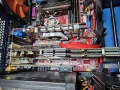
Are you plugging your monitor into the correct VGA port on the back of the DxR2?

In the image I've attached to this post, the larger VGA connector goes to the monitor. The pass through cable is the smaller connector going to the Rage Fury MAXX. As for the system specs..

Motherboard: Asus K7V (VIA Chipset)
CPU: AMD Athlon 750MHz (Slot A)
RAM: 640MB of RAM
GPU: ATi Rage Fury MAXX 64MB
SND: Creative SoundBlaster Live! 5.1 Digital
Optical Drive: LG DVD-RW GSA-H10N
I/O: Symbios SYM8952U PCI SCSI Host Adapter

Worth noting that the ATi iDCT, included in the Rage 128 and higher GPU, is miles ahead in terms of image quality. It also offloads most of the processing for MPEG2 decode to the GPU.

Main Retro Rig:
MSI 875P Neo-FIS2R | Intel Pentium IV 3.2GHz (Northwood C) | 2GB Corsair XMS 4000 DDR RAM | ATi Radeon 9800 Pro 256MB Graphics Card | Quantum Obsidian X-24 24MB Glide 3D Accelerator | Creative SoundBlaster X-fi Elite Pro Sound Card

Reply 9 of 10, by soviet conscript

User metadata
Rank Oldbie
Rank
Oldbie
Mahigan wrote on Today, 00:46:
Are you plugging your monitor into the correct VGA port on the back of the DxR2? […]
Show full quote
soviet conscript wrote on 2026-04-11, 17:25:
ok, so the Creative DXR2 is an MPEG decoder kit for playing DVDs and some select DVD versions of games on PCs with hardware to s […]
Show full quote

ok, so the Creative DXR2 is an MPEG decoder kit for playing DVDs and some select DVD versions of games on PCs with hardware to slow to reliably or smoothly do these things. I'm currently trying to get this decoader running on my 166MHz K6 machine with 64MB RAM and a PT-2006 motherboard with an Intel chipset. Unfortunitly even though everything seems to be setup correctly, when I try to play a DVD, all I get is no image or audio in the Encore DVD software provided. DXR2 DVD games like Wing Commander IV DVD edition do not play the FMVs; I get no error messages, just a slightly off-black screen. My primary video card is a Diamond Monster Rendition Verite 2100 with a BIOS update to the 2200.

I'm using the official Creative DVD drive, which appears to be working just fine; it reads CDs and DVDs fine.

I've tried multiple different DVDs, different drivers, tried reinstalling the Encore software several times, different PCI slots, and different passthrough cables. I even bought a second DXR2 card (the first card I tried was worse; it just locked the software up when I would try to play a DVD.)

so question is, is my motherboard possibly just incompatible? Is the Verite incompatible with the DXR2? Could both of my DXR2 decoader cards be faulty? Am I just missing something obvious?

Are you plugging your monitor into the correct VGA port on the back of the DxR2?

In the image I've attached to this post, the larger VGA connector goes to the monitor. The pass through cable is the smaller connector going to the Rage Fury MAXX. As for the system specs..

Motherboard: Asus K7V (VIA Chipset)
CPU: AMD Athlon 750MHz (Slot A)
RAM: 640MB of RAM
GPU: ATi Rage Fury MAXX 64MB
SND: Creative SoundBlaster Live! 5.1 Digital
Optical Drive: LG DVD-RW GSA-H10N
I/O: Symbios SYM8952U PCI SCSI Host Adapter

Worth noting that the ATi iDCT, included in the Rage 128 and higher GPU, is miles ahead in terms of image quality. It also offloads most of the processing for MPEG2 decode to the GPU.

yep, cables are connected to the correct VGA ports.

I'm really just using this card for the novelty of it. I find it hard to beleive both my DXR2 cards are bad but i'm starting to wonder.

Reply 10 of 10, by Fazeshift

User metadata
Rank Newbie
Rank
Newbie
soviet conscript wrote on 2026-04-13, 22:41:

OS is Windows 95b

The DXR2 used a special VGA cable? I'm just using a standard one like one you would use for connecting a Voodoo 1 or 2 to a primary video card. as far as I knew, it just uses a standard VGA cable or am I wrong?

No audio, but yes, the CD drive is reading, the image on the screen goes to that lighter black so something is being sent but obviously no video or sound. It will even stop once what I assume is the FMV is done and then the game will progress.

Only if you have the mini-DIN to VGA version. If there are 2 VGA ports on your DXR2 card, it should be standard.

The slightly-less-black is what the main VGA should output, which the DXR2 then overlays video. I seems like it is doing something then. I brought up VGA and audio cables because missing/bad cables will do exactly what you are describing.

marxveix wrote on Yesterday, 17:58:

K6-2 300Mhz should starts playing DVD already with Rage Pro. I have used DVD with Original AMD K6 266Mhz (not K6-2) + Rage128 Pro, so the Rage128/128 Pro works for sure and you dont need DXR2.

I probably mixed up my upgrades. If so, I was upgrading from a 5x86@133MHz to new board and K6@200MHz around when I got the DXR2 kit.

Whichever 3D Rage card I had was prior to the Rage 128 or 3D Rage II+DVD, and didn't have decode acceleration.