VOGONS


First post, by MAN0

User metadata
Rank Newbie
Rank
Newbie

I got this game working with the available XP patch but the mouse/cursor was lagging like hell, can't control it and it ruins the game.
Heard that if you run the game through dosbox, everything is smooth. (don't care bout some audio issues i read about), only problem is i just can't get it to work with dosbox.
I have the cd's as .bin & .cue images so I used daemon tools to mount each one as drive F:

This is what i've tried in dosbox so far:

1) first attempt..

z:\> mount c c:\sierra\p2dos

z:\> c:

c:\> mount f f:\ -t cdrom

c:\> f:

f:\> dir

f:\>setup.exe

..and i got "this program requires microsoft windows"

2) second attempt..

z:\> mount c c:\sierra\p2dos

z:\> c:

c:\> imgmount f c:\sierra\p2dos

..and i got "image files doesn't exist"

Please tell me what i did wrong, and how to do this properly.
Give me the exact commands if possible.

I'd appreciate it a lot, thanks!!

Reply 2 of 8, by MAN0

User metadata
Rank Newbie
Rank
Newbie

Ok

I got "illegal command : install.exe"

Reply 3 of 8, by Qbix

User metadata
Rank DOSBox Author
Rank
DOSBox Author

type dir and make a screen shot (when on f:\)

Water flows down the stream
How to ask questions the smart way!

Reply 4 of 8, by MAN0

User metadata
Rank Newbie
Rank
Newbie

dosbox.jpg

..tried sierra.exe as well and nothing.

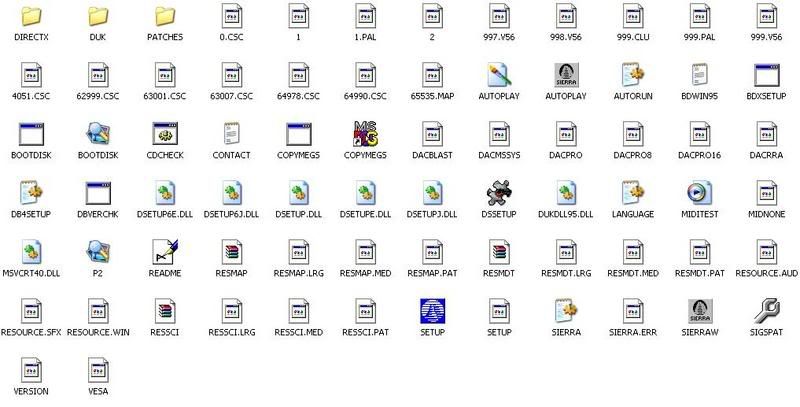
And here are all the files within drive F:

p2cd1.jpg

Reply 5 of 8, by darkgamorck

User metadata
Rank Member
Rank
Member

Looks like you have a Windows version of the game. That's not going to work. Unless it's a 16 bit game and you install Windows 3.1 within DOSBox. There are probably other caveats there as well, but I have no urge to install Windows 3.1 ever again so there 😀

Reply 6 of 8, by collector

User metadata
Rank l33t
Rank
l33t

P2 did not come with a DOS version of the game. Sierra made a DOS patch to convert the game to DOS, but the batch file in P2DOS does not run in XP. Somewhere on these boards someone modified the bat to run in XP. The link here to it may be dead, but I have it on my site for download, too.

Phantasmagoria 2 & Windows XP

You will then be able to run it in DOSBox.

Reply 7 of 8, by MAN0

User metadata
Rank Newbie
Rank
Newbie

So all I have to do is to run the patch in DOSbox?

Are these steps correct?

1. Create a folder with all the extracted patch files in it, i.e. C:\XPpatch
2. Open dosbox and mount C:\XPpatch
3. CD to C:\XPpatch and hit PATCH