VOGONS


First post, by PhaytalError

User metadata
Rank Member
Rank
Member

Hi all,

As in another post, I ultimately want to get a K6-3+ so im testing the waters of 450Mhz [ultimately would like a 500 or 550Mhz K6-3+]... going from 350Mhz to 450Mhz SVGA VESA mode games DO run smoother thats for sure, seems as if they are a few frame's per second higher going from upper teens into the 20's.

So I finally got around to overclocking my AMD K6-2 350Mhz CPU to 450Mhz for testing, to run stable I had to set it's voltage to 2.6v which is the maximum amount that AMD apparently suggested for the K6-2 350Mhz CPU's. It's running stable [I only use DOS, not Windows so have no idea just HOW stable it actually is].

My CPU temps went from 42c under full load to around 52-55c full load... is this too hot or am I in a safe range?

Thanks. 😎

DOS Gaming System: MS-DOS, AMD K6-III+ 400/ATZ@600Mhz, ASUS P5A v1.04 Motherboard, 32 MB RAM, 17" CRT monitor, Diamond Stealth 64 3000 4mb PCI, SB16 [CT1770], Roland MT-32 & Roland SC-55, 40GB Hard Drive, 3.5" Floppy Drive.


Reply 1 of 20, by mr_bigmouth_502

User metadata
Rank Oldbie
Rank
Oldbie

The K6-2 is known to be a hot-running chip. What kind of a cooling setup do you have?

Reply 2 of 20, by PhaytalError

User metadata
Rank Member
Rank
Member
mr_bigmouth_502 wrote:

The K6-2 is known to be a hot-running chip. What kind of a cooling setup do you have?

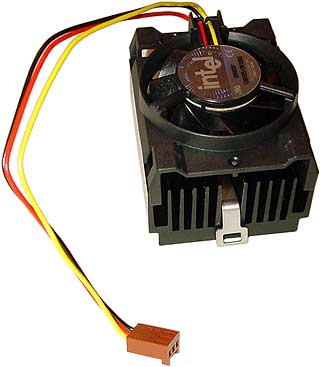
Heatsink and fan, not sure what the fans RPMs are [the fan connects to one of the PSU molex connectors]... the heatsink is black and the fan is pretty fast, as I said full load [few hours of Quake autodemo, and Screamer 2 gameplay and Screamer 2 autodemo] is around 52-55c for CPU temps. I dunno if im in the safe zone with those or not, but so far no lockups at all. *knock on wood* 😎

DOS Gaming System: MS-DOS, AMD K6-III+ 400/ATZ@600Mhz, ASUS P5A v1.04 Motherboard, 32 MB RAM, 17" CRT monitor, Diamond Stealth 64 3000 4mb PCI, SB16 [CT1770], Roland MT-32 & Roland SC-55, 40GB Hard Drive, 3.5" Floppy Drive.

Reply 3 of 20, by mr_bigmouth_502

User metadata
Rank Oldbie
Rank
Oldbie

This may seem kind of drastic, but if you really want to test for stability, install Win95 on there and run Prime95, or just run it from a BartPE disc if you can boot from CDROM on there. Alternatively, you could try running mprime from a Linux liveCD. I have no idea what the safe temperature range for that processor is, but if it can run Prime95 or mprime without spitting out any errors, it should be safe.

Reply 5 of 20, by Skyscraper

User metadata
Rank l33t
Rank
l33t

2.6v is safe for a K6-2 as long as the temps are ok
Dont go higher without really good coooling though

The K6-3+ and K6-2+ should be able to handle up to 2.2v without extreme cooling.

Last edited by Skyscraper on 2013-10-17, 08:38. Edited 1 time in total.

New PC: i9 12900K @5GHz all cores @1.2v. MSI PRO Z690-A. 32GB DDR4 3600 CL14. 3070Ti.
Old PC: Dual Xeon X5690@4.6GHz, EVGA SR-2, 48GB DDR3R@2000MHz, Intel X25-M. GTX 980ti.
Older PC: K6-3+ 400@600MHz, PC-Chips M577, 256MB SDRAM, AWE64, Voodoo Banshee.

Reply 6 of 20, by noshutdown

User metadata
Rank Oldbie
Rank
Oldbie
mr_bigmouth_502 wrote:

The K6-2 is known to be a hot-running chip. What kind of a cooling setup do you have?

i don't think that k6-2 has ever been a hot cpu, especially when compared to its k6-3-ahx brother.
at least the k6-2 core was officially pushed to 550 with 2.3v voltage, while k6-3 was released up to 450 only even at 2.4v, and very few could overclock to 500 and run stably.

Reply 7 of 20, by PhaytalError

User metadata
Rank Member
Rank
Member
Mau1wurf1977 wrote:

PhaytalError got a question for you!

Does your board have a specific BIOS setting. It's ACPI or disable ACPI?

Usually found under the Power Management options.

In the BIOS under Power Management there is Power Management: and it can be changed to Disable, Min. Savings or Max. Savings -- default is Disable.

There's also...

Video Off Options
Video Off Methods

** PM Timers **
HDD Power Down:
Doze Mode:
Standby Mode:
Suspend Mode:

** Power Up Controls **
PWR Button < 4 Secs:
PWR Up On Modem Act:
AC PWR Loss Restart:
Wake On LAN:
Automatic Power Up:

Also fan speed details, CPU temps, and Voltages -- the reason why the CPU fan speed can't be detected by the BIOS is because it's powered via a molex connector and not directly from the motherboard.

DOS Gaming System: MS-DOS, AMD K6-III+ 400/ATZ@600Mhz, ASUS P5A v1.04 Motherboard, 32 MB RAM, 17" CRT monitor, Diamond Stealth 64 3000 4mb PCI, SB16 [CT1770], Roland MT-32 & Roland SC-55, 40GB Hard Drive, 3.5" Floppy Drive.
Reply 9 of 20, by TELVM

User metadata
Rank Oldbie
Rank
Oldbie

Max operating temp is 60C for K6-2 350/AFQ and 70C for K6-2 350/AFR.

What's the system temp while the CPU is at 55C?

Let the air flow!

Reply 10 of 20, by idspispopd

User metadata
Rank Oldbie
Rank
Oldbie

Did you set the MTRRs to enable write combining for the LFB? (Assuming your K6-2 is the right stepping, 350MHz was the highest speed the first stepping was specified for. But since you can overclock it to 450 MHz I assume it already is a CXT core.)
For VESA SVGA write combining probably makes more of a difference than some more MHz.

[EDIT] If you are talking about 640x480 and about 20fps than this probably won't make much of a difference since only about 6MB/sec are needed. For higher resolutions and games like eg. Duke3D it should matter, though.

Reply 11 of 20, by PhaytalError

User metadata
Rank Member
Rank
Member
TELVM wrote:

What's the system temp while the CPU is at 55C?

Around 30c

DOS Gaming System: MS-DOS, AMD K6-III+ 400/ATZ@600Mhz, ASUS P5A v1.04 Motherboard, 32 MB RAM, 17" CRT monitor, Diamond Stealth 64 3000 4mb PCI, SB16 [CT1770], Roland MT-32 & Roland SC-55, 40GB Hard Drive, 3.5" Floppy Drive.

Reply 12 of 20, by PhaytalError

User metadata
Rank Member
Rank
Member

According to what I could find on the net the heatsink/fan is by AOC.

The fan pushes 10.2 CFM and spins at 4200 RPM.

Does anyone know what the best heatsink/fan was in that era?

DOS Gaming System: MS-DOS, AMD K6-III+ 400/ATZ@600Mhz, ASUS P5A v1.04 Motherboard, 32 MB RAM, 17" CRT monitor, Diamond Stealth 64 3000 4mb PCI, SB16 [CT1770], Roland MT-32 & Roland SC-55, 40GB Hard Drive, 3.5" Floppy Drive.

Reply 13 of 20, by Skyscraper

User metadata
Rank l33t
Rank
l33t

Someone else suggested a Celeron ppga cooler
They fit perfectly and it is what I use on my K6-2 450@500 2.4v
It even keeps my CPU reasonable cool at 550 mhz 2.8v but that is not a voltage I would recommend.

cuminesink320.jpg

When it comes to temperature I would not be too worried as long as the the heatsink isnt to hot to touch or the voltage is higher than 2.6v.

New PC: i9 12900K @5GHz all cores @1.2v. MSI PRO Z690-A. 32GB DDR4 3600 CL14. 3070Ti.
Old PC: Dual Xeon X5690@4.6GHz, EVGA SR-2, 48GB DDR3R@2000MHz, Intel X25-M. GTX 980ti.
Older PC: K6-3+ 400@600MHz, PC-Chips M577, 256MB SDRAM, AWE64, Voodoo Banshee.

Reply 14 of 20, by noshutdown

User metadata
Rank Oldbie
Rank
Oldbie
Skyscraper wrote:
Someone else suggested a Celeron ppga cooler They fit perfectly and it is what I use on my K6-2 450@500 2.4v It even keeps my CP […]
Show full quote

Someone else suggested a Celeron ppga cooler
They fit perfectly and it is what I use on my K6-2 450@500 2.4v
It even keeps my CPU reasonable cool at 550 mhz 2.8v but that is not a voltage I would recommend.

cuminesink320.jpg

When it comes to temperature I would not be too worried as long as the the heatsink isnt to hot to touch or the voltage is higher than 2.6v.

🤣 i am also using this one, except the color is silver. it looks cheap but its approved by intel. 🤣
there are bigger 370 coolers but they may not fit on the socket7 board, obstructed by the nearby components.

Reply 15 of 20, by PhaytalError

User metadata
Rank Member
Rank
Member
noshutdown wrote:

there are bigger 370 coolers but they may not fit on the socket7 board, obstructed by the nearby components.

Yep just what I was thinking when thinking about using my old AMD T-Bird heatsink/fan, "damn capacitors are REALLY close" 😜

DOS Gaming System: MS-DOS, AMD K6-III+ 400/ATZ@600Mhz, ASUS P5A v1.04 Motherboard, 32 MB RAM, 17" CRT monitor, Diamond Stealth 64 3000 4mb PCI, SB16 [CT1770], Roland MT-32 & Roland SC-55, 40GB Hard Drive, 3.5" Floppy Drive.

Reply 17 of 20, by TELVM

User metadata
Rank Oldbie
Rank
Oldbie
PhaytalError wrote:
TELVM wrote:

What's the system temp while the CPU is at 55C?

Around 30c

Any room for adding extra case fans?

Let the air flow!

Reply 18 of 20, by Malik

User metadata
Rank l33t
Rank
l33t

52c is ok. But do not know how long it will last. And the stability remains to be seen. Try stressing the cpu with benchmarks and reassess the temperature again. Better still, check after 1 hour of running.

I always prefer to get a appropriate cpu rather than overclocking. But I do underclock.

5476332566_7480a12517_t.jpgSB Dos Drivers

Reply 19 of 20, by PhaytalError

User metadata
Rank Member
Rank
Member
TELVM wrote:

Max operating temp is 60C for K6-2 350/AFQ and 70C for K6-2 350/AFR.

What's the system temp while the CPU is at 55C?

Luckily it's an AMD K6-2 350/AFR -- however today I bought me a Cooler Master DP5-6I11A heatsink/fan for $4 from our local Goodwill Computer Works center. The CPU temps now only run in the upper 30's celcius under full load. 😲

That;s with regular thermal paste, im sure with Arctic Silver it'll run even cooler.

However that don't matter now really as I have a brand new/never used AMD K6-III+ 400/ATZ on the way... it's rated to overlock to 600Mhz. 😜

DOS Gaming System: MS-DOS, AMD K6-III+ 400/ATZ@600Mhz, ASUS P5A v1.04 Motherboard, 32 MB RAM, 17" CRT monitor, Diamond Stealth 64 3000 4mb PCI, SB16 [CT1770], Roland MT-32 & Roland SC-55, 40GB Hard Drive, 3.5" Floppy Drive.