VOGONS


First post, by clueless1

User metadata
Rank l33t
Rank
l33t

I have a Genoa Turboexpress 3-VL motherboard. Here is the spec sheet:

http://th99.classic-computing.de/src/m/E-H/31776.htm

GENOA TURBOEXPRESS 3-VL MOTHERBOARD
- Bios ID string 40-0100-006156-00101111-080893-SIS461-P
- 8-30 pin SIMM slots (1-64meg FPM DRAM)
- 3-32bit VESA Local Bus slots
- 8-16bit ISA slots
- 64k-256k CACHE support in 8-28pin sockets + 1 TAG RAM
- AMI 1993 Auto-Detect BIOS.
- Green PC Connector
- SiS 85C461 chipset
- Supports 3.3v/5volt CPU's
- ZIF 237pin CPU socket 3 which supports these processors:
INTEL 80486SX/SX2,80486DX/DX2/DX3, Pentium Overdrive
- Supports speeds of 20/25/33/40/50/66 MHz.
- Manufactured by: GENOA SYSTEMS
- website: http://www.genoasys.com
Connector and Jumper Settings
-----------------------------
The TurboExpress 486VL motherboard has two jumpers (JP7, JP6) for
the CPU type selector, and two jumpers (JP11, JP12) for the Cache Size
selection. Connectors are also provided for the front panel interface
between the system board and the computer chassis.
NOTE: JP2 and JP3 are used for the optional power saving feature on
the TurboExpress 486VL - 3G version.
Front Panel Speaker Connector (JP15)
------------------------------------
Connector JP15 is a 4-pin single in-line BERG strip which provides
a front panel speaker connection. The pin assignments are:

JP15 Pin# Assignment
1 Speaker Data
2 N.C.
3 Ground
4 +5 V

Front Panel Keylock / Power LED Connector (JP16)
------------------------------------------------
Connector JP16 is a 5-pin single in-line BERG strip which provides
a front panel keylock and power LED connection. When it is connected
to a lock on your system case, you can enable or disable the keyboard
by switching the key. The pin assignments are:

JP16 Pin# Assignment
1 LED Power
2 N.C.
3 Ground
4 Keyboard Inhibit
5 Ground

Front Panel Reset Connector (JP17)
----------------------------------
The reset button connector is a 2-pin single in-line BERG strip.
It is used to reboot the system and will allow safe re-initialization
of the system at any time. The connector should always be set in the
OFF position, otherwise the system will continually reset itself.

JP17 Pin# Assignment
1 Ground
2 Reset Strobe
Show last 118 lines

Front Panel Turbo LED Connector (JP18)
--------------------------------------
Connector JP18 is a 2-pin single in-line BERG strip. It can be
connected to an LED display indicating the CPU speed. The display
lights up when the CPU is running at full speed.
JP18 Pin# Assignment
1 Anode
2 Cathode

Front Panel Turbo Connector (JP19)
----------------------------------
Connector JP19 is a 2-pin single in-line BERG strip. It is the
connector for the 'Turbo' processor speed switch, which allows you
to switch between system speeds.

JP19 Pin# Assignment
1 Ground
2 Turbo Control
Hardware CMOS Setup Connector (JP21)
------------------------------------
The hardware CMOS setup Connector is a 3-pin connector.
To discharge the CMOS static memory (clear the CMOS setup settings),
remove the jumper shunt from pin 2 and 3 of JP21 (default setting),
and place it at the position of pin 1 and pin 2 of JP21 for 5 seconds,
then return it ot the original position. The jumper selections are:

Selections JP21
Default 2-3
Discharge 1-2

Power Supply Connector (PW1)
----------------------------
There is a power supply connector on-board. The pin assignments are:

PW1 Pin# Assignment PW1 Pin# Assignment
1 Power Good 7 Ground
2 +5 VDC 8 Ground
3 +12 VDC 9 -5 VDC
4 -12 VDC 10 +5 VDC
5 Ground 11 +5 VDC
6 Ground 12 +5 VDC

Cache Memory Configuration
--------------------------
There are two jumpers to be set for the cache memory selection.
For 64K cache, install 8Kx8 SRAM in locations
U27, U23, U24, U25, U26, U33, U34, U35, and U36.

For 128K cache, install 8Kx8 SRAM in location U27,
and 32Kx8 SRAM in locations U23, U24, U25, and U26.

For 256K cache, install 32Kx8 SRAM in location U27,
and 32Kx8 SRAM in locations U23, U24, U25, U26, U33, U34, U35, U36.

Selection JP11 JP12
64K Open Open
128K 1-2 Close
256K 2-3 Close
External Battery (JP1)
----------------------
The TurboExpress 486VL motherboard provides one external battery
supply connector. The pin assignments are:

JP1 Pin# Assignment
1 Battery Positive
2 No Connection
3 Ground
4 Ground
Keyboard Connector (KB1)
------------------------
The keyboard connector is a 5-pin DIN connector. This connector
consists of a 90-degree printed circuit board PCB mounting.
KB1 Pin# Assignment
1 Keyboard Clock
2 Keyboard Data
3 Spare
4 Ground
5 +5 V
CPU Type Selection
------------------
The TurboExpress 486VL motherboard can accommodate either
the Intel 486DX, 486DX2, 486DX3, 486SX, 487SX, 486 OverDrive,
or Pentium OverDrive. There are two jumpers to be set for the
microprocessor selection. Configuration of the correct CPU
setting will allow compatibility with various low-end and high-end
applications. The jumper settings are:

CPU Type JP7 JP8
486DX/486DX2/486DX3 1-2,3-4 1-2
486 OverDrive 168-pin 1-2,3-4 1-2
486 OverDrive 169-pin 1-2,3-4 2-3
Pentium OverDrive 1-2,3-4 2-3
486SX 2-3 Open
487SX/486SX2 1-2,3-4 2-3

CPU Clock Selection
-------------------
The TurboExpress 486VL motherboard uses a CPU frequency generator
to generate the clock instead of an oscillator. There are three
jumpers to be set for the CPU clock selection.

CPU Clock JP4 JP5 JP6
DX-50 MHz Open Close Open
DX-40 MHz Close Open Open
DX-33/DX2-66 MHz Open Close Close
DX-25/DX2-50 MHz Close Open Close
DX-20 MHz Close Close Open

VESA Local-Bus Identifier Jumpers (JP13, JP14)
----------------------------------------------
The identifier jumpers (JP13, JP14) allow the VL-Bus slave to
identify the speed of the host CPU.

CPU Speed JP13 JP14
<= 33 MHz Open Open
> 33 MHz Close Close
===================End of Genoa TurboExpress VL Data====================

I've got a Seagate ST51080A 1GB hard drive connected to an ISA controller card with UMC chipset. The BIOS autodetects the drive correctly:

The attachment bios1.jpg is no longer available

But MS-DOS only sees 503MB:

The attachment msd.jpg is no longer available

MSD seems to be differentiating between CMOS parameters the parameters that DOS is using.

Currently I'm fine on space (ignore the 38MB free space, I have stuff loaded on for testing that I don't need on there), and am not interested in using overlay software. But I'm curious, what is causing the 500MB limitation? It seems that if the BIOS sees the full size of the drive, that it should all be available in DOS?

The more I learn, the more I realize how much I don't know.
OPL3 FM vs. Roland MT-32 vs. General MIDI DOS Game Comparison
Let's benchmark our systems with cache disabled
DOS PCI Graphics Card Benchmarks


Reply 1 of 7, by Jepael

User metadata
Rank Oldbie
Rank
Oldbie

It seems the BIOS is not able to do geometry translation. So it can detect the drive parameters (note 2100 cylinders) alright, but as BIOS disk interface what DOS uses can only have 1024 cylinders, it is limited to 504MB.

2100*63*16=1033 MB
1024*63*16=504 MB

Later motherboards do geometry translation, they halve the cylinders while doubling the heads until it fits into 1024 cylinders.
Or anyway use the disk as LBA, but still present max CHS parameters via BIOS disk interface.

Fix: use disk overlay of some sort.

Reply 2 of 7, by clueless1

User metadata
Rank l33t
Rank
l33t
Jepael wrote:
It seems the BIOS is not able to do geometry translation. So it can detect the drive parameters (note 2100 cylinders) alright, b […]
Show full quote

It seems the BIOS is not able to do geometry translation. So it can detect the drive parameters (note 2100 cylinders) alright, but as BIOS disk interface what DOS uses can only have 1024 cylinders, it is limited to 504MB.

2100*63*16=1033 MB
1024*63*16=504 MB

Later motherboards do geometry translation, they halve the cylinders while doubling the heads until it fits into 1024 cylinders.
Or anyway use the disk as LBA, but still present max CHS parameters via BIOS disk interface.

Fix: use disk overlay of some sort.

Thanks, geometry translation was the bit I was missing. Inspired by your post, I had a good read over here, particularly this part:

"Ignorance": Some BIOSes will report the true number of logical cylinders that the drive has, making you think your system supports the full size of the hard disk. Really, the BIOS just has no clue what it is seeing. When you go to partition and format the hard disk, you will be stuck with the same limit (which can be both confusing and frustrating). This is usually seen with older BIOSes and the 1,024 cylinder limitation.

Thank you Jepael.

The more I learn, the more I realize how much I don't know.
OPL3 FM vs. Roland MT-32 vs. General MIDI DOS Game Comparison
Let's benchmark our systems with cache disabled
DOS PCI Graphics Card Benchmarks
Reply 3 of 7, by Jo22

User metadata
Rank l33t++
Rank
l33t++

LBA is nice, but it was not the only one in town. If you're still on 16Bit DOS, you also have another choice.
Some BIOSes also did support ECHS/Large, which allowed disk sizes of about ~8GB via standard int13h.
Since you do have got a true 486 era machine, this option might be available to you..
http://www.pcguide.com/ref/hdd/bios/modesECHS-c.html

PS: If your BIOS doesn't support it, you can try to load the AT-version of the XT-IDE BIOS to get around the ~500MB limit.
Some people already tried this. I'm still a bit worried about data loss and thus haven't done much with it.

Edit: Just checked, XT-IDE BIOS detects my large CF card.
I used a D-Link DE-220 card as a host. Booting DOS worked fine so far.

Last edited by Jo22 on 2016-11-06, 14:46. Edited 1 time in total.

"Time, it seems, doesn't flow. For some it's fast, for some it's slow.
In what to one race is no time at all, another race can rise and fall..." - The Minstrel

//My video channel//

Reply 4 of 7, by PhilsComputerLab

User metadata
Rank l33t++
Rank
l33t++

You could also go SCSI and access full 8 GB that way.

YouTube, Facebook, Website

Reply 5 of 7, by Jo22

User metadata
Rank l33t++
Rank
l33t++

That's a good idea, Phil. I always forget about SCSI! ^^
I remember compatibility among them was said to be quite good, at least better than ATA.
I think this was because SCSI was more mature than early ATA (and a true BUS), so clueless1 shouldn't have much trouble with that.
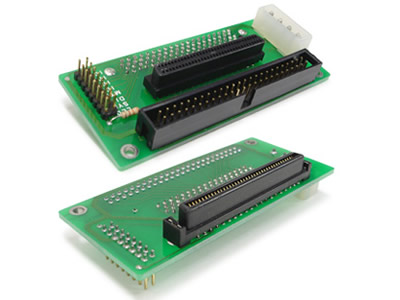
There are even adapters for the different SCSI types, so he doesn't has to use these archaic 80pin monsters.

SLSC1003.jpg
Source: http://www.soarland.com/SCA_80-Pin_To_SCSI_68 … roduct-201.html

In case nobody cares, my first XP machine also had a 2.1GB wide-SCSI hard disk (I think).
I ran Snes9x on it and I had moved the taskbar to the top. This was when XP was new, and 98SE was still #1! 😁
If my memory serves, I never had issues with SCSI. Everything just worked.
And if I'm not mistaked, my 286 also had a SCSI CD-ROM.

But back to the topic - As far as I know, there are also SCSI to IDE adapters out there.
I have seen them beeing used by users of classic Macintoshes and vintage Pianos.
They are a bit more expensive, but I think that's okay for such a niche product.

Anyway, SCSI was/is great. It still lives on as SAS (a super set of SATA).
Just make sure it has its own int13h support. Some older cards were just
meant as a fast alternative to parallel ports, and thus have no BIOS (for scanners, etc).

"Time, it seems, doesn't flow. For some it's fast, for some it's slow.
In what to one race is no time at all, another race can rise and fall..." - The Minstrel

//My video channel//

Reply 6 of 7, by Kisai

User metadata
Rank Member
Rank
Member
clueless1 wrote:
Thanks, geometry translation was the bit I was missing. Inspired by your post, I had a good read over here, particularly this p […]
Show full quote
Jepael wrote:
It seems the BIOS is not able to do geometry translation. So it can detect the drive parameters (note 2100 cylinders) alright, b […]
Show full quote

It seems the BIOS is not able to do geometry translation. So it can detect the drive parameters (note 2100 cylinders) alright, but as BIOS disk interface what DOS uses can only have 1024 cylinders, it is limited to 504MB.

2100*63*16=1033 MB
1024*63*16=504 MB

Later motherboards do geometry translation, they halve the cylinders while doubling the heads until it fits into 1024 cylinders.
Or anyway use the disk as LBA, but still present max CHS parameters via BIOS disk interface.

Fix: use disk overlay of some sort.

Thanks, geometry translation was the bit I was missing. Inspired by your post, I had a good read over here, particularly this part:

"Ignorance": Some BIOSes will report the true number of logical cylinders that the drive has, making you think your system supports the full size of the hard disk. Really, the BIOS just has no clue what it is seeing. When you go to partition and format the hard disk, you will be stuck with the same limit (which can be both confusing and frustrating). This is usually seen with older BIOSes and the 1,024 cylinder limitation.

Thank you Jepael.

Most hard drive installation software of the day used Ontrack disk Manager to get around the BIOS size.

Reply 7 of 7, by clueless1

User metadata
Rank l33t
Rank
l33t

Thanks guys. Lots of good ideas. I'm still good on space, I was mainly curious as to why (which Jepael helped me with), but SCSI might be an option down the road if I come across some drives and a controller card. 😀

The more I learn, the more I realize how much I don't know.
OPL3 FM vs. Roland MT-32 vs. General MIDI DOS Game Comparison
Let's benchmark our systems with cache disabled
DOS PCI Graphics Card Benchmarks