VOGONS


First post, by jheronimus

User metadata
Rank Oldbie
Rank
Oldbie

Hi, all

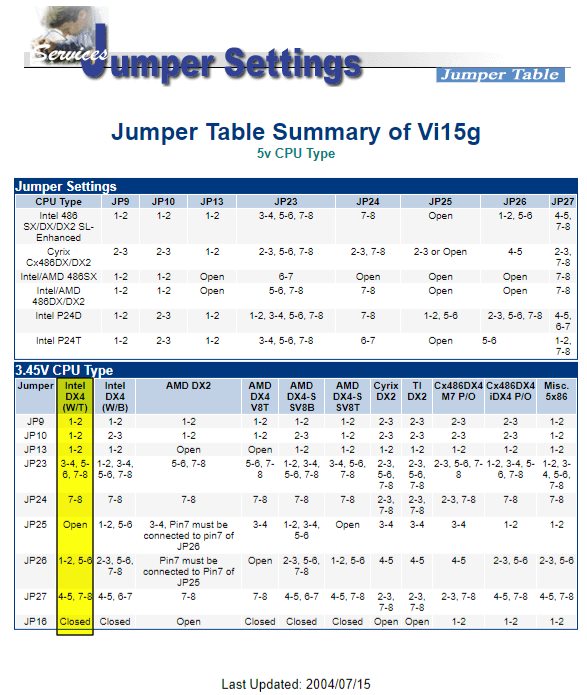
Got myself an AOpen Vi15G motherboard (SIS471 chipset, VLB) with the purpose of running AMD 5x86 at 133. I've used the jumper settings from here to set the board up (specifically, the "misc 5x86" option from there). However, it feels like I did not set the motherboard properly.

CHKCPU tells me that 5x86 is running at 3x33 (not 4x33).

System Information identifies the chip as Cyrix 486 @ 88 MHz with the index of 132.3
Doom timedemo gives me about 28FPS (2134 gametics/2627 realtics)
Speedsys identifies the chip as AMD Am486DX4 @ 100 MHz with the index of 35.29
3DBench: 51.1
Chris's Bench: 53.8

Doom result is particularly weird. Even if my 5x86 is working as DX4-100, shouldn't I get at least 40 FPS?

The other specs are:

256KB L2 cache
4x4MB RAM
Cirrus Logic CL-GD5428 with 2MB VRAM
BIOS version R2.30

Still, I'm guessing, maybe those "Misc 5x86" settings hosted by AOpen are for Cyrix 5x86 (uses 3x multiplier), so maybe I just need to somehow switch to 2x which 5x86 should recognise as 4x? How do I do that? TH99 and AOpen don't show explicit settings for clock multiplier.

If anyone has any other documentation (and maybe a newer BIOS file), I would be very grateful. I also have issues with front panel connectors — looks like the TH99 has it all wrong (or I have a different revision).

Pentium 166 MMX Overdrive, 32 MB RAM, Ark Logic ARK1000VL, Tekram DC-680C, Turtle Beach Tropez, Gravis Ultrasound Max
Pentium III 1000, 256 MB RAM, Matrox G400 MAX, Adaptec 19160, Yamaha YMF740B

Reply 1 of 8, by Deksor

User metadata
Rank l33t
Rank
l33t

When you compare each CPU, you can see that JP16 is always set to "closed" or "1-2" for 3x cpus (and the 5x86) while the DX2s have it to "open"

Though it might be something completely different, all we can do here is guessing ...

Trying to identify old hardware ? Visit Ultimate Hardware 2019 - Project's thread The Ultimate Hardware 2019 (UH19) project- a stason.org/TH99
alternative

Reply 2 of 8, by jheronimus

User metadata
Rank Oldbie
Rank
Oldbie
Deksor wrote:

When you compare each CPU, you can see that JP16 is always set to "closed" or "1-2" for 3x cpus (and the 5x86) while the DX2s have it to "open"

Frankly, I thought it was a voltage selector (3.45v vs 5v) since it's open for all DX2s, but your comment made me recall that some AMD DX2s were 3.45v. However, I tried it in "open", and the benchmark didn't change.

Though it might be something completely different, all we can do here is guessing ...

It's just that I've seen a lot of people mention this board on Vogons, so I think someone might be able to give me some insight.

Pentium 166 MMX Overdrive, 32 MB RAM, Ark Logic ARK1000VL, Tekram DC-680C, Turtle Beach Tropez, Gravis Ultrasound Max
Pentium III 1000, 256 MB RAM, Matrox G400 MAX, Adaptec 19160, Yamaha YMF740B

Reply 3 of 8, by Deksor

User metadata
Rank l33t
Rank
l33t

Another thing that may help would be to update the bios. My Aopen AP43 needed one in order to make my 5x86 to work or else mine would hang at POST (it was working configured as a DX4) though that shouldn't change the frenquency

Trying to identify old hardware ? Visit Ultimate Hardware 2019 - Project's thread The Ultimate Hardware 2019 (UH19) project- a stason.org/TH99
alternative

Reply 4 of 8, by TheMobRules

User metadata
Rank Oldbie
Rank
Oldbie

BIOS R2.30 is the latest version available I'm afraid. I also have that board, but it's the 5V only version (no voltage regulator) so I cannot test my 5x86 there.

This link may be of help however:

http://www.cpu-collection.de/?l0=co&l1=amd&l2=5x86

In particular:

"Since having a clock multiplier of four was not part of the original Socket 3 design, AMD made the 5x86 look for a two times setting from the motherboard and interpret that as four times instead. In other words, to use the 5x86 you want to set the motherboard to the 2x setting. This will actually cause the 5x86 to run at 4x."

Reply 5 of 8, by meljor

User metadata
Rank Oldbie
Rank
Oldbie
Deksor wrote:

Another thing that may help would be to update the bios. My Aopen AP43 needed one in order to make my 5x86 to work or else mine would hang at POST (it was working configured as a DX4) though that shouldn't change the frenquency

I had the exact same thing with the AP43 board. No way it would run the 586 cpu at 2x/4x but it ran fine on the 3x33 and 3x40 setting as an Amd dx4 cpu.
As soon as i set the 2x setting it went all bananas on me and would hang right after post or run extremely slow. A bios update made it all go away and the board is running 4x 40mhz at the moment, fast and stable.

So i don't know what it is with these cpu's but bios support can be very important. This usually is not a problem with the Cyrix 5x86 (as far as i know).

asus tx97-e, 233mmx, voodoo1, s3 virge ,sb16
asus p5a, k6-3+ @ 550mhz, voodoo2 12mb sli, gf2 gts, awe32
asus p3b-f, p3-700, voodoo3 3500TV agp, awe64
asus tusl2-c, p3-S 1,4ghz, voodoo5 5500, live!
asus a7n8x DL, barton cpu, 6800ultra, Voodoo3 pci, audigy1

Reply 6 of 8, by jheronimus

User metadata
Rank Oldbie
Rank
Oldbie

Looks like AOpen is even hosting BIOS files for this board, and 2.30 is really the last version. This version is dated '93, so it's obvious that I'll never get the board to show 5x86 in POST.

Furthermore, it looks like L1 cache is in write-through mode. I can set L2 to write-back in BIOS settings, but L1 options are greyed out, so I assume it should be configured through jumpers? Can this explain why right now the CPU doesn't even reach DX4-100 levels?

So it looks like I need to a) find 2x option b) change cache to write-back.

Pentium 166 MMX Overdrive, 32 MB RAM, Ark Logic ARK1000VL, Tekram DC-680C, Turtle Beach Tropez, Gravis Ultrasound Max
Pentium III 1000, 256 MB RAM, Matrox G400 MAX, Adaptec 19160, Yamaha YMF740B

Reply 7 of 8, by Deksor

User metadata
Rank l33t
Rank
l33t

To find out how to enable write-back, just compare the settings for the amd DX4 write-trough and write-back ^^

Trying to identify old hardware ? Visit Ultimate Hardware 2019 - Project's thread The Ultimate Hardware 2019 (UH19) project- a stason.org/TH99
alternative

Reply 8 of 8, by meljor

User metadata
Rank Oldbie
Rank
Oldbie
jheronimus wrote:

Looks like AOpen is even hosting BIOS files for this board, and 2.30 is really the last version. This version is dated '93, so it's obvious that I'll never get the board to show 5x86 in POST.

Furthermore, it looks like L1 cache is in write-through mode. I can set L2 to write-back in BIOS settings, but L1 options are greyed out, so I assume it should be configured through jumpers? Can this explain why right now the CPU doesn't even reach DX4-100 levels?

So it looks like I need to a) find 2x option b) change cache to write-back.

When options are greyed out it will be slow, happened also on the ap43 board. Your best option is to set it as a dx4-120 (3x40mhz). This way those options are probably not greyed out and you don't need bios support. It will still be fast and with 16kb cache. On the ap43 even 3x50 was a stable option but memory timings had to be set to pretty slow.

asus tx97-e, 233mmx, voodoo1, s3 virge ,sb16
asus p5a, k6-3+ @ 550mhz, voodoo2 12mb sli, gf2 gts, awe32
asus p3b-f, p3-700, voodoo3 3500TV agp, awe64
asus tusl2-c, p3-S 1,4ghz, voodoo5 5500, live!
asus a7n8x DL, barton cpu, 6800ultra, Voodoo3 pci, audigy1