VOGONS


First post, by ediflorianUS

User metadata
Rank Member
Rank
Member

I have a project for a friend that I really want to fix, and give back ,however I am stuck:

Hello all,
I have a rebuilt hp dx7300M/E6300/250hnqm/1.0R/j s/n:HUB7251CNB that refuses to post.
I checked psu interior, it seems fine, I recapped MB board , most of 6.3v470uf were blown/bulged, however after pressing pwr buton, ( May I have broken a trace at one of the caps? It had same orange led and post code before the recap).
The fan stops and 10 beeps appear+ orange led , manual says it's "Bad option card" - whatever that means,(no source to find exactly what the 10 beep code means).
I don't have any cards inside, during the p.o.s.t. procedure.
I Tested the dx7300 with a stock atx psu, or a pcie gpu... & made no difference.
- changed 10 ram modules different configuration, different cpu.no differences (0 result , same beeps).

Problem persists. I need some assistance, don't want to throw in the towel and throw away the pc hp.

As it's a project any suggestions welcomed, I have hot air machine also , however I don't know what parts on MB to check for if it's in order or to change if needed.

My 80486-S i66 Project

Reply 1 of 10, by ediflorianUS

User metadata
Rank Member
Rank
Member

can anyone tell me at least what ¬ Bad Option Card means- is (on a HP compaq) from BIOS code list? (10 beeps) flashing lights..... no one?

My 80486-S i66 Project

Reply 2 of 10, by janih

User metadata
Rank Member
Rank
Member
ediflorianUS wrote on 2023-02-07, 11:11:

can anyone tell me at least what ¬ Bad Option Card means- is (on a HP compaq) from BIOS code list? (10 beeps) flashing lights..... no one?

Option card means probably this dummy DVI riser card mentioned in manual page 119: https://www.manualslib.com/manual/72058/Hp-Dx … page=119#manual

Reply 3 of 10, by ediflorianUS

User metadata
Rank Member
Rank
Member
janih wrote on 2023-02-07, 11:47:
ediflorianUS wrote on 2023-02-07, 11:11:

can anyone tell me at least what ¬ Bad Option Card means- is (on a HP compaq) from BIOS code list? (10 beeps) flashing lights..... no one?

Option card means probably this dummy DVI riser card mentioned in manual page 119: https://www.manualslib.com/manual/72058/Hp-Dx … page=119#manual

hmm , I don't seem to have that card , system only had a : firewire NEC Japan D720101GJ KU-204IN Ver:10 PCI card , that I first pulled. rest was onboard even the GPU+Chipset=one chip (I tried with a known good PCIe GPU) did not budge.

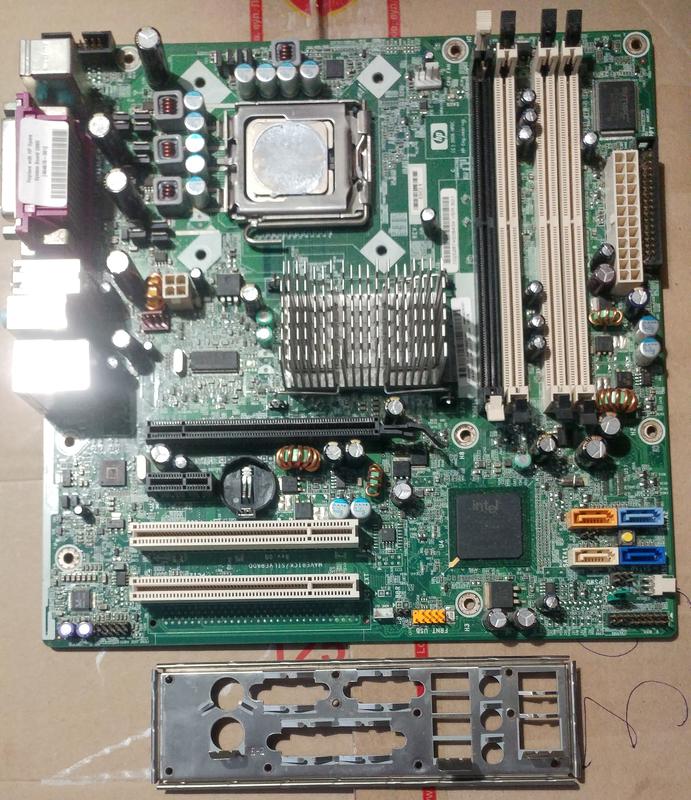
MB look :
Original-for-HP-for-DC7700-DX7300-MT-motherboard-404673-001-404676-001-965-motherboard-Fully-tested-768x532.jpg

29844585

My 80486-S i66 Project

Reply 4 of 10, by ediflorianUS

User metadata
Rank Member
Rank
Member

it's driving me stirr-crazy what does 10 beep code mean? is it 2x5? is it a broken trace ?bad mosfet how do I determine?!

My 80486-S i66 Project

Reply 5 of 10, by ediflorianUS

User metadata
Rank Member
Rank
Member

sooo - ANY
suggested assistance is appreciated....

still was not able to repair it , have to fix-her ... PLS!!!!

My 80486-S i66 Project

Reply 6 of 10, by janih

User metadata
Rank Member
Rank
Member

Did it really beep or blink power led 10 times because the manual says that 'Bad option card' is actually no beeps but 10 LED blinks? So your problem is probably something else than related to the option card but rechecking the error message might help you find the source of this issue.

Reply 7 of 10, by ediflorianUS

User metadata
Rank Member
Rank
Member
janih wrote on 2023-05-17, 06:08:

Did it really beep or blink power led 10 times because the manual says that 'Bad option card' is actually no beeps but 10 LED blinks? So your problem is probably something else than related to the option card but rechecking the error message might help you find the source of this issue.

it blinks and beeps 5x2 = 10 than stops beeping and remains blinking. Should I recap the CPU region caps also? They all seem fine ... could that be ?( I tested lower spec CPU , same beeps) , can anyone tell me how it beeps if it has damadged bios? or corrupted bios?

It never came with anything remote like a option card , only a onboard GPU , a firewire card + front panel , dvd , and If I mount a PCIe GPU same beeps. (same with a diffrent known working PSU).

L.E. Caps around the cpu...

Last edited by ediflorianUS on 2023-05-19, 10:01. Edited 1 time in total.

My 80486-S i66 Project

Reply 8 of 10, by ediflorianUS

User metadata
Rank Member
Rank
Member

Here is a video of the beeping HP MB when I plug-it in. It won't start the system(fan) - so no P.O.S.T.

And some photos of MB : (the cap's I circled where changed , at least I changed most of 6.3V caps on MB) , except the aluminium ones , should I change these also?

My 80486-S i66 Project

Reply 9 of 10, by Towncivilian

User metadata
Rank Newbie
Rank
Newbie

Does the system behave any differently with the CMOS battery removed?

abit BX-133 RAID, P3-S 1.4Ghz, 768MB PC133, Radeon 9000 PRO, AWE64, 2x40GB RAID1, Sony SDT-9000 & Connor CTD-8000 SCSI DDS2 DAT drives, Realtek 8169 1GB NIC, Adaptec DuoConnect AUA-3121, Win2k SP4
Depeche Mode Live Wiki

Reply 10 of 10, by ediflorianUS

User metadata
Rank Member
Rank
Member
Towncivilian wrote on 2023-05-19, 10:50:

Does the system behave any differently with the CMOS battery removed?

Sadly no difference whatsoever , even pressed the clear CMOS ,same beeps . Moving ram or changing no difference same beeps on different cpu (so it's not from CPU) it's maybe something on rail 6.3V , but I don't have a clue what to measure or test.(further).

My 80486-S i66 Project