VOGONS


First post, by dulu

User metadata
Rank Member
Rank
Member

1FJ_YptwsIKqkdpaF2IWFXyUJvdxoVq-k

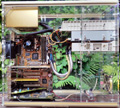
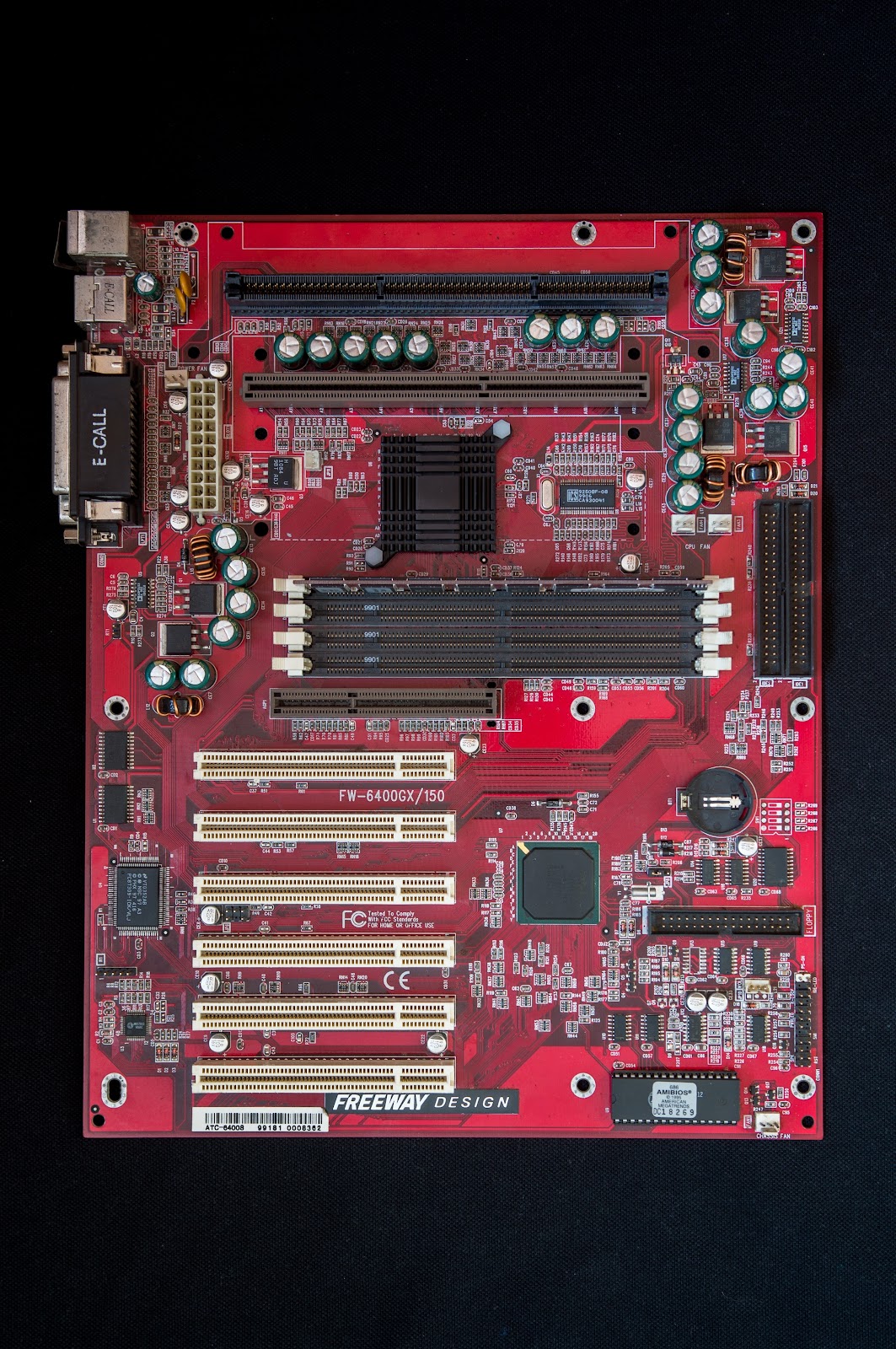
Due to the lack of information about this motherboard on a scale I have never encountered before, I want to create a thread that will collect information in one place. This copy was tested quite briefly due to lack of time. Moreover, this is the first mobo I have ever used for which I cannot find a manual.
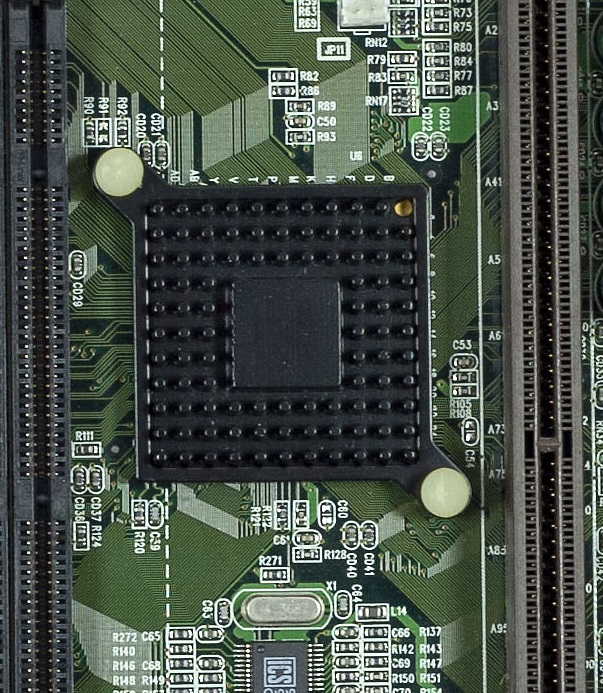
I received it without heatsink on northbridge, I had to match it with some from my own scrap. The one that fit was the one with the fan, and the fan fit into the "JP11" connector next to the northbridge. When turned on, the fan did not rotate. Measurements with a multimeter showed that it is probably not the fan connector - the polarity is reversed and the voltage is 5V instead of 12.
The board does not respond to the USB keyboard in BIOS. I got a PS/2 keyboard and the board works fine with it. After installing the system and connecting the USB keyboard - it also works. (leaked capacitor in the photo, near USB ports, has of course been replaced with a new one)

Dual processor systems have always been outside of my scope of interest, so I didn't know much about xeon slot II processors. However, this mobo allows for a close comparison of xeon vs pentium processors in games under Win98, and theoretically creating a period-correct system that will outperform the highest PII / PIII models (without leaving the second slot unused). Since few people have such an opportunity, I feel obliged to create such a test : )

Refering to the above, I`m looking for info:

1: Does anyone have the manual for this board or would like to create a digital version by scanning or photographing the physical version?

2: What is the JP11 connector next to northbridge for?

3: Does the board model number "150" guarantee a 150MHz northbridge bus frequency?

4: Does the board support all Xeon processors, including Cascade?

5: Is the not working USB keyboard in BIOS actually a feature of this board? Or maybe it's a defect in my one?

6: Is there a Xeon mount with this spacing for mounting pins on other motherboards? When looking at photos of other dual-slot II, the spacing is different (symmetrical).

List of forum users who had this motherboard in their possession:
@Batyra
@m1919

Last edited by dulu on 2026-01-10, 01:01. Edited 5 times in total.

Reply 1 of 18, by mockingbird

User metadata
Rank Oldbie
Rank
Oldbie

TheRetroWeb has it.

mslrlv.png
(Decommissioned:)
7ivtic.png

Reply 2 of 18, by dulu

User metadata
Rank Member
Rank
Member

Apart from retroweb, I did not find any confirmation that the ATC-6400 is the same board. The manual does not say anything about the JP11 connector and says that the board only supports Pentium II.
The board correctly recognizes the Pentium III Katmai 550. The Coppermine on modded PPGA adapter also works, but it does not start after changing the FSB from 66 to 100.

Reply 3 of 18, by majestyk

User metadata
Rank Oldbie
Rank
Oldbie

"ATC-6400" is even printed on the white sticker at the bottom.

Hope you replaced the leaky cap...

Reply 4 of 18, by H3nrik V!

User metadata
Rank l33t
Rank
l33t
dulu wrote on 2024-07-21, 23:29:

Dual processor systems have always been outside of my scope of interest, so I didn't know much about xeon slot II processors. However, this mobo allows for a close comparison of xeon vs pentium processors in games under Win98, and theoretically creating a period-correct system that will outperform the highest PII / PIII models (without leaving the second slot unused). Since few people have such an opportunity, I feel obliged to create such a test : )

You write "Dual processor systems". I would not expect this board to run with both a PII AND a Xeon at the same time?

If it's dual it's kind of cool ... 😎

--- GA586DX --- P2B-DS --- BP6 ---

Please use the "quote" option if asking questions to what I write - it will really up the chances of me noticing 😀

Reply 5 of 18, by PARKE

User metadata
Rank Oldbie
Rank
Oldbie
dulu wrote on 2024-07-21, 23:29:

2: What is the JP11 connector next to northbridge for?

That looks like a connector for a thermistor (for measuring cpu temp)

Reply 6 of 18, by mockingbird

User metadata
Rank Oldbie
Rank
Oldbie
dulu wrote on 2024-07-22, 09:27:

Apart from retroweb, I did not find any confirmation that the ATC-6400 is the same board. The manual does not say anything about the JP11 connector and says that the board only supports Pentium II.
The board correctly recognizes the Pentium III Katmai 550. The Coppermine on modded PPGA adapter also works, but it does not start after changing the FSB from 66 to 100.

Run Bios Patcher on it, see if that helps.

mslrlv.png
(Decommissioned:)
7ivtic.png

Reply 7 of 18, by dulu

User metadata
Rank Member
Rank
Member
majestyk wrote on 2024-07-22, 09:55:

"ATC-6400" is even printed on the white sticker at the bottom.

Hope you replaced the leaky cap...

You`re right, what a shame..
Cap replaced, like i said 😀

Last edited by dulu on 2025-11-30, 15:50. Edited 2 times in total.

Reply 8 of 18, by dulu

User metadata
Rank Member
Rank
Member
H3nrik V! wrote on 2024-07-22, 10:39:
dulu wrote on 2024-07-21, 23:29:

Dual processor systems have always been outside of my scope of interest, so I didn't know much about xeon slot II processors. However, this mobo allows for a close comparison of xeon vs pentium processors in games under Win98, and theoretically creating a period-correct system that will outperform the highest PII / PIII models (without leaving the second slot unused). Since few people have such an opportunity, I feel obliged to create such a test : )

You write "Dual processor systems". I would not expect this board to run with both a PII AND a Xeon at the same time?

I meant that the board is designed to run a single Xeon, so it is better suited to a Win98-based system. I know that it won't support two processors at the same time 😀

Reply 9 of 18, by pshipkov

User metadata
Rank l33t
Rank
l33t

These Freeway red PCBs are eye catching for sure.
Great for early P2 and P3 processors. Well packaged for that mission. But if you want more from them - they will struggle.
Here is a short overview of FW-6280BXDR, for reference. It answers some of your questions.
Usb mouse works in “later” windows/linux versions.
One issue with the 6280 version is the closely placed cpu slots. Prevents you from inserting a second CPU with standard height heatsink/fan. Requires finding low profile ones, which is more difficult nowadays than it sounds. Not great.
I think it is the same for your board, but since it does not allow dual cpu configuration - not a problem really.

retro bits and bytes | DOS media library

Reply 10 of 18, by kevin223

User metadata
Rank Newbie
Rank
Newbie

The board model number "150" does not gurantee that it's 150 MHz.
There is no mention of "150MHz" or any other frequency in the text on the motherboard that directly corresponds to the model number "150".

Reply 11 of 18, by pshipkov

User metadata
Rank l33t
Rank
l33t

FSB is controlled through the BIOS.
There are options for 150 and 155, at least in the 6280 model. They kind of work.
I assume it is similar for 6400.

retro bits and bytes | DOS media library

Reply 12 of 18, by PC Hoarder Patrol

User metadata
Rank l33t
Rank
l33t
kevin223 wrote on 2024-07-23, 14:40:

The board model number "150" does not gurantee that it's 150 MHz.
There is no mention of "150MHz" or any other frequency in the text on the motherboard that directly corresponds to the model number "150".

It's clearly listed on their spec sheet for the board...

The attachment ATC6400 Specs.pdf is no longer available

Reply 13 of 18, by dulu

User metadata
Rank Member
Rank
Member

I will start playing further only when I get the right xeon. After a long search, it seems that I will not find a matching retention bracket, no board has such a mounting. I'll have to create something.

In the meantime - does anyone know what board/graphics card this heatsink was mounted on? I remember well that it was on something that I moved to scrap. It must have been some riva tnt, i740, mx200 or something. I clearly remember that characteristic drilled hole in the corner.

164_HeEaac4oA5XtZ7UyWs0Ol9ICt1vLo

Reply 14 of 18, by dulu

User metadata
Rank Member
Rank
Member

Someone could say this is obvious, but it wasn’t obvious to me. A certain Japanese website mentions two versions of this motherboard — FW6400GX and FW6400GXR — and they are not the same.

  • The FW6400GX has a green PCB, while the FW6400GXR has a red PCB (on red motherboard there is still 6400GX marking on silkscreen, which is misleading).
  • The FW6400GXR is identical to the ATC-6400, and the BIOS from the ATC6400 works on the FW6400GXR (by the way, has anyone ever actually seen an ATC-6400?).
  • All BIOS images on RetroWeb are for the green GX board, and flashing them onto a GXR will brick it.
  • The non-working USB keyboard is a BIOS issue — flashing the ATC BIOS ROM or the GXR 129 ROM makes the keyboard work in the BIOS. I am attaching the GXR 129 ROM here, because it is hard to find; it’s not even available on the Internet Archive. The ROM for the ATC6400 is easy to find, but the FREEWAY logo disappears during POST.

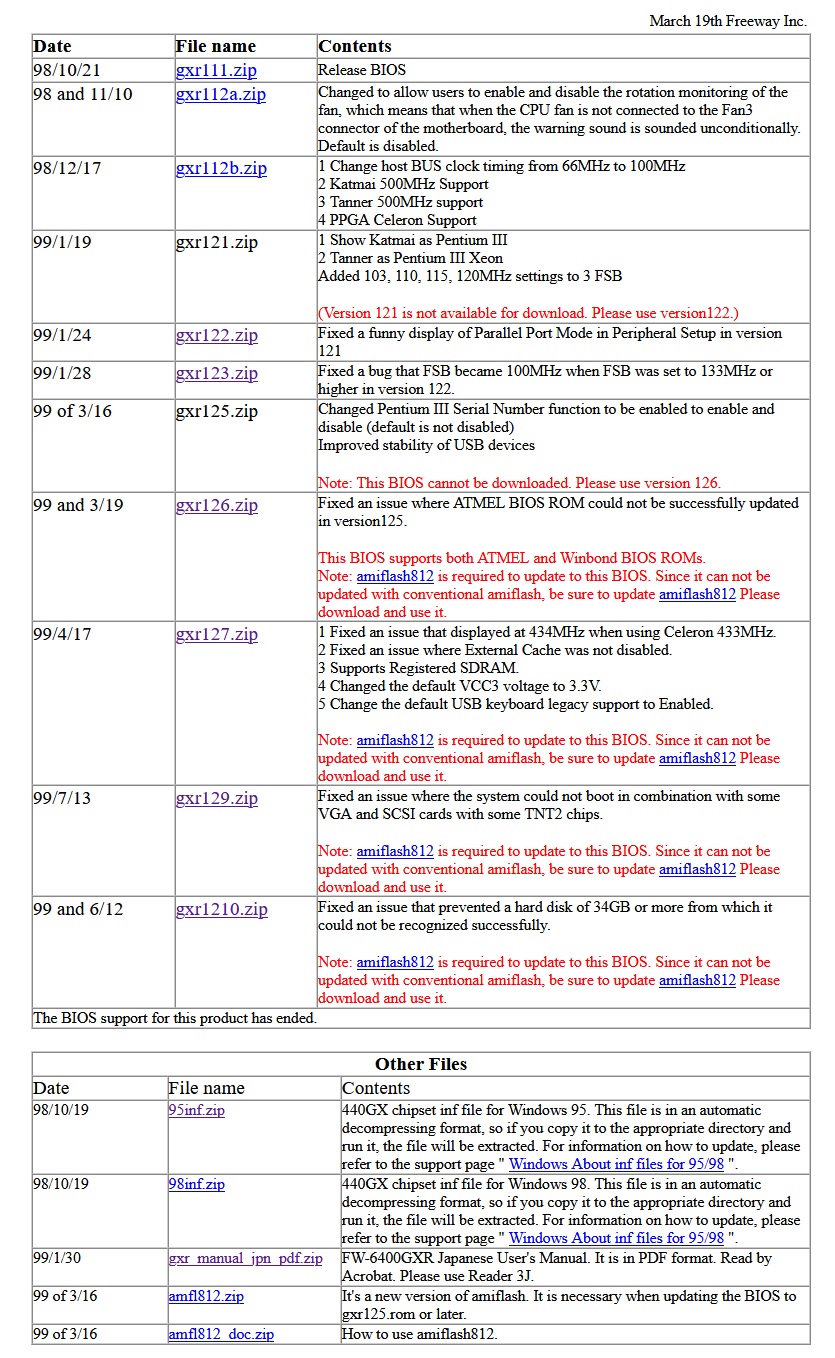
ROM 129 is the newest version my friend managed to find. Below is an changelog. As you can see, there is an even newer BIOS that adds support for newer hard drives. There is also a mention of a manual file in Japanese; it appears that an English-language manual never existed. This manual could explain what the JP11 header is used for. It is not a thermistor connector — that role is served by the RT1 header.

1E_jEhLaaIS2MI7IoI82ZMMimoa7lbzOQ

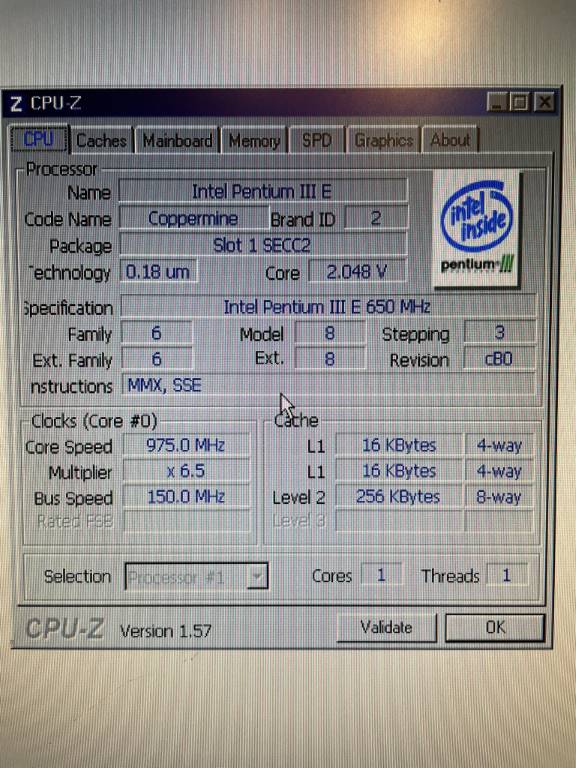
By the way - looks like FSB150 works

1_eBTDQhYSiuRx1nvygYBSBZhusyqLINh

Reply 15 of 18, by red-ray

User metadata
Rank Oldbie
Rank
Oldbie

Does your board have a Winbond/Nuvoton W83781D SIO chip? I wonder if my SIV utility will find it and report the temperatures, fan speeds and voltages, please will you try it and post the Menu->File->Save Local files? It should work on Windows 9x and Windows NT/2000/XP, in general SIV will report more on NT/2000/XP.

Reply 16 of 18, by PcBytes

User metadata
Rank l33t
Rank
l33t
dulu wrote on 2024-07-30, 20:39:
I will start playing further only when I get the right xeon. After a long search, it seems that I will not find a matching reten […]
Show full quote

I will start playing further only when I get the right xeon. After a long search, it seems that I will not find a matching retention bracket, no board has such a mounting. I'll have to create something.

In the meantime - does anyone know what board/graphics card this heatsink was mounted on? I remember well that it was on something that I moved to scrap. It must have been some riva tnt, i740, mx200 or something. I clearly remember that characteristic drilled hole in the corner.

164_HeEaac4oA5XtZ7UyWs0Ol9ICt1vLo

Although old - it's likely originating from a Voodoo Banshee made by Sparkle - SP3800 more exactly.

"Enter at your own peril, past the bolted door..."
Main PC: i5 3470, GB B75M-D3H, 16GB RAM, 2x1TB
98SE : P3 650, Soyo SY-6BA+IV, 384MB RAM, 80GB

Reply 17 of 18, by dulu

User metadata
Rank Member
Rank
Member

Where is menu/file/save as? i can`t find it. Temp report is correct, i have cable thermistor which i`m touching and i see that temp is changing.
Out of curiosity, why did you want me to check this? Is this chip uncommon?

Reply 18 of 18, by red-ray

User metadata
Rank Oldbie
Rank
Oldbie
dulu wrote on 2026-01-10, 13:35:

Where is menu/file/save as? i can`t find it.
Out of curiosity, why did you want me to check this?

The attached should show how to navigate to Menu->File->Save Local. I asked as it's an unusual motherboard, further in general if there is something unexpected on the screen shot the save files are likely to tell me why.

I just noticed the disk drive temperature is missing, did you get a pop-up window asking you to reboot to enable them?