VOGONS


First 386 build – looking for guidance!

Topic actions

Reply 20 of 35, by keenmaster486

User metadata
Rank l33t
Rank
l33t
Honthro wrote on 2026-02-21, 20:07:
keenmaster486 wrote on 2026-02-21, 17:39:

As for a video card, you can expect to pay about $70 on eBay for a good one at the low end.

How about this I found local?

The attachment Screenshot_20260221-150442.png is no longer available

Great. That card will max out the ISA bus. I'm guessing that price is in CAD like the PC was? If so, that's a good price if the card works.

Pickle wrote on 2026-02-22, 14:43:

The performance difference isn’t that large on these Isa cards esp. on a 386.

I, too, used to think this.

Then I started experimenting with my 286-12 and found that the difference can be stark. A fast VGA card makes a huge difference, both in benchmarks and in games. Keen 5 went from having irritating slowdowns in scenes with a lot of screen updates to having a very solid framerate just by upgrading from a WD90C00-JK (low end) to a WD90C30 (high end). FWIW the VGA Wonder is even slower than the WD90C00-JK. You *will* see a difference especially with a 386-33, which is loads faster than the 286-12. You don't want to be draw bandwidth limited with games.

World's foremost 486 enjoyer.

Reply 21 of 35, by Shponglefan

User metadata
Rank l33t
Rank
l33t
Honthro wrote on 2026-02-21, 03:53:

Is there a community favourite or a recommendation you can give for the flash card and adapter? Is this something I can hot-swap to side load files off my main pc?

I use these adapters: https://www.amazon.com/Syba-Connects-3-5-Inch … R/dp/B001JTO782

I use them with almost everything from Pentiums down to 286 era systems.

For Compact Flash cards, I recommend either genuine Sandisk or industrial Cisco cards in the 256MB or 512MB size. You might even be able to find new-old-stock versions on Ebay (I bought a few in the past few years).

I recommend being particular about which Compact Flash cards you get. Using off brand cards may not work properly, so you want to make sure you get some genuine.

Pentium 4 Multi-OS Build
486 DX4-100 with 6 sound cards
486 DX-33 with 5 sound cards

Reply 22 of 35, by keenmaster486

User metadata
Rank l33t
Rank
l33t
keenmaster486 wrote on 2026-02-22, 16:00:
Pickle wrote on 2026-02-22, 14:43:

The performance difference isn’t that large on these Isa cards esp. on a 386.

I, too, used to think this.

Then I started experimenting with my 286-12 and found that the difference can be stark. A fast VGA card makes a huge difference, both in benchmarks and in games. Keen 5 went from having irritating slowdowns in scenes with a lot of screen updates to having a very solid framerate just by upgrading from a WD90C00-JK (low end) to a WD90C30 (high end). FWIW the VGA Wonder is even slower than the WD90C00-JK. You *will* see a difference especially with a 386-33, which is loads faster than the 286-12. You don't want to be draw bandwidth limited with games.

Just remembered I made a thread on this subject: 286-12 doesn't bottleneck fast VGA

World's foremost 486 enjoyer.

Reply 23 of 35, by jakethompson1

User metadata
Rank l33t
Rank
l33t
Honthro wrote on 2026-02-21, 04:04:

Before I install anything new, I want to get the current setup up and running. Does the Dallas need to be replaced first before anything else will work, or can I work around it until the part comes in (just wont save my clock/settings)? What do I need to address "Display card mismatch" or "system memory mismatch" ?

Hello, nice system.
The issue is that some BIOSes see the 'dead battery' bit set in the real time clock and clear the settings on every boot, even though it should at least hold its settings until you cut power.
That DTK BIOS is custom and I'm not familiar with it. On some later AMI and Award, if you let it force you into setup, then 'exit without saving,' it will boot but you will be stuck with the default settings.
In any case, there are successors to that DS1287/1187 still being manufactured *if* you buy from a legitimate parts house like DigiKey or Mouser. The DS12C887+ should be compatible but there's always the chance of some weird pinout issue. You can also buy one that has been modified to use an external battery as someone else linked.

Reply 24 of 35, by BitWrangler

User metadata
Rank l33t++
Rank
l33t++

Yeah there's a wide variety of dead battery behavior, some Asus boards act dead as a dodo, some things have peculiar errors. The Epson ActionNote I got last year, it kept saying it's hard drive was bad, after apparently detecting it, and apparently holding type set through warm boot. Put in the new Dallas, sat there with a stack of HDD to try and to my surprise, booted right off original HDD.

Unicorn herding operations are proceeding, but all the totes of hens teeth and barrels of rocking horse poop give them plenty of hiding spots.

Reply 25 of 35, by Honthro

User metadata
Rank Newbie
Rank
Newbie

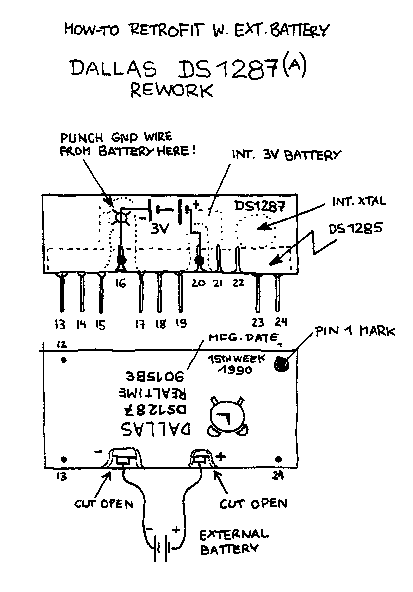
Thanks everyone for the help so far. I did some research and decided to try the "cheap" path first to see if simply exposing the pins on the dead Dallas chip and hooking up some leads to it would work.

I opened my system to begin work on it. Overall in great condition for a 35 year old machine - very little dust:
FWuOa0z.jpeg

I had to start with removing the front cover - the fan had done an impressive job of holding the grime at bay (I don't have the pictures of it before I cleaned it, but there was a thick layer of brown dust built up)
xpUqDux.jpeg

To get to the motherboard, you need to remove this drive bay that doubles as a structural support. Its heavy but also built like a tank.
gUtODb5.jpeg
mv6poPX.jpeg

Finally with the board revealed, I can get started on the chip in the corner
fEfUhPf.jpeg

As you can see, its soldered directly onto the board (was hoping it used an IC socket but no such like).
jKa7mru.jpeg

As such, I decided to try hand and use the Dremel to carefully work away at the two locations to expose the pins. I worked slowly and was able to get it fairly cleanly without mucking up much else on the board.
vcCHauo.jpeg

I even went the step of separating the lead from the battery on the negative terminal, as I saw recommended in a number of videos:
5b8ZBm5.jpeg

The good news, the messages I was seeing previously disappeared! The bad news is the system hung after checking the RAM
U7GVMGV.jpeg

Double checked my wiring (making sure I didn't accidentally solder onto the old battery in the chip) and polarity, but nothing seemed to work.

As I was about to shut down, I noticed that the Dallas chip was getting hot! Based on my knowledge, nothing in that chip should be producing heat, so I shut the system down and packed up.

I went and ordered the Necroware nwx287 replacement that was posted here as a recommendation (THANK YOU!). Waiting for it to arrive, then will try again.

More to come

Reply 26 of 35, by Pickle

User metadata
Rank Member
Rank
Member

ive always seen the battery terminal on opposite sides of the chip. Theres a crystal oscillator further down which i think you shorted into.
what soldering tools do you have access to?

Reply 27 of 35, by Honthro

User metadata
Rank Newbie
Rank
Newbie
Pickle wrote on Yesterday, 02:26:

ive always seen the battery terminal on opposite sides of the chip. Theres a crystal oscillator further down which i think you shorted into.
what soldering tools do you have access to?

Not sure what you mean by the "opposite sides of the chip". Used this diagram which is consistent with others.
https://www.mcamafia.de/mcapage0/jpg/ds1287rw.gif

I'm using a Hakko FX888D

Reply 28 of 35, by Pickle

User metadata
Rank Member
Rank
Member
Honthro wrote on Yesterday, 03:25:
Not sure what you mean by the "opposite sides of the chip". Used this diagram which is consistent with others. https://www.mcam […]
Show full quote
Pickle wrote on Yesterday, 02:26:

ive always seen the battery terminal on opposite sides of the chip. Theres a crystal oscillator further down which i think you shorted into.
what soldering tools do you have access to?

Not sure what you mean by the "opposite sides of the chip". Used this diagram which is consistent with others.
https://www.mcamafia.de/mcapage0/jpg/ds1287rw.gif

I'm using a Hakko FX888D

yeah look like im wrong about the contacts and you look ok on that.
Im not sure what your plan is, but you might look into low melt solder to try to heat all the pins before they solidify and get the chip to drop out. Then use braid to clear the holes.

Reply 29 of 35, by BitWrangler

User metadata
Rank l33t++
Rank
l33t++

It looks like you've got pos to neg and neg to pos on your battery box.

Unicorn herding operations are proceeding, but all the totes of hens teeth and barrels of rocking horse poop give them plenty of hiding spots.

Reply 30 of 35, by H3nrik V!

User metadata
Rank l33t
Rank
l33t
BitWrangler wrote on Yesterday, 05:37:

It looks like you've got pos to neg and neg to pos on your battery box.

Agreed!

If it's dual it's kind of cool ... 😎

--- GA586DX --- P2B-DS --- BP6 ---

Please use the "quote" option if asking questions to what I write - it will really up the chances of me noticing 😀

Reply 32 of 35, by H3nrik V!

User metadata
Rank l33t
Rank
l33t
Honthro wrote on Yesterday, 12:13:
H3nrik V! wrote on Yesterday, 06:33:
BitWrangler wrote on Yesterday, 05:37:

It looks like you've got pos to neg and neg to pos on your battery box.

Agreed!

I tried both ways! But maybe having it reversed fried something in the chip? Will remove the chip from the board for a closer look.

I would definately not rule out that something could be damaged by a wrong polarity. Since these are factory "sealed" it is not expected that someone could fail-polarize them, thus no need for reverse-polarity protection.

If it's dual it's kind of cool ... 😎

--- GA586DX --- P2B-DS --- BP6 ---

Please use the "quote" option if asking questions to what I write - it will really up the chances of me noticing 😀

Reply 33 of 35, by Honthro

User metadata
Rank Newbie
Rank
Newbie
Pickle wrote on Yesterday, 04:31:

Im not sure what your plan is, but you might look into low melt solder to try to heat all the pins before they solidify and get the chip to drop out. Then use braid to clear the holes.

I removed the chip. Looks like I did it correctly, but as others have said, I may have messed up the polarity in the process. Oops! Live and learn
5lEiQNf.jpeg

Reply 34 of 35, by jmarsh

User metadata
Rank Oldbie
Rank
Oldbie

The connections on the RTC are fine. Although you didn't need to expose the negative terminal, it's connected to GND which can be found practically all over the board.
What people were pointing out is that the wires on your battery holder were connected in reverse - red to negative, black to positive.

Reply 35 of 35, by keenmaster486

User metadata
Rank l33t
Rank
l33t

Good work with the Dallas chip but yeah your battery holder has the polarity reversed. You could put it right and try again, hoping there's a diode in there, but you probably fried the chip. I would still get one of the coin battery replacements.

World's foremost 486 enjoyer.