VOGONS


Virtual CD drive speed issues

Topic actions

Reply 20 of 32, by DustyShinigami

User metadata
Rank Oldbie
Rank
Oldbie
douglar wrote on 2026-04-08, 17:24:
Here's what happens for the standard protected mode IDE driver ESDI_506.PDR : 1. The "NoIDE" Registry Flag - the driver checks […]
Show full quote
wierd_w wrote on 2026-04-08, 15:30:

It tends to happen when dos disk drivers are loaded.

Certain dos atapi or scsi drivers trigger it, iirc.

Here's what happens for the standard protected mode IDE driver ESDI_506.PDR :
1. The "NoIDE" Registry Flag - the driver checks HKLM\System\CurrentControlSet\Services\VxD\IOS for a value named NoIDE. If this exists (often placed by Windows after a crash), the driver aborts.
2. "Safe to Hook" Check - The I/O Supervisor (IOS) checks if the drive is already being managed by a driver other than the motherboard BIOS. If it is handled by a DOS driver and the driver is not listed in the c:\windows\IOS.INI "safe" list, the protected-mode driver aborts.
3. Controller Validation - The driver attempts to communicate directly with the IDE controller's I/O ports . if the the "Busy" bit stays on too long, the protected mode driver fails to initialize.
4. ATA Identity Command - The protected mode driver wants to see a 512-byte block of data containing the model number, firmware version, the drive geometry and capabilities like LBA support. If the drive returns garbage or fails to respond, the protected-mode driver exits.
5. Interrupt validation - The protected-mode driver triggers a simple command and waits for the hardware interrupt for the returned results. If the interrupt smells funny, the protected-mode driver exits. This catches many newer IDE controllers.
6. Geometry Sync - compares the geometry returned by the identify device command against the BIOS drive table. If there is a discrepancy that it cannot understand, the protected-mode driver exits.

So it sounds like windows is passing all those tests unless there is some odd third party IDE driver loaded.

Only thing that springs to mind would be the RAID adapter driver...? But I'm sure I had this issue with GK3's installation before I bought that. Other than that, there's the HPT controller, which has the latest driver installed (I think?) - 1.26. Prior to re-installing my 80GB HDD, I did disable that controller in the BIOS. I can always try disabling it again and resetting everything in the BIOS...?

OS: Windows 98 SE
CPU: Slot 1 Pentium III Coppermine 933MHz (SL448)
RAM: Kingston 256MB 133MHz
GPU: Nvidia 16MB Riva TNT/128MB Geforce 4 Ti 4200
Motherboard: ABit AB-BE6-II Intel 440BX
Sound Card: Sound Blaster Live Value CT4670

Reply 21 of 32, by DustyShinigami

User metadata
Rank Oldbie
Rank
Oldbie

Hmm. The mystery continues… Reset the BIOS settings and disabled the HPT controller, disabled Nero DriveSpeed, uninstalled CDSlow, and then reinstalled CDSlow. Quake 2 installed perfectly! It actually takes around 50-55% of the install time just for pak0.pak to copy.

So one of those is the root cause, it seems. Just trying to narrow down what. Reinstalling CDSlow may have helped…? Having both CDSlow and DriveSpeed running could have been conflicting…? Or maybe it is the HPT controller that’s to blame…? When it was disabled though, the HDD LED was permanently stuck. Like it was forever trying to load something. Since enabling it it’s stopped. Will try installing it again and see what happens.

OS: Windows 98 SE
CPU: Slot 1 Pentium III Coppermine 933MHz (SL448)
RAM: Kingston 256MB 133MHz
GPU: Nvidia 16MB Riva TNT/128MB Geforce 4 Ti 4200
Motherboard: ABit AB-BE6-II Intel 440BX
Sound Card: Sound Blaster Live Value CT4670

Reply 22 of 32, by DustyShinigami

User metadata
Rank Oldbie
Rank
Oldbie

Huh. Even with the HPT controller enabled, it installed and plays fine. So something somewhere must have got its knickers in a twist. Will re-try Gabriel Knight 3 next.

OS: Windows 98 SE
CPU: Slot 1 Pentium III Coppermine 933MHz (SL448)
RAM: Kingston 256MB 133MHz
GPU: Nvidia 16MB Riva TNT/128MB Geforce 4 Ti 4200
Motherboard: ABit AB-BE6-II Intel 440BX
Sound Card: Sound Blaster Live Value CT4670

Reply 23 of 32, by douglar

User metadata
Rank l33t
Rank
l33t

Trying to think outside the box on this one. The fact that the drives don’t show as in compatibility mode suggests that windows doesn’t see any int13h, ATA, or geometry issues when your system boots. Those are the usual suspects.

Sounds like your system is stable when not doing disk IO, but acts up when copying large files between two drives and when working with large 7200rpm drives.

I’m going to assume you ran scandisk recently.

Do your file copy issues only show up in windows or do they happen in DOS? Boot in DOS mode and try copying the files if you can. If the file copy issues don’t happen in DOS, it could be borderline system memory that acts up on extended DMA transfers, since you are likely only using UDMA in Windows. edit, I guess I should ask if you enabled DMA in win98 or not. Usually that’s something you have to turn on after installing. https://www.philscomputerlab.com/windows-98-dma-mode.html

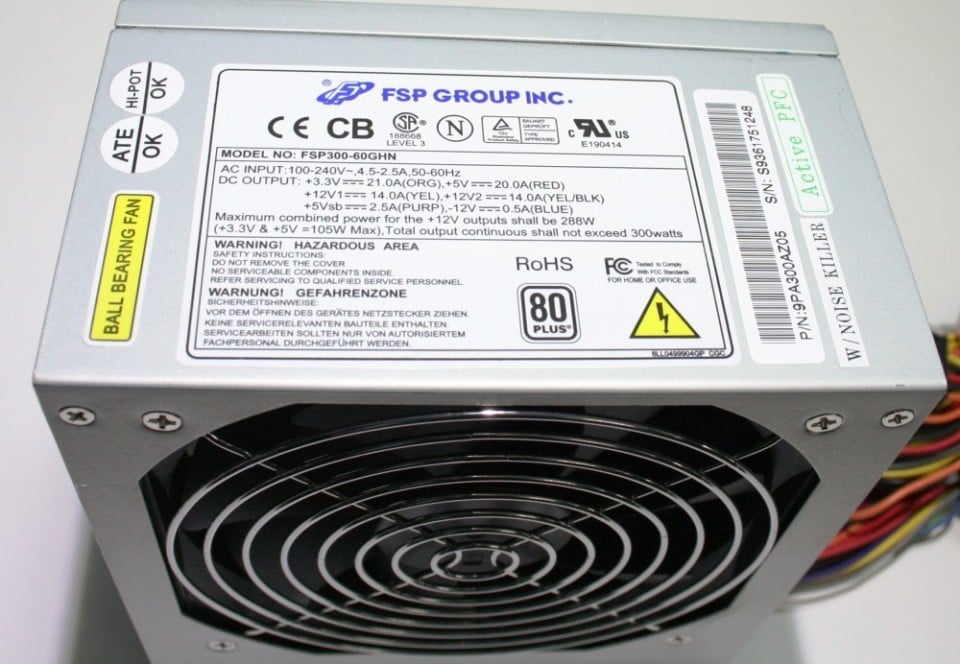
Maybe your power supply has a weak 5v rail and heavy disk load is too much for it to handle. What power supply are you using? Some newer ATX power supplies have weak 5v rails compared to what was common in the Pentium II days, since newer systems don’t require as much power on that line. You likely need 20amps on the 5v line for this system.

Reply 24 of 32, by DustyShinigami

User metadata
Rank Oldbie
Rank
Oldbie
douglar wrote on Yesterday, 20:02:
Trying to think outside the box on this one. The fact that the drives don’t show as in compatibility mode suggests that windows […]
Show full quote

Trying to think outside the box on this one. The fact that the drives don’t show as in compatibility mode suggests that windows doesn’t see any int13h, ATA, or geometry issues when your system boots. Those are the usual suspects.

Sounds like your system is stable when not doing disk IO, but acts up when copying large files between two drives and when working with large 7200rpm drives.

I’m going to assume you ran scandisk recently.

Do your file copy issues only show up in windows or do they happen in DOS? Boot in DOS mode and try copying the files if you can. If the file copy issues don’t happen in DOS, it could be borderline system memory that acts up on extended DMA transfers, since you are likely only using UDMA in Windows. edit, I guess I should ask if you enabled DMA in win98 or not. Usually that’s something you have to turn on after installing. https://www.philscomputerlab.com/windows-98-dma-mode.html

Maybe your power supply has a weak 5v rail and heavy disk load is too much for it to handle. What power supply are you using? Some newer ATX power supplies have weak 5v rails compared to what was common in the Pentium II days, since newer systems don’t require as much power on that line. You likely need 20amps on the 5v line for this system.

I thought I had DMA enabled, but apparently not. However, for the E (and F) drive, there's no option for it. I'm guessing because it's hooked to the RAID controller...? And the F drive is connected to the HPT controller.

And yep, ScanDisks have been run. It found and fixed some errors at one point. Just ran them again, too.

Thanks for the suggestion about file transferring in DOS. I'll give that a go and see what happens.

Save having to disconnect and get it out of the case to see the label, I only know from the eBay purchase name that it's an FSP300-60GHN ATX 300W 80 PLUS BRONZE. So I think it's some cheap make...? I think it's this one:

sursa-fsp-group-300w-fsp300-60ghn-85-80~513.jpg

I remember reading somewhere I'd need at least 20A for my setup.

EDIT: Ooh. I've remembered something though regarding DOS. Whenever I try to check the directory of drive E, it seems to pause. Usually after showing me the list/directory of a drive, I'm able to input another command and carry on. It doesn't let me do that for the E drive. It seems to hang.

OS: Windows 98 SE
CPU: Slot 1 Pentium III Coppermine 933MHz (SL448)
RAM: Kingston 256MB 133MHz
GPU: Nvidia 16MB Riva TNT/128MB Geforce 4 Ti 4200
Motherboard: ABit AB-BE6-II Intel 440BX
Sound Card: Sound Blaster Live Value CT4670

Reply 25 of 32, by DustyShinigami

User metadata
Rank Oldbie
Rank
Oldbie

Okay, in DOS, I copied pak0.pak from Quake 2 from C to D in DOS. No issues. I copied it from C to E - again, no issues.

The hang I mentioned still happens, but if I leave it, it does continue and let me input a command. It just takes a bit longer than the other drives. Presumably because it’s so big for DOS to handle.

OS: Windows 98 SE
CPU: Slot 1 Pentium III Coppermine 933MHz (SL448)
RAM: Kingston 256MB 133MHz
GPU: Nvidia 16MB Riva TNT/128MB Geforce 4 Ti 4200
Motherboard: ABit AB-BE6-II Intel 440BX
Sound Card: Sound Blaster Live Value CT4670

Reply 26 of 32, by douglar

User metadata
Rank l33t
Rank
l33t

the pause you describe is usually caused becuase DOS calculates free space at that time. it’s usually not that noticeable if your hard drive is period correct, but starts to become noticeable when you put a drive that’s much larger than what the system would have had when they were first released. I put a 256gb drive in a 486 system just to see if i could one time. the pause was so long that i thought the system died. anyway, that kind of pause can often be mitigated by increasing the buffers in the config.sys

Or it could be a signaling issue on the ide cable causing a bad CRC forcing the drive to retransmit. Frequent causes of IDE CRC errors:

  • IDE header block is faulty , cable > 45cm, using a cable extension, or your cable is wrapped around a noisy power cable. raw electrical stuff.
  • Master/Slave Conflict. Sometimes drives just don’t get along
  • PIO vs. UDMA: BIOS is set to a PIO mode that is too fast for the drive or controller, the data will often arrive corrupted, forcing the system into a retry-loop. You really want udma to be enabled.

Sometimes you can to see "silent" CRC errors (those that retry and eventually succeed, causing only a lag) by using a tool that can read the drive's S.M.A.R.T. attributes if your drive supports Attribute ID 199: UltraDMA CRC Error Count. CRC errors are usually accompanied by intermittent “aborty retry fail” errors, so this seems less likely

Reply 27 of 32, by douglar

User metadata
Rank l33t
Rank
l33t

How much ram do you have in your system? sometimes if you have 512mb ram, the windows disk cache can get fouled.

Can you copy the file successfully if you boot into safe mode?

Reply 28 of 32, by DustyShinigami

User metadata
Rank Oldbie
Rank
Oldbie
douglar wrote on Today, 03:57:
the pause you describe is usually caused becuase DOS calculates free space at that time. it’s usually not that noticeable if yo […]
Show full quote

the pause you describe is usually caused becuase DOS calculates free space at that time. it’s usually not that noticeable if your hard drive is period correct, but starts to become noticeable when you put a drive that’s much larger than what the system would have had when they were first released. I put a 256gb drive in a 486 system just to see if i could one time. the pause was so long that i thought the system died. anyway, that kind of pause can often be mitigated by increasing the buffers in the config.sys

Or it could be a signaling issue on the ide cable causing a bad CRC forcing the drive to retransmit. Frequent causes of IDE CRC errors:

  • IDE header block is faulty , cable > 45cm, using a cable extension, or your cable is wrapped around a noisy power cable. raw electrical stuff.
  • Master/Slave Conflict. Sometimes drives just don’t get along
  • PIO vs. UDMA: BIOS is set to a PIO mode that is too fast for the drive or controller, the data will often arrive corrupted, forcing the system into a retry-loop. You really want udma to be enabled.

Sometimes you can to see "silent" CRC errors (those that retry and eventually succeed, causing only a lag) by using a tool that can read the drive's S.M.A.R.T. attributes if your drive supports Attribute ID 199: UltraDMA CRC Error Count. CRC errors are usually accompanied by intermittent “aborty retry fail” errors, so this seems less likely

Ah-ha. Interesting. As tests have been fine, I suspect it’s likely the first scenario. I’ll try increasing the buffer count later today. I don’t recall what I set it to.

It’s unlikely the cable is wrapped around anything. The drive and cable are at the bottom of the case, but I will check later today.
Also, it’s the only drive connected to the RAID controller, so a Master/Slave conflict is unlikely.
I’ll take a look and see if there’s a PIO/UDMA mode in my BIOS, though surely it would be the RAID controller’s BIOS I’d need to do that in…? Sadly, much like the HPT controller’s BIOS, it gives very little options for much of anything.

Thanks

OS: Windows 98 SE
CPU: Slot 1 Pentium III Coppermine 933MHz (SL448)
RAM: Kingston 256MB 133MHz
GPU: Nvidia 16MB Riva TNT/128MB Geforce 4 Ti 4200
Motherboard: ABit AB-BE6-II Intel 440BX
Sound Card: Sound Blaster Live Value CT4670

Reply 29 of 32, by DustyShinigami

User metadata
Rank Oldbie
Rank
Oldbie
douglar wrote on Today, 04:22:

How much ram do you have in your system? sometimes if you have 512mb ram, the windows disk cache can get fouled.

Can you copy the file successfully if you boot into safe mode?

256MB.

I can give file copying in Safe Mode a try, for sure. 😀

OS: Windows 98 SE
CPU: Slot 1 Pentium III Coppermine 933MHz (SL448)
RAM: Kingston 256MB 133MHz
GPU: Nvidia 16MB Riva TNT/128MB Geforce 4 Ti 4200
Motherboard: ABit AB-BE6-II Intel 440BX
Sound Card: Sound Blaster Live Value CT4670

Reply 30 of 32, by douglar

User metadata
Rank l33t
Rank
l33t

If it works in safe mode, but fails in normal mode with dma enabled and without, I would try

1) boot in safe mode, removing the drive controllers in device manager, (Intel 82371AB/EB PCI Bus Master IDE Controller) and whatever you installed for the pci drive controllers and power down.

2) physically remove the pci ide controllers

3) reboot and install the newest version of the 440bx chipset drivers. reboot and test drives in dma mode copying large files.

4) if the onboard controller works on the large file copies, then readd the pci controllers and install the windows drivers. early highpoint drivers were buggy. quick web search suggests you want 1.25 or 1.28

Reply 31 of 32, by DustyShinigami

User metadata
Rank Oldbie
Rank
Oldbie
douglar wrote on Today, 14:06:
If it works in safe mode, but fails in normal mode with dma enabled and without, I would try […]
Show full quote

If it works in safe mode, but fails in normal mode with dma enabled and without, I would try

1) boot in safe mode, removing the drive controllers in device manager, (Intel 82371AB/EB PCI Bus Master IDE Controller) and whatever you installed for the pci drive controllers and power down.

2) physically remove the pci ide controllers

3) reboot and install the newest version of the 440bx chipset drivers. reboot and test drives in dma mode copying large files.

4) if the onboard controller works on the large file copies, then readd the pci controllers and install the windows drivers. early highpoint drivers were buggy. quick web search suggests you want 1.25 or 1.28

Is this the C (and D) drives you’re referring to? I think they’ll be fine. They were fine at transferring without DMA enabled, so I imagine they’ll be fine with it enabled.

Or are you referring to the E drive? The big drive? That one I have no option to enable/disable DMA from what I can see. I know those controllers have a box for inputting commands/switches under Device Manager, but I have no idea what.

So do you want me to uninstall the IDE controllers for every drive? Or just the RAID?

I need to find out exactly what the latest IDE controller drivers for that chipset are. I think I did download the latest, but I’m not 100%. Same for the RAID controller.

Also, I believe I have the latest HighPoint drivers installed. I’d have to check what version though, but 1.25/1.28 sounds about right.

OS: Windows 98 SE
CPU: Slot 1 Pentium III Coppermine 933MHz (SL448)
RAM: Kingston 256MB 133MHz
GPU: Nvidia 16MB Riva TNT/128MB Geforce 4 Ti 4200
Motherboard: ABit AB-BE6-II Intel 440BX
Sound Card: Sound Blaster Live Value CT4670

Reply 32 of 32, by douglar

User metadata
Rank l33t
Rank
l33t

Windows 98 can be fussy about the order in which drivers are installed.

these first
https://vogonsdrivers.com/getfile.php?fileid=398

then see if you can find a good driver for your raid controller on the theretroweb.com

not sure what chip your card has
