VOGONS


First post, by altarofmelektaus

User metadata
Rank Newbie
Rank
Newbie

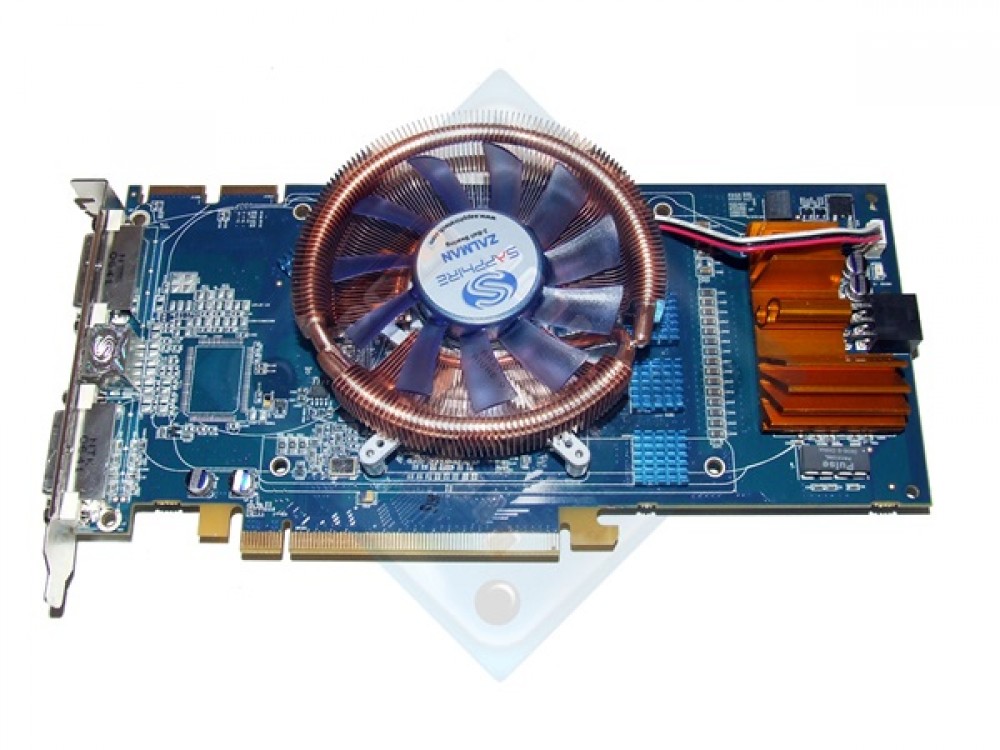
I have this X1950 pro with a bad fan that can't be replaced and I'm going to throw a VF900 on it. Aside from the memory chips, what should I do about these components here? They're VOLTERRA VT1165SF + VT233TF and I think they're responsible for power regulation. They were tied to the heatsink beforehand, and I was wondering if small heatsinks barely larger than the chips themselves would be sufficient? If not, could I possibly source heatsinks made for these? Thanks!

Reply 1 of 9, by shevalier

User metadata
Rank Oldbie
Rank
Oldbie
altarofmelektaus wrote on 2026-05-01, 02:11:

I have this X1950 pro with a bad fan

Does it not spin at all, or does it make a noise?
And what’s under the black sticker on the back of the fan?
https://www.amazon.co.uk/693ZZ-bearing-comput … g/dp/B0DHVG9QHH
since the 693 ball bearing (ABEC 9 class) is sold ready-made; otherwise, you will have to trim the heat sink so that it looks like the one on the Sapphire ‘Zalman Edition’ model
A ready-made heat sink is unlikely to be available.
104672-1000x750.jpg

Aopen MX3S, PIII-S Tualatin 1133, Radeon 9800Pro@XT BIOS, Audigy 4 SB0610
JetWay K8T8AS, Athlon DH-E6 3000+, Radeon HD2600Pro AGP, Audigy 2 Value SB0400
Gigabyte Ga-k8n51gmf, Turion64 ML-30@2.2GHz , Radeon X800GTO PL16, Diamond monster sound MX300

Reply 2 of 9, by altarofmelektaus

User metadata
Rank Newbie
Rank
Newbie
shevalier wrote on 2026-05-01, 04:49:

Does it not spin at all, or does it make a noise?

It does spin, barely.. and it sounds horrible. Like an electric razor.

shevalier wrote on 2026-05-01, 04:49:

And what’s under the black sticker on the back of the fan?

I tried getting to the bearings to replace them as I am used to refurbing older fans like this, but the bearing itself is completely sealed off. I'm unsure how to get to it. Where you peel the sticker off on the back, there's just a metal cap.

Edit: I was able to get to the sleeve bearing just by pulling up on the fan itself. Interestingly simple design I've yet to run into before. It's pretty rusty and bad though, but some oil did actually help it start to spin. I'm going to look into carefully cutting a new heatsink for that piece though as I'm not seeing many cards with tiny heatsinks for the power regulation like I'd been imagining.

Reply 4 of 9, by Grem Five

User metadata
Rank Member
Rank
Member

I would guess you can just use smaller stick on heatsinks. The larger one Zalman/Sapphire used was actually screwed down.

Reply 5 of 9, by shevalier

User metadata
Rank Oldbie
Rank
Oldbie
altarofmelektaus wrote on 2026-05-01, 12:38:

Edit: I was able to get to the sleeve bearing just by pulling up on the fan itself. Interestingly simple design I've yet to run into before. It's pretty rusty and bad though, but some oil did actually help it start to spin. I'm going to look into carefully cutting a new heatsink for that piece though as I'm not seeing many cards with tiny heatsinks for the power regulation like I'd been imagining.

This is a completely standard procedure for certain types of fans, such as those from Gigabyte, including the RTX 3060.

Compatible turbines (these aren’t fans; as you can see, their blades run parallel to the axis of rotation) are still being sold for some reason.
As for their quality, I won’t say a any word - i dont know.
The diameter, height and position of the mounting holes are important.
I’d look in that direction, to be honest.
https://www.ebay.com/itm/326909234872

But if you fancy cutting some aluminium, that’s a great option too. It’s not a complicated shape—a couple of straight cuts and four holes will do the trick.

Aopen MX3S, PIII-S Tualatin 1133, Radeon 9800Pro@XT BIOS, Audigy 4 SB0610
JetWay K8T8AS, Athlon DH-E6 3000+, Radeon HD2600Pro AGP, Audigy 2 Value SB0400
Gigabyte Ga-k8n51gmf, Turion64 ML-30@2.2GHz , Radeon X800GTO PL16, Diamond monster sound MX300

Reply 6 of 9, by momaka

User metadata
Rank Oldbie
Rank
Oldbie
altarofmelektaus wrote on 2026-05-01, 12:38:

I tried getting to the bearings to replace them as I am used to refurbing older fans like this, but the bearing itself is completely sealed off. I'm unsure how to get to it. Where you peel the sticker off on the back, there's just a metal cap.

Edit: I was able to get to the sleeve bearing just by pulling up on the fan itself. Interestingly simple design I've yet to run into before. It's pretty rusty and bad though, but some oil did actually help it start to spin. I'm going to look into carefully cutting a new heatsink for that piece though as I'm not seeing many cards with tiny heatsinks for the power regulation like I'd been imagining.

Good to hear that you were able to get the fan taken apart.
My usual encounter with these types of fans that have metal caps on the back (a few smaller Sunon Maglev's) haven't been so lucky so far - I just can't pull them apart without breaking them.
Now the newer fans that are "all-sealed" with plastic on the back - those I have figured out: just make a round cutout on the plastic where the shaft is, heat the shaft with a soldering iron (but not so hot to have solder stick to the shaft) so that the plastic locking retainer on the front side of the fan softens up, then finally pull on the fan blade assembly and it should break loose from the plastic locking retainer on the front.

Once the fan is taken apart, you can "deep-clean" the sleeve bearing by taking a really small flat heat screw driver and scrape inside the sleeve bearing opening in direction parallel to the shaft / bearing hole. This will create very tiny scratches that will act like micro-channels when the sleeve bearing is cleaned up and oiled again. So once you clean the sleeve bearing well via doing the scratching the with small screw driver, then push some paper towel balls soaked in IPA through the sleeve bearing opening. This should degrease everything. After that, apply sewing machine oil / light machine oil and re-assemble. The fan should work like new and stay that way for a long time.

...

Now, instead of making a new heatsink/cooler, have you considered just replacing the fan with something else?
In particular, if the original heatsink has "open" fins on the top (at least after removing any plastic shroud(s)), you can then just remove the original fan and install something else right on top of the heatsink. It sure won't look original, on top of making this a 2+ slot card... but who cares about that?! 😉 Well, to me at least, the card just has to cool properly and work right. How it looks is irrelevant. As a bonus, putting a fan directly onto the heatsink might allow you to install a bigger and possibly slower-turning / more quiet fan... so you get maybe the same or better cooling with less noise?
IDK, at least I'd try that first. Definitely easier than hacking together a brand new heatsink from scratch (though I have done that more than a few times too.)

shevalier wrote on 2026-05-01, 04:49:

https://www.amazon.co.uk/693ZZ-bearing-comput … g/dp/B0DHVG9QHH
since the 693 ball bearing (ABEC 9 class) is sold ready-made;

Or, as an alternative to buying new ball bearings, you could just look for another fan that uses the same bearings and re-use those.
In my case, that's the preferred method, since on the flea market I go to, there's an electronic scrapper that always removed the fans from equipment and chucks them behind the place's fence. Not only is the guy littering, but he's wasting some perfectly good fans. Instead of complaining, though, I just pick up his "trash". The fans that are OK, I re-use as-is. But the way he removes some of the fans, he sometimes he breaks either their housing or the fan blades (or both), and these are only salvageable for parts afterwards - a good source for standard ball bearings, to me at least. 😉


Reply 7 of 9, by shevalier

User metadata
Rank Oldbie
Rank
Oldbie
momaka wrote on 2026-05-01, 18:19:

a good source for standard ball bearings, to me at least. 😉
I’ve tried:
- reusing ball bearings
- lubricating them (many have a retaining ring to remove the seal)
- buying cheap Chinese ones
- buying what are supposedly "genuine" NSK ABEC 9 bearings.
They’re all rubbish, but at least the latter ones work for a while.
I mean, they all spin perfectly well, but being near them is no fun at all – the noise is like sitting in a dentist’s chair.

Aopen MX3S, PIII-S Tualatin 1133, Radeon 9800Pro@XT BIOS, Audigy 4 SB0610
JetWay K8T8AS, Athlon DH-E6 3000+, Radeon HD2600Pro AGP, Audigy 2 Value SB0400
Gigabyte Ga-k8n51gmf, Turion64 ML-30@2.2GHz , Radeon X800GTO PL16, Diamond monster sound MX300

Reply 8 of 9, by shevalier

User metadata
Rank Oldbie
Rank
Oldbie
altarofmelektaus wrote on 2026-05-01, 12:38:

I was able to get to the sleeve bearing just by pulling up on the fan itself. Interestingly simple design I've yet to run into before. It's pretty rusty and bad though, but some oil did actually help it start to spin.

If you’re feeling a bit adventurous, you can actually replace the slide bearings using a screw too. (Screenshot from a random video, but you get the idea.)
All you need to do is buy a replacement.

Aopen MX3S, PIII-S Tualatin 1133, Radeon 9800Pro@XT BIOS, Audigy 4 SB0610
JetWay K8T8AS, Athlon DH-E6 3000+, Radeon HD2600Pro AGP, Audigy 2 Value SB0400
Gigabyte Ga-k8n51gmf, Turion64 ML-30@2.2GHz , Radeon X800GTO PL16, Diamond monster sound MX300

Reply 9 of 9, by momaka

User metadata
Rank Oldbie
Rank
Oldbie
shevalier wrote on 2026-05-02, 07:31:
I’ve tried: - reusing ball bearings - lubricating them (many have a retaining ring to remove the seal) - buying cheap Chinese on […]
Show full quote

I’ve tried:
- reusing ball bearings
- lubricating them (many have a retaining ring to remove the seal)
- buying cheap Chinese ones
- buying what are supposedly "genuine" NSK ABEC 9 bearings.
They’re all rubbish, but at least the latter ones work for a while.
I mean, they all spin perfectly well, but being near them is no fun at all – the noise is like sitting in a dentist’s chair.

I've also tried the first 3.

Reusing ball bearings is only good if you can get a good source of them. In my case, the guy who does the computer scrapping does throw away a lot of fans - some of them still very good and overall very quiet.

As for lubricating... it sort of, kind of works... but not really - not long-term anyways. First, the bearing must not be overly-worn out - nothing will revive those. For the ones that are just starting to go a little noisy, remvoing the seals and degreasing with brake cleaner, then relubricating with grease suitable for ball bearings... can keep them quiet for a wee bit longer.

And yes, I've also bought cheap Chinese ones - 10x for $1 with the shipping included!!! 🤣 Needless to say, only 5 were "kinda" usable (as in, they were in overall better condition than the bearings I was trying to replace). The other 5 were just as noisy. And they didn't look all that new, despite the listing saying "100% brand new and high quality" 🤣. My hunch is they were recycled parts from ewaste. But hey, for $1, I still got 2 fans running much better than they were before (these were large 120 mm PSU fans, so they turn slowly, so it's OK if the bearings weren't "top notch".)

As for option #4 that you tired... well, if you got the bearings from AliExpress or some other similar China mall, I think we can be sure they were not genuine parts.