VOGONS


First post, by AaronS

User metadata
Rank Member
Rank
Member

Hello, I want to capture digital audio from my Audigy 2 ZS (I don't have the Creative front panel), I saw in one of phils videos he uses one of those brackets you can get off ebay/aliexpress:

Untitled.png
https://www.youtube.com/watch?v=RfmYYG1rVug

Do all of these brackets work (he's using an ASUS one in the video but there's other non branded ones I'm finding), and is there a guide to which pins I need to connect so I don't damage anything?


Reply 2 of 13, by AaronS

User metadata
Rank Member
Rank
Member

Thanks, I ordered one of the cheaper black PCB ones, they're like half the price of the Asus ones that have a large capacitor on them, hopefully works with my setup. My only slight concern is I need to install it behind the sound card bracket and hope those wires can stretch that far.

Reply 3 of 13, by Stretch

User metadata
Rank Oldbie
Rank
Oldbie

Alternatively, you can also use a mono 3.5 mm to RCA adapter and connect the cable to a coax to optical converter.

Win 11 - Intel i7-1360p - 32 GB - Intel Iris Xe - ESI Maya22 USB

Reply 4 of 13, by ott

User metadata
Rank Member
Rank
Member
Stretch wrote on 2026-04-23, 22:55:

Alternatively, you can also use a mono 3.5 mm to RCA adapter and connect the cable to a coax to optical converter.

The official manual (PDF) allows this method for connecting 2.0/2.1 speakers, but I'm concerned because the DIGITAL OUT jack on the Audigy2/2ZS cards is a 4-pole jack and provides three S/PDIF outputs (6 channels). This connection is used for Creative's 5.1 digital speakers.

The attachment For Digital speakers.jpg is no longer available

With a 3.5mm mono jack plug, all three digital outputs will be shorted to single pole, which is probably not good (I hope there's protection for this).

I'd rather use a 3.5mm 4-pole jack plug to 3x RCA A/V cable - fortunately, it's ideal for connecting three S/PDIF outputs:
- SPDIF#1 (red RCA): Front channels (Left, Right)
- SPDIF#2 (white RCA): Center, LFE
- SPDIF#3 (yellow RCA): Surround Left, Surround Right

The attachment av-cable.jpg is no longer available

Reply 5 of 13, by shevalier

User metadata
Rank Oldbie
Rank
Oldbie

And what exactly should be at the end?
If you just need a recording, Creative sound cards have a special source in the control panel called “Wats-U-Here”.
This returns a fully processed audio stream from the DSP.
If you’re sending it to, say, a ‘receiver’, then multi-channel audio won’t fit into SPDIF; you’ll need Dolby Digital or DTS encoding.

Aopen MX3S, PIII-S Tualatin 1133, Radeon 9800Pro@XT BIOS, Audigy 4 SB0610
JetWay K8T8AS, Athlon DH-E6 3000+, Radeon HD2600Pro AGP, Audigy 2 Value SB0400
Gigabyte Ga-k8n51gmf, Turion64 ML-30@2.2GHz , Radeon X800GTO PL16, Diamond monster sound MX300

Reply 6 of 13, by Joseph_Joestar

User metadata
Rank l33t++
Rank
l33t++
ott wrote on 2026-04-24, 12:11:

The official manual (PDF) allows this method for connecting 2.0/2.1 speakers, but I'm concerned because the DIGITAL OUT jack on the Audigy2/2ZS cards is a 4-pole jack and provides three S/PDIF outputs (6 channels). This connection is used for Creative's 5.1 digital speakers.

With a 3.5mm mono jack plug, all three digital outputs will be shorted to single pole, which is probably not good (I hope there's protection for this).

I've been using a set of Cambridge SoundWorks Digital 2.1 speakers with SBLive/Audigy cards for years. The speaker manual confirms that mono 3.5mm to RCA is the official connection method for SBLive cards.

The attachment SoundWorks_Manual.jpg is no longer available

Not sure if the Audigy cards are wired differently, but I've connected an Audigy 2 ZS to those speakers using the same method and haven't encountered any issues.

My retro builds

Reply 7 of 13, by ott

User metadata
Rank Member
Rank
Member
Joseph_Joestar wrote on 2026-04-24, 12:40:

I've been using a set of Cambridge SoundWorks Digital 2.1 speakers with SBLive/Audigy cards for years. The speaker manual confirms that mono 3.5mm to RCA is the official connection method for SBLive cards.

Not sure if the Audigy cards are wired differently, but I've connected an Audigy 2 ZS to those speakers using the same method and haven't encountered any issues.

Thanks, I will keep it in mind.

In addition to my previous post, I found description of the DIGITAL OUT jack on the Creative's knowledge base:
https://support.creative.com/kb/ShowArticle.aspx?sid=5764

Reply 8 of 13, by AaronS

User metadata
Rank Member
Rank
Member

Arrived and working in DOS 6.22 with VSBHDA, Windows 98 and XP.

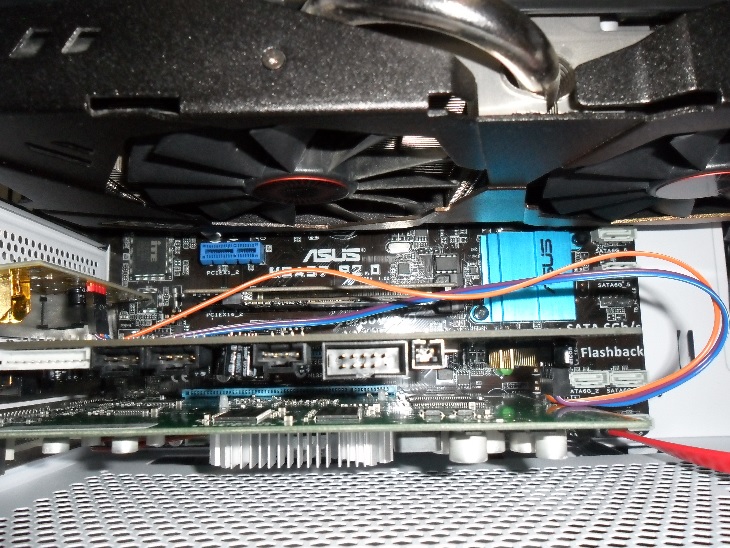
As expected, the wires aren't long enough to route it behind the Audigy card, I've had to remove my PCI GPU for now. What are these wires called so I can get some longer ones?

SAM-3203.jpg

Reply 9 of 13, by shevalier

User metadata
Rank Oldbie
Rank
Oldbie
AaronS wrote on 2026-05-06, 15:57:
Arrived and working in DOS 6.22 with VSBHDA, Windows 98 and XP. […]
Show full quote

Arrived and working in DOS 6.22 with VSBHDA, Windows 98 and XP.

As expected, the wires aren't long enough to route it behind the Audigy card, I've had to remove my PCI GPU for now. What are these wires called so I can get some longer ones?

SAM-3203.jpg

bls dupont Female to Female cable
https://www.amazon.com.au/uxcell-30CM-Length- … r/dp/B007Q84AUU
https://www.amazon.com.au/uxcell-Jumper-Femal … /dp/B08MZPJFMR/

https://www.amazon.com.au/RLECS-Dupont-7-9inc … r/dp/B0DGGCM12Z
https://www.amazon.com.au/ZYAMY-Dupont-Connec … d/dp/B0789F523N

Aopen MX3S, PIII-S Tualatin 1133, Radeon 9800Pro@XT BIOS, Audigy 4 SB0610
JetWay K8T8AS, Athlon DH-E6 3000+, Radeon HD2600Pro AGP, Audigy 2 Value SB0400
Gigabyte Ga-k8n51gmf, Turion64 ML-30@2.2GHz , Radeon X800GTO PL16, Diamond monster sound MX300

Reply 10 of 13, by ott

User metadata
Rank Member
Rank
Member
AaronS wrote on 2026-05-06, 15:57:

Arrived and working in DOS 6.22 with VSBHDA, Windows 98 and XP.

As expected, the wires aren't long enough to route it behind the Audigy card, I've had to remove my PCI GPU for now. What are these wires called so I can get some longer ones?

I'm not sure if I can provide Amazon links, but the best solution is probably to get 10-Pin (2x5) IDC ribbon cable, the extension version.
FC-10P connector has low height (unlike Dupont) and doesn't block the installation of long cards, which can be important.

The attachment 51olVkCHsPL._SL1082_.jpg is no longer available

If you have soldering experience, you can make your own cable from the motherboard COM port cable, following the pinout of both devices.

The attachment fc-10p.jpg is no longer available

Reply 11 of 13, by AaronS

User metadata
Rank Member
Rank
Member
shevalier wrote on 2026-05-07, 04:25:
bls dupont Female to Female cable https://www.amazon.com.au/uxcell-30CM-Length- … r/dp/B007Q84AUU https://www.amazon.com.au/uxce […]
Show full quote

bls dupont Female to Female cable
https://www.amazon.com.au/uxcell-30CM-Length- … r/dp/B007Q84AUU
https://www.amazon.com.au/uxcell-Jumper-Femal … /dp/B08MZPJFMR/

https://www.amazon.com.au/RLECS-Dupont-7-9inc … r/dp/B0DGGCM12Z
https://www.amazon.com.au/ZYAMY-Dupont-Connec … d/dp/B0789F523N

Thank you, last question, it doesn't matter what colour they are does it? so long as they're connected to the correct pins obviously. I found some here and they have "black female to female 30cm, 5pcs"
https://www.ebay.co.uk/itm/389191498901

ott wrote on 2026-05-07, 09:39:
I'm not sure if I can provide Amazon links, but the best solution is probably to get 10-Pin (2x5) IDC ribbon cable, the extensio […]
Show full quote

I'm not sure if I can provide Amazon links, but the best solution is probably to get 10-Pin (2x5) IDC ribbon cable, the extension version.
FC-10P connector has low height (unlike Dupont) and doesn't block the installation of long cards, which can be important.

The attachment 51olVkCHsPL._SL1082_.jpg is no longer available

If you have soldering experience, you can make your own cable from the motherboard COM port cable, following the pinout of both devices.

The attachment fc-10p.jpg is no longer available

and then connect the dupont cables to the male pins or?

Last edited by AaronS on 2026-05-13, 14:10. Edited 1 time in total.

Reply 12 of 13, by shevalier

User metadata
Rank Oldbie
Rank
Oldbie
AaronS wrote on 2026-05-13, 13:31:
Thank you, last question, it doesn't matter what colour they are does it? so long as they're connected to the correct pins obvio […]
Show full quote
shevalier wrote on 2026-05-07, 04:25:
bls dupont Female to Female cable https://www.amazon.com.au/uxcell-30CM-Length- … r/dp/B007Q84AUU https://www.amazon.com.au/uxce […]
Show full quote

bls dupont Female to Female cable
https://www.amazon.com.au/uxcell-30CM-Length- … r/dp/B007Q84AUU
https://www.amazon.com.au/uxcell-Jumper-Femal … /dp/B08MZPJFMR/

https://www.amazon.com.au/RLECS-Dupont-7-9inc … r/dp/B0DGGCM12Z
https://www.amazon.com.au/ZYAMY-Dupont-Connec … d/dp/B0789F523N

Thank you, last question, it doesn't matter what colour they are does it? so long as they're connected to the correct pins obviously. I found some here and they have "black female to female 30cm, 5pcs"
https://www.ebay.co.uk/itm/389191498901

ott wrote on 2026-05-07, 09:39:
I'm not sure if I can provide Amazon links, but the best solution is probably to get 10-Pin (2x5) IDC ribbon cable, the extensio […]
Show full quote

I'm not sure if I can provide Amazon links, but the best solution is probably to get 10-Pin (2x5) IDC ribbon cable, the extension version.
FC-10P connector has low height (unlike Dupont) and doesn't block the installation of long cards, which can be important.

The attachment 51olVkCHsPL._SL1082_.jpg is no longer available

If you have soldering experience, you can make your own cable from the motherboard COM port cable, following the pinout of both devices.

The attachment fc-10p.jpg is no longer available

I see, I'll have a look.

The colour doesn’t matter until the first time you swap the power and earth leads. 🙁
Because sooner or later you’ll forget which end goes where.
https://www.ebay.co.uk/itm/196058776454
https://www.ebay.co.uk/itm/264007428327
The Dupont connector has a plastic tab. If you gently pry it up with a knife or needle, the wire will come out.
Take one 2*5 connector (for the sound card) and one 1*4 connector (for the bracket).
Then assemble a single specialised cable from 3 wire.

Aopen MX3S, PIII-S Tualatin 1133, Radeon 9800Pro@XT BIOS, Audigy 4 SB0610
JetWay K8T8AS, Athlon DH-E6 3000+, Radeon HD2600Pro AGP, Audigy 2 Value SB0400
Gigabyte Ga-k8n51gmf, Turion64 ML-30@2.2GHz , Radeon X800GTO PL16, Diamond monster sound MX300

Reply 13 of 13, by AaronS

User metadata
Rank Member
Rank
Member

SAM_3233.JPG?ex=6a11ed05&is=6a109b85&hm=66c0e1c306cdbc82249d6b5e1740c11e73e95bc619b43694878069b7208502c9&=&format=webp&width=1152&height=864

Yep all good, 5x2 to 1x4. No longer putting any pressure on those pins.

I had another idea but probably for another time, it would be interesting if I could cut a gameport sized hole into the S/PDIF bracket (since I have no intention of using the coax port, desolder that), and wire that up too.