VOGONS


First post, by VanillaFairy

User metadata
Rank Newbie
Rank
Newbie

So, I've recently finally built my retro PC, after a decent bit of planning (more than I did for my main modern PC) and a bit of fortune with getting the right CPU and GPU for cheap....
Though there's a problem.

When it POSTs, it detects some... error, that it then doesn't tell me anything about (even if I visit the Power tab in the BIOS as it begs me to do).
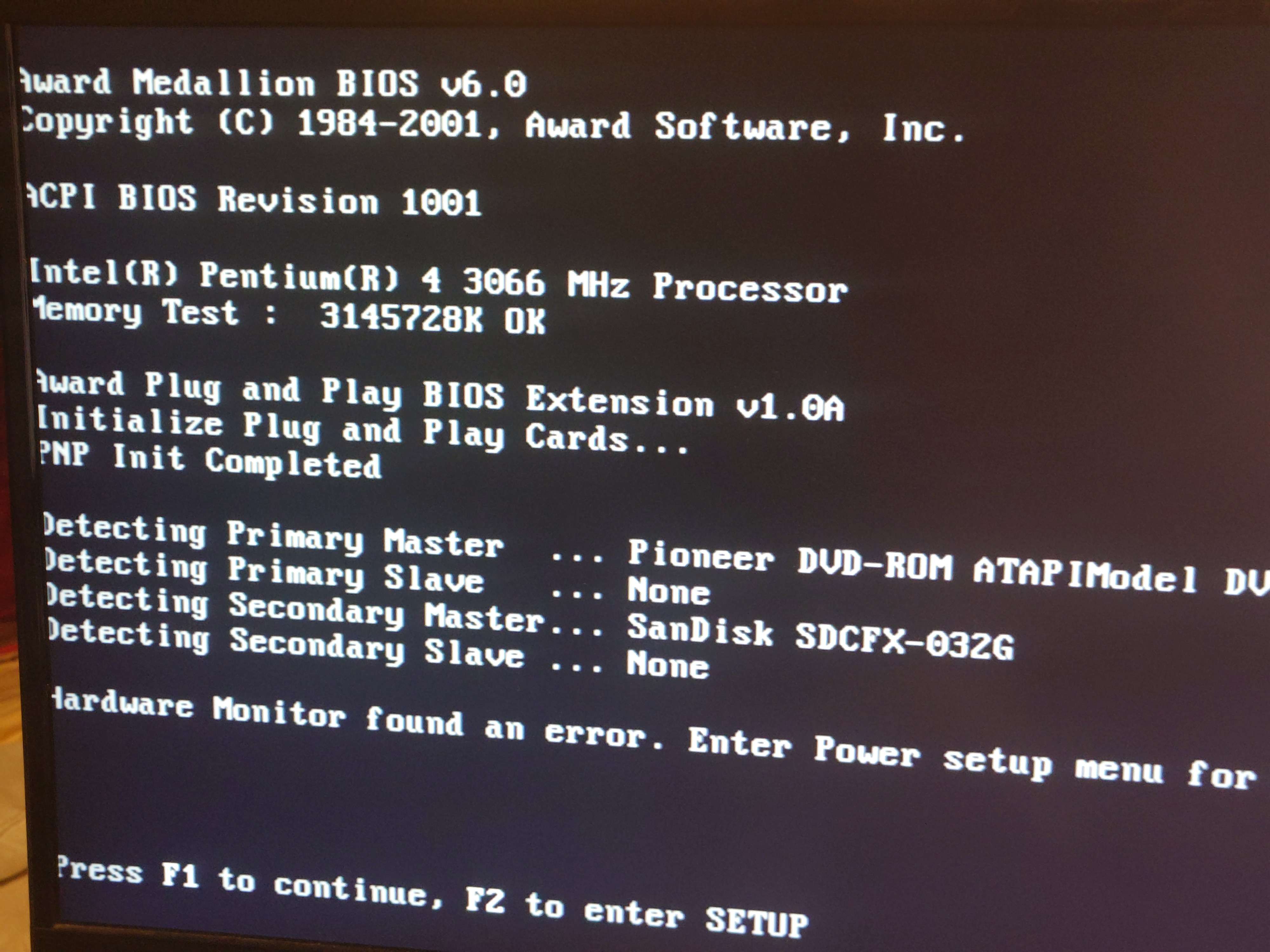
bios%20error%201.jpg
About the only thing that seems to be of interest outside of that is that when continuing anyway, it says the BIOS update data is incorrect.
.....I'm not trying to update the BIOS. actually I don't even think there is any BIOS for this board other than the one I already have, version 1001.
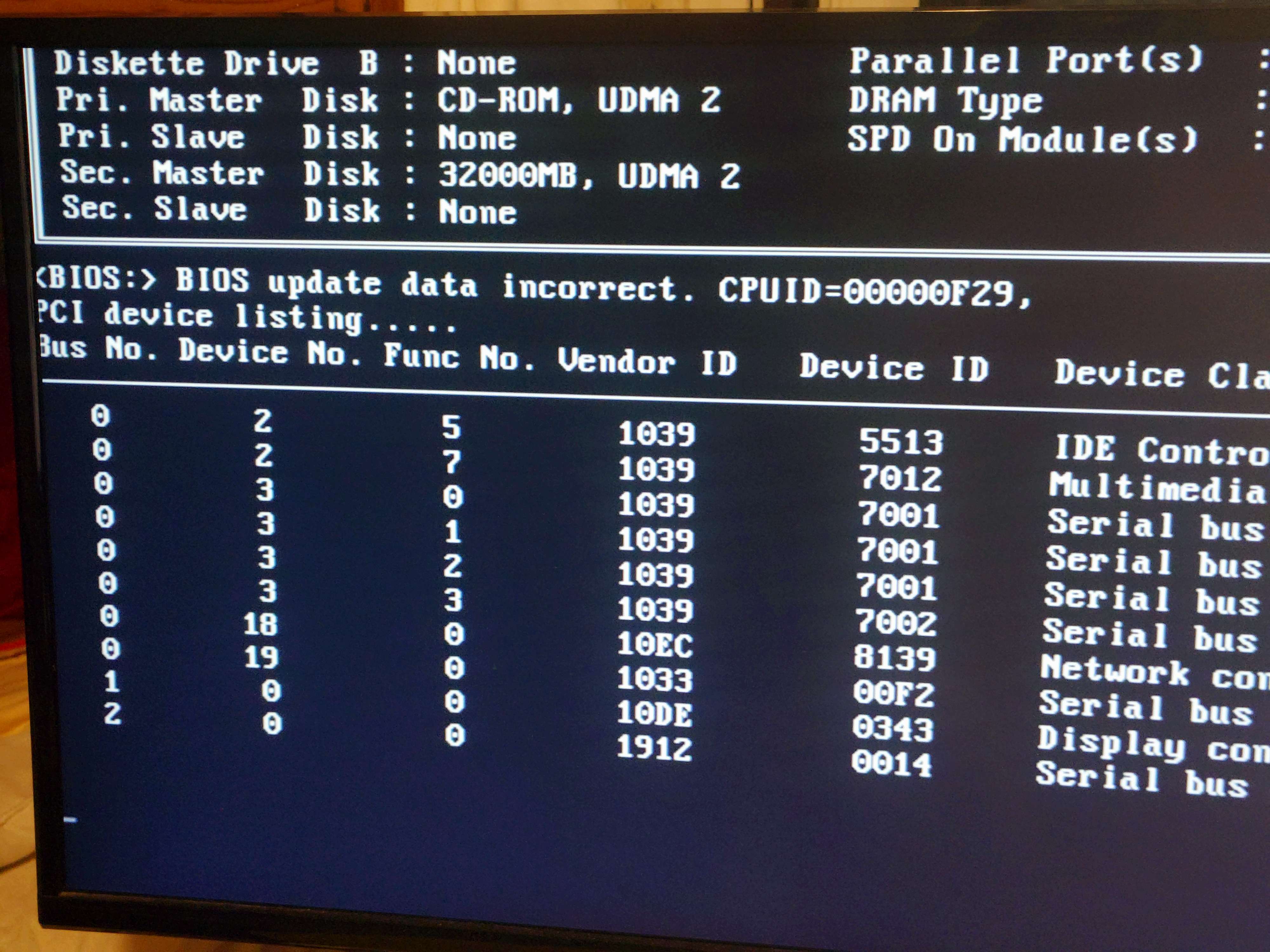
bios%20error%202.jpg
(...ignore the monitor being a a modern one, it's acutally my only monitor that has VGA and I don't have any DVI cables or DVI to HDMI adaptors)

After that it just hangs, which I think is because this DVD drive is either dead, needs its laser cleaning, or just can't read DVD-Rs. (Or all of the above perhaps.)
(...well, either that or it's repeatedly trying to boot from the probably blank CF card.)

I am probably going to flash something to the CF card directly to try to boot from that, although I'll have to wait until tomorrow for that since I realised too late that my IDE-to-USB thingy does not support CF cards-

Just a silly lil person in a very big world.

huggies_small.png

Reply 1 of 8, by VanillaFairy

User metadata
Rank Newbie
Rank
Newbie

...wait, huh, the front panel fan isn't connected right, it's not spinning.
And "Power Fan Speed" in the Power tab on the BIOS is listed as N/A..... could this be it???? it'd explain why the issue happened with a bare motherboard, although it wouldn't explain the issue either because the original computer had no fans outside of the power supply and the CPU fan.

or maybe it's expecting somehow to be hooked up to the PSU's fan, and I put a Noctua fan into that port instead?

Just a silly lil person in a very big world.

huggies_small.png

Reply 2 of 8, by BitWrangler

User metadata
Rank l33t++
Rank
l33t++

I think the update data is for the PCI IRQs DMPI data, which it will store when it gets a successful boot on a good battery.

The hardware monitor may be picking up a missing voltage, like -5 being absent is common, or low voltage, -12V can be all over the place if there's no actual load on it, or an unplugged system or CPU fan, 0 rpm, or one with no or different type of RPM monitoring. Many of these things can be set to be ignored in setup.

Unicorn herding operations are proceeding, but all the totes of hens teeth and barrels of rocking horse poop give them plenty of hiding spots.

Reply 3 of 8, by VanillaFairy

User metadata
Rank Newbie
Rank
Newbie

All of the voltages seem fine and are within spec; VCORE is 1.4v, +3.3 is at 3.2, +5V is at 4.8 and +12V is at 11.9. The motherboard doesn't seem to measure -5V or -12V though, there's no sensor data for them at all.
I think the only actual 'issue' is the "Power Fan Speed" being N/A, but annoyingly it doesn't let me ignore that, since the cursor skips right over it!

Also- I realised the fan I have plugged into that port actually does spin, but only initially when it POSTs. The moment that the system detects a 'hardware issue', the fan stops spinning.
So I think that port really isn't a normal fan port and is meant to read the PSU fan or something, and obviously modern PSUs don't have such a feature, so the motherboard throws a fit at how I plugged a normal fan into it.

Just a silly lil person in a very big world.

huggies_small.png

Reply 4 of 8, by BitWrangler

User metadata
Rank l33t++
Rank
l33t++

Well that's annoying. I have seen Setups where there's another line to set fan rpm detection thresholds, sometimes on a different page. Those of us with excess computer junk around would just try powering the CPU fan with an adapter to a PSU drive connector and using any other old 3 lead fan to keep the motherboard happy. However, some boards also have several headers, system fan, CPU fan, and maybe second system fan or PSU fan monitoring. They are usually particularly fussy about having a CPU fan though, so double check you are not running it off a system fan header when there might be a CPU fan header.

Unicorn herding operations are proceeding, but all the totes of hens teeth and barrels of rocking horse poop give them plenty of hiding spots.

Reply 5 of 8, by PC Hoarder Patrol

User metadata
Rank l33t
Rank
l33t
VanillaFairy wrote on 2026-06-20, 08:07:
All of the voltages seem fine and are within spec; VCORE is 1.4v, +3.3 is at 3.2, +5V is at 4.8 and +12V is at 11.9. The motherb […]
Show full quote

All of the voltages seem fine and are within spec; VCORE is 1.4v, +3.3 is at 3.2, +5V is at 4.8 and +12V is at 11.9. The motherboard doesn't seem to measure -5V or -12V though, there's no sensor data for them at all.
I think the only actual 'issue' is the "Power Fan Speed" being N/A, but annoyingly it doesn't let me ignore that, since the cursor skips right over it!

Also- I realised the fan I have plugged into that port actually does spin, but only initially when it POSTs. The moment that the system detects a 'hardware issue', the fan stops spinning.
So I think that port really isn't a normal fan port and is meant to read the PSU fan or something, and obviously modern PSUs don't have such a feature, so the motherboard throws a fit at how I plugged a normal fan into it.

Check the schematic I posted here...Re: Northwood motherboard with two 4pin power connectors?...the front fan header P2 is connected to the psu fan (probably has a monitored thermal probe linked to case temps) so using just any other fan will likely throw this error.

The BIOS update error is down to it not including the correct microcode for your 3.06GHz P4.

Reply 6 of 8, by VanillaFairy

User metadata
Rank Newbie
Rank
Newbie

...ah. I hope the lack of microcode won't cause any issues if that's the case, especially with Windows.
Actually, I have tried just to put a basic Vista install onto it (had to manually just flash it onto the CF card) and it failed to boot entirely; it booted fine in a VM, but not from the actual hardware.

About the only thing I've been able to get booting right is Alpine Linux, by flashing an installed image directly to a CF card, although it was far too slow to do anything (it took probably at least 15 minutes to even boot, and the already-installed image was also far far far slower than when I tried booting the installer directly to the point where line redraws took seconds too (Probably because swapfile on a CF card)), and my USB wifi card wasn't detected anyway so I'll have to wait for ethernet cables to tether it to my main PC

...my choosing to use CF cards was such a mistake, though. I'm going to have to buy some IDE to SATA adaptor instead, or something.

Just a silly lil person in a very big world.
huggies_small.png

Reply 7 of 8, by Fish3r

User metadata
Rank Newbie
Rank
Newbie
VanillaFairy wrote on 2026-06-20, 13:25:

Actually, I have tried just to put a basic Vista install onto it (had to manually just flash it onto the CF card)

I wouldn't expect anything beyond 98/ME to be usable on one of those

Reply 8 of 8, by VanillaFairy

User metadata
Rank Newbie
Rank
Newbie
Fish3r wrote on 2026-06-20, 13:30:

I wouldn't expect anything beyond 98/ME to be usable on one of those

Yyeah I really just... should've researched more into it.
At least CEX has some cheap used SSDs... I'll get a 128gb one, put some Linux distro onto it with GRUB, and then I can (hopefully) then boot other OSes (Vista and XP most-likely) from external SSDs instead via USB with GRUB as a stepping stool.

Just a silly lil person in a very big world.
huggies_small.png