VOGONS


Socket A: Aiming for the Stars!!!

Topic actions

Reply 600 of 642, by Dothan Burger

User metadata
Rank Member
Rank
Member
The Sandman wrote on 2026-09-04, 16:24:

For the temperature and controlling it I can only provide you with this information: stop benching before shit hits the fan. If you see that the waterblock is getting moist on the outside, shut the system down and remove it from the board. For the tubing I was wrapping around one layer of toilet paper to keep it dry. That's it.

I honestly didn't try any other timings. It's stable in 3DMark01 😉 . Back in the day people said that 2-2-2-11 is the fastest timing for nF2, I know. I don't think that there is much of a difference in 3DMark. Benching SuperPi is another story.

stay safe supercordo

What sticks are you running?

Reply 601 of 642, by The Sandman

User metadata
Rank Newbie
Rank
Newbie

Kingstons finest rejects 😉
_digitalbath had to fix them in the end.

Reply 602 of 642, by NorsteinB

User metadata
Rank Newbie
Rank
Newbie

Are there any good resources on how to identify good OC RAM? I wouldn't know what chips to look for to begin with, but I've got around 70 modules here, from absolute garbage to Corsair XMS Pro and TwinX and OCZ Gold PC4000 3-4-3-8, so there should be some useable among them.

Reply 603 of 642, by VooDooMan

User metadata
Rank Member
Rank
Member

Hello guys! Looks like you're having some good fun here. Mind if I join in? 😁

I'm usually more of a Socket 370 guy, but let me try with Socket A this time 😀

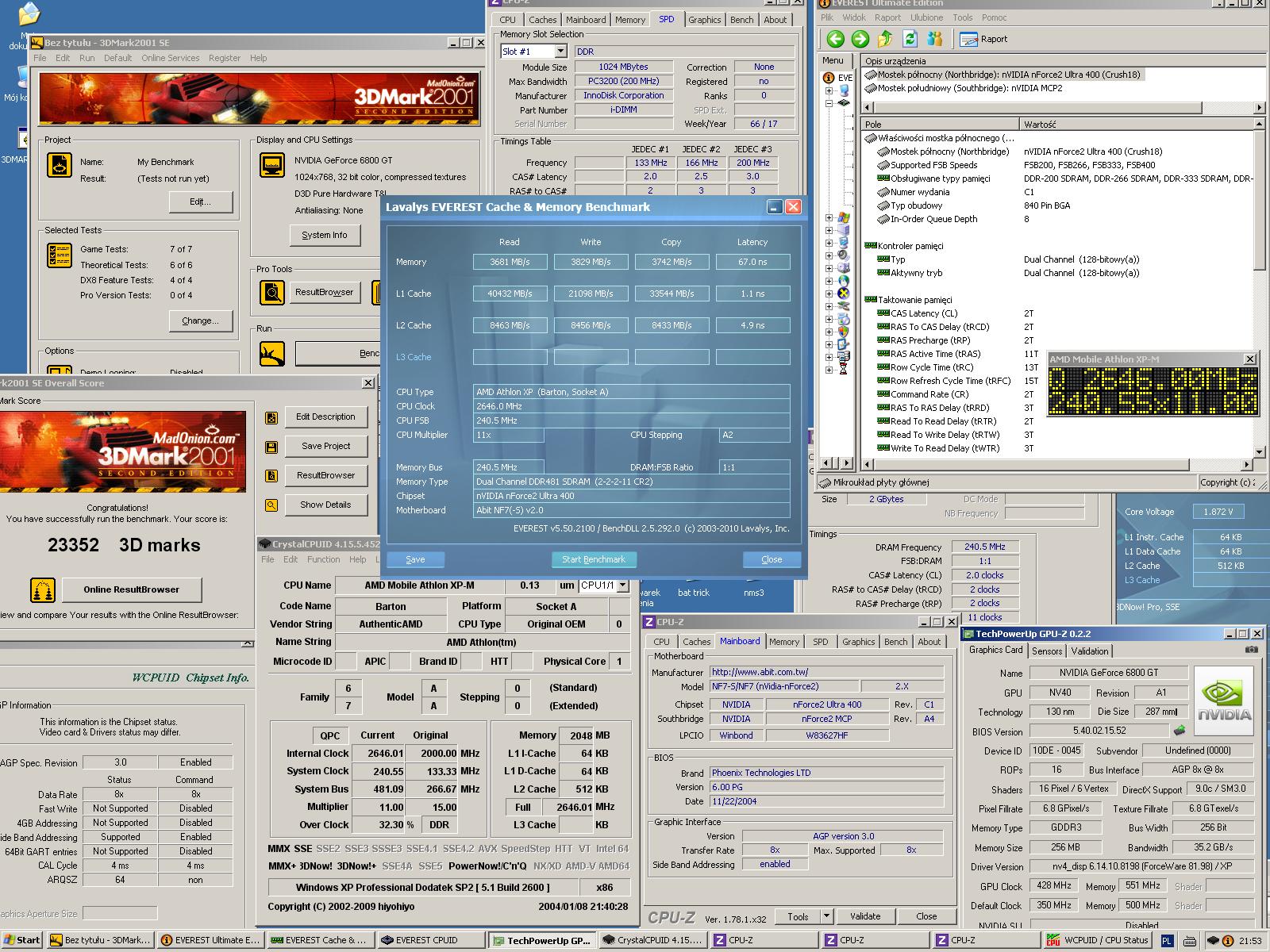
First shot with GeForce 6800 GT after some overclocking...

23352GF6800GTOC.jpg

Let me find my ATI Radeon 3850 AGP to beat my score 😀

NorsteinB wrote on 2026-09-05, 16:33:

Are there any good resources on how to identify good OC RAM? I wouldn't know what chips to look for to begin with, but I've got around 70 modules here, from absolute garbage to Corsair XMS Pro and TwinX and OCZ Gold PC4000 3-4-3-8, so there should be some useable among them.

There are plenty of them...
This one is taken from somebody else's post:
https://community.hwbot.org/topic/210226-link … fy-ddrddr2ddr3/

Best Tualatin Motherboard
ECS P6S5AT at 166 MHz
Overclocking Pentium III

Reply 604 of 642, by supercordo

User metadata
Rank Member
Rank
Member
paradigital wrote on 2026-05-19, 18:38:

23238 - 7900GS @ 580/755. Realised I hadn't tried pushing the GPU further at a lower FSB, 233FSB must have been on the very limit of stable enough for a benchmark run.

Paradigital you have been knocked out of top 5. Better get on that if you havent already.

Reply 605 of 642, by Tzk

User metadata
Rank Newbie
Rank
Newbie

@voodooman
CR2? That should result in lower scores at 240Mhz FSB. Usually you need 10-15Mhz FSB to match CR1 performance, so CR2 is usually slower.

NorsteinB wrote on 2026-09-05, 16:33:

from absolute garbage to Corsair XMS Pro and TwinX and OCZ Gold PC4000 3-4-3-8,

I’ve written some posts about this on the last few pages. For absolute top scores you’ll need Winbond BH-5 or Infineon AT-6 and high volts on the ram. Second to this is a mix of different ram chips: Hynix, Infineon, micron, Samsung. If you’re aiming for (very) high FSB (250++), stick to single sided modules.

Maybe open a separate topic and upload a few photos or list the sticks? We can help identifying their oc potential.

Reply 606 of 642, by supercordo

User metadata
Rank Member
Rank
Member

Just snagged an Abit AN7 untested for a decent price. We'll see if it works.

Reply 607 of 642, by NorsteinB

User metadata
Rank Newbie
Rank
Newbie

Meh, appears it has become pretty much impossible to get my hands on Winbond BH-5 based chips without selling a kidney. Any hints on how to get some anyway, or a decent alternative for the Barton XP-M 2400+ 35W and NF7-S v2.0 combo?

It turns out both my Corsair XMS Pro and TwinX have garbage chips despite being sold as premium RAM, and my OCZ gold chips do 250 MHz but want 3-4-3-8 timings...

Reply 608 of 642, by tehsiggi

User metadata
Rank Oldbie
Rank
Oldbie
cyclone3d wrote on 2026-09-02, 20:56:
Now you give me ideas. […]
Show full quote
MattRocks wrote on 2026-09-02, 05:53:

I won't risk it... maybe someone else will? 😉

Now you give me ideas.

Pretty sure I already have some of these, maybe with the x16 slot instead of the x1 slot.

However, they will only be running at PCI 33-mhz (or whatever the PCI bus is running at).

The bridge chip does support 66-Mhz operation, but only the server boards that aren't really going to benefit from that due to lower CPU and RAM speed will do that.

Just for the sake of having it noted somewhere:
Tested this idea with two X700 GPUs. One of them AGP DDR1 X700 and the other PCIe GDDR3 X700Pro - both 256MB.
Platform was EPoX EP-9NDA3+ with an Athlon 64 X2 3800 on Windows XP.
I used the PCI to PCIe bridge (and even if you see the 16x slot, it's only 1x)

I get:

  • 15000 points with the AGP Radeon X700
  • 9000 points with the PCIe@PCI Radeon X700 Pro

Even with the faster memory etc, even with those little cards the bottleneck is already brutal.

AGP Card Real Power Consumption
AGP Power monitor - diagnostic hardware tool
Graphics card repair collection

Reply 609 of 642, by supercordo

User metadata
Rank Member
Rank
Member
tehsiggi wrote on 2026-09-09, 15:54:
Just for the sake of having it noted somewhere: Tested this idea with two X700 GPUs. One of them AGP DDR1 X700 and the other PC […]
Show full quote
cyclone3d wrote on 2026-09-02, 20:56:
Now you give me ideas. […]
Show full quote
MattRocks wrote on 2026-09-02, 05:53:

I won't risk it... maybe someone else will? 😉

Now you give me ideas.

Pretty sure I already have some of these, maybe with the x16 slot instead of the x1 slot.

However, they will only be running at PCI 33-mhz (or whatever the PCI bus is running at).

The bridge chip does support 66-Mhz operation, but only the server boards that aren't really going to benefit from that due to lower CPU and RAM speed will do that.

Just for the sake of having it noted somewhere:
Tested this idea with two X700 GPUs. One of them AGP DDR1 X700 and the other PCIe GDDR3 X700Pro - both 256MB.
Platform was EPoX EP-9NDA3+ with an Athlon 64 X2 3800 on Windows XP.
I used the PCI to PCIe bridge (and even if you see the 16x slot, it's only 1x)

I get:

  • 15000 points with the AGP Radeon X700
  • 9000 points with the PCIe@PCI Radeon X700 Pro

Even with the faster memory etc, even with those little cards the bottleneck is already brutal.

Going from 8x to 4x agp will give similar results.

Reply 610 of 642, by MattRocks

User metadata
Rank Oldbie
Rank
Oldbie
supercordo wrote on 2026-09-09, 17:16:
tehsiggi wrote on 2026-09-09, 15:54:
Just for the sake of having it noted somewhere: Tested this idea with two X700 GPUs. One of them AGP DDR1 X700 and the other PC […]
Show full quote
cyclone3d wrote on 2026-09-02, 20:56:
Now you give me ideas. […]
Show full quote

Now you give me ideas.

Pretty sure I already have some of these, maybe with the x16 slot instead of the x1 slot.

However, they will only be running at PCI 33-mhz (or whatever the PCI bus is running at).

The bridge chip does support 66-Mhz operation, but only the server boards that aren't really going to benefit from that due to lower CPU and RAM speed will do that.

Just for the sake of having it noted somewhere:
Tested this idea with two X700 GPUs. One of them AGP DDR1 X700 and the other PCIe GDDR3 X700Pro - both 256MB.
Platform was EPoX EP-9NDA3+ with an Athlon 64 X2 3800 on Windows XP.
I used the PCI to PCIe bridge (and even if you see the 16x slot, it's only 1x)

I get:

  • 15000 points with the AGP Radeon X700
  • 9000 points with the PCIe@PCI Radeon X700 Pro

Even with the faster memory etc, even with those little cards the bottleneck is already brutal.

Going from 8x to 4x agp will give similar results.

Maybe but I'm a sceptic because the record shows that going from 4xAGP to 8xAGP made practically no difference for nVIDIA geForce 4 Ti series.

.. tehsiggi, how did the POST go with PCI bridge? Does your adapter feed any 12V power into the PCIe fingers to power the GPU?

As for the results, I feel they provide partial data:

  • PCIe-AGP bridge - tested by AGP X700
  • PCIe-PCI bridge - tested by X700Pro
  • PCIe baseline - missing? This matters because both bridge solutions should have efficiency <100%.

To maximise FPS, the real test for AthlonXP on Windows XP is not running the same GPU - it's finding the fastest possible GPU for each bus. Maybe:

  • PCIe-AGP bridge - Radeon HD3850
  • PCIe-PCI bridge - Radeon R9 280X
  • AGP baseline - Radeon X850 Pro

I don't know what the fastest combination is. I'm confident the AthlonXP-X850Pro is the most efficient solution, nominally 100%. I expect the Radeon R9 280X on PCI is the least efficient solution. But, even if the R9 280X on PCI bus can reach only 40% efficiency, it has eight times the memory bandwidth of the x850Pro so might still be ~3 times faster overall?

And the competition isn't limited to Windows XP, so that PCIe-PCI bridge card could be something bigger. But another problem is the desire to avoid SSE2 instructions in the drivers - not sure how you guys are navigating that? So, I deeply thank tehsiggi for providing a test and I think there is more to learn.

Desktop timeline [ MOS 7501 → 68030 → x86(P5/MMX) → x86(K6-2) → x86(K7*) → PPC(G3*) → x86-64(K8) → x86-64(Xeon) → x86-64(i7) ] * lost

Reply 611 of 642, by NorsteinB

User metadata
Rank Newbie
Rank
Newbie
MattRocks wrote on 2026-09-09, 21:11:

Maybe but I'm a sceptic because the record shows that going from 4xAGP to 8xAGP made practically no difference for nVIDIA geForce 4 Ti series.

That's how a bottleneck works, though. First of all, the first generation of Geforce 4 cards internally worked with AGP 4x to begin with. So obviously there was nothing to be gained in an AGP 8x slot. Secondly, the throughput of the card wasn't that high. Even the later 8x versions of the card were about 3% faster, which most people didn't even notice, but it was at least (barely) measurable.

It is not about what you call efficiency as in "the card performs at 40% of its capability all the time". What happens is that whenever the card's data throughput would exceed the bus limit, whether it is by 3% or 400%, it gets completely cut off.
And a native AGP card on an AGP 4x slot may very well outperform a native PCIe card that would normally be 20 times faster when that PCIe card is limited by the PCI bus.

At any rate, the AGP 4x bus still has 1066 MB/s bandwidth.
A PCI slot only has 133 MB/s bandwidth.
That's an eigth of that.

I have a PCI Geforce FX 5200 (64 bit), had a PCI Geforce FX 5500 (128 bit), and still have ATI Radeon 9000 in both 64 and 128 bit versions.

Even the castrated 64 bit versions still perform noticeably slower than their AGP counterparts, it was about 1/3 less points in 3DMark 2001SE IIRC (would have to bench that again if you want proof, the FX 5500 128 bit has sadly died in the meantime).

I also have a Geforce PCX 5300, which is a 64 bit Geforce FX 5200 with a PCIe bridge chip. Haven't used it yet, it is a new old stock card from Club3D. In theory it should perform exactly as fast (or rather as slow) as the 64 bit AGP version of the card, since it has less throughput than a Geforce 4 Ti. But it would still measurably outperform a Geforce FX 5200 64 bit PCI.

In the meantime, you could also read up on this other PCIe vs PCI graphics, where a Geforce 9500 GT was obliterated by a Geforce GT 240 PCIe:
Jaton 9500GT PCI BENCHMARKS/REVIEW


Reply 612 of 642, by SlowA

User metadata
Rank Newbie
Rank
Newbie

Please help me with BH6-BH5, I can’t find 512 MB anywhere. On eBay there is one Kingston Set, but delivery to EU cannot be done…I have 2x BH UTT 1.5 Corsair but it won’t run properly on nforce 2(NF7-S or Delta ILSR).

Reply 613 of 642, by MattRocks

User metadata
Rank Oldbie
Rank
Oldbie
NorsteinB wrote on 2026-09-10, 06:12:
That's how a bottleneck works, though. First of all, the first generation of Geforce 4 cards internally worked with AGP 4x to be […]
Show full quote
MattRocks wrote on 2026-09-09, 21:11:

Maybe but I'm a sceptic because the record shows that going from 4xAGP to 8xAGP made practically no difference for nVIDIA geForce 4 Ti series.

That's how a bottleneck works, though. First of all, the first generation of Geforce 4 cards internally worked with AGP 4x to begin with. So obviously there was nothing to be gained in an AGP 8x slot. Secondly, the throughput of the card wasn't that high. Even the later 8x versions of the card were about 3% faster, which most people didn't even notice, but it was at least (barely) measurable.

It is not about what you call efficiency as in "the card performs at 40% of its capability all the time". What happens is that whenever the card's data throughput would exceed the bus limit, whether it is by 3% or 400%, it gets completely cut off.
And a native AGP card on an AGP 4x slot may very well outperform a native PCIe card that would normally be 20 times faster when that PCIe card is limited by the PCI bus.

At any rate, the AGP 4x bus still has 1066 MB/s bandwidth.
A PCI slot only has 133 MB/s bandwidth.
That's an eigth of that.

I have a PCI Geforce FX 5200 (64 bit), had a PCI Geforce FX 5500 (128 bit), and still have ATI Radeon 9000 in both 64 and 128 bit versions.

Even the castrated 64 bit versions still perform noticeably slower than their AGP counterparts, it was about 1/3 less points in 3DMark 2001SE IIRC (would have to bench that again if you want proof, the FX 5500 128 bit has sadly died in the meantime).

I also have a Geforce PCX 5300, which is a 64 bit Geforce FX 5200 with a PCIe bridge chip. Haven't used it yet, it is a new old stock card from Club3D. In theory it should perform exactly as fast (or rather as slow) as the 64 bit AGP version of the card, since it has less throughput than a Geforce 4 Ti. But it would still measurably outperform a Geforce FX 5200 64 bit PCI.

In the meantime, you could also read up on this other PCIe vs PCI graphics, where a Geforce 9500 GT was obliterated by a Geforce GT 240 PCIe:
Jaton 9500GT PCI BENCHMARKS/REVIEW

I did a check on how 3DMarks are awarded and apparently, disappointingly, it's just FPS. So you can technically increase your score by lowering the resolution. With the bigger PCIe GPU you can increase load on the GPU (e.g. add FSAA, increase resolution, etc.) without impacting the command bus, so more demanding GPU tests can negate the negative impact of lower bus bandwidths.

But I strongly believe "no, no, no" is not the right way to run a test as evidenced by decorated scientists in world history wrongly claiming that everything that can be invented, has been invented. Even if PCIe on 32bit PCI slot cannot be redeemed, there is PCIe on 64bit PCI-X slots.. 😉

Desktop timeline [ MOS 7501 → 68030 → x86(P5/MMX) → x86(K6-2) → x86(K7*) → PPC(G3*) → x86-64(K8) → x86-64(Xeon) → x86-64(i7) ] * lost

Reply 615 of 642, by Tzk

User metadata
Rank Newbie
Rank
Newbie
SlowA wrote on 2026-09-10, 06:22:

I have 2x BH UTT 1.5 Corsair but it won’t run properly on nforce 2(NF7-S or Delta ILSR).

I've had the same experience with Twinmos "new BH-5" sticks which are also UTT. Those sticks ran flawlessly >250Mhz on DFI Ultra-B (939), but struggled at 200MHz 2-2-2-5 on seveal NF2 boards. Not sure why, but some UTT seems to be somewhat incompatible with Nforce 2. That's why i always try to un old BH/CH or Infineon AT-6. Those just work great.

MattRocks wrote on 2026-09-09, 21:11:
[…]
Show full quote
  • PCIe-AGP bridge - Radeon HD3850
  • PCIe-PCI bridge - Radeon R9 280X
  • AGP baseline - Radeon X850 Pro

Fastest XP compatible GPU should be Geforce 980Ti. Not sure that one even runs via PCIe/PCI bridge, but the PCI bandwidth will bottleneck it for sure. Sadly going the PCIe/PCI route with a AGP connector (using AGP in PCI66 mode) will also be an issue as the most interesting AGP boards on socket 462 are 1.5V only. Else you'd have at least 266mb/s bandwidth.

There were PCIe/AGP converter cards in the past, but those didn't work with all boards. Maybe trying such a card on NF2 is the way?

Reply 616 of 642, by NorsteinB

User metadata
Rank Newbie
Rank
Newbie
Tzk wrote on 2026-09-11, 05:01:

Fastest XP compatible GPU should be Geforce 980Ti.

Wouldn't it be the Titan X Maxwell, then?

Reply 617 of 642, by tehsiggi

User metadata
Rank Oldbie
Rank
Oldbie
Tzk wrote on 2026-09-11, 05:01:

There were PCIe/AGP converter cards in the past, but those didn't work with all boards. Maybe trying such a card on NF2 is the way?

The one sdz built was effectively the 66MHz AGP slot variant - still bandwidth is highly limited.

There were cards from ABIT using the HSI from NVidia, however those are limited by the HSI chip, meaning that it had to be configured as "card XYZ" and was not universal.

I am currently investigating the ATI Rialto bridge in my "little venice" project, as it appears to be a bit more flexible.

AGP Card Real Power Consumption
AGP Power monitor - diagnostic hardware tool
Graphics card repair collection

Reply 618 of 642, by Tzk

User metadata
Rank Newbie
Rank
Newbie

I always forget about Titan X, you’re right Norstein.

Regarding the SDZ adapter: iirc that one has level shifters on board which work at 3.3V only (5V/3.3V on the pci side and 3.3V on the „agp“ side). So you’re limited to AGP 1.0 and no 1.5V support. The fastest 3.3V AGP boards are KT333 ones. And those are limited on FSB.

Not sure how compatible the HSI Bridge adapters are, I had those in mind. I’m not aware of a Rialto based adapter card.

Reply 619 of 642, by tehsiggi

User metadata
Rank Oldbie
Rank
Oldbie
Tzk wrote on 2026-09-11, 06:15:

I always forget about Titan X, you’re right Norstein.

Regarding the SDZ adapter: iirc that one has level shifters on board which work at 3.3V only (5V/3.3V on the pci side and 3.3V on the „agp“ side). So you’re limited to AGP 1.0 and no 1.5V support. The fastest 3.3V AGP boards are KT333 ones. And those are limited on FSB.

Not sure how compatible the HSI Bridge adapters are, I had those in mind. I’m not aware of a Rialto based adapter card.

I was thinking about the design he had shown / or in mind at some point where he used a PLX bridge to go from AGP to PCIe, it's not listed on his page, but I recall him doing something in that direction.

The HSI ones had jumpers on them which made sure they work correctly with the AGP counter part. They were strongly limited in what they can work with. And they were from Albatron, my bad: https://www.techpowerup.com/3272/more-albatron-atop-info

And for the Rialto bridge.. there is no card with it.. ..yet 😉

AGP Card Real Power Consumption
AGP Power monitor - diagnostic hardware tool
Graphics card repair collection