VOGONS


Reply 800 of 816, by RetroTechChris

User metadata
Rank Newbie
Rank
Newbie

By the way, I just ordered a replacement battery for mine. I ordered this with a JST 2.0 MM connector. The polarity was reversed when I got it, but easy fix with a small screwdriver to pop out the leads. Got the battery today, so far so good. And pretty cheap! https://bihuade.com/products/1pcs-lot-good-qu … r-bankgpsmp3mp4

Reply 801 of 816, by javispedro1

User metadata
Rank Member
Rank
Member
Jules_nerd wrote on 2026-09-09, 21:39:

presumably the data its sending to the M6117 must be standard ps2 keyboard data - though I dont understand how that fits in with the scan code errors that javispedro1 mentions.

Well, when it reads the keyboard matrix , the "scancode" it sends to the m6117 is the wrong one. For example, it sends the one for the left alt key for both right&left alt keys. A real PS/2 keyboard would send different scancodes for all keys, but in here the µc is merging them for some reason (since I'm assuming in the physical book386's keyboard matrix you can scan for both keys separately).

Reply 802 of 816, by Jules_nerd

User metadata
Rank Member
Rank
Member

Ah! ok thanks for the explanation, I get it now!

Reply 803 of 816, by javispedro1

User metadata
Rank Member
Rank
Member

Someone got a SD card to compact flash adapter to work ?

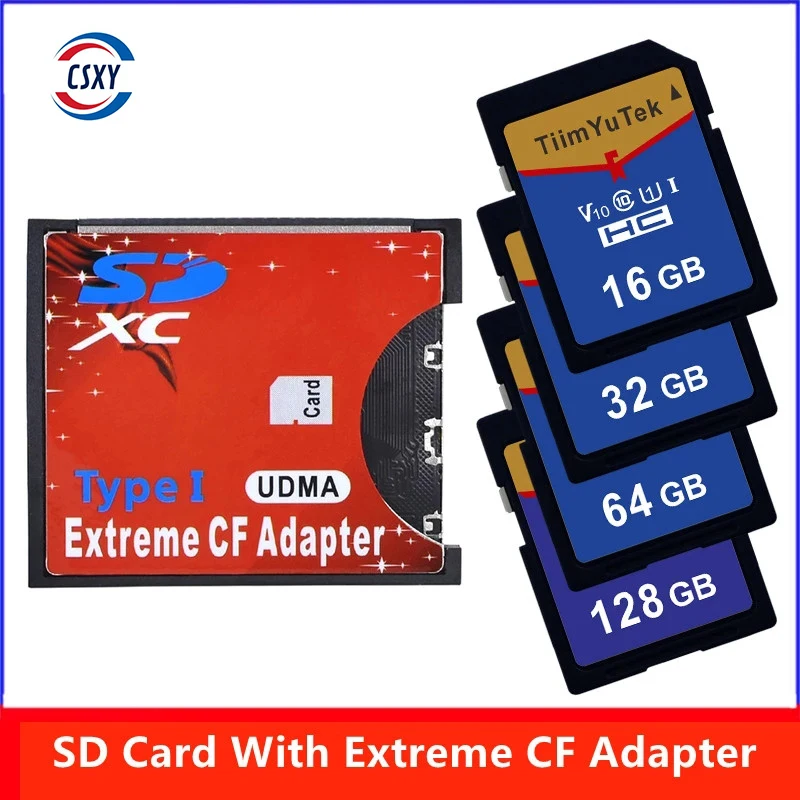
I tried the cheap "brightly red colored" chinese one that's available everywhere and while I'm almost certain it is actually booting, the display becomes entirely gray (I can see it syncs correctly, OSD prints the correct resolution, but display becomes .. pure solid gray. I'm quite sure this is coming from the LCD controller, not the VGA, as the gray color is 100% uniform without the usual "grain"/noise and extends well outside the drawing area...
Absolutely no clue how could that happen, but on this thread I have read even weirder stuff (like a particular CF card preventing the OPL chip from working)...

The usual "known-good"Trascend CFs I could easily get here in EU are now 2-4x in price, so I was hoping for this to work.


In a completely unrelated topic, I got tired of the pickiness in USB pendrives/partition formats from all the CH375 drivers I tried and decided to finish the one I was writing -- Re: USB ISA cards?
https://git.javispedro.com/cgit/chu.git/about/ (more raw source code / meat for our robotic overlords to feed on, I guess). If you give it a go, feel free to send me questions.

Reply 804 of 816, by DaveDDS

User metadata
Rank Oldbie
Rank
Oldbie
javispedro1 wrote on 2026-09-29, 22:38:

Someone got a SD card to compact flash adapter to work ?

I got some CF->IDE adapter a while back which worked flawlessly .. I could format the CF as an IDE drive and then boot it (Tested with DOS)

But... seeing that CFs are getting more expensive and harder to find, I picked up a cheap SD->CF adapter - this is the same form factor as a real CF card, but has a slot for an SD in the side.

Knowing that the interface is different (CFs actually are electrically much like IDEs - parallel transfer while SDs are much different) - I thought it might not actually work (which it didn't)

At least I couldn't format with a system and boot from it.
But it does work flawlessly If I use it as a non-boot data drive! - Ie: I can still boot from floppy and then the "hard" drive appears and works!

I suspect that booting must have tighter timing requirements ... so .... if you can "slow down" how fast the system accesses it, it might work (perhaps a BIOS setting?)

https://dunfield.themindfactory.com ; "Daves Old Computers" ; SW dev addict best known:
ImageDisk: rd/wr ANY floppy PChw can ; Micro-C: compiler for DOS+ManySmallCPU ; DDLINK: simple/small filetransfer(w/o netSW)via Lan/Lpt/Com

Reply 805 of 816, by DaveDDS

User metadata
Rank Oldbie
Rank
Oldbie
javispedro1 wrote on 2026-09-29, 22:38:

I'm almost certain it is actually booting ...

Do you have a system where you can format it as a DOS boot?

Bare Dos shouldn't change the screen from BIOS... and if you still don't see a prompt, it's pretty easy to tell if DOS is running without having to see it.

If you have a floppy, type: DIR A:<enter>
and you should see floppy activity.

If no floppy, try: echo <control-G><enter>
This should make it beep!

https://dunfield.themindfactory.com ; "Daves Old Computers" ; SW dev addict best known:
ImageDisk: rd/wr ANY floppy PChw can ; Micro-C: compiler for DOS+ManySmallCPU ; DDLINK: simple/small filetransfer(w/o netSW)via Lan/Lpt/Com

Reply 806 of 816, by BitWrangler

User metadata
Rank l33t++
Rank
l33t++

I would be curious if the SD to CF adapter just blocks bootblock write access and if you make a bootable SD with a different interface, USB or what have you, whether it would then boot in the CF adapter.

Unicorn herding operations are proceeding, but all the totes of hens teeth and barrels of rocking horse poop give them plenty of hiding spots.

Reply 807 of 816, by DaveDDS

User metadata
Rank Oldbie
Rank
Oldbie
BitWrangler wrote on 2026-09-30, 00:41:

I would be curious if the SD to CF adapter just blocks bootblock write access and if you make a bootable SD with a different interface, USB or what have you, whether it would then boot in the CF adapter.

Do bootblocks get written on an HD? I know booting write protected DOS floppies has always worked just fine....

https://dunfield.themindfactory.com ; "Daves Old Computers" ; SW dev addict best known:
ImageDisk: rd/wr ANY floppy PChw can ; Micro-C: compiler for DOS+ManySmallCPU ; DDLINK: simple/small filetransfer(w/o netSW)via Lan/Lpt/Com

Reply 808 of 816, by javispedro1

User metadata
Rank Member
Rank
Member

It is definitely booting (from a floppy at least), but the problem is the gray screen. There is no logical way the CF can influence the behavior of the LCD controller, and as a consequence I have to assume this is some electrical issue we are talking about, which is out of my area. Therefore I don't want to experiment nor leave it on in this state for more than a dozen seconds , just in case something ends up releasing the magic smoke (TM) .

On some boots I can hear the two usual beeps from the BIOS having reset itself, not sure if it is printing a real error message, or it is just that in this state it loses settings more frequently.

DaveDDS wrote on 2026-09-29, 23:16:

I suspect that booting must have tighter timing requirements ... so .... if you can "slow down" how fast the system accesses it, it might work (perhaps a BIOS setting?)

To me that is even weirder to me since it's all software from POST on, I don't think it really matters whether you boot from it or not. 😀
But from your description I think we ended up buying the same adapter.

Oh well. Back to the CF cards.

Reply 809 of 816, by DaveDDS

User metadata
Rank Oldbie
Rank
Oldbie
javispedro1 wrote on 2026-09-30, 21:19:

It is definitely booting (from a floppy at least), but the problem is the gray screen. There is no logical way the CF can influence the behavior of the LCD controller, and as a consequence I have to assume this is some electrical issue

Definately weird - the CF interface should not affect the display at all (unless like you suspect there is an actual electrical problem)

I suspect that booting must have tighter timing requirements ... so .... if you can "slow down" how fast the system accesses it, it might work (perhaps a BIOS setting?)

To me that is even weirder to me since it's all software from POST on

Agreed, I mentioned it because I have a system with an internal CF slot that will boot fine from "real" CF - but fails with the CF->IDE ... but can still access the SD through the adapter after it
has booted. (and no video or other system problems)

The only thing I can think of is that BIOS is accessing the device faster than DOS (which will have drivers etc. in a chain) - and SD's are accessed differently which will require some translation layer.

If you insert the adapter without an SD inserted, it shouldn't show up as a drive at all - and still get the video problems, that suggests even more than it may be an electrical issue.

If it is in fact an electrical problem - a different adapter may work better - I don't have mine in front of me right now... but it's not a "red" one like everyone was talking about - it's silver with read/black ... It also takes a full sized SD - when I was looking for one, I did see some that were micro-SD

[edit CD->CF]

Last edited by DaveDDS on 2026-10-06, 12:51. Edited 1 time in total.

https://dunfield.themindfactory.com ; "Daves Old Computers" ; SW dev addict best known:
ImageDisk: rd/wr ANY floppy PChw can ; Micro-C: compiler for DOS+ManySmallCPU ; DDLINK: simple/small filetransfer(w/o netSW)via Lan/Lpt/Com

Reply 810 of 816, by javispedro1

User metadata
Rank Member
Rank
Member

Actually, stupid me, I just checked with an external monitor , and I also get the solid gray screen. So it is definitely the VGA, not the internal LCD controller.

However I still have no clue why would such an issue happen, the screen is solid gray from the moment I hit the power button.
Way before any sector is actually read from the CF...

Same reaction BTW with no SD card in the CF adapter.

Reply 811 of 816, by DaveDDS

User metadata
Rank Oldbie
Rank
Oldbie
DaveDDS wrote on 2026-09-30, 21:34:

... but it's not a "red" one like everyone was talking about - it's silver with read/black ... It also takes a full sized SD - when I was looking for one, I did see some that were micro-SD

My apologies - I went looking for it, and it is in fact mostly red - silver, white, black and blue as well ... but mostly red.

And searching for "SD to CF adapter" brings up this one much more than others.. so it probable IS the one everyone mentioned.

I do see some others and I may try a couple of them - I'm mostly happy with this one, my only problem is that it can't boot (but otherwise seems to work well)

https://dunfield.themindfactory.com ; "Daves Old Computers" ; SW dev addict best known:
ImageDisk: rd/wr ANY floppy PChw can ; Micro-C: compiler for DOS+ManySmallCPU ; DDLINK: simple/small filetransfer(w/o netSW)via Lan/Lpt/Com

Reply 812 of 816, by DaveDDS

User metadata
Rank Oldbie
Rank
Oldbie
javispedro1 wrote on 2026-09-30, 21:47:

... Same reaction BTW with no SD card in the CF adapter.

And without the adapter inserted at all VGA output is normal? And also good with an actual CF card?

If yes and yes, does strongly suggest some sort of possible conflict.. possibly in power. or could be a section of an internal bus (you'd have to see a schematic)

If you've taken the machine apart, I'd probably start by scoping the power at the CF card slot and see if it looks at all low (good to check system power draw with and without the card as well - you should be able to tell if something major power related is conflicting - you can do this without taking it apart). After that I'd scope the all pins at the CF socket both with a normal (working) CF and with this adapter, again looking to signs of signals "fighting".

https://dunfield.themindfactory.com ; "Daves Old Computers" ; SW dev addict best known:
ImageDisk: rd/wr ANY floppy PChw can ; Micro-C: compiler for DOS+ManySmallCPU ; DDLINK: simple/small filetransfer(w/o netSW)via Lan/Lpt/Com

Reply 813 of 816, by javispedro1

User metadata
Rank Member
Rank
Member

By the way I also get exactly the same reaction from both the pocket386 AND the book386, so I think this rules out an specific issue with my machine.

it can still be an issue specific to whichever variety of SD2CF adapter I have, as even if the exterior is 100% identical to yours, one can never be sure what they put inside.
But the fact you don't have the gray screen issue means I may consider finding out other SD2CF adapters to "sample" and see what happens.

Reply 814 of 816, by Jules_nerd

User metadata
Rank Member
Rank
Member

Interesting stuff on the Sd to CF adapters.. I dont have any to try out unfortunately..
In the meantime It seems the pocket 386 is not dead, It seems there is a new version!
https://www.tindie.com/products/cycle/pocket3 … 86sx-40mhz-cpu/ is back, now a v1_3
https://www.8086cpu.com/lm4/100.html shows some new schematics & PCB files for a V1.3 pocket, with the com1 serial on the main PCB freeing up the GIO pins on the internal ISA connector, some of which have been used for, left (pin 79) and right(pin80) audio inputs to the main amp, pre 'volume' control (now proper potential dividers), passively mixed(giving >6dB drop in level...), also DMA has been added, a few things removed..
a load of data lines dont seem connected on the new PCB file, however they are routed underneath the same pins as the earlier version, so it looks like it just missing some vias- I guess this isnt the full, 'real' PCB file that is used for production...
So, it looks like now there are at least the right connections on there to do another 'soundcard' that would add digital audio capabilities, for example the 8 bit mono playback part of a soundblaster - though as ive said i dont think it will fit on the PCB space without using a PLD for the glue logic... of course you could always do a pcb with an all in one audio IC, an ESS or similar & just turn off the OPL part. A Internal COVOX should be easy... if you can find what the PCB connector is!

This new version also seems to have a max809 reset IC on the schematic, if not the PCB... if its on the real PCB it should have much improved BIOS reset bug...

Hard to say if any other things have changed (filtering of the battery voltage monitor signal would be nice for example as would fixing instability of the battery charge /5V reg) , or indeed to be 100% sure of the above, the schematics and PCB files aren't 100% complete, presumably to prevent copies....
But I guess we can at least presume the built in COM1 & changes o the ISA connector will be there - they have said so!

if they bring out a digital playback card & re-used the other pins on the rear panel connector for a joystick port, Id be ordering one! even though I have 2 of the old version! 😁


Reply 815 of 816, by Jules_nerd

User metadata
Rank Member
Rank
Member
Jules_nerd wrote on 2026-10-02, 12:31:

lso DMA has been added, a few things removed..
a load of data lines dont seem connected on the new PCB file, however they are routed underneath the same pins as the earlier version, so it looks like it just missing some vias- I guess this isnt the full, 'real' PCB file that is used for production...

It looks like I was wrong, the new manual for the V1.3 shows the upper 8 data lines (D8-D15) are no longer connected and it looks like a load of the 16 bit data transfer control signals have also been removed, to make space for IRQ7 & some of the DMA signals.
I dont think this is an issue for most soundcard options; the original 8 bit soundblaster only used 8 bit transfers & it looks like one chip solutions like the ESS1868 & CS4236 etc etc only seem to use 8 bit transfers from what I can see in the datasheets...

Reply 816 of 816, by Jules_nerd

User metadata
Rank Member
Rank
Member

For those wanting to design internal 'ISA' interface cards for the pocket386, the vendor has given me a link to the connector type
https://www.sgdconn.com/product.php?cid=2

Some of my notes for interface PCBs:
I think the connector on the serial interface PCB is part number SGDBM-05-080P-H10
Distance between PCBs is 4mm
The OPL chip is 2.4mm high, leaving little room over it for parts on the underside of the interface PCB.
there is approx 4 to 4.5mm height available above the interface card, if like the serial V1.2 PCB you use 1.2mm PCB thickness - not good for SMD electrolytics you might use in audio ccts...

Its not easy to get the connector outside of china in small qtys, JLPCB seem to have it on their inventory, with a huge MOQ, but still not expensive...

If you're doing a one off that you populate yourself it might be easier to swap the motherboard connector for a panasonic or hirose...