VOGONS


Help with Tualatin on fcpga socket

Topic actions

Reply 20 of 44, by F2bnp

User metadata
Rank l33t
Rank
l33t
Tetrium wrote:
Mine does. […]
Show full quote
F2bnp wrote:

My father is extremely skilled with electronics, he has helped me to a few solderings before along with other stuff, so I should be ok!
I'm still not sure whether or not the CUSL2 supports 1.45V though

Mine does.

I'll go look up that thread...

Edit2:Proper link

Ah alright, that's good to now!
I'll inform you when I do the mod.

Reply 21 of 44, by F2bnp

User metadata
Rank l33t
Rank
l33t

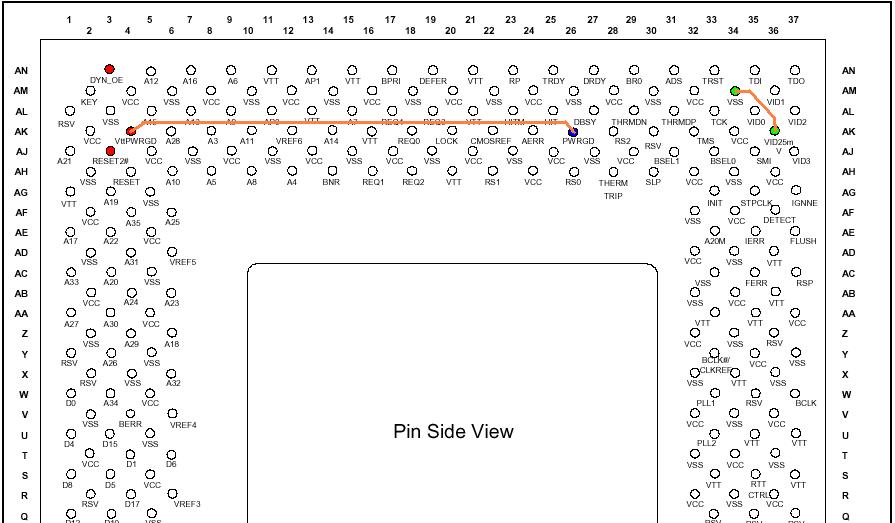
Hmm, I cut off the 3 red pins completely, but it doesn't POST at all. The two guides say that to get it to work normally they had to connect AK4 to another pin, but they both differ ! What should I do and what should I connect the two pins with?

Reply 22 of 44, by Tetrium

User metadata
Rank l33t++
Rank
l33t++
F2bnp wrote:

Hmm, I cut off the 3 red pins completely, but it doesn't POST at all. The two guides say that to get it to work normally they had to connect AK4 to another pin, but they both differ ! What should I do and what should I connect the two pins with?

Better hope you didn't mirror the CPU when cutting the pins...

Edit:Did a bit of googling and found a couple other pics:
http://digilander.libero.it/grandecigno/Tua_BX_41.htm This one looks very clear, it's the same minus the purple pins and it connects 1 of the pins to a different pin.
One more pic here http://digilander.libero.it/grandecigno/foto/pinout1.jpg

And I found an entire (old) thread about it here which is handy as it includes a compatibility list
http://discussions.hardwarecentral.com/showth … ead.php?t=15452

Edit2: I know 1 or 2 members here recently bought a pre-modded Tualatin chip from Ebay, but I don't know who it was.

Whats missing in your collections?
My retro rigs (old topic)
Interesting Vogons threads (links to Vogonswiki)
Report spammers here!

Reply 23 of 44, by F2bnp

User metadata
Rank l33t
Rank
l33t

Thanks for the links, they've been posted on the previous page though. What do you mean by CPU mirroring?
Anyway, anybody know a relatively easy way to connect the two pins? The guy on the links above uses some kind of silver paint but I've no idea where to find that and soldering a wire between these two pins is almost impossible!

Reply 24 of 44, by sliderider

User metadata
Rank l33t++
Rank
l33t++

I'm going to seriously have to pick up a spare VP6 and try this. If only they weren't so damn expensive.

Last edited by sliderider on 2011-05-27, 18:38. Edited 1 time in total.

Reply 25 of 44, by retro games 100

User metadata
Rank l33t
Rank
l33t
F2bnp wrote:

Anyway, anybody know a relatively easy way to connect the two pins? The guy on the links above uses some kind of silver paint but I've no idea where to find that and soldering a wire between these two pins is almost impossible!

Do you want to connect 2 CPU pins together? You can connect the 2 corresponding CPU socket holes instead. I tried this and it worked. I used a bit of wire from a fan. Firstly, I stripped the plastic off the wire. Then, I stripped the wire found inside this plastic. That got me several thin pieces of copper coloured wire. I used one piece of that. If you use about 12mm in length, you can push one end of the wire in to one CPU socket hole, and then push the other end of the wire in to the other CPU socket hole. Because the wire is thin, you can still put the CPU in to the CPU socket.

Reply 26 of 44, by F2bnp

User metadata
Rank l33t
Rank
l33t

Wow that sounds completely scary, if that wires makes contact with any other pin it might fry everything!

Reply 27 of 44, by sliderider

User metadata
Rank l33t++
Rank
l33t++
retro games 100 wrote:
F2bnp wrote:

Anyway, anybody know a relatively easy way to connect the two pins? The guy on the links above uses some kind of silver paint but I've no idea where to find that and soldering a wire between these two pins is almost impossible!

Do you want to connect 2 CPU pins together? You can connect the 2 corresponding CPU socket holes instead. I tried this and it worked. I used a bit of wire from a fan. Firstly, I stripped the plastic off the wire. Then, I stripped the wire found inside this plastic. That got me several thin pieces of copper coloured wire. I used one piece of that. If you use about 12mm in length, you can push one end of the wire in to one CPU socket hole, and then push the other end of the wire in to the other CPU socket hole. Because the wire is thin, you can still put the CPU in to the CPU socket.

Sounds easier to me to do it from the backside of the motherboard.

How do you make sure the wire doesn't touch any other pins when you're installing the CPU and does the CPU sit flat in the socket with a wire under it if you put the wire in the socket holes?

Reply 29 of 44, by retro games 100

User metadata
Rank l33t
Rank
l33t

>> Wow that sounds completely scary, if that wires makes contact with any other pin it might fry everything!
+
>> How do you make sure the wire doesn't touch any other pins when you're installing the CPU

With the CPU in place, the wire cannot move. Both ends of the wire are inside the CPU socket holes. Then with the CPU put in to place, the CPU pins ensure that the wire cannot wriggle out of position. Also, with the underside of the CPU directly on top of the wire, the wire has no place to go. It stays put.

>> does the CPU sit flat in the socket with a wire under it if you put the wire in the socket holes?

Yes, because a small piece of wire is thin. I talked about this issue here. Scroll down to the word "Success!" in blue, and also read the post immediately above it. Ultimately however, the wire mod trick did not work for this mobo (Soyo 7VBA133U). That's because it suffers from cold boot problems. However, for normal operation it's a useful mobo. It supports the 1.4GHz tualatin, and has 2 ISA slots.

Reply 30 of 44, by elfuego

User metadata
Rank Oldbie
Rank
Oldbie
F2bnp wrote:

Wow that sounds completely scary, if that wires makes contact with any other pin it might fry everything!

If done properly, there is no danger of frying anything. As the matter affect, I think thats the easiest, least-intrusive, retroactively removable mod one can do. 😀

Reply 31 of 44, by F2bnp

User metadata
Rank l33t
Rank
l33t

Alright, I might give it a try sometime these days. Tetrium what do you mean by CPU mirroring?

Reply 32 of 44, by RogueTrip2012

User metadata
Rank Oldbie
Rank
Oldbie

🤣 @ Tetrium, no offense. but at long as you keep the notch in the cpu at the right part, you can mirror all day and still isolate the right pins.

Also I was one of the people you speak of whom bought a modded Tualeron. I tried it the other night. In a MSI-6309 (Via 694x) The system posted the 1.3 as 1.26. My IDE channel was not detecting anything so thought it was a messed up chip. I tossed the 1GHz back in and still couldn't find my IDE channels. I had to clear the RTC and play with it a bit before my drives showed up again. I think messing around with the bios would get the Tualeron working if I would have kept at detecting the drives. The only thing I didn't realize when I bought that chip the seller fixed the voltage at 1.5 and a 100FSB!!

For the danger of shorting pins I'd use some 30awg Kynar wire that is already insulated (just wrap around the pin a few times and solder should work great). I still have a bunch left over from installing a PS2 modchip. I'm still thinking of a better insulator for the pins if I choose to do this as it would be nice to reverse your work and use on a Tualatin supported board if needed. I'm thinking a couple layers of saran wrap over the pins would do the trick.

@F2bnp. I found another thread talking about the CUSL2-C: http://www.abxzone.com/forums/f149/tualatin-c … help-17202.html

Did you short the green pins together with a wire?

> W98SE . P3 1.4S . 512MB . Q.FX3K . SB Live! . 64GB SSD
>Win XP . AMD 960T . 8GB . Q.K2200. SB X-Fi . 512GB SSD . 2TB HDD
> Win XI . i7 12700k . 96GB . RTX4070TI . 512GB NVME

Reply 33 of 44, by Old Thrashbarg

User metadata
Rank Oldbie
Rank
Oldbie

@ Tetrium, no offense. but at long as you keep the notch in the cpu at the right part, you can mirror all day and still isolate the right pins.

Er... go pick up a CPU, look at the pin side of it, with the notch in the top left corner. Stick a piece of tape or something to the top edge. Now turn the CPU over, but keep the notch in the top left corner, and watch what happens to the piece of tape. Is it still on the top edge? (Hint: nope.)

That's what Tetrium means by 'mirroring'.

Reply 34 of 44, by Tetrium

User metadata
Rank l33t++
Rank
l33t++
Old Thrashbarg wrote:

@ Tetrium, no offense. but at long as you keep the notch in the cpu at the right part, you can mirror all day and still isolate the right pins.

Er... go pick up a CPU, look at the pin side of it, with the notch in the top left corner. Stick a piece of tape or something to the top edge. Now turn the CPU over, but keep the notch in the top left corner, and watch what happens to the piece of tape. Is it still on the top edge? (Hint: nope.)

That's what Tetrium means by 'mirroring'.

Exactly. I almost made this mistake myself, it's easy to make this mistake when trying to locate pins on your CPU while looking at a diagram with a couple pins colored in. Don't assume you're looking at the pin side whenever you see such a diagram.

And sorry for my poor choice of words 😜

Whats missing in your collections?
My retro rigs (old topic)
Interesting Vogons threads (links to Vogonswiki)
Report spammers here!

Reply 35 of 44, by RogueTrip2012

User metadata
Rank Oldbie
Rank
Oldbie

Ok... I thought you guys would be referencing the picture http://digilander.libero.it/grandecigno/foto/pinout1.jpg

It says pin side view which means bottom of chip. I see what you guys mean without referencing said locations.

> W98SE . P3 1.4S . 512MB . Q.FX3K . SB Live! . 64GB SSD
>Win XP . AMD 960T . 8GB . Q.K2200. SB X-Fi . 512GB SSD . 2TB HDD
> Win XI . i7 12700k . 96GB . RTX4070TI . 512GB NVME

Reply 36 of 44, by F2bnp

User metadata
Rank l33t
Rank
l33t

So what you mean is, I may have removed the wrong pins?
http://digilander.libero.it/grandecigno/foto/pinout1.jpg

This is the one I used and I guess when he says Pin Side view he means that you're looking the CPU from the side where the pins are actually sticking out.

But yeah good point, have to keep it in mind from now on!

And no I haven't bridged the two green ones, because they only set the default voltage at 1.65 and ,like we discussed earlier, the CUSL2 probably supports 1.45 voltage. What I need to do now is bridge AK4 with AK26.
I'll try the wire trick and hope it doesn't destroy my whole motherboard 😜

Reply 37 of 44, by Tetrium

User metadata
Rank l33t++
Rank
l33t++

If I read it correctly, the voltage wire mod is supposed to prevent the board from grilling the chip with voltages of like 2v or something.

But I still say, whenever you get tired of trying to mod your chip, just get a Tualatin board, it's still the easiest (though possibly not the most fun) way 😉

Whats missing in your collections?
My retro rigs (old topic)
Interesting Vogons threads (links to Vogonswiki)
Report spammers here!

Reply 38 of 44, by sliderider

User metadata
Rank l33t++
Rank
l33t++
Tetrium wrote:

If I read it correctly, the voltage wire mod is supposed to prevent the board from grilling the chip with voltages of like 2v or something.

But I still say, whenever you get tired of trying to mod your chip, just get a Tualatin board, it's still the easiest (though possibly not the most fun) way 😉

This was why I said these old hardware mods aren't worth the trouble anymore. The parts to build a proper fast computer without cheating are cheap enough now. What's a Tualatin board go for? $15 to $20? And it will have a later chipset that might be faster or support more features.

Last edited by sliderider on 2011-05-28, 13:30. Edited 1 time in total.

Reply 39 of 44, by Tetrium

User metadata
Rank l33t++
Rank
l33t++
sliderider wrote:

This was why I said these old hardware mods aren't worth the trouble anymore. The parts to build a proper fast computer without cheating are cheap enough now. What's a Tualatin board go for? $15 to $20? And it will have a later chiipset that might be faster or support more features.

Exactly, these boards are going for cheap right now (but expect them to become harder to get within a couple of years). I've actually bought 2 GA-60XT's untested for just 1 pound + shipping and both even worked!
With a bit of luck, you can get the boards cheaper then the costs of killing a chip and the wire+solder it cost you to try to mod it. Let alone the time lost.

I'd say, just use a Coppermine, Coppermines are perfectly capable chips in their own right ;D

Whats missing in your collections?
My retro rigs (old topic)
Interesting Vogons threads (links to Vogonswiki)
Report spammers here!