VOGONS


Reply 20 of 37, by F2bnp

User metadata
Rank l33t
Rank
l33t
Kreshna Aryaguna Nurzaman wrote:

The problem is, the 310M is not fast enough. There are choppiness when playing Crimson Skies at 1024x768, for instance.

I doubt that is the problem. It's probably choppy because of driver/compatibility issues, since the card is so much newer than the game.

Reply 21 of 37, by nforce4max

User metadata
Rank l33t
Rank
l33t

This sounds like a money pit build that wouldn't accomplish much if anything at all. Cheap SB/IB Pentium or Celeron and a 8800/9800gt will be enough but for RAW fillrates start looking at a GTX200/400 series as they are cheap now compared to spending $900-$1200 for a Titan. The GTX200 series have almost unbroken openGL support that is lacking due to drivers in later cards but 16bit color mode look at older Geforce 6/7 series with older drivers that have the split frame mode for sli (both cards work on each frame).

On a far away planet reading your posts in the year 10,191.

Reply 22 of 37, by d1stortion

User metadata
Rank Oldbie
Rank
Oldbie
Kreshna Aryaguna Nurzaman wrote:
d1stortion wrote:

I don't know if you have that opinion that certain games just look "cheap" with maximum framerate, but for some strange reason Nvidia's FPS limiter doesn't work in XP even though it's in the driver.

Me? No, why? The greater the framerate, the better.

Well, motion blur seems to work better at 30 FPS than 60. Also if I'm correct, higher framerates=more tearing, unless you can put up with VSync lag.

To give a somewhat topic related example, I'm currently using an old X1950 Pro in my main computer w/ XP and was doing some testing on NFSU2. Game looks great w/ widescreen hack, 1920x1080 and full AA, quite nice what an old RV570 can do if you throw the right games at it 😀 still, the tearing is horrendous if you run no AA and a bit less, but still very annoying with full AA, so I turned on VSync and the tearing was gone+motion blur looked a lot better on the lower framerate while the game was still very playable. Unfortunately the input lag is noticeable in such a racing game, so somehow I can't seem to get it all perfect...

Reply 23 of 37, by Kreshna Aryaguna Nurzaman

User metadata
Rank l33t
Rank
l33t
m1so wrote:

You guys want a GTX Titan to run MDK, a game that runs at 30 fps in software mode on a Pentium 90, just to destroy an old classic games with "smoothing" effects? And you wonder why I sometimes think you guys have waay to much money and spare time.

nforce4max wrote:

This sounds like a money pit build that wouldn't accomplish much if anything at all. Cheap SB/IB Pentium or Celeron and a 8800/9800gt will be enough but for RAW fillrates start looking at a GTX200/400 series as they are cheap now compared to spending $900-$1200 for a Titan. The GTX200 series have almost unbroken openGL support that is lacking due to drivers in later cards but 16bit color mode look at older Geforce 6/7 series with older drivers that have the split frame mode for sli (both cards work on each frame).

No, the Titan is just a "yardstick". If Titan still works on Windows XP, then so does earlier (but still new) generations like GeForce GTX 480 and GTX 580.

What I'm concerned is identifying backward compatibility problems with older games, and what I mean by "older" here is games from around the year 2000 or 2002-something. Games like Crimson Skies, Freedom Force, Jedi Knight 2, Emperor: Battle For Dune, Command & Conquer: Generals, F-22 Lightning III, Dungeon Siege, Neverwinter Nights 1, and such. The reason I included MDK is because the game just happens to work fine with Windows XP and 2010-generation GeForce card, which is in my case is the GeForce 310M.

So far, I haven't found any games of the early 2000s period that suffers compatibility problems with 310M-generation card. Well actually Crimson Skies refuses to work with CSAA, but it works fine after I switch to SSAA. Alas, the 310M is not fast enough to SSAA many older games. For instance, I cannot use full 8x SSAA with F-22 Lighting III or Crimson Skies because it's choppy. 4x SSAA is the best I can do with the 310M.

F2bnp wrote:
Kreshna Aryaguna Nurzaman wrote:

The problem is, the 310M is not fast enough. There are choppiness when playing Crimson Skies at 1024x768, for instance.

I doubt that is the problem. It's probably choppy because of driver/compatibility issues, since the card is so much newer than the game.

Uh, I don't think driver/compatibility issues is the case here. Indeed, Crimson Skies have compatibility issues with CSAA, but switching to MSAA or SSAA solves the problem. I still believe it's because the 310M is a low-end (or middle-end at best) mobile video chip, where energy savings is more important than raw performance. And indeed, the number speaks: GeForce 310M's fill rate and memory bandwidth is lower than those of GeForce 6800 GT.

But if anything, it proves that 310M's generation GeForce works pretty well with older games. So far, I haven't found any backward compatibility problems with DirectX 9 games from around the year 2000.

Never thought this thread would be that long, but now, for something different.....
Kreshna Aryaguna Nurzaman.


Reply 24 of 37, by Kreshna Aryaguna Nurzaman

User metadata
Rank l33t
Rank
l33t
d1stortion wrote:
Kreshna Aryaguna Nurzaman wrote:
d1stortion wrote:

I don't know if you have that opinion that certain games just look "cheap" with maximum framerate, but for some strange reason Nvidia's FPS limiter doesn't work in XP even though it's in the driver.

Me? No, why? The greater the framerate, the better.

Well, motion blur seems to work better at 30 FPS than 60. Also if I'm correct, higher framerates=more tearing, unless you can put up with VSync lag.

To give a somewhat topic related example, I'm currently using an old X1950 Pro in my main computer w/ XP and was doing some testing on NFSU2. Game looks great w/ widescreen hack, 1920x1080 and full AA, quite nice what an old RV570 can do if you throw the right games at it 😀 still, the tearing is horrendous if you run no AA and a bit less, but still very annoying with full AA, so I turned on VSync and the tearing was gone+motion blur looked a lot better on the lower framerate while the game was still very playable. Unfortunately the input lag is noticeable in such a racing game, so somehow I can't seem to get it all perfect...

Very interesting. To be frank, I prefer Radeon's AA than GeForce's AA, but I wonder if I would bump into problems with older games. It seems NFSU2 is one of those games that work without problems with MSAA.

Anyway, I wonder about another thing: if I want to go SLI (not for AFR nor SFR, but purely for AA), what is the best SLI motherboard that sill have Windows XP drivers?

Never thought this thread would be that long, but now, for something different.....
Kreshna Aryaguna Nurzaman.

Reply 25 of 37, by Shagittarius

User metadata
Rank Oldbie
Rank
Oldbie
Kreshna Aryaguna Nurzaman wrote:

I understand GeForce 6800 is the latest (and fastest) video card that supports Windows 98.

Forgive me if I'm wrong cause I am also in the market for the highest end Windows '98 AGP card I can find, but isn't the 7800 GS technically the fastest card for that configuration?

UPDATE : Nevermind I answered my own question : http://nvidia.custhelp.com/app/answers/detail … windows-98%2Fme

Now I can limit my search to a 6800 Ultra only.

Reply 26 of 37, by swaaye

User metadata
Rank l33t++
Rank
l33t++

Radeon cards do have superior MSAA until GF8 where they become essentially the same. Actually GF8 and up have lots of interesting hidden AA modes (including options from previous cards). NVIDIA Inspector lets you access them. In particular the hidden sparse grid SSAA modes are interesting. I also think high resolution 2x Quincunx is nice in some cases (and very fast).

Radeon 5000+ have official SSAA support. But I really can't recommended any ATI cards for old games. For that matter all of these D3D10 cards have known legacy issues.

Reply 27 of 37, by tincup

User metadata
Rank Oldbie
Rank
Oldbie

Recently I completed a maxed out W98se & XP build which I discuss in another thread. The goal was to dual boot without sacrificing either early era XP performance or W98 hardware/driver compatibility. The solution was fairly inexpensive:

P4-3.60ghz socket 775 Prescott [doubles as a space heater on crisp days]
2gb DDR2 PC4300 ram
NVidia 7900gtx-512mb PCIe GPU; modded 7269 drivers AND the Rloew ram limitation patch [$20 from R. Loew himself]
Biostar P4M890-M7-TE
SBLive!

This setup provides very respectable XP performance for games of the early 2000's while still having full W98 hardware compatibility. The Rlowe patch is essential to get this all working though. The patch is not specifically designed to solve Vram issues but did in my case and there have been scattered reports of others getting 512mb PCIe cards running too.

This is a 'bridge' retro machine filling the gap between 90's era Dos/W9x/3dfx builds and the W7-64bit mothership.

Reply 28 of 37, by d1stortion

User metadata
Rank Oldbie
Rank
Oldbie

If you are serious about a GTX 480 or 580 for this (which I don't understand and wouldn't recommend either) it should be mentioned that those cards have a coil whine issue which becomes obvious on high framerates. I'm not sure what role a huge amount of SSAA would play in this but unless you run VSync or some other kind of FPS limiter it's something to keep in mind.

Reply 29 of 37, by nforce4max

User metadata
Rank l33t
Rank
l33t

You could look into a dual 7950gx2 or 7900gtx duo build, 4 way sli and 64x aa ect.

On a far away planet reading your posts in the year 10,191.

Reply 30 of 37, by m1so

User metadata
Rank Member
Rank
Member

Why not just dual boot Windows XP on your main rig? I ran 64-bit Windows XP for a while on my i7 rig as it had some problems that prevented a reinstall of Windows 7 (later discovered to be a dying hard drive) and it ran with no issues, despite the 64-bit version of XP being supposedly one of the worst.

Reply 31 of 37, by Kreshna Aryaguna Nurzaman

User metadata
Rank l33t
Rank
l33t
swaaye wrote:

Radeon cards do have superior MSAA until GF8 where they become essentially the same. Actually GF8 and up have lots of interesting hidden AA modes (including options from previous cards). NVIDIA Inspector lets you access them. In particular the hidden sparse grid SSAA modes are interesting. I also think high resolution 2x Quincunx is nice in some cases (and very fast).

Radeon 5000+ have official SSAA support. But I really can't recommended any ATI cards for old games. For that matter all of these D3D10 cards have known legacy issues.

Could you be more specific? What kind of issues? Is that the 16-bit color problem? If that's the case, then it's not an issue for my purpose, because I aim to play games around early 2000, which mostly have 32-bit color mode, like Crimson Skies.

Anyway, GeForce 3xx series (circa 2010) are also 3D10 cards, but I haven't found any problem so far.

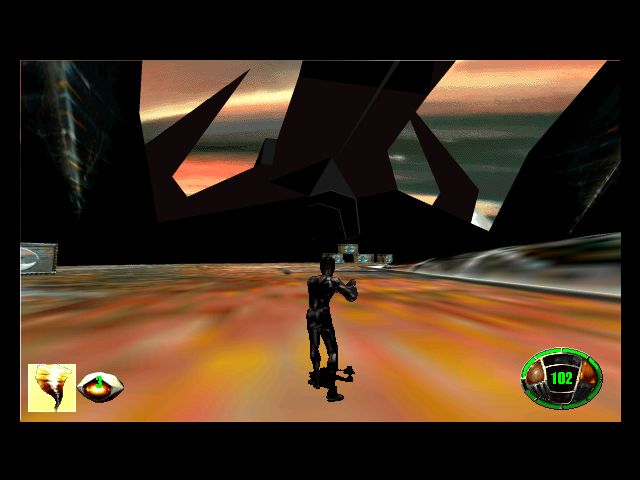
MDKAA_zps61bb6a5a.jpg
MDK on GeForce 310M, 4xSSA + 4xMSAA + forced 16xAF using nVidia Inspector.

m1so wrote:

Why not just dual boot Windows XP on your main rig? I ran 64-bit Windows XP for a while on my i7 rig as it had some problems that prevented a reinstall of Windows 7 (later discovered to be a dying hard drive) and it ran with no issues, despite the 64-bit version of XP being supposedly one of the worst.

Precisely. This ultimate (fastest) Windows XP rig will be also my main rig, dual boot with Windows 7. That's why I'm going to use the best possible video card here. That's why I'm not going to use 8800GT, for example.

Never thought this thread would be that long, but now, for something different.....
Kreshna Aryaguna Nurzaman.

Reply 32 of 37, by Kreshna Aryaguna Nurzaman

User metadata
Rank l33t
Rank
l33t
nforce4max wrote:

You could look into a dual 7950gx2 or 7900gtx duo build, 4 way sli and 64x aa ect.

I actually thought about it too, and 7950GX2 is actually very interesting, because it is the last card that supports quad-SLI on Windows XP. I think that would be the most "period correct" Windows XP rig.

But lately I have changed my mind; instead of building period-correct XP machine, I become more interested to build "ultimately overpowered" XP machine. It's like building a pure DOS system using Soyo 845PE ISA motherboard - a Pentium 4 motherboard with ISA slot. You know, the "skateboard with rocket engine" things. Of course, for practicality' s sake, I would dual-boot the ultimately overpowered XP system with Win 7 - the same way I dual boot the Soyo DOS system with Win 98.

I think an ultimately overpowered XP machine could serve as decent Windows 7 system.

d1stortion wrote:

If you are serious about a GTX 480 or 580 for this (which I don't understand and wouldn't recommend either) it should be mentioned that those cards have a coil whine issue which becomes obvious on high framerates. I'm not sure what role a huge amount of SSAA would play in this but unless you run VSync or some other kind of FPS limiter it's something to keep in mind.

SSAA actually reduces frame rate, although the video card would be so fast that frame rate reduction due to SSAA won't really matter for gameplay. So I think coil whine won't be an issue here.

Never thought this thread would be that long, but now, for something different.....
Kreshna Aryaguna Nurzaman.

Reply 33 of 37, by tincup

User metadata
Rank Oldbie
Rank
Oldbie

Interesting: Until recently I dual booted W7/XP on an AMD FX8350 cpu/HD 7870 gpu system - it was silly fast for XP, max AF/AA etc.. But in the end I decided to delegate XP to 'retro duty' - the XP/W98se dual boot rig mention earlier. The reason being that W7 runs mid-late XP era stuff fine so XP didn't really *need* to reside with W7, but for the earlier XP stuff that W7 [and related hardware] did have issues with it made more sense to create an XP period specific build, which also coincided comfortably with an uber W98se spec rig well - i.e. 3+ ghz cpu/512mb gpu/modded drivers etc.

Reply 34 of 37, by d1stortion

User metadata
Rank Oldbie
Rank
Oldbie
Kreshna Aryaguna Nurzaman wrote:

SSAA actually reduces frame rate, although the video card would be so fast that frame rate reduction due to SSAA won't really matter for gameplay. So I think coil whine won't be an issue here.

Well, you contradict yourself here 😉 if you are sure that you get 200-300 FPS w/ SSAA on the games you'll be playing you absolutely will get coil whine on such a video card. GF8 ripping through old games or certain menus is where this started I think...

Reply 35 of 37, by Kreshna Aryaguna Nurzaman

User metadata
Rank l33t
Rank
l33t
tincup wrote:

Interesting: Until recently I dual booted W7/XP on an AMD FX8350 cpu/HD 7870 gpu system - it was silly fast for XP, max AF/AA etc.. But in the end I decided to delegate XP to 'retro duty' - the XP/W98se dual boot rig mention earlier. The reason being that W7 runs mid-late XP era stuff fine so XP didn't really *need* to reside with W7, but for the earlier XP stuff that W7 [and related hardware] did have issues with it made more sense to create an XP period specific build, which also coincided comfortably with an uber W98se spec rig well - i.e. 3+ ghz cpu/512mb gpu/modded drivers etc.

Does the Radeon's SSAA work with older games?

d1stortion wrote:
Kreshna Aryaguna Nurzaman wrote:

SSAA actually reduces frame rate, although the video card would be so fast that frame rate reduction due to SSAA won't really matter for gameplay. So I think coil whine won't be an issue here.

Well, you contradict yourself here 😉 if you are sure that you get 200-300 FPS w/ SSAA on the games you'll be playing you absolutely will get coil whine on such a video card. GF8 ripping through old games or certain menus is where this started I think...

Depends. At which point does the coil whine typically start? Let say, the whine starts at 250 FPS. On the other hand, when running early 2000 games on newer GeForce (like 580 or 480), I got 300 FPS without AA, but 150 FPS with SSAA. The frame rate is still insanely high, but it won't cause whine.

Anyway, it seems coil whine is not really serious problem after all.

AzN-SoLjA wrote:

Its normal, sound goes away after some hours on it. I used to hear it during folding but it no longer does that.

_Nite_ wrote:

Coil whine is not uncommon with new graphics cards it will go away after a while you just have to break them in. Folding@home is a great way to do this as it will run the card at full load 24/7 crunching work units

RMA'ing the card won't garantee you get one without the noise.

Also, there is already solution for that.

Never thought this thread would be that long, but now, for something different.....
Kreshna Aryaguna Nurzaman.
Reply 36 of 37, by swaaye

User metadata
Rank l33t++
Rank
l33t++

You could just run with vsync enabled, locking your frame rate to the refresh of the monitor, and you won't have to worry about pointless out-of-sync super fast framerates.

Honestly it's really hard to have all the answers to this stuff unless one personally has this specific setup and has used it very thoroughly (and recently). I have played a lot of old games on modern hardware but I simply don't remember all of the quirks anymore... 🤣

One specific game issue I can think of is Star Wars Republic Commando's bump mapping. I was messing with this months ago. It doesn't work right on modern drivers. For example, with Radeon you can not use a card newer than a 3870 because you need to be able to run Catalyst 7.12 or older. The driver hack that had the game working properly was apparently removed after that. NVIDIA cards are also problematic but I don't know specifics. The game uses some touchy form of NVIDIA-written D3D8 bump mapping.

The reality of drivers and games is that often game-specific tweaks are needed in the driver to remove bugs for various reasons. Realities of game development with thick APIs. You can't count on a modern driver still having everything right for a game from 10+ years ago. Thus, using an old card that can run a wide range of driver revisions is beneficial.