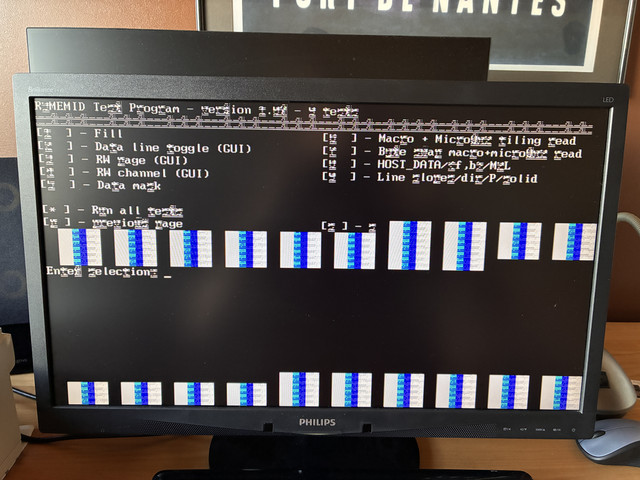
R3MEMID version 1.07, (c) Copyright ATI Technologies Inc, 2003
Log file generation enabled to .\R3MEMID.LOG ...
Reference data file (RDF) loading disabled ...
No wait on error enabled (not effected by '-s') ...
TEST RESULT SUMMARY:
====================
R300 (0x4e44) detected.
128M video memory.
Test suite ran 1 of 1 times.
Checking test status array ...
[1 ] Fill : FAIL
Error ID 0VB001
1024 x 768 - 32 bpp ( 60 Hz): TEST FAILURE
failing bit : MDC0 28 29 30 31
[2 ] Data line toggle (GUI) : FAIL
Error ID 0VB023
1024 x 768 - 32 bpp ( 60 Hz): TEST FAILURE
failing bit : MDC0 28 29 30 31
[3 ] RW page (GUI) : FAIL
Error ID 0VB025
1024 x 768 - 32 bpp ( 60 Hz): TEST FAILURE
failing bit : MDC0 28 29 30 31
[4 ] RW channel (GUI) : FAIL
Error ID 0VB028
1024 x 768 - 32 bpp ( 60 Hz): TEST FAILURE
failing bit : MDC0 28 29 30 31
[5 ] Data mask : FAIL
Error ID 0VB006
1024 x 768 - 32 bpp ( 60 Hz): TEST FAILURE
failing bit : MDC0 28 29 30 31
[6 ] Macro + Micro8x2 tiling read : PASS
[7 ] Byte swap macro+micro8x2 read : FAIL
Error ID 0VC018
1024 x 768 - 32 bpp ( 60 Hz): TEST FAILURE
failing bit : MDC0 28 29 30 31
[8 ] HOST_DATA/<f,b>/M2L : FAIL
Error ID 0TR014
640 x 480 - 8 bpp ( 75 Hz): TEST FAILURE
failing bit : MDC0 29 MDD0 32 33 34 35 36 37 38 39 ...
640 x 480 - 15 bpp ( 75 Hz): TEST FAILURE
failing bit : MDC0 29 MDD0 32 33 34 35 36 37 38 39 ...
640 x 480 - 16 bpp ( 75 Hz): TEST FAILURE
failing bit : MDC0 29 MDD0 32 33 34 35 36 37 38 39 ...
640 x 480 - 32 bpp ( 75 Hz): TEST PASSED
800 x 600 - 8 bpp ( 75 Hz): TEST FAILURE
failing bit : MDC0 29 MDD0 32 33 34 35 36 37 38 39 ...
800 x 600 - 15 bpp ( 75 Hz): TEST FAILURE
failing bit : MDC0 29 MDD0 32 33 34 35 36 37 38 39 ...
800 x 600 - 16 bpp ( 75 Hz): TEST FAILURE
failing bit : MDC0 29 MDD0 32 33 34 35 36 37 38 39 ...
800 x 600 - 32 bpp ( 75 Hz): TEST PASSED
1024 x 768 - 8 bpp ( 75 Hz): TEST FAILURE
failing bit : MDC0 29 MDD0 32 33 34 35 36 37 38 39 ...
1024 x 768 - 15 bpp ( 75 Hz): TEST FAILURE
failing bit : MDC0 29 MDD0 32 33 34 35 36 37 38 39 ...
1024 x 768 - 16 bpp ( 75 Hz): TEST FAILURE
failing bit : MDC0 29 MDD0 32 33 34 35 36 37 38 39 ...
1024 x 768 - 32 bpp ( 75 Hz): TEST PASSED
[9 ] Line slopes/dir/P/solid : FAIL
Error ID 0TR010
640 x 480 - 8 bpp ( 75 Hz): TEST FAILURE
failing bit : MDC0 29 MDD0 32 33 34 35 36 37 38 39 ...
640 x 480 - 15 bpp ( 75 Hz): TEST FAILURE
failing bit : MDC0 29 MDD0 32 33 34 35 36 37 38 39 ...
640 x 480 - 16 bpp ( 75 Hz): TEST FAILURE
failing bit : MDC0 29 MDD0 32 33 34 35 36 37 38 39 ...
640 x 480 - 32 bpp ( 75 Hz): TEST PASSED
800 x 600 - 8 bpp ( 75 Hz): TEST FAILURE
failing bit : MDC0 29 MDD0 32 33 34 35 36 37 38 39 ...
800 x 600 - 15 bpp ( 75 Hz): TEST FAILURE
failing bit : MDC0 29 MDD0 32 33 34 35 36 37 38 39 ...
800 x 600 - 16 bpp ( 75 Hz): TEST FAILURE
failing bit : MDC0 29 MDD0 32 33 34 35 36 37 38 39 ...
800 x 600 - 32 bpp ( 75 Hz): TEST PASSED
1024 x 768 - 8 bpp ( 75 Hz): TEST FAILURE
failing bit : MDC0 29 MDD0 32 33 34 35 36 37 38 39 ...
1024 x 768 - 15 bpp ( 75 Hz): TEST FAILURE
failing bit : MDC0 29 MDD0 32 33 34 35 36 37 38 39 ...
1024 x 768 - 16 bpp ( 75 Hz): TEST FAILURE
failing bit : MDC0 29 MDD0 32 33 34 35 36 37 38 39 ...
1024 x 768 - 32 bpp ( 75 Hz): TEST PASSED
Failure detected.
Tried hot airing without the kapton tape and I think I saw the chip settle this time without the kapton tape in the way (if my eyes haven't glitched). One nearby resistor did flew off, but I soldered it back.
There is definitely an improvement now. No artifacts at all in the dos prompt. However, there are still errors.
Now I don't understand if my bga chip solder is bad, or it's something else.