VOGONS


386 MB Parity Error

Topic actions

First post, by tony359

User metadata
Rank Member
Rank
Member

Hi there,

While testing a 386 board, most RAM works but when I try a bank I have, I get "On Board Parity Error - System halted".

The attachment SCR-20251209-qgjr.jpeg is no longer available
The attachment IMG_8441.jpeg is no longer available

The MB is on TRW under many names and from this thread I understand that it might be an issue with the NMI line of the RAM or even the RAM itself. Though I tried mixing the "bad" RAM with other working RAM and as soon as ONE stick of the BAD ram is present, the system halts.

Is this just "incompatible RAM" or is there anything I can try? There is no "parity" jumper here.

Thanks!

My Youtube channel: https://www.youtube.com/@tony359
Reply 1 of 33, by wierd_w

User metadata
Rank Oldbie
Rank
Oldbie

Look for damaged traces, corrosion, or debris under the affected pair of SIMM sockets, and inside the socket.

What a parity error is:

On a row of DRAM chips, the value of the bits gets computed if it is either even, (parity bit value 0), or odd (parity bit value 1).

If the parity bit value does not match the data value, there is a parity error, and it means either the parity bit is wrong (stuck logic state? Bad parity chip on ram module? Etc), OR, the read back value of the DRAM row is wrong. (A bad dram chip, stuck logic level, unconnected logic line, etc)

To prevent the computer doing very wrong things from the data in ram being very obviously wrong, the bios routine halts the computer and tells you about it.

There are a few things to do.

1) does this only happen with a specific simm module? (If yes, it's probably bad)
2) does this happen with known good ram, in a specific slot? (Check the logic lines, and ras/cas lines leading to that slot with an oscilloscope, and check to see if an incorrect logic high or logic low state is being driven on the bus there, and that ras/cas is strobing correctly and cleanly)

3) are you putting nonparity memory in a system that does parity checking? If you are, the 'nonexistent parity chip' will assert parity bit value 0 (even), even if an odd test pattern is written, triggering the error.

Reply 2 of 33, by tony359

User metadata
Rank Member
Rank
Member

1) No. I have tried replacing ONE module at a time with one from another batch and system would still HALT. Then I tried adding ONE module from the "bad" one to a good set and still failed. Doesn't matter if I swapped that module.
2) I tried 3 sets, same size. 2 sets (8 sticks) work. One did not.

3 is interesting. Is there such thing as a 30-pin non-parity module? How do I check? IC datasheet?

Thanks!

My Youtube channel: https://www.youtube.com/@tony359
Reply 3 of 33, by wierd_w

User metadata
Rank Oldbie
Rank
Oldbie

3)

There is indeed!

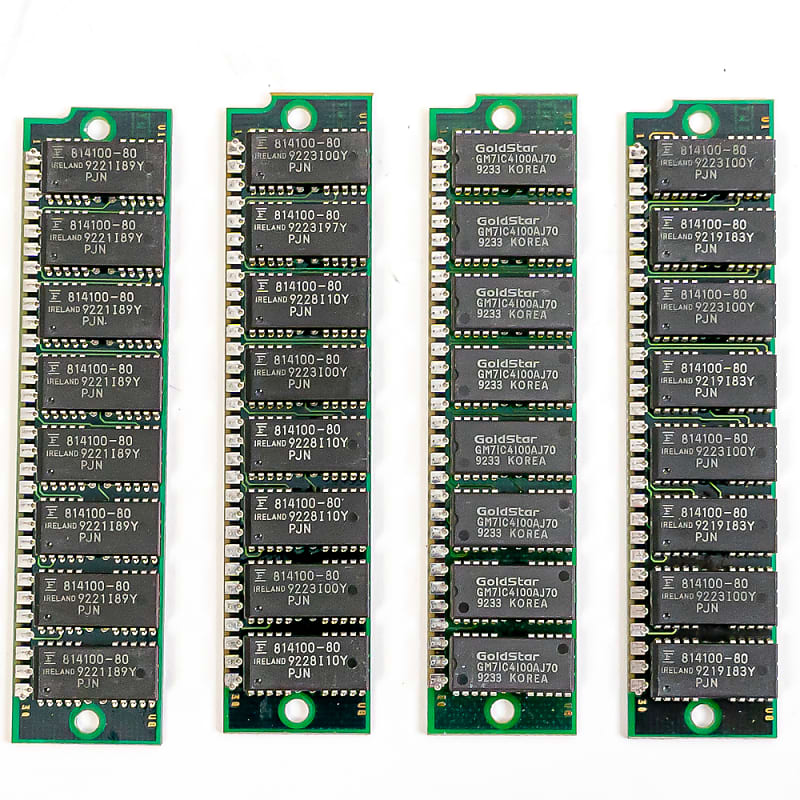
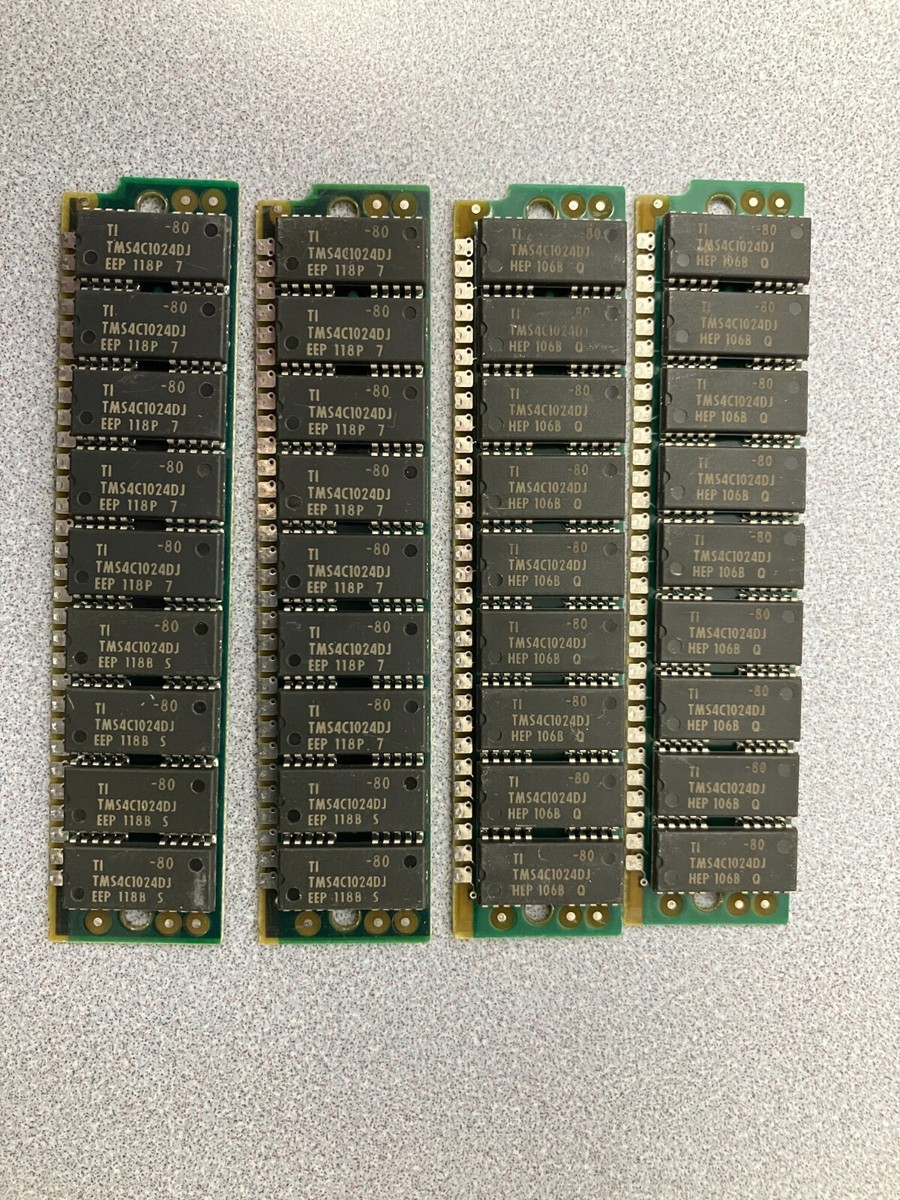
Check the number of chips on the module.
at least for FP memory layouts, nonparity modules will have 8 chips, and parity ones will have 9.

See for instance, these nonparity FP simms

pjqemzfy7ezd99xhxfl8.jpg

And these parity ones.

s-l1200.jpg

Reply 5 of 33, by wierd_w

User metadata
Rank Oldbie
Rank
Oldbie

That's EDO.

Harder to suss out.

Reply 6 of 33, by tony359

User metadata
Rank Member
Rank
Member

I had to google "suss out" 😀

So you're saying it's just an incompatibility?

My Youtube channel: https://www.youtube.com/@tony359

Reply 7 of 33, by wierd_w

User metadata
Rank Oldbie
Rank
Oldbie

A very common one.

Parity memory cost more to make, and thus cost more to buy.

Early on, pc's wanted parity memory more often, but it fell out of favor over the lower cost of nonparity.

It was a common source of headache putting PC commodity ram inside say, a mac color classic.

PC memory was often nonparity, and the color classic DEMANDS parity.

Reply 8 of 33, by weedeewee

User metadata
Rank l33t
Rank
l33t
tony359 wrote on 2025-12-09, 19:50:

Hey Tony359,

Is there any reason you haven't posted photos of the modules that work and the modules that do not work ?

Right to repair is fundamental. You own it, you're allowed to fix it.
How To Ask Questions The Smart Way
Do not ask Why !
https://www.vogonswiki.com/index.php/Serial_port

Reply 9 of 33, by PC@LIVE

User metadata
Rank Oldbie
Rank
Oldbie
tony359 wrote on 2025-12-09, 18:38:
Hi there, […]
Show full quote

Hi there,

While testing a 386 board, most RAM works but when I try a bank I have, I get "On Board Parity Error - System halted".

The attachment SCR-20251209-qgjr.jpeg is no longer available
The attachment IMG_8441.jpeg is no longer available

The MB is on TRW under many names and from this thread I understand that it might be an issue with the NMI line of the RAM or even the RAM itself. Though I tried mixing the "bad" RAM with other working RAM and as soon as ONE stick of the BAD ram is present, the system halts.

Is this just "incompatible RAM" or is there anything I can try? There is no "parity" jumper here.

Thanks!

Ciao Tony
You could do a test, to understand if the problem is the parity chip, you should remove it and try the RAM with only the two memory chips, if the problem disappears, obviously it was the parity chip that caused the error, then I don't know if it's possible to check it once removed.
Update us if you can solve it, and good work.

AMD 286-16 287-10 4MB
AMD 386SX-33 4MB
AMD 386DX-40 Intel 387 8MB
Cyrix 486DLC-40 IIT387-40 8MB
486DX2-66 +many others
P60 48MB
iDX4-100 32MB
AMD 5X86-133 16MB VLB CL5429 2MB
AMD K62+ 550 SOYO 5EMA+ +many others
AST Pentium Pro 200 MHz L2 256KB

Reply 10 of 33, by tony359

User metadata
Rank Member
Rank
Member
weedeewee wrote:

Hey Tony359,

Is there any reason you haven't posted photos of the modules that work and the modules that do not work ?

Senility? 🙂

I just forgot. I’ve just noticed one chip is different from the others

My Youtube channel: https://www.youtube.com/@tony359

Reply 11 of 33, by megatog615

User metadata
Rank Member
Rank
Member

A way you can easily avoid this problem is to simply turn off parity in the BIOS(or change the jumper to non-parity if the board has one). The BIOS only starts checking parity after the POST screen. Oftentimes parity is enabled by default and if you use 8-chip SIMMs in a system with parity turned on it will throw that error.

For the modern vintage pc hobbyist, parity serves little to no purpose since we are not running mission-critical software on these machines anymore. That and non-parity SIMMs are simply way more common.

In the case of 3-chip SIMMs, the presence of a third chip indicates parity. They are also not always EDO, and EDO 30-pin SIMMs are incredibly uncommon.

Reply 12 of 33, by tony359

User metadata
Rank Member
Rank
Member

Hi @megato615

The board halts when I try to enter the BIOS. It tries to count the RAM in a weird way, it kind of gets stuck at 64KB for a couple of seconds then skips to 4MB but a bit lower than the usual 3712. Then it says "CMOS ram size error" and when I try to get into the BIOS, it halts.

So if I understand correctly, The NEC 424400‑70 devices are 4‑Mbit DRAMs used together for the 8‑bit data path, while the lone MI514100J‑70 device is a smaller‑width DRAM used to generate and store the parity bit, so it does not need to be the same type or brand as the NEC parts.

But is this module EDO?

My Youtube channel: https://www.youtube.com/@tony359

Reply 13 of 33, by wierd_w

User metadata
Rank Oldbie
Rank
Oldbie

I'm old and scenile.

I just recall the lower chipcount packages being more likely to be edo, or to behave strangely in old boards.

EDO dram chips are indeed nominally found on 72pin modules.

I'd agree that you should look for a parity disable jumper.

Reply 14 of 33, by tony359

User metadata
Rank Member
Rank
Member

Thanks, I'll have a look but jumper sheets don't seem to show any. I'll see if there are any "unknown" jumpers which might help. Also, I can try getting into the BIOS with good RAM and see if there is a parity option. What is checking for parity on a 386 board?

In any case, why is this set not working? Just weird incompatibility?

My Youtube channel: https://www.youtube.com/@tony359

Reply 15 of 33, by maxtherabbit

User metadata
Rank l33t
Rank
l33t

all 30-pin modules are pretty much guaranteed* to NOT be EDO however...
the 3-chip layout has different memory refresh requirements and will simply not work in some older boards

I suspect this board just will not work with 3-chips and requires 9-chips. FYI the 3rd chip which is different is indeed the parity chip

*new production stuff notwithstanding, some ebay sellers actually do make them with EDO

Reply 16 of 33, by tony359

User metadata
Rank Member
Rank
Member

Thanks!

Then what are the chances that these module I purchased from Italy are going to work on this board? 😂
2 ICs means no parity?

My Youtube channel: https://www.youtube.com/@tony359

Reply 17 of 33, by HwAoRrDk

User metadata
Rank Newbie
Rank
Newbie
tony359 wrote on 2025-12-09, 22:11:

So if I understand correctly, The NEC 424400‑70 devices are 4‑Mbit DRAMs used together for the 8‑bit data path, while the lone MI514100J‑70 device is a smaller‑width DRAM used to generate and store the parity bit, so it does not need to be the same type or brand as the NEC parts.

But is this module EDO?

Yes, you have 2x 4-bit wide DRAM chips plus 1x 1-bit wide chip which will be the parity. For the NEC part, the datasheet says they are FPM. Don't know for certain about the AM-branded ones, but other brands with part number 514100 are all FPM. I have a bunch of 2- and 3-pin 30-pin SIMMs and they're all FPM.

But one thing strikes me as odd... the 424400 are 1Mx4 and the MI514100 is 4Mx1. It's my understanding that 2x 4-bits gives you the 8-bits wide data and the x1 is the 9th parity bit - for which you only need as much capacity as the data bits, right? So why is this parity chip four times the size of the data chips?

Reply 18 of 33, by maxtherabbit

User metadata
Rank l33t
Rank
l33t
tony359 wrote on 2025-12-10, 08:18:

Thanks!

Then what are the chances that these module I purchased from Italy are going to work on this board? 😂
2 ICs means no parity?

Correct, no parity. These SIMMs will have the same refresh requirements as the 3-chips which means they will also not work in systems which require 8/9 chip memory. Only difference is the absence of parity bit.

Reply 19 of 33, by wierd_w

User metadata
Rank Oldbie
Rank
Oldbie

I'd suggest getting parity memory that's 9chip config.

1mb modules. I doubt 4mb modules will be tolerated.

If you feel extra cautious, 512k modules.