VOGONS


3 (+3 more) retro battle stations

Topic actions

Reply 2480 of 2493, by sqpat

User metadata
Rank Newbie
Rank
Newbie

I actually tried FPU for some RealDOOM stuff a couple weeks ago. Mostly the obvious use case is to replace 48:32 bit division (a single instruction in x86-32 but a complicated mess that in the worst case might involve multiple div/mul instructions in x86-16 to replicate) but even in the worst case I could not get a performance increase, in fact it was generally a significant loss in performance. Probably something could be built from the ground up to use the 287 properly as a coprocessor rather than block on calculation of values, but it's hard to integrate into doom. I don't think FPU is fast enough to do be doing a FIDIV for every column drawn in the doom engine. There's a handful of other operations done to prepare the column for drawing, but i think even if they were done in parallel you'd sit there waiting a long time for the FIDIV calculation to complete. And if its not even fast enough to do this, it's hard to think of something it could do often and at a high frame rate to be useful.

That said It was my first time in using 287s though, and when I tried to bench performance on various programs, it seemed the performance of both my FPUs was halved. At 25 mhz i scored ~521 KWhetstones on Navtratil (some of the other benches were not working or were 'off the scale' low) while it seems you got 1097 kwhetstones with the same FPU and speed. I tried with both a 20 mhz IIT and Cyrix CX-82S87-NP-SV (both ran 25 mhz just fine) and both got about half your scores. I fiddled around with bus clocks and things like that, but the performance was consistently half of what I expected. The screen did say the FPU was running at 25 mhz and there was no sign it was a fake chip or anything. I could imagine something like wait states existing in 287 communication but most of the cycles are spent with the FPU doing its work so there's no reason for such a large performance drop. This was the SCAT router board; I can try another board later. I scoured all the chipset settings and docs and couldn't find anything to suggest the speed should be halved. If the FPU performance was really compromised in some way I might have to revisit those realdoom FPU div tests at some point.

Outside of benchmarks is there anything actually 'cool' using the FPU? I guess I am mostly aware of CAD, mandelbrot/fractal programs and flight sims. I never really messed around with this stuff either so I have some learning to do. Perhaps a raytracer could use an FPU as an "accelerator" that traces other pixels in parallel or something. Might make a neat demo/benchmark itself.

Reply 2482 of 2493, by pshipkov

User metadata
Rank l33t
Rank
l33t

Yeah, for this class hardware it is unfair to compare FPUs against fixed point math specialization in on-rails runtimes such as videogames.
FPUs will make a significant difference for general purpose math computations, usually found in CAD systems, offline graphics software (image and video editing, vector and 3D rendering, etc), spreadsheets, research/modeling (Mathlab, etc.).
In the late 80ies and early 90ies, compatible with 286/287, i can think of a handful of "cool" things such as AutoCAD, TurboCAD, Microstation, POVRay, Chaos (a cool set of fractal generators published by Autodesk), CorelDraw, drive/flight simulators with vector graphics, but that's about it.
From what i can see online, people tend to run a game or two on their 286es once in a while for the good old memories, so the obscurities above are largely a no factor.

VLSI SCAMP is brutally slow on a clock-to-clock basis. It is incomparable to VLSI VL82CPCAT-16QC or Headland HT-18.
I was able to squeeze out of it ~750 kwhetstones/s in NSSI at 20MHz CPU and 10MHz FPU but that's about it. Link here. This is long-term stable.
Hope these notes help somewhat.

I prefer to test things with real software. For the purpose of benchmarking 287 FPUs i use Autodesk Chaos. It greatly stresses the system and also makes nice images (for its time).
Take a look at this post - the last chart. It gives a glimpse into how things are for 287. Time is measured in seconds. Only handful of chipsets/motherboards are worth FPU-testing as the rest are way WAY too slow.
The fastest chipset and motherboard for 287 FPUs, that i have seen so far, is Protech PM286 based on Headland HT-18/C. The thing is a beast in this area.

(btw, this conversation reminds me that it is time to post info about few more 286 chipsets - obscure ones)

retro bits and bytes | DOS media library

Reply 2483 of 2493, by pshipkov

User metadata
Rank l33t
Rank
l33t

Ever since the very successful outcome with Chicony CH-471B rev 2.0 i have been wondering how Chico Jr. (the A models) would do in terms of performance and overclocking. Not far ago i managed to obtain rev 3.0 of the assembly and inspected it.

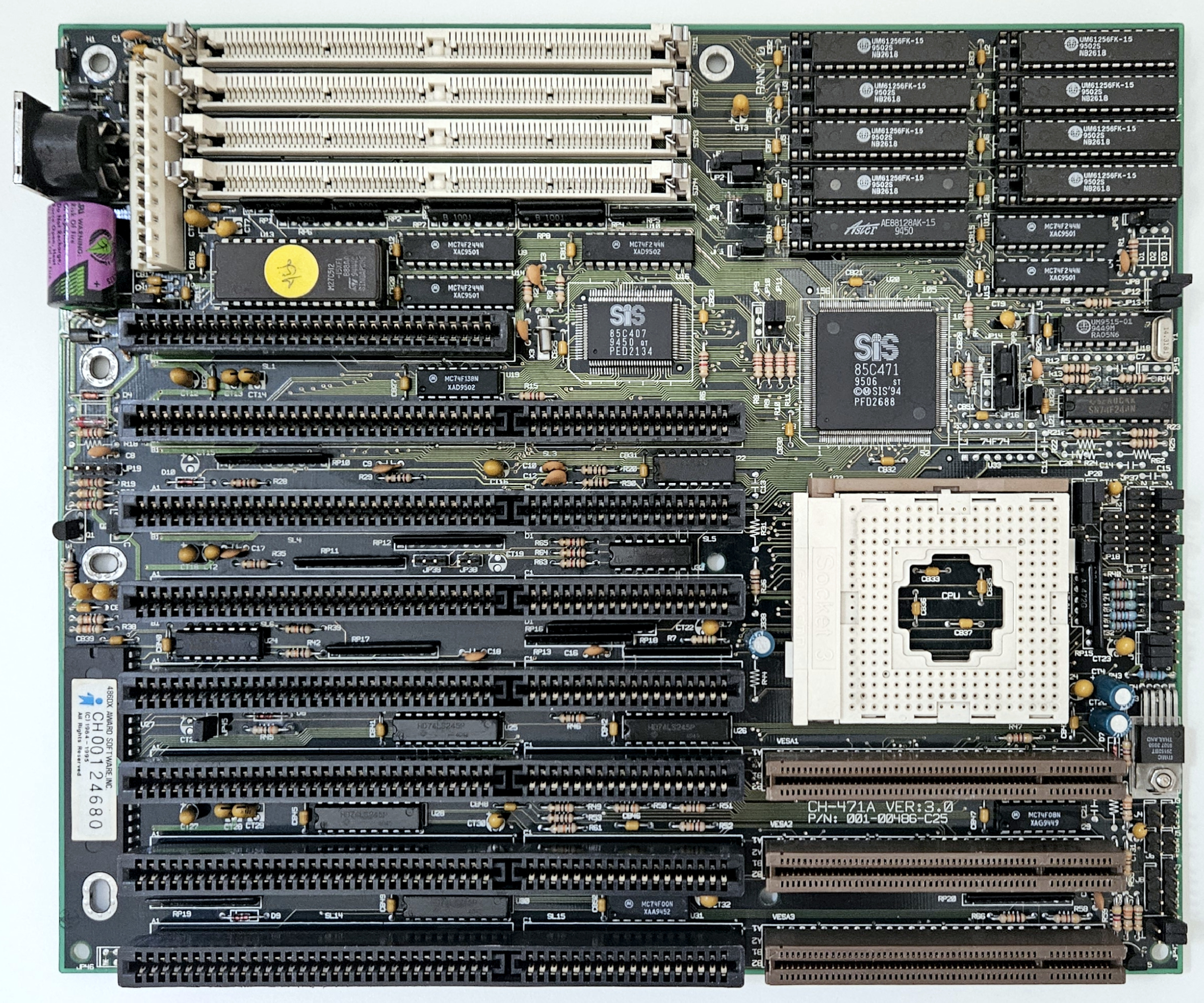
Chicony CH-471A rev:3.0 based on SiS 85C471, 85C407

motherboard_486_chicony_ch-471a_ver_3.0.jpg

Classic ISA/VLB layout. Nothing much to say really.

There was a small corrosion from leaked battery around the lower right corner of the memory slots. Cleaned it for good.

Upgraded it to 1Mb level 2 cache. Board is not very picky about level 2 cache chips - was able to quickly bin the right set.
I see this class hardware as mostly DOS-bound, so my preferred card is Ark1000VL, since it is the VGA blaster = fastest DOS interactive graphics. The card can be fussy in some motherboards with tight BIOS timings - this is a known issue. Instead of relaxing the wait states and slowing the system down, i switched to a Diamond Stealth 64 DRAM T VLB REV B2 (S3 Trio64) which is more resistent than Ark1000VL in such situations. The S3 Trio64 is slightly slower clock-to-clock than Ark1000VL at DOS interactive graphics, but it handles the tightest BIOS settings which results in a better overall performance.

Local storage through Promise EIDE2300Plus with CF card attached to it.

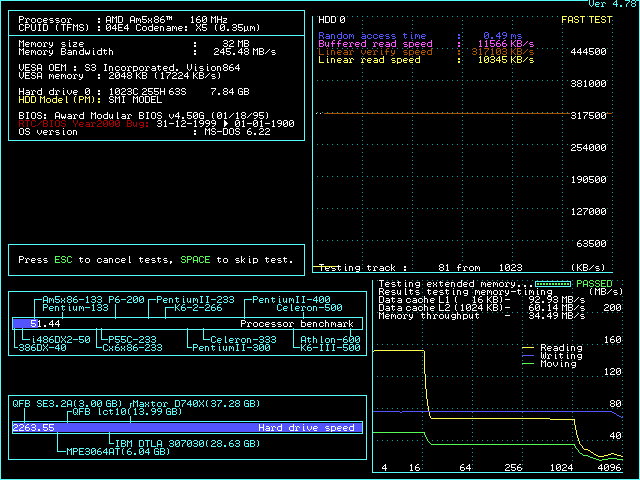
--- Am5x86 at 160MHz (4x40)

All BIOS settings on max.
1Mb level 2 cache - achieved with a mix of 10/15 ns chips.
32Mb (2x16) RAM, 60ns.

Level 1 cache policy is always in write-trough mode regardless of what the corresponding BIOS setting says.

Nothing much to add really. Things just work. System is fully stable. Intermediate performance.
performance results

chicony_ch_471a_ver_3.0_speedsys_160.png

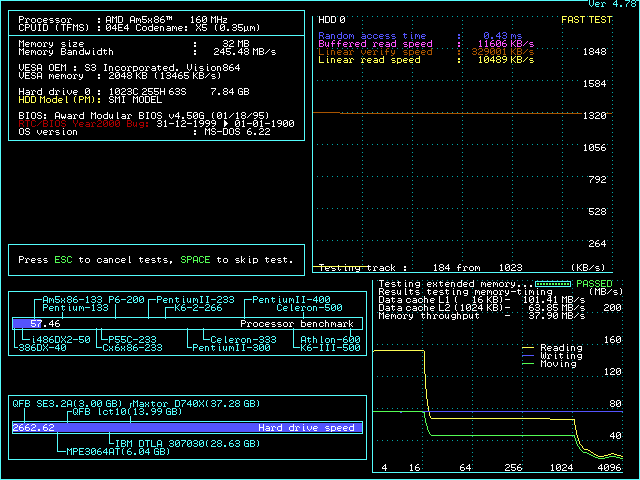
--- Am5x86 at 180MHz (3x60)

3.6V to CPU, 5V Peltier element for cooling.

All BIOS settings on max, except:
DRAM SPEED = "SLOWER" (best is FASTEST)
DRAM WRITE WS = 1 WS (best is 0 WS)
CACHE BURST READ = 1T (best is 0T)
LOCAL BUS READY = SYNCHRONIZE (best is TRANSPARENT)

Was not able to achieve fully stable system.
All is good in the simple DOS interactive graphics (Wolf3D, Doom, Quake 1, bunch of other benchmarks / games) and standard Windows usability tests, but some of the heavy offline compute tests fail no matter what. Tried all CPU voltages. 12V peltier for deep processor freeze. All sorts of BIOS settings combinations - from most conservative to different grades of wait states tightening. Rotated CPUs, L2 cache chips, video and IDE controllers, RAM modules. Used multiple sets of trusted components. Nothing helped.
For DOS gaming and casual Windows activities, the motherboard totally cuts it. For more intricate usage - there can be trouble.

Performance is lacking - below average.
performance results

chicony_ch_471a_ver_3.0_speedsys_180.png

--- Am5x86 at 200MHz (3x66)

System is unstable no matter what.

--- P24T (POD100) at 100MHz (2.5 x 40)

Similar to Chicony CH-471B ver 2.0, the system hangs at boot time no matter what. Tried everything - components, frequencies, BIOS settings - no luck.

---

All in all - a slightly disappointing motherboard.

retro bits and bytes | DOS media library

Reply 2484 of 2493, by feipoa

User metadata
Rank l33t++
Rank
l33t++

The Chicony CH-471A rev 3.0 looks similar to Chicony CH-471B rev 2.0, except that the B-rev2 had to make space for onboard IDE/floppy/IO (UM82C865F, SMC FDC37C666GT, Appian ADI/2). The B-rev2 being the better board, I wonder if having these components integrated onto the motherboard somehow was the magic difference. Everything is hit or miss at 180 MHz.

Plan your life wisely, you'll be dead before you know it.

Reply 2485 of 2493, by pshipkov

User metadata
Rank l33t
Rank
l33t

I expected that the simpler, more compact A model will do better than B, but as you said - when operating out of specification, presumptions are meaningless.

retro bits and bytes | DOS media library

Reply 2486 of 2493, by sqpat

User metadata
Rank Newbie
Rank
Newbie

OK - here is my first crack at the 5434 bios for Diamond Speedstar64. It works on 86box on a 286. I am on a plane right now and cannot test my real hardware for a day or two. Use at your own risk etc.

https://github.com/sqpat/5434bios/blob/main/5 … 6-speedstar.BIN

I think they probably used this on the PCI 5434. Theres a lot of 32 bit instructions used in PCI bus tests. The asm returns carry flag on when the card is not found on the pci bus, and this call is made in a lot of places before running other pci checks. Instead i just set carry and return. Then there are some spots that check all the memory on the card. They were using DWORD (32 bit) string copies, this had to be changed to 16 bit copies to make it work. It's a pretty naive but safe implementation. I have a feeling the initialization could be slow on some machines.
Until I have hardware access I won't really be able to tell the performance of the card on 286 systems but I hope to be able to check in a couple of days.

I worked hard on realdoom the past few months, but yesterday/the day before got to binning 286 chips and overclocking a little bit. I actually went through about 200 chips - a lot of new sources from chinese sellers. I am traveling and will have hardware access again in a few weeks, then i will finish binning chips and I think I will have some interesting learnings, but some of the interesting results is that if you go through real legitimate old early 90s harris 12/16 mhz stock you will get a lot of 30 mhz chips, so maybe the fake 25s that are sometimes capable of low to mid 30s arent even fakes of legitimate 20s, maybe they are fakes of 12s or 16s. Of course, I really want to confirm date codes and batch IDs since it might be just specific good batches here and there.

I managed a 38.4 3d bench run at 14.4 (though there are some missing pixels if you look closely, not sure how legit it is.) At 38.0 mhz i got a timedemo of realdoom to complete at a little over 26 fps, and a 14.2 3d bench run. These involved chucking my ram in the freezer pre-run so I had limited run-time. Mostly I wanted to get the practice down. It's like a lazy man's peltier.

38.0 mhz
https://www.youtube.com/watch?v=zUrvGz0fMz0
38.4 mhz
https://www.youtube.com/watch?v=Tab0VChx9UQ

As usual these are all on my SCAMP board, this time with an ET4000AX/W32i. I experimented at slightly higher clocks. I can definitely boot with 1 ws at 40 mhz for example so I really think I am DRAM limited. I wanted to try 2 populated banks but was struggling to do better than 33-34 mhz. I will have to try again later.

I think I'm going to take a crack at a topcat bios next. VLSI topcat as you may know is a 286/386sx bios and Rodney over on the vcfed forums is refining his topcat 286 design, but he says the working 286 bios kind of sucks while the 386 one is much more tunable. If its just a matter of ripping out some small 386 protected mode tests i may be able to get that working for him.

I think potentially a lot of the difference in performance in different 286 chipsets comes down to wait states and clock speeds. Of course is one is not capable of high clocks it's very limited, but I think wait states is a more complicated subject and usually wait states are not 0 or 1 but something in between dependent on factors like interleaving.

At some point I would like to just have a stable 32 or 35 mhz machine, but even that is asking a lot of my DRAM.

Reply 2487 of 2493, by JonnyAmps

User metadata
Rank Newbie
Rank
Newbie

I very excitedly gave this BIOS a shot on several GD-5434 cards in an Amptron VLSI Turbo (VL82CPCAT) and then a PM286 (HT18C). Both boards gave the no video detected beeps. I tested the BIOS on Speedstar64s Rev A3 and A3-A along with a STB Nitro ISA.

Reply 2488 of 2493, by sqpat

User metadata
Rank Newbie
Rank
Newbie

The behavior of my board:

Working video card: normal POST
No video card: 1 long, 2 short beeps.
Unmodified GD5434: failed post. No beeps.
5434 with new BIOS: Worked!

Mine was a diamond speedstar 64 with 2 MB inserted and the original bios was rev 2.02. Interestingly it was a one time write ROM on there - no window (ATMEL AT27C256R) . Maybe make sure you are not accidentally writing to a one time write eprom originally on the card (though your programmer should say it failed if there was a verify step.) But if you had the old bios it should crash the processor and not do any beeps anyway. So hmm, thats interesting. Wonder if it can be related to memory size or jumpers... or a hardware revision.

I'd hope other people can share their experience with whether or not the card works. I think if the card beeps at you, that sounds like the video memory test maybe failed..? I'd like some more data points, so I will post about this in other spots. I just thought the 286 nerds here might like to know first.

Some benches on this vs a speedstar pro:

5429 (Speedstar PRO):

landmark: 6261.40 / 39.72
3dbench: 10.5
topbench: 235/113/90/171/97 total 719 (about) = 70
realdoom (current/0.87): 8293

5434 (Speedstar 64):

landmark: 7336.12 / 39.72 (faster)
3dbench: 10.7 (faster)
topbench: 235/113/90/179/97 total 718 (about) = 69 (slower)
realdoom (current/0.87): 8088 (3-4% faster)

So that's nteresting. topbench says video memory is faster and gives the 5429 a higher score but the 5434 wins at everything else including raw throughput. I double checked 0 ws jumpers and such.

I'm currently away from all my hardware and unable to see if the card will bench at high clocks. I think my 5426 outperforms my ET4000AX/w32i a little bit in clock per clock synthetic benchmarks but struggles beyond 35-37 mhz while the tseng will do 41-43. If this card did more than that, it could probably get big chr/ms and topbench scores, but it wouldnt affect stuff like 3d bench or doom scores.

It's possible a card like this can enable higher end windows experiences on a 286 than before. I wonder if the drivers are 286 compatible... I recall someone doing driver development for a cirrus card recently on vcfed. I will follow up over there...

What a time to be alive, running doom on my 5434 on my 286 right now.

Reply 2489 of 2493, by pshipkov

User metadata
Rank l33t
Rank
l33t

Tried your BIOS, but similar to JonnyAmps - without success.
This in turn motivated me to take a closer look as well.
Dumped Diamond Speedstar64 ROM version 1.02.
Patched the two PCI functions, as you said - they are the only non-286-compatible code paths in there.
No picture on 286 machines.
May get back to it at some point later.
Providing the ROM if somebody wants to take it further.

The attachment cl_gd-5434_v1.02___patched_for_286.zip is no longer available

Btw, i think some small hw mod may be needed. This was discussed before but need to locate the info.

Great numbers from your peak 286 overclocking tests. It is kind of stupid - 38MHz.
Also, this is the highest score i have seen in Superscape on a 286 machine.
Cannot say much about the RealDoom as i don't have historical data with it, but from your words it sounds like a thing.

You are right that 286 machines are mostly DRAM limited for overclocking.
Finding those special FPM RAM modules takes its time. Some notes from me on the subject here.

Didn't test enough 16MHz 286 chips so cannot say much. What's the success ratio (30MHz) for 16MHz rated chips?
Won't be surprised if there are Chung Kuo relabeling shenanigans in the mix. Won't be the first time. But fact is that all 25MHz labeled chips from there hold at 30MHz ++ just fine. As long as this is the fact, i don’t have concerns with relabeling or not.

retro bits and bytes | DOS media library

Reply 2490 of 2493, by sqpat

User metadata
Rank Newbie
Rank
Newbie

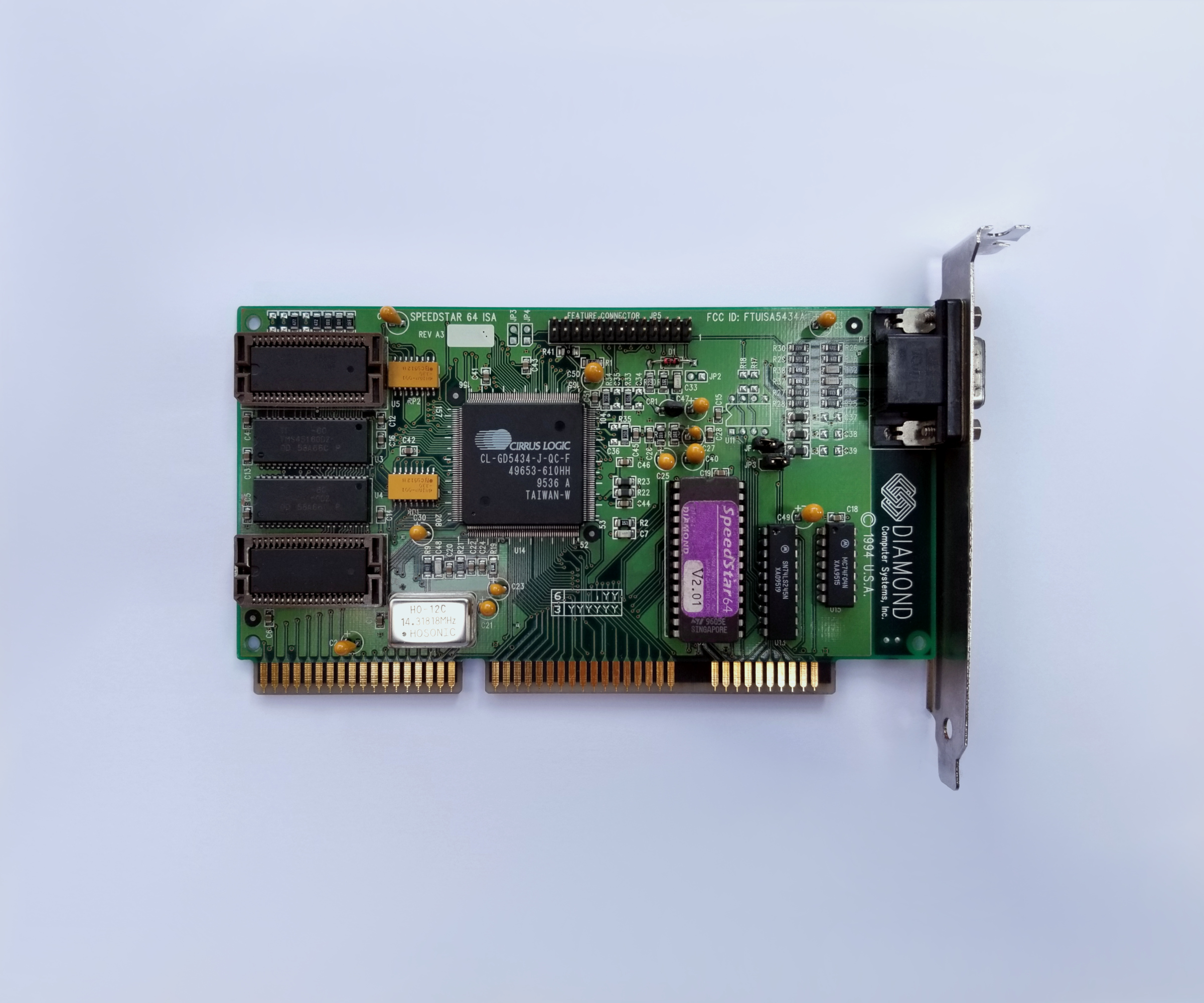
OK, hmm there might be a hardware difference after all. I attached the photo of my exact card (I had to improvise for a temporary bios, its actually a 512kbit ROM double-written)
It is Rev A3-A, and filled with 2 MB and both jumpers are on. The original BIOS on the card was 2.02, and the modified one is based on 2.00. Maybe I should have modified the 2.02 to work instead.

Do you have the unmodified 1.02 bios? (I can't find it online, only a 1.01). I'll do the full disassembly and post that to the github as well (the 2.00 one was here: https://github.com/sqpat/5434bios/blob/main/5434bios.asm and compare with what I have. I did confirm the rep stosd code does not seem to be present in yours like it was in 2.00, so maybe it's just the pci code to work around.

When I'm back home in a few weeks I may look at STB Nitro and Kelvin64 and test my other cards. I may even take a quick look at mach64 and s3 928 BIOS just in case, but I assume they are 386 heavy. I also am curious if the pci/vlb card literally has the same bios.

Reply 2491 of 2493, by pshipkov

User metadata
Rank l33t
Rank
l33t

I have two of these cards. The one on the photo has BIOS version 2.01 but is inside a PC.
The one i test with currently is with the 1.02 BIOS.
Hardware is identical, including your card.
card

Take a look.

retro bits and bytes | DOS media library

Reply 2492 of 2493, by douglar

User metadata
Rank l33t
Rank
l33t
sqpat wrote on Yesterday, 19:41:

What a time to be alive, running doom on my 5434 on my 286 right now.

So you have a 64 bit GPU running at 135 Mhz working with your 286. Nice. Hercules Graphics Station Gold? Eat your heart out!!!

Sorry if I missed this in these posts, but has anyone tried the Windows 3.1 drivers for the 5434 on a 286?

Reply 2493 of 2493, by sqpat

User metadata
Rank Newbie
Rank
Newbie

Oh OK, I just meant the ROM, but a disassembly saves me some time too 😀

This bios is a bit simpler to convert than the v2 one. There's only one pci function instead of two, and no dword string operations. Your edits are correct (replacing push/pop eax with push/pop ax and nop, etc).

The key thing is the function at 0x301A: this just looks for the device on the pci bus, it returns carry if not found. So just going f9 c3 (stc, ret) actually should make everything else avoid the PCI bus and 32 bit code branches.

The code you edited in there, I'm not sure what it's doing, but probably crashes? (Works on 86box though...)
This is what I see there:

0x301a:  51             push cx
0x301b: 56 push si
0x301c: F9 stc
0x301d: B8 01 B1 mov ax, 0xb101
0x3020: CD 1A int 0x1a
0x3022: 72 12 jb 0x3036
0x3024: B8 02 B1 mov ax, 0xb102
0x3027: B9 A8 00 mov cx, 0xa8
0x302a: BA 13 10 mov dx, 0x1013
0x302d: 33 F6 xor si, si
0x302f: CD 1A int 0x1a
0x3031: 5E pop si
0x3032: 59 pop cx
0x3033: C3 ret

Seems like maybe some sort of time of day routine or something, anyway i have no idea what that returns in carry flag ultimately, but you can just change these 3 bytes in your earlier .bin:

0x301A: F9 C3 ; stc, ret
0x7FFF : 44 ; fix checksum-8

Generally, just changing those bytes and replacing the 66 on the two sets of push/pops that call that 310a should be sufficient i think.