VOGONS


What retro activity did you get up to today?

Topic actions

Reply 31360 of 31365, by MattRocks

User metadata
Rank Oldbie
Rank
Oldbie
VanillaFairy wrote on 2026-05-17, 12:44:
Took in a really old PC of a friend's who didn't want it & just had it in their attic unfortunately the motherboard is toast, bu […]
Show full quote

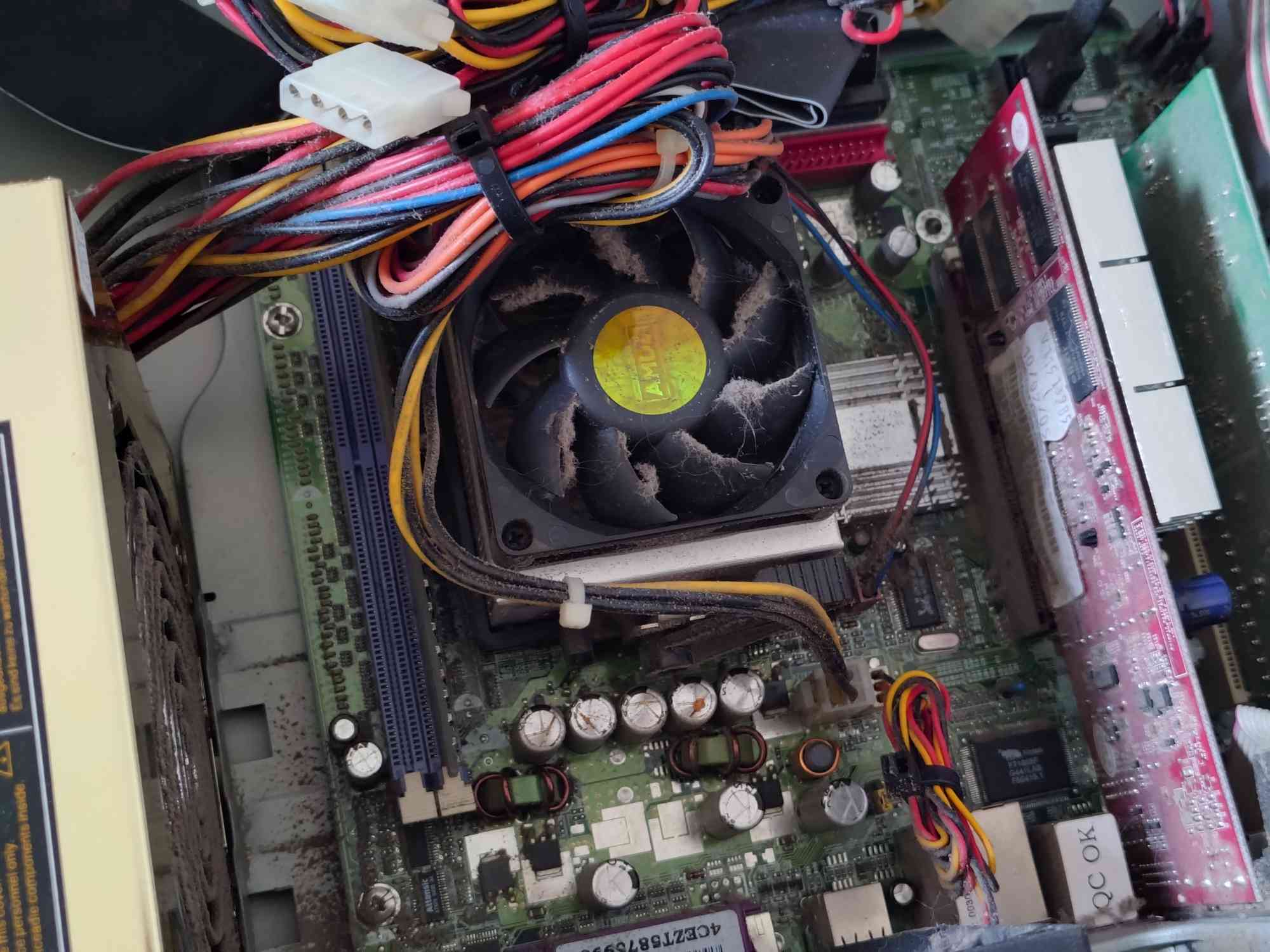
Took in a really old PC of a friend's who didn't want it & just had it in their attic
unfortunately the motherboard is toast, bulging capacitors. Probably fixable but I lack the equipment or skills to do so.
capacitors_ohno.jpg

I'm hoping that whatever CPU in it isn't toast, at least... (unless it was a Celeron competitor, but even then I don't really want it to be dead.)

There's a saying, "you cannot break what is already broken."

Though, I'm not entirely sure the same phrase isn't catalogued in a list of famous last words.

Desktop timeline [ MOS 7501 → 68030 → x86(P5/MMX) → x86(K6-2) → x86(K7*) → PPC(G3*) → x86-64(K8) → x86-64(Xeon) → x86-64(i5) → x86-64(i7) ] * lost

Reply 31361 of 31365, by VanillaFairy

User metadata
Rank Newbie
Rank
Newbie
MattRocks wrote on Today, 09:19:

There's a saying, "you cannot break what is already broken."

Though, I'm not entirely sure the same phrase isn't catalogued in a list of famous last words.

I guess that's right, although I have a tendency to be very accident-prone so I don't know if soldering new caps would be feasible without accidentally kiling my lungs with the fumes or just generally being stupid and getting myself hurt.
Could probably also just try sending it, seeing what happens if I plug it into 240V as-is, though I feel like that could make things even worse assuming it somehow works-

worst case scenario though I can probably try to either get a new motherboard for that PC, or just strip it for parts and use the case for my P4 build. (though I feel like it'd be a downgrade going from some form of Athlon around 2004-2005 to a Northwood P4 with a lowend motherboard from 2002. even putting aside how this system has SATA while my P4 motherboard only has IDE.)

Just a silly lil person in a very big world.
huggies_small.png

Reply 31362 of 31365, by DaveDDS

User metadata
Rank Oldbie
Rank
Oldbie
VanillaFairy wrote on Today, 11:48:
MattRocks wrote on Today, 09:19:

There's a saying, "you cannot break what is already brokened in a list of famous last words.

I guess that's right, although I have a tendency to be very accident-prone so I don't know if soldering new caps would be feasible without accidentally kiling my lungs with the fumes or just generally being stupid and getting myself hurt.
Could probably also just try sending it, seeing what happens if I plug it into 240V as-is, though I feel like that could make things even worse assuming it somehow works-

You definitely CAN break an already broken thing worse while trying to fix it ...

If you are interested in doing stuff like this, it's worth developing some soldering skills.

Always good to get some "old electrisical junk" and practice removing and replacing parts till you are comfortable using the soldering iron/solder.

If the fumes bo1ther/worry you, a small fan a short distance away can help keep the workbench clear... best if you can use a room with a window and direct airflow over your bench, then toward an open window. (unless you are doing a LOT at one time, it's not normally a problem - I solder at my workbench in the basement all the time with no special extra venting)

Caps are usually among the easiest things on a mainboard to replace - the typical "bulged" CAP is usually a fairly large component (electrolytic capacitor) mounted with through-hole leads which can be heated from the non-component side allowing the actual component to be lifted off the board.

The part than can be tricky is that mainboards are usually multi-layer and caps can connect to inside layers as well .. main trick is to go partly by "feel" whille getting the leads hot enough to melt the solder all the way through.

While it is possible to insert new component leads through existing solder-filled holes by just melting that solder, I tend to prefer to use a "solder sucker" (another good tool to have - basically a tube with a sprint loaded plunger and a tip to place over the solder you want to remove), then just solder the new component into the now-empty holes.

-- If the system came from near where you are, chances are it's the same power as you have.
Many older PSUs had a switch to select 120/240v, some newer ones are auto-sensing.

Good luck whichever way you choose to proceed!

- Dave ; https://dunfield.themindfactory.com ; "Daves Old Computers" ; SW dev addict best known:
ImageDisk: rd/wr ANY floppy PChardware can ; Micro-C: compiler for DOS+ManySmallCPU ; DDLINK: simple/small FileTrans(w/o netSW)via Lan/Lpt/Serial

Reply 31363 of 31365, by PD2JK

User metadata
Rank Oldbie
Rank
Oldbie

Heh. Rookie mistake. The replacing capacitor was too high so it came in touch with the 8800GTX hsf so I had to get the mainboard out again.

This is looking better.

The attachment 20260521_121353649.JPG is no longer available

i386 16 ⇒ i486 DX4 100 ⇒ Pentium MMX 200 ⇒ Athlon Pluto 700 ⇒ AthlonXP 1700+ ⇒ Opteron 165 ⇒ Dual Opteron 856

Reply 31364 of 31365, by Law212

User metadata
Rank Oldbie
Rank
Oldbie
DaveDDS wrote on Today, 15:20:
You definitely CAN break an already broken thing worse while trying to fix it ... […]
Show full quote
VanillaFairy wrote on Today, 11:48:
MattRocks wrote on Today, 09:19:

There's a saying, "you cannot break what is already brokened in a list of famous last words.

I guess that's right, although I have a tendency to be very accident-prone so I don't know if soldering new caps would be feasible without accidentally kiling my lungs with the fumes or just generally being stupid and getting myself hurt.
Could probably also just try sending it, seeing what happens if I plug it into 240V as-is, though I feel like that could make things even worse assuming it somehow works-

You definitely CAN break an already broken thing worse while trying to fix it ...

If you are interested in doing stuff like this, it's worth developing some soldering skills.

Always good to get some "old electrisical junk" and practice removing and replacing parts till you are comfortable using the soldering iron/solder.

If the fumes bo1ther/worry you, a small fan a short distance away can help keep the workbench clear... best if you can use a room with a window and direct airflow over your bench, then toward an open window. (unless you are doing a LOT at one time, it's not normally a problem - I solder at my workbench in the basement all the time with no special extra venting)

Caps are usually among the easiest things on a mainboard to replace - the typical "bulged" CAP is usually a fairly large component (electrolytic capacitor) mounted with through-hole leads which can be heated from the non-component side allowing the actual component to be lifted off the board.

The part than can be tricky is that mainboards are usually multi-layer and caps can connect to inside layers as well .. main trick is to go partly by "feel" whille getting the leads hot enough to melt the solder all the way through.

While it is possible to insert new component leads through existing solder-filled holes by just melting that solder, I tend to prefer to use a "solder sucker" (another good tool to have - basically a tube with a sprint loaded plunger and a tip to place over the solder you want to remove), then just solder the new component into the now-empty holes.

-- If the system came from near where you are, chances are it's the same power as you have.
Many older PSUs had a switch to select 120/240v, some newer ones are auto-sensing.

Good luck whichever way you choose to proceed!

This is good advice. I have started doing more soldering and Im getting better at it and have repaired a good amount of electronics from motherboards to sega CD , to sony 3d glasses. Though I had to get a good headset with magnifying lenses on it to see the tiny details

Reply 31365 of 31365, by myne

User metadata
Rank l33t
Rank
l33t

Finally.
Figured out Wtf was wrong with Win98 +h55 +quadro fx 550.

Couldn't get out of vga mode. 640x480x8
Modded drivers.
Forced related cards.
Different driver versions.
Reinstalled 6 different ways including quickinstall.
With and without usb drivers, ide/sata.
Maxphyspage, maxvcache, patchmem/patchsata/patch1tb on/off.
Dis/enabled every setting in the bios.
Checked irqs, conflicts,
Confirmed windows 10 worked fine.

Because it is past the 9x era, I thought I was just pushing a square per in a round hole.
I tried everything. Absolutely everything.

Except the one thing I caused.
When I got it, it was artifacting. Easy fixed with the stock bios. Except mats/mods reported write errors. Never read errors. Odd. Easy fixed. Quick and dirty reflash with a modded underclocked bios and move on.

After all the bullshit, the last thing I tried randomly was the OG stock bios again.
Voila.

Now it's full 32bit at a proper resolution. Quick install worked fine with full usb2, sata ahci, etc

I really have no idea why a quick underclock would cause it to fail to switch modes in 98 but not w10.
Doesn't make any sense, but that's what it was.

It's annoying when you step in your own rake

I built:
Convert old ASUS ASC boardviews to KICAD PCB!
Re: A comprehensive guide to install and play MechWarrior 2 on new versions on Windows.
Dos+Windows 3.11+tcp+vbe_svga auto-install iso template
Script to backup Win9x\ME drivers from a working install
Re: The thing no one asked for: KICAD 440bx reference schematic