VOGONS


What retro activity did you get up to today?

Topic actions

Reply 31360 of 31459, by MattRocks

User metadata
Rank Oldbie
Rank
Oldbie
VanillaFairy wrote on 2026-05-17, 12:44:
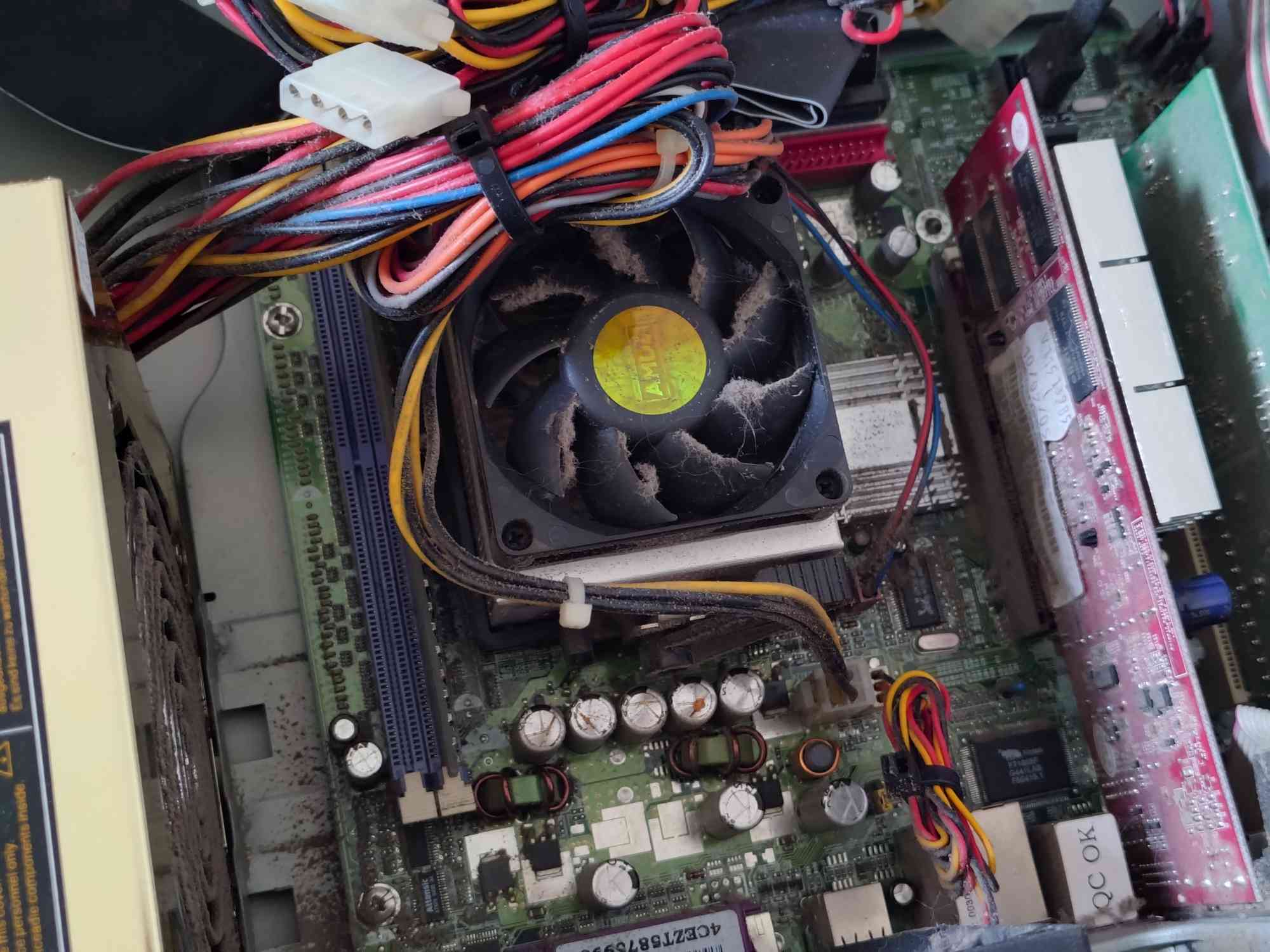
Took in a really old PC of a friend's who didn't want it & just had it in their attic unfortunately the motherboard is toast, bu […]
Show full quote

Took in a really old PC of a friend's who didn't want it & just had it in their attic
unfortunately the motherboard is toast, bulging capacitors. Probably fixable but I lack the equipment or skills to do so.
capacitors_ohno.jpg

I'm hoping that whatever CPU in it isn't toast, at least... (unless it was a Celeron competitor, but even then I don't really want it to be dead.)

There's a saying, "you cannot break what is already broken."

Though, I'm not entirely sure the same phrase isn't catalogued in a list of famous last words.

Desktop timeline [ MOS 7501 → 68030 → x86(P5/MMX) → x86(K6-2) → x86(K7*) → PPC(G3*) → x86-64(K8) → x86-64(Xeon) → x86-64(i5) → x86-64(i7) ] * lost

Reply 31361 of 31459, by VanillaFairy

User metadata
Rank Newbie
Rank
Newbie
MattRocks wrote on 2026-05-21, 09:19:

There's a saying, "you cannot break what is already broken."

Though, I'm not entirely sure the same phrase isn't catalogued in a list of famous last words.

I guess that's right, although I have a tendency to be very accident-prone so I don't know if soldering new caps would be feasible without accidentally kiling my lungs with the fumes or just generally being stupid and getting myself hurt.
Could probably also just try sending it, seeing what happens if I plug it into 240V as-is, though I feel like that could make things even worse assuming it somehow works-

worst case scenario though I can probably try to either get a new motherboard for that PC, or just strip it for parts and use the case for my P4 build. (though I feel like it'd be a downgrade going from some form of Athlon around 2004-2005 to a Northwood P4 with a lowend motherboard from 2002. even putting aside how this system has SATA while my P4 motherboard only has IDE.)

Just a silly lil person in a very big world.
huggies_small.png

Reply 31362 of 31459, by DaveDDS

User metadata
Rank Oldbie
Rank
Oldbie
VanillaFairy wrote on 2026-05-21, 11:48:
MattRocks wrote on 2026-05-21, 09:19:

There's a saying, "you cannot break what is already brokened in a list of famous last words.

I guess that's right, although I have a tendency to be very accident-prone so I don't know if soldering new caps would be feasible without accidentally kiling my lungs with the fumes or just generally being stupid and getting myself hurt.
Could probably also just try sending it, seeing what happens if I plug it into 240V as-is, though I feel like that could make things even worse assuming it somehow works-

You definitely CAN break an already broken thing worse while trying to fix it ...

If you are interested in doing stuff like this, it's worth developing some soldering skills.

Always good to get some "old electrisical junk" and practice removing and replacing parts till you are comfortable using the soldering iron/solder.

If the fumes bo1ther/worry you, a small fan a short distance away can help keep the workbench clear... best if you can use a room with a window and direct airflow over your bench, then toward an open window. (unless you are doing a LOT at one time, it's not normally a problem - I solder at my workbench in the basement all the time with no special extra venting)

Caps are usually among the easiest things on a mainboard to replace - the typical "bulged" CAP is usually a fairly large component (electrolytic capacitor) mounted with through-hole leads which can be heated from the non-component side allowing the actual component to be lifted off the board.

The part than can be tricky is that mainboards are usually multi-layer and caps can connect to inside layers as well .. main trick is to go partly by "feel" whille getting the leads hot enough to melt the solder all the way through.

While it is possible to insert new component leads through existing solder-filled holes by just melting that solder, I tend to prefer to use a "solder sucker" (another good tool to have - basically a tube with a sprint loaded plunger and a tip to place over the solder you want to remove), then just solder the new component into the now-empty holes.

-- If the system came from near where you are, chances are it's the same power as you have.
Many older PSUs had a switch to select 120/240v, some newer ones are auto-sensing.

Good luck whichever way you choose to proceed!

- Dave ; https://dunfield.themindfactory.com ; "Daves Old Computers" ; SW dev addict best known:
ImageDisk: rd/wr ANY floppy PChardware can ; Micro-C: compiler for DOS+ManySmallCPU ; DDLINK: simple/small FileTrans(w/o netSW)via Lan/Lpt/Serial

Reply 31363 of 31459, by PD2JK

User metadata
Rank Oldbie
Rank
Oldbie

Heh. Rookie mistake. The replacing capacitor was too high so it came in touch with the 8800GTX hsf so I had to get the mainboard out again.

This is looking better.

The attachment 20260521_121353649.JPG is no longer available

has all kinds of stuff

Reply 31364 of 31459, by Law212

User metadata
Rank Oldbie
Rank
Oldbie
DaveDDS wrote on 2026-05-21, 15:20:
You definitely CAN break an already broken thing worse while trying to fix it ... […]
Show full quote
VanillaFairy wrote on 2026-05-21, 11:48:
MattRocks wrote on 2026-05-21, 09:19:

There's a saying, "you cannot break what is already brokened in a list of famous last words.

I guess that's right, although I have a tendency to be very accident-prone so I don't know if soldering new caps would be feasible without accidentally kiling my lungs with the fumes or just generally being stupid and getting myself hurt.
Could probably also just try sending it, seeing what happens if I plug it into 240V as-is, though I feel like that could make things even worse assuming it somehow works-

You definitely CAN break an already broken thing worse while trying to fix it ...

If you are interested in doing stuff like this, it's worth developing some soldering skills.

Always good to get some "old electrisical junk" and practice removing and replacing parts till you are comfortable using the soldering iron/solder.

If the fumes bo1ther/worry you, a small fan a short distance away can help keep the workbench clear... best if you can use a room with a window and direct airflow over your bench, then toward an open window. (unless you are doing a LOT at one time, it's not normally a problem - I solder at my workbench in the basement all the time with no special extra venting)

Caps are usually among the easiest things on a mainboard to replace - the typical "bulged" CAP is usually a fairly large component (electrolytic capacitor) mounted with through-hole leads which can be heated from the non-component side allowing the actual component to be lifted off the board.

The part than can be tricky is that mainboards are usually multi-layer and caps can connect to inside layers as well .. main trick is to go partly by "feel" whille getting the leads hot enough to melt the solder all the way through.

While it is possible to insert new component leads through existing solder-filled holes by just melting that solder, I tend to prefer to use a "solder sucker" (another good tool to have - basically a tube with a sprint loaded plunger and a tip to place over the solder you want to remove), then just solder the new component into the now-empty holes.

-- If the system came from near where you are, chances are it's the same power as you have.
Many older PSUs had a switch to select 120/240v, some newer ones are auto-sensing.

Good luck whichever way you choose to proceed!

This is good advice. I have started doing more soldering and Im getting better at it and have repaired a good amount of electronics from motherboards to sega CD , to sony 3d glasses. Though I had to get a good headset with magnifying lenses on it to see the tiny details

Reply 31365 of 31459, by myne

User metadata
Rank l33t
Rank
l33t

Finally.
Figured out Wtf was wrong with Win98 +h55 +quadro fx 550.

Couldn't get out of vga mode. 640x480x8
Modded drivers.
Forced related cards.
Different driver versions.
Reinstalled 6 different ways including quickinstall.
With and without usb drivers, ide/sata.
Maxphyspage, maxvcache, patchmem/patchsata/patch1tb on/off.
Dis/enabled every setting in the bios.
Checked irqs, conflicts,
Confirmed windows 10 worked fine.

Because it is past the 9x era, I thought I was just pushing a square per in a round hole.
I tried everything. Absolutely everything.

Except the one thing I caused.
When I got it, it was artifacting. Easy fixed with the stock bios. Except mats/mods reported write errors. Never read errors. Odd. Easy fixed. Quick and dirty reflash with a modded underclocked bios and move on.

After all the bullshit, the last thing I tried randomly was the OG stock bios again.
Voila.

Now it's full 32bit at a proper resolution. Quick install worked fine with full usb2, sata ahci, etc

I really have no idea why a quick underclock would cause it to fail to switch modes in 98 but not w10.
Doesn't make any sense, but that's what it was.

It's annoying when you step in your own rake

I built:
Convert old ASUS ASC boardviews to KICAD PCB!
Re: A comprehensive guide to install and play MechWarrior 2 on new versions on Windows.
Dos+Windows 3.11+tcp+vbe_svga auto-install iso template
Script to backup Win9x\ME drivers from a working install
Re: The thing no one asked for: KICAD 440bx reference schematic

Reply 31366 of 31459, by Law212

User metadata
Rank Oldbie
Rank
Oldbie

Finally finished setting up this Birthday find and isntalled and ran some games one it. It runs very well and It came without a sound card so i put in a MediaVision Jazz 16 which i have had sitting around for ages. It sounds great, but MK2 the music is loud but the sound FX are barely audible which is a shame.

The games run so great on it though. Doom, Rise of the Triad, Super Street Fighter 2 Turbo , MK1 and MK 2 and Terminator Future Shock. As good as the Jazz sounds in everything else, im considering switching it out because of MK2.
Oh and the Turbo has no button I pressed it and it exploded out of the unit and i lost the parts. I also added a CD-ROM and cleaned it up , ill edit with a picture of how it looks now.
k3K93gH.jpeg
XJjzJfX.jpeg

Reply 31367 of 31459, by GigAHerZ

User metadata
Rank Oldbie
Rank
Oldbie

This one was fully disassembled, washed, and reassembled. Just good old soap and water here, no Retrobrite.

CPU: Intel Pentium III @ 866MHz
RAM: 512MB SDRAM (133MHz)
GPU: NVIDIA Riva TNT2 Pro (16MB)
Audio: SoundMAX Integrated Audio (it even has a built-in speaker!)
HDD: 40GB Seagate Barracuda 7200.7 (7200 RPM)
Optical: 40X CD-ROM
Floppy: 1.44MB FDD

Monitor: Compaq S710 CRT (Still bright and sharp! Set to 80% brightness in the photos)
Mouse: Compaq S34 PS/2 ball mouse
Keyboard: Keytronic PS/2 keyboard (Estonian layout)

While this hardware screams "Windows 2000 Workstation," (it's even on the license sticker!) it makes for a beautiful Windows 98 gaming machine. Windows is fully updated thanks to windowsupdaterestored.com, and I've configured a Protoweb proxy so I can enjoy the early-2000s web properly.

This feels like the perfect baseline to drop in a Voodoo 2 and turn it into the ultimate late-90s gaming rig. Now, if only I could track down a matching period-correct Compaq keyboard to finish the look...

While the main task was giving it a deep clean, I did have to fix a few broken components along the way:

* The PSU Fan Fix: The single 80mm fan in the system was originally wired directly to the 5V rail. Looking closer, the fan controller components inside the PSU were fried, and a previous owner had done a lazy "fix" to bypass it. The fan was incredibly noisy, too. I managed to trace the broken components on the PSU board (A TIP115 darlington transistor), replaced them (similar TIP117), and installed a brand-new fan. Now, the fan speed is properly regulated by the system based on internal temperatures.

* Plastic Repairs: A few plastic elements were snapped, most notably on the CRT housing. I used solvent/chemical welding to fuse the pieces back together. The joints are now rock-solid—probably stronger than the rest of the housing, given how brittle the original untouched plastic has become over the years.

"640K ought to be enough for anybody." - And i intend to get every last bit out of it even after loading every damn driver!
A little about software engineering: https://byteaether.github.io/

Reply 31368 of 31459, by gerry

User metadata
Rank l33t
Rank
l33t
GigAHerZ wrote on 2026-05-21, 20:23:
This one was fully disassembled, washed, and reassembled. Just good old soap and water here, no Retrobrite. […]
Show full quote

This one was fully disassembled, washed, and reassembled. Just good old soap and water here, no Retrobrite.

CPU: Intel Pentium III @ 866MHz
RAM: 512MB SDRAM (133MHz)
GPU: NVIDIA Riva TNT2 Pro (16MB)
Audio: SoundMAX Integrated Audio (it even has a built-in speaker!)
HDD: 40GB Seagate Barracuda 7200.7 (7200 RPM)
Optical: 40X CD-ROM
Floppy: 1.44MB FDD

Monitor: Compaq S710 CRT (Still bright and sharp! Set to 80% brightness in the photos)
Mouse: Compaq S34 PS/2 ball mouse
Keyboard: Keytronic PS/2 keyboard (Estonian layout)

While this hardware screams "Windows 2000 Workstation," (it's even on the license sticker!) it makes for a beautiful Windows 98 gaming machine. Windows is fully updated thanks to windowsupdaterestored.com, and I've configured a Protoweb proxy so I can enjoy the early-2000s web properly.

This feels like the perfect baseline to drop in a Voodoo 2 and turn it into the ultimate late-90s gaming rig. Now, if only I could track down a matching period-correct Compaq keyboard to finish the look...

While the main task was giving it a deep clean, I did have to fix a few broken components along the way:

* The PSU Fan Fix: The single 80mm fan in the system was originally wired directly to the 5V rail. Looking closer, the fan controller components inside the PSU were fried, and a previous owner had done a lazy "fix" to bypass it. The fan was incredibly noisy, too. I managed to trace the broken components on the PSU board (A TIP115 darlington transistor), replaced them (similar TIP117), and installed a brand-new fan. Now, the fan speed is properly regulated by the system based on internal temperatures.

* Plastic Repairs: A few plastic elements were snapped, most notably on the CRT housing. I used solvent/chemical welding to fuse the pieces back together. The joints are now rock-solid—probably stronger than the rest of the housing, given how brittle the original untouched plastic has become over the years.

great looking result! nice fixes along the way too and it will make a great 98 platform with excellent specs

Reply 31369 of 31459, by MattRocks

User metadata
Rank Oldbie
Rank
Oldbie
GigAHerZ wrote on 2026-05-21, 20:23:
This one was fully disassembled, washed, and reassembled. Just good old soap and water here, no Retrobrite. […]
Show full quote

This one was fully disassembled, washed, and reassembled. Just good old soap and water here, no Retrobrite.

CPU: Intel Pentium III @ 866MHz
RAM: 512MB SDRAM (133MHz)
GPU: NVIDIA Riva TNT2 Pro (16MB)
Audio: SoundMAX Integrated Audio (it even has a built-in speaker!)
HDD: 40GB Seagate Barracuda 7200.7 (7200 RPM)
Optical: 40X CD-ROM
Floppy: 1.44MB FDD

Monitor: Compaq S710 CRT (Still bright and sharp! Set to 80% brightness in the photos)
Mouse: Compaq S34 PS/2 ball mouse
Keyboard: Keytronic PS/2 keyboard (Estonian layout)

While this hardware screams "Windows 2000 Workstation," (it's even on the license sticker!) it makes for a beautiful Windows 98 gaming machine. Windows is fully updated thanks to windowsupdaterestored.com, and I've configured a Protoweb proxy so I can enjoy the early-2000s web properly.

This feels like the perfect baseline to drop in a Voodoo 2 and turn it into the ultimate late-90s gaming rig. Now, if only I could track down a matching period-correct Compaq keyboard to finish the look...

While the main task was giving it a deep clean, I did have to fix a few broken components along the way:

* The PSU Fan Fix: The single 80mm fan in the system was originally wired directly to the 5V rail. Looking closer, the fan controller components inside the PSU were fried, and a previous owner had done a lazy "fix" to bypass it. The fan was incredibly noisy, too. I managed to trace the broken components on the PSU board (A TIP115 darlington transistor), replaced them (similar TIP117), and installed a brand-new fan. Now, the fan speed is properly regulated by the system based on internal temperatures.

* Plastic Repairs: A few plastic elements were snapped, most notably on the CRT housing. I used solvent/chemical welding to fuse the pieces back together. The joints are now rock-solid—probably stronger than the rest of the housing, given how brittle the original untouched plastic has become over the years.

There was a time when Compaq had its global centralised repair operation in Scotland, perhaps because swathes of their compact desktop and workstation configurations had diverged quite a lot from generic industry standards.

They also manufactured desktops in Scotland.

I remember one of the closures being big enough news to make it onto the BBC front pages. IIRC, the news photo showed someone using a forklift truck to move a huge server or similar box - the last place on earth that could professionally service them.

Desktop timeline [ MOS 7501 → 68030 → x86(P5/MMX) → x86(K6-2) → x86(K7*) → PPC(G3*) → x86-64(K8) → x86-64(Xeon) → x86-64(i5) → x86-64(i7) ] * lost

Reply 31370 of 31459, by dominusprog

User metadata
Rank Oldbie
Rank
Oldbie

Replace the sound card on my Cyrix build with AWE64 Value (the specs are in my sign).

The attachment IMG_20260521_085751.jpg is no longer available

Duke_2600.png
A-Trend ATC-1020 V1.1 ❇ Cyrix 6x86 150+ @ 120MHz ❇ 32MiB EDO RAM (8MiBx4) ❇ A-Trend S3 Trio64V2 2MiB
OPTi MAD16 / Creative Vibra16XV ❇ 8.4GiB Quantum Fireball ❇ Win95 OSR2 Plus!

Reply 31371 of 31459, by Nvm1

User metadata
Rank Member
Rank
Member

Dug out my Vogons login after a few years to see what is going on here. Hope some older members are still active.
Also started clearing some newer hardware I got so I have room to work on my older builds/parts again, and first project is reviving an unwilling Asus PC-DL.
2 Xeons coming in tomorrow, hope to get it revived. Last test with one cpu it had 0 signs of life.

Reply 31372 of 31459, by SpoXi

User metadata
Rank Newbie
Rank
Newbie

Getting bored playing old games on my Voodoo 1 build. A new build is required so I dig a Voodoo 3 card and it began. Voodoo 3 2000 recap and cooling overhaul.

The attachment voodoo3-heatsink1.jpg is no longer available
The attachment voodoo3-heatsink2.jpg is no longer available
The attachment voodoo3-heatsink3.jpg is no longer available

Took me good half a day to remove the stock heat sink and get rid of the glue. Quite the tedious task.
One of the caps save me the hassle by disappearing, the rest I needed to remove by myself.
Went with 50mm square heat sink, so if I'm not pleased with the temps (burn a finger upon taking a reading), mounting a 50mil fan will be a child play.

Reply 31373 of 31459, by DaveDDS

User metadata
Rank Oldbie
Rank
Oldbie

Ok, not entirely PC/game related, but very old-school parts I used to build many add-ons, often to automate functions in games over the years!

Spent all yesterday hand-wiring a board with DS2250 simm and wire-wrappable posts. (man... my vision and dexterity have declined a LOT in my old age!)

I still build many old-school embedded controllers with Intel8031 proc, often to handle one job that I prob. won't need again, wrapping boards (Cpu, Memory, Interface and IO devices), (re)burning ROMs for these "one-of"s takes a lot of time and gets tiring... So I decided to make a simple movable board that I can just wrap interfaces on-to using a DS2250.

Dallas makes the DS5000 an 8051 with 32k NVram ... but... it's a 40-pin "block" which suffers the usual Dallas problem of having to grind it away to get at the battery to replace it when it dies. This problem is likely well known here as Dallas "blocked" RTCs are used in many old PCs!

The DS2250 is the same but better! - 64k NVR + RTC, *and* it's an exposed 40-pin SIMM! - No grinding to replace the battery! But... yeah, dealing with that SIMM is painful enough that I rarely used them!

Top row: DS2250s with homebrew adapter at the center.

Bottom: An 8051 ICE based on DS2250 I built years go, a Dallas DS5000TK (TestKit - just so you can see the 40-pin "block").

- Dave ; https://dunfield.themindfactory.com ; "Daves Old Computers" ; SW dev addict best known:
ImageDisk: rd/wr ANY floppy PChardware can ; Micro-C: compiler for DOS+ManySmallCPU ; DDLINK: simple/small FileTrans(w/o netSW)via Lan/Lpt/Serial

Reply 31374 of 31459, by Lopo

User metadata
Rank Newbie
Rank
Newbie

L386 v0.1 — Population starting
Boards finally arrived from JLC, beginning the bring-up. AT PSU connectors are in (photo). Working through the rest over the coming days.
Couple of rev 0.1 issues already logged for rev 0.2

  • AT PWR drill diameter too tight — had to trim the polarization keys to seat the connectors. Drill sizes are being increased for rev 0.2
  • KBC no_connect gotcha — some pins I'd marked no_connect in my custom symbol library overrode the schematic connections silently. The PCB is missing those traces; rev 0.1 will get bodge wires, symbol fixed for rev 0.2

Will post a more meaningful update once there's something to actually show — clock generation alive, RTC ticking, etc. Repo will go public once the design is debugged.

Reply 31375 of 31459, by myne

User metadata
Rank l33t
Rank
l33t

Surprised you went 30pin
Hard to get now, isn't it?
Kinda makes me wonder if there's a way to adapt newer ram.
SDRAM is still made

I built:
Convert old ASUS ASC boardviews to KICAD PCB!
Re: A comprehensive guide to install and play MechWarrior 2 on new versions on Windows.
Dos+Windows 3.11+tcp+vbe_svga auto-install iso template
Script to backup Win9x\ME drivers from a working install
Re: The thing no one asked for: KICAD 440bx reference schematic

Reply 31376 of 31459, by Lopo

User metadata
Rank Newbie
Rank
Newbie

It's a 1:1 reverse of the DataExpert 367C, so SIMM30 stays — same chipset, same routing, same footprints.
Not really a problem — they're still available, and worst case I can make my own (modern DRAM chips are plentiful).
The U4800-VLX natively supports SIMM72 too, so that's likely for a later revision. SDRAM is a different protocol entirely (sync vs async), so that's not happening — would mean redesigning the chipset.

Reply 31377 of 31459, by RetroLizard

User metadata
Rank Member
Rank
Member

That's a nice 486 remake. Do you plan on adding ZIF sockets?

Reply 31378 of 31459, by Lopo

User metadata
Rank Newbie
Rank
Newbie
RetroLizard wrote on 2026-05-24, 13:39:

That's a nice 486 remake. Do you plan on adding ZIF sockets?

Thanks, but it's actually a 386 — 1:1 reverse of the DataExpert 367C with the UniChip U4800-VLX chipset (which can do both 386 and 486, but this board is the 386 variant).
For 486, I'm separately reverse engineering an EXP4407 rev 1.1 board — same U4800-VLX chipset, but with VLB slots, larger cache, and the surrounding logic adapted for 486. That's a longer-term project though, nothing ready to show yet.
ZIF on 386 PGA-132 — would be nice, but the sockets are basically unobtainium at reasonable prices these days, so staying with standard PGA-132 LIF.

Reply 31379 of 31459, by RetroLizard

User metadata
Rank Member
Rank
Member

Ah. I tried looking the board up on TRW. It only showed as a 486.

Still a cool project, though I'm not sure how I feel about LIF sockets; never worked with one.