VOGONS


First post, by ulinta

User metadata
Rank Newbie
Rank
Newbie

Hi Dege,

First of all, thank you for continuing to maintain dgVoodoo2.

I'd like to report a reproducible crash that only occurs when using dgVoodoo2 with the **Taiwan version of Cross Gate (cg.exe)**, an old 32-bit DirectDraw game.

### Environment

* Game: Cross Gate (Taiwan version, cg.exe)
* OS: Windows 11 24H2 (Build 26100)
* dgVoodoo: 2.87.3
* DDraw.dll version: 4.7.1.3000

### Problem

The game works normally, but after running for approximately **6-12 hours** (usually while the character is idle running a player shop), it crashes to desktop.

I don't remember this happening before I started using dgVoodoo2.

I first noticed the problem with 2.87.2 and it still occurs with 2.87.3.

I also tested with **Fast video memory access disabled**, but the crash still occurs.

### Event Viewer

Faulting module:
DDRAW.dll

Exception code:
0xC0000005

Fault offset:
0x0002FDDE

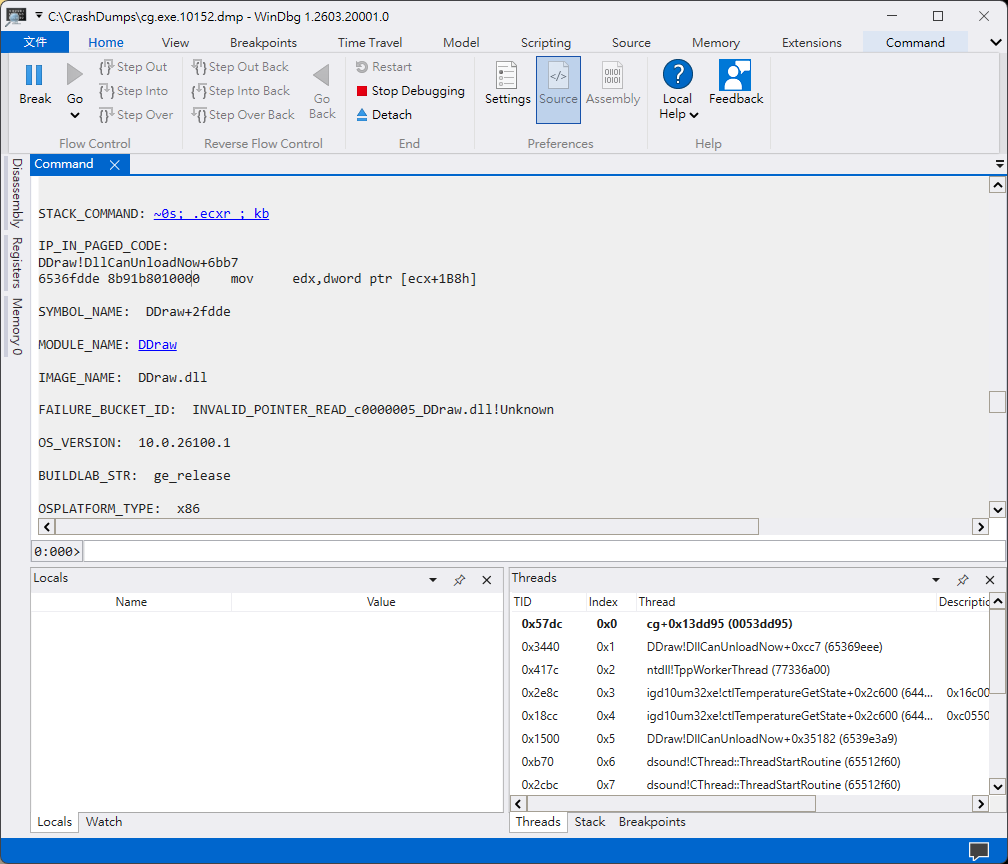
### WinDbg

I enabled Windows LocalDumps and analyzed the crash dump.

The crash always occurs at:

```
DDraw+0x2FDDE
```

Instruction:

```
mov edx, dword ptr [ecx+1B8h]
```

Register state:

```
ECX = 00000000
```

The instruction dereferences a NULL pointer, resulting in an access violation.

Call stack:

```
DDraw
DDraw
DDraw
cg.exe
DDraw
```

Unfortunately, there are no public symbols available, so WinDbg cannot resolve the internal function names.

### Additional Information

I have collected:

* Full crash dump (~1.45 GB)
* WER report
* Event Viewer logs
* WinDbg analysis

I'd be happy to upload the dump or test any debug build if it would help investigate the issue.

Thank you very much for your time.
K2a8MD0.png

Reply 1 of 2, by Dege

User metadata
Rank l33t
Rank
l33t

Hi,

Thx for the report!
The crash point is an internal function called when a new DD surface is being created. The this pointer is NULL which is weird, the only thing that I can think of is that there is a resource leak and the 2GB address space is slowly eaten up by a lot of leaked DD(?) objects.
1) Could you check out the virtual size of the process when it crashes (e.g. in Process Explorer)?
2) Or check out if the virtual size is slowly growing as the game is being run?
3) And trying to run the game on a GPU from a different vendor? Because unfortunately I myself had cases when I got memory leaks from an Intel driver (integrated).

Reply 2 of 2, by ulinta

User metadata
Rank Newbie
Rank
Newbie

Hi Dege,

I collected the information you requested.

I monitored the first cg.exe process while leaving the game running as a merchant for many hours.

Results:

- The Virtual Size keeps growing steadily over time.
- It starts at about 550 MB and gradually increases to around 1.7 GB.
- Private Memory also keeps increasing during the same period.

This seems to support your suspicion of a possible memory/resource leak.

However, I also noticed something new.

Previously the game usually crashed with DDraw.dll (I uploaded the dump before), but during these recent tests the game often freezes instead of crashing.

When it freezes:
- The cg.exe process is still running.
- The game window remains on the last rendered frame.
- The game becomes completely unresponsive.
- I have to terminate the process manually.
- The freezes occurred while the game was simply running as a merchant with no user interaction and no active trading.

One interesting observation is that the Virtual Size continues increasing until roughly 1.7 GB, then stops growing. The process remains alive in this frozen state until I manually terminate it.

Unfortunately, I have not been able to test the game on a GPU from another vendor because I only have a system with Intel UHD Graphics 730.

I also collected the memory logs. Unfortunately, the forum does not allow me to upload CSV files. If you would like to examine them, I can upload them to a cloud storage service or provide them in another format.

Please let me know if there is anything else you would like me to collect or test.

Thank you again for taking the time to investigate this issue.