VOGONS


Socket A: Aiming for the Stars!!!

Topic actions

Reply 460 of 513, by zuldan

User metadata
Rank Oldbie
Rank
Oldbie
supercordo wrote on 2026-07-07, 01:44:

NM they are EK Quantum Torque black nickel.

Thanks for that!

Tzk wrote on 2026-07-10, 04:58:

Yes, you can use SPDTool and disable the second rank on 512mb TCCD sticks. Also yes, the board will detect it as 256mb stick afterwards. I tried this with Corsair XL sticks (0538 and 0542), worked but i didn't gain any additional FSB. I never tested why this was the case, two reasons came to mind: a) the disabled rank still causes load on the dram controller in the chipset and the vdimm power stage or b) the sticks just had avarage chips on both sides and maybe the weakest chip on the first rank.

Thanks for that. I decided not to do it and just wait for the PCB's to arrive.

Tzk wrote on 2026-07-10, 04:58:

Going for 250Mhz 2.5-3-3 with 512mb Hynix DT-D43 or or 2.5-4-4 with Hynix 256mb BT-D43 is waaaay easier and those are also a lot cheaper with good availability. Still king of NF2 is the mighty Hynix ETR, >275MHz 2.5-3-3 works. Or Winbond at 255-260MHz 2-2-2-5.

I found some super cheap Hynix 256mb BT-D43's so I'm going to play with those as well.

Going to do this mod with a simple POT to get the voltage up to 3.2v for my Winbond sticks https://warp9-systems.proboards.com/thread/7/nf7-rev-2-mods

Reply 461 of 513, by zuldan

User metadata
Rank Oldbie
Rank
Oldbie
tehsiggi wrote on 2026-07-10, 12:54:
Hoping for some time next week to get some new scores. Also have to mod the other board as well. But here's my take on the 12V P […]
Show full quote

Hoping for some time next week to get some new scores. Also have to mod the other board as well.
But here's my take on the 12V PWR mod for the A7N8X. Files and stuff will land on github this weekend, so anybody can do the mod themselves.

See you around (hopefully with a score to kick zuldan out of the top 5 again 😁)

The attachment vrm_complete.jpeg is no longer available

Very impressive. I didn't realize the ASUS boards didn't have a 12v input.. I so wish I could make my own PCB's. I've got to take time to sit down and go through the links you gave me.

Well done with the higher score!

Reply 462 of 513, by zuldan

User metadata
Rank Oldbie
Rank
Oldbie
supercordo wrote on 2026-07-13, 21:36:

OC the video card!!!!!

Don't help him! I'm going to have a hard enough time getting to 23k 🤣 😉

Reply 463 of 513, by tehsiggi

User metadata
Rank Oldbie
Rank
Oldbie
zuldan wrote on 2026-07-14, 03:21:
supercordo wrote on 2026-07-13, 21:36:

OC the video card!!!!!

Don't help him! I'm going to have a hard enough time getting to 23k 🤣 😉

Hahaha, but he's right. I didn't take the time to properly check out the max clock of that HD3850. However I'm impressed to see the performance of the 7900GS as well, seems like it really loves 3Dmark2001.

zuldan wrote on 2026-07-14, 03:21:

Very impressive. I didn't realize the ASUS boards didn't have a 12v input.. I so wish I could make my own PCB's. I've got to take time to sit down and go through the links you gave me.

Yeah I didn't think too much about it until my PSU shut off. Then I started to do what I usually do: measure. Turns out the board with 2V VCore + 3,5V VDimm was pulling around 36A on the 5V rail from the power supply.
Over four 5V wires of the ATX connector. Not only is the voltage drop a nightmare, but also the ripple etc will be just bad. That makes life for the VRM of CPU and memory even harder. So I knew there was no away around the 12V mod.
Now under load, with 2,4GHz @ 2.0V (which is a very ugly overclock) the CPU VRM pull 11A on 12V - which is 132W - assuming 80% efficiency for the VRM we're at 105W for the CPU and the rest is losses in the VRM.

So power matters very much. At least for my board 1 (calling it phoenix now) it really did a difference.

AGP Card Real Power Consumption
AGP Power monitor - diagnostic hardware tool
Graphics card repair collection

Reply 464 of 513, by Tzk

User metadata
Rank Newbie
Rank
Newbie

Great scores! At this point i'd probably check drivers, as some may simply run faster. Also OCing the gpu and maybe tweaking the alphatimings of the ram. 24K is the goal i guess 😀

zuldan wrote on 2026-07-14, 03:21:

Very impressive. I didn't realize the ASUS boards didn't have a 12v input..

No need to make some PCBs, here's how i mostly do it. Simply pull the primary coil, as it connects the 5V rail to the cpu VRM. Then bend one leg upwards and solder a 4pin 12V plug onto it and resolder onto the board. Also replace the primary cpu caps with 12V tolerant ones (usually 16V types). Plug PSU and go! The mod shown was done on an A7V600-X, but does also work on A7N8X, Tyan S2460, K7NF2-RAID, A7N8X-XE and several other boards.

Of course the PCB is way cleaner, still this works better than i initially expected.

The attachment Foto 25.11.25, 11 14 55.jpg is no longer available

Reply 465 of 513, by tehsiggi

User metadata
Rank Oldbie
Rank
Oldbie
Tzk wrote on 2026-07-14, 04:53:

Great scores! At this point i'd probably check drivers, as some may simply run faster. Also OCing the gpu and maybe tweaking the alphatimings of the ram. 24K is the goal i guess 😀

Hmm.. time time time.. 😁
I'll see what I can do in today's lunch break. But yeah, I'm trying to go as far as possible. After vacation I'll have both boards fully modded with properly attached Vmods + 12V. Perhaps I just design a VTT+VDIMM piggyback for the kicks.. not sure yet.. I kind of interests me to see what (if anything) it does. Even if it just gives me better efficiency, I'd be happy. We're in hot territory already 😀

Tzk wrote on 2026-07-14, 04:53:

No need to make some PCBs, here's how i mostly do it. Simply pull the primary coil, as it connects the 5V rail to the cpu VRM

Yeah, that's exactly how I'd have done it as well. Because it's nice and simple. I was intrigued by the thought of having the connector "solidly" attached to the PCB and also to provide a shorter GND path of the returning current. Just for that: measurements have shown that out of 11A going in to the CPU VRM, around 6-7A go back through the 12V connectors GND, rest through the ATX plug.

And also, I wanted to have the INA226 to measure the CPU power in realtime without a current clamp meter - I'm a sucker for telemetry data on hardware 😀


In the end I want to have the boards to be as "clean as possible" so I can put them into a nice and clean tower as a real retro gaming machine (with a lot of OC potential 😁) - that's why I also went for the AIO water cooling route. But that one has it's flaws as well..

AGP Card Real Power Consumption
AGP Power monitor - diagnostic hardware tool
Graphics card repair collection

Reply 466 of 513, by cyclone3d

User metadata
Rank l33t++
Rank
l33t++

I'm still needing to join. Was hoping to start tonight but I have to wait for some m3 bolts and nuts to arrive so I can mount a Thermaltake Big Typhoon cooler....

Going to start out with T-Bird runs as I was able to get a 1333 that seems like it is going to be good with around 230Mhz fsb.

My board I am currently testing with, or rather the BIOS, is limiting to around 234Mhz fsb.

Yamaha modified setupds and drivers
Yamaha XG repository
YMF7x4 Guide
Aopen AW744L II SB-LINK

Reply 467 of 513, by tehsiggi

User metadata
Rank Oldbie
Rank
Oldbie

Alright, here we go. The 23k mark fell today. Not sure if I'll have time this evening or not, but I'm leaving that here for now.

The attachment a7n8x_1_240_fsb_3d_3.JPG is no longer available

AGP Card Real Power Consumption
AGP Power monitor - diagnostic hardware tool
Graphics card repair collection

Reply 468 of 513, by Ozzuneoj

User metadata
Rank l33t
Rank
l33t

Sorry for jumping in to the middle of this without checking every post, but are any of you guys running DDR that was sold as PC-4000\DDR-500? Or are you just using DDR-400 that has chips that are known to tolerate higher clocks? Is it more important for 3dmark2k1 scores to have a balance of clock speed and fast timings?

I'm just wondering if it is beneficial at all for me to be keeping an eye out for DDR-500 sticks. I had some OCZ Gold PC-4000 many years ago and ended up selling it in 2012 for something like $150, which blew my mind. That was much needed at the time, so I won't say I regret selling it, but I think it would be interesting to tinker with some nice DDR again some day.

Looking back now, that was some VERY expensive RAM! I just checked my newegg order history and it was this 2x1GB kit of OCZ Gold DDR-500 3-4-4-8. I paid a whopping $210 after tax for it back in March of 2006. 😯

That would have gone into my DFI Lanparty Nforce4 Ultra-D with an Athlon 64 X2 4200+ and a brand new 7900GTX. I went all out to maximize Oblivion performance (mostly in vain thanks to the "wonderful" game engine).

I do have a pretty decent collection of DDR, so it's possible that I already have something that is good enough for overclocking. I'm just not sure what to look for. I have a bunch of OCZ Platinum DDR-400... hmm... 🤔

Now for some blitting from the back buffer.

Reply 469 of 513, by tehsiggi

User metadata
Rank Oldbie
Rank
Oldbie
Ozzuneoj wrote on 2026-07-14, 15:07:
Sorry for jumping in to the middle of this without checking every post, but are any of you guys running DDR that was sold as PC- […]
Show full quote

Sorry for jumping in to the middle of this without checking every post, but are any of you guys running DDR that was sold as PC-4000\DDR-500? Or are you just using DDR-400 that has chips that are known to tolerate higher clocks? Is it more important for 3dmark2k1 scores to have a balance of clock speed and fast timings?

I'm just wondering if it is beneficial at all for me to be keeping an eye out for DDR-500 sticks. I had some OCZ Gold PC-4000 many years ago and ended up selling it in 2012 for something like $150, which blew my mind. That was much needed at the time, so I won't say I regret selling it, but I think it would be interesting to tinker with some nice DDR again some day.

Looking back now, that was some VERY expensive RAM! I just checked my newegg order history and it was this 2x1GB kit of OCZ Gold DDR-500 3-4-4-8. I paid a whopping $210 after tax for it back in March of 2006. 😯

That would have gone into my DFI Lanparty Nforce4 Ultra-D with an Athlon 64 X2 4200+ and a brand new 7900GTX. I went all out to maximize Oblivion performance (mostly in vain thanks to the "wonderful" game engine).

I do have a pretty decent collection of DDR, so it's possible that I already have something that is good enough for overclocking. I'm just not sure what to look for. I have a bunch of OCZ Platinum DDR-400... hmm... 🤔

You might wanna take a look at this https://www.hardwareluxx.de/community/threads … thread.1244468/ - you can use the auto translate of your browser, it appears to do a proper job. It'll give you some idea I suppose 😀

My kits are DDR400 / DDR433 - no DDR500

AGP Card Real Power Consumption
AGP Power monitor - diagnostic hardware tool
Graphics card repair collection

Reply 470 of 513, by Tzk

User metadata
Rank Newbie
Rank
Newbie
Ozzuneoj wrote on 2026-07-14, 15:07:

Sorry for jumping in to the middle of this without checking every post, but are any of you guys running DDR that was sold as PC-4000\DDR-500? Or are you just using DDR-400 that has chips that are known to tolerate higher clocks? Is it more important for 3dmark2k1 scores to have a balance of clock speed and fast timings?

I'm just wondering if it is beneficial at all for me to be keeping an eye out for DDR-500 sticks.

I’m running DDR333 rated chips at up to 275Mhz. Ddr500 sticks are just rated for that frequency and I’d assume they were tested on either socket 478 or 939. that being said they may behave completely different on socket 462 at those speeds.

I always select the chips I want to use and then the sticks I have available. For example Winbond BH-6 (rated DDR333) will behave the same as BH-5 sold as DDR500, it’s the same chip, just with different binning. So no, you don’t „need“ ddr500 sticks.

Two exceptions though: Samsung TCCD and Crucial Ballistix are heavily binned, even the DDR400 ones. So if you try regular OEM micron 5B C/D/F/G or Samsung revision F Chips which are TCCC, don’t expect much.

Regarding 3Dmark scores: It depends. Athlon XP at higher clocks is mainly bandwidth (FSB) and latency starved. So going for tight timings at the highest FSB possible is key. Especially with gpus like 6800GT and faster you’re cpu limited.

The fastest options are:
- Winbond BH-5 at high volts and 2-2-2-5, preferably 250-260Mhz or whatever your board can handle.
- Crucial Ballistix 5B G 2.5-2-2 at about 250Mhz
- Hynix ETR 2.5-3-3-8 at 270-275Mhz

There’s other options which are still quite fast, but not top notch.

Reply 471 of 513, by Ozzuneoj

User metadata
Rank l33t
Rank
l33t
Tzk wrote on 2026-07-14, 17:01:
I’m running DDR333 rated chips at up to 275Mhz. Ddr500 sticks are just rated for that frequency and I’d assume they were tested […]
Show full quote

I’m running DDR333 rated chips at up to 275Mhz. Ddr500 sticks are just rated for that frequency and I’d assume they were tested on either socket 478 or 939. that being said they may behave completely different on socket 462 at those speeds.

I always select the chips I want to use and then the sticks I have available. For example Winbond BH-6 (rated DDR333) will behave the same as BH-5 sold as DDR500, it’s the same chip, just with different binning. So no, you don’t „need“ ddr500 sticks.

Two exceptions though: Samsung TCCD and Crucial Ballistix are heavily binned, even the DDR400 ones. So if you try regular OEM micron 5B C/D/F/G or Samsung revision F Chips which are TCCC, don’t expect much.

Regarding 3Dmark scores: It depends. Athlon XP at higher clocks is mainly bandwidth (FSB) and latency starved. So going for tight timings at the highest FSB possible is key. Especially with gpus like 6800GT and faster you’re cpu limited.

The fastest options are:
- Winbond BH-5 at high volts and 2-2-2-5, preferably 250-260Mhz or whatever your board can handle.
- Crucial Ballistix 5B G 2.5-2-2 at about 250Mhz
- Hynix ETR 2.5-3-3-8 at 270-275Mhz

There’s other options which are still quite fast, but not top notch.

tehsiggi wrote on 2026-07-14, 16:42:

You might wanna take a look at this https://www.hardwareluxx.de/community/threads … thread.1244468/ - you can use the auto translate of your browser, it appears to do a proper job. It'll give you some idea I suppose 😀

My kits are DDR400 / DDR433 - no DDR500

Thanks for all the info. Looks like I have a lot of digging to do. I am going through my stockpile of DDR and I have found a couple that might be good ones. The rest will take some investigating.

This is going to sound like a total noob question, but I'm asking because my DDR test system is not currently ready to hook up... what is the best program to identify the chips used on memory that has glued-on heat spreaders? Is there anything better than CPU-Z for something as old as an Nforce 2 system?

I have lots of memory with head spreaders, and I really don't want to tear them apart to see what chips they use. I have 5 OCZ PC3200 "1024MB EL Dual Ch Platinum Edition 2-3-2-5", a Crucial Ballistix of some kind (looks like I wrote on it 512MB DDR400 2-2-2-6 2.8v ... not sure when I did this, 🤣) as well as various Corsair XMS, SuperTalent and Patriot memory.

Found some Samsung TCCC... one Rev E and a couple Rev F, and some UCCC. No TCCD yet.

Just found a Kingston 1GB stick with 16x Qimonda BE-5 chips. Looks like that might be worth tinkering with... too bad it's only one.

I can definitely see this being an interesting challenge, since during the DDR1 era it was still very common for even a good DDR-based system to be single-channel. So, someone may have bought good RAM, but they only needed one stick. Makes it much harder to find matching pairs of good RAM to run in a dual channel board.

EDIT: Were there any overclocking-friendly DDR chips that were in the smaller, more square-shaped (DDR2-like) BGA package? I have come across some of those as well, but they have minimal markings. On one "AMPO PC3200/1GB" module the chips are mostly blank except for a tiny little bullseye symbol and "DDR DXT".

Now for some blitting from the back buffer.

Reply 472 of 513, by tehsiggi

User metadata
Rank Oldbie
Rank
Oldbie
Tzk wrote on 2026-07-14, 17:01:

Regarding 3Dmark scores: It depends. Athlon XP at higher clocks is mainly bandwidth (FSB) and latency starved. So going for tight timings at the highest FSB possible is key. Especially with gpus like 6800GT and faster you’re cpu limited.

Finding the right balance is the key I guess.

Here we are, going for place number 4!

Enough for me today.. This is with an Athlon XP 2800.

The attachment a7n8x_1_235_fsb_3d_1.JPG is no longer available

AGP Card Real Power Consumption
AGP Power monitor - diagnostic hardware tool
Graphics card repair collection

Reply 473 of 513, by supercordo

User metadata
Rank Member
Rank
Member

Updated!!! I find it hilarious that my thunderbird is still in the top ten.

Reply 474 of 513, by SPBHM

User metadata
Rank Oldbie
Rank
Oldbie

where are all of the fast Palominos?!
peak 180nm!

Reply 475 of 513, by supercordo

User metadata
Rank Member
Rank
Member
SPBHM wrote on 2026-07-14, 22:41:

where are all of the fast Palominos?!
peak 180nm!

Post one!!!

Reply 477 of 513, by Ozzuneoj

User metadata
Rank l33t
Rank
l33t
Ozzuneoj wrote on 2026-07-14, 18:29:
Thanks for all the info. Looks like I have a lot of digging to do. I am going through my stockpile of DDR and I have found a cou […]
Show full quote
Tzk wrote on 2026-07-14, 17:01:
I’m running DDR333 rated chips at up to 275Mhz. Ddr500 sticks are just rated for that frequency and I’d assume they were tested […]
Show full quote

I’m running DDR333 rated chips at up to 275Mhz. Ddr500 sticks are just rated for that frequency and I’d assume they were tested on either socket 478 or 939. that being said they may behave completely different on socket 462 at those speeds.

I always select the chips I want to use and then the sticks I have available. For example Winbond BH-6 (rated DDR333) will behave the same as BH-5 sold as DDR500, it’s the same chip, just with different binning. So no, you don’t „need“ ddr500 sticks.

Two exceptions though: Samsung TCCD and Crucial Ballistix are heavily binned, even the DDR400 ones. So if you try regular OEM micron 5B C/D/F/G or Samsung revision F Chips which are TCCC, don’t expect much.

Regarding 3Dmark scores: It depends. Athlon XP at higher clocks is mainly bandwidth (FSB) and latency starved. So going for tight timings at the highest FSB possible is key. Especially with gpus like 6800GT and faster you’re cpu limited.

The fastest options are:
- Winbond BH-5 at high volts and 2-2-2-5, preferably 250-260Mhz or whatever your board can handle.
- Crucial Ballistix 5B G 2.5-2-2 at about 250Mhz
- Hynix ETR 2.5-3-3-8 at 270-275Mhz

There’s other options which are still quite fast, but not top notch.

tehsiggi wrote on 2026-07-14, 16:42:

You might wanna take a look at this https://www.hardwareluxx.de/community/threads … thread.1244468/ - you can use the auto translate of your browser, it appears to do a proper job. It'll give you some idea I suppose 😀

My kits are DDR400 / DDR433 - no DDR500

Thanks for all the info. Looks like I have a lot of digging to do. I am going through my stockpile of DDR and I have found a couple that might be good ones. The rest will take some investigating.

This is going to sound like a total noob question, but I'm asking because my DDR test system is not currently ready to hook up... what is the best program to identify the chips used on memory that has glued-on heat spreaders? Is there anything better than CPU-Z for something as old as an Nforce 2 system?

I have lots of memory with head spreaders, and I really don't want to tear them apart to see what chips they use. I have 5 OCZ PC3200 "1024MB EL Dual Ch Platinum Edition 2-3-2-5", a Crucial Ballistix of some kind (looks like I wrote on it 512MB DDR400 2-2-2-6 2.8v ... not sure when I did this, 🤣) as well as various Corsair XMS, SuperTalent and Patriot memory.

Found some Samsung TCCC... one Rev E and a couple Rev F, and some UCCC. No TCCD yet.

Just found a Kingston 1GB stick with 16x Qimonda BE-5 chips. Looks like that might be worth tinkering with... too bad it's only one.

I can definitely see this being an interesting challenge, since during the DDR1 era it was still very common for even a good DDR-based system to be single-channel. So, someone may have bought good RAM, but they only needed one stick. Makes it much harder to find matching pairs of good RAM to run in a dual channel board.

EDIT: Were there any overclocking-friendly DDR chips that were in the smaller, more square-shaped (DDR2-like) BGA package? I have come across some of those as well, but they have minimal markings. On one "AMPO PC3200/1GB" module the chips are mostly blank except for a tiny little bullseye symbol and "DDR DXT".

Just a followup to this.

This page seems to indicate that my OCZ PC-3200 EL Platinum Edition with 2-3-2-5 timings is using either Samsung TCB3, ProMOS 5ns, Mosel Vitelic 5ns or Winbond CH-5 chips. I have poked at them a bit and it doesn't seem possible to take the heat spreaders off without destroying the labels, which is too bad.

I wish I could see what chips they had. Still... I have only found a handful of other single sticks of memory that may have good overclocking chips on them. This OCZ stuff is pretty much the only thing I have in (hopefully) matching kits. I have a feeling these are going to be my best bet if I want to take a stab at getting onto the leaderboard. 😁

I have a variety of higher end AGP cards to test with it as well. An HD3850, a 7800GS, a 6800 Ultra and an HD4650.

Now for some blitting from the back buffer.

Reply 478 of 513, by Tzk

User metadata
Rank Newbie
Rank
Newbie
Ozzuneoj wrote on 2026-07-14, 18:29:

This is going to sound like a total noob question, but I'm asking because my DDR test system is not currently ready to hook up... what is the best program to identify the chips used on memory that has glued-on heat spreaders? Is there anything better than CPU-Z for something as old as an Nforce 2 system?

I have lots of memory with head spreaders, and I really don't want to tear them apart to see what chips they use. I have 5 OCZ PC3200 "1024MB EL Dual Ch Platinum Edition 2-3-2-5", a Crucial Ballistix of some kind (looks like I wrote on it 512MB DDR400 2-2-2-6 2.8v ... not sure when I did this, 🤣) as well as various Corsair XMS, SuperTalent and Patriot memory.

EDIT: Were there any overclocking-friendly DDR chips that were in the smaller, more square-shaped (DDR2-like) BGA package? I have come across some of those as well, but they have minimal markings. On one "AMPO PC3200/1GB" module the chips are mostly blank except for a tiny little bullseye symbol and "DDR DXT".

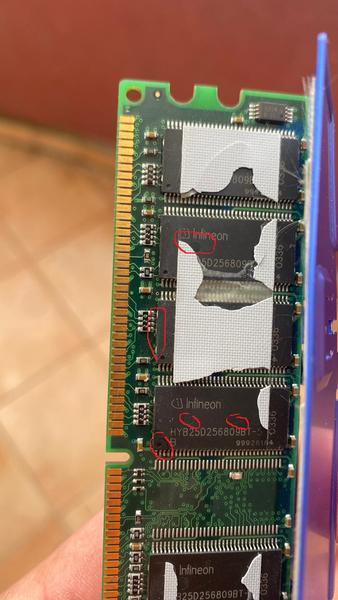
Sadly software tools can only read the SPD of the ram sticks. There's no way to identify the chips that way. However ram chips got very specific metal dots or fins on the shorter edge of the plastic package. So if you can see the short edge below the heatspreaders, you can at least guess what they are. Winbond for example does have two lengthy metal tabs. Samsung 256mbit rev. F chips (TCCC/TCCD) got six tiny metal dots ( . .. .. . ). Micron has a round cutout. Other chips mostly have four dots, but their position varies.

There are BGA chips - for example there's Samsung TCCC (TSOP package) and ZCCC (BGA package). Or Infineon BT-6 (TSOP) and BC-6 (BGA). The only "good" BGA chips i know about is Infineon CF-5 (basically 512mbit CE-6 in BGA package). If you got those, try testing it. Just beware that some of these OEM sticks were made cheap and may have 128Mx4 organization, which will only work on Athlon 64 but not 462 or 423/478/479.

Besides that you can check old ram chip lists or the above mentioned ddr chip thread on hardwareluxx forums. Your Ballistix got their chips on the white label. If it's for example named: BL12864AL1065.16FD3, then it's 5B D chips. If it's named ....16TG then it's 5B G My DDR400 Ballistix (2x512mb 5B G) are able to run 2-2-2-5 2.8V at 200Mhz and 2.5-2-2-9 250Mhz 2.8V on Nforce 2. Setting Tras to 9 is key for stability at 250MHz on my system.

Regarding your mentioned sticks: There are two huge lists for Corsair XMS which you can check. One is the DDR Inquiry List on Corsair forums and the other was compiled by stunned_guy on Hardwareluxx. I took both lists and made them searcheable here . I also found a bit of information for GEIL and Twinmos (see last link). You can also check the DDR1 databases ( Link #1 for 512mb and #2 for 1gb) on hardwareluxx, those are mostly accurate but may contain smaller errors.

In the end it's trial, error and a lot of testing. Having a good 939 system at hand to pre-test the rams is a great idea.

tehsiggi wrote on 2026-07-14, 19:41:

Finding the right balance is the key I guess.

Here we are, going for place number 4!

Yes, tweaking and tinkering (bios version, alphatimings, hard mods) and then goind for the right balance is key on socket A. What makes this so much fun is the fact, that it is just the right balance of hard- and softmods without requiring replacement of clockgens (like socket 370) and still giving you a challenge to push it hard.

Congratz on #4, well done! 😀

Reply 479 of 513, by SlowA

User metadata
Rank Newbie
Rank
Newbie

SuperTalent DDR400 CL2 blue heat spreaders are definitely BH/CH5, I pulled off heat spreaders from mine:
Super-Talent.jpg