VOGONS


Socket 370 - Aiming For The Stars

Topic actions

Reply 40 of 56, by TELVM

User metadata
Rank Oldbie
Rank
Oldbie
bloodem wrote on 2026-08-06, 07:39:

... these circuits probably have far more tolerance than the design guidelines appear to suggest ...

bloodem wrote on 2026-08-06, 07:39:

... I'm not advocating for the use of general purpose caps, just stating my experience ...

Yep you're right, the parameters Intel chose for the graph above represent a worst case scenario ("... This is a fairly conservative analysis ...").

Once I get hands on to the trouble of recapping some piece of beloved vintage hardware, my approach is to go overkill & bombproof well beyond the call of duty 😀 , in the hope of maximizing its reliability & longevity.

shevalier wrote on 2026-07-06, 04:35:
... Regarding polymer caps: 5 x 820 µF general-purpose ones will give you an ESR of right around 2 mΩ. Works like a charm. Rippl […]
Show full quote

... Regarding polymer caps:
5 x 820 µF general-purpose ones will give you an ESR of right around 2 mΩ.
Works like a charm.
Ripple + noise is around 20–30 mV peak-to-peak.

^ This. 👍

Man do I need to write Santa about an oscilloscope. 😀

Let the air flow!

Reply 41 of 56, by bloodem

User metadata
Rank Oldbie
Rank
Oldbie
TELVM wrote on 2026-08-06, 09:15:

Once I get hands on to the trouble of recapping some piece of beloved vintage hardware, my approach is to go overkill & bombproof well beyond the call of duty 😀 , in the hope of maximizing its reliability & longevity.

Of course, I think most of us do that. 😁

I just recapped an Asus A8V board and, on the CPU VRM, I used Chemi-Con 1500uF / 16V polys with 8 mOhms ESR, rated for 7.5A of ripple current and a lifetime of 15 000 hours @ 105 degrees C.
This is way (and I mean WAY) beyond overkill. Why did I do it? Because... They. Just. Look. So. Cool. 🤣

(in case anyone is wondering, I again went with Panasonic FR 1000uF / 10V for all other caps)

2 x PLCC-68 / 4 x PGA132 / 5 x Skt 3 / 1 x Skt 4 / 9 x Skt 7 / 12 x SS7 / 1 x Skt 8 / 21 x Slot 1 / 8 x Slot A
5 x Skt 370 / 8 x Skt A / 2 x Skt 478 / 2 x Skt 754 / 3 x Skt 939 / 7 x LGA775 / 1 x LGA1155
Current PC: Ryzen 7 9800X3D
Backup: Ryzen 7 5800X3D

Reply 42 of 56, by TELVM

User metadata
Rank Oldbie
Rank
Oldbie

^ Now THAT's overkill in my book! 👍

?u=https%3A%2F%2Fi.pinimg.com%2Foriginals%2F7b%2F78%2F35%2F7b7835c1b724fa1a0ce02e3718f2bd39.gif&f=1&nofb=1&ipt=c2a385fc651ea4ebba337ea8f9c9569c8c8abb218171e48c9fdb1e5ae9d9cd56

Let the air flow!

Reply 43 of 56, by PcBytes

User metadata
Rank l33t
Rank
l33t
bloodem wrote on 2026-08-06, 07:39:
I think you've misunderstood what I was saying. I know very well what Intel & AMD say, and of course low ESR caps will always be […]
Show full quote
TELVM wrote on 2026-08-06, 06:55:
I'm afraid Intel disagrees. […]
Show full quote

I'm afraid Intel disagrees.

Intel Slot 1 Processor Power Distribution Guidelines

This wonderful graph explains at a glance the relationship between capacitance and ESR for the CPU VRM output bank of caps:

^ General purpose lytics with high ESR fall beyond the right edge of the graph , where you need a humongous amount of combined capacitance to stay above the grey insufficiency area.

Low ESR lytics fall around the middle-right in the graph.

Very low ESR polys fall to the left in the graph, where you can still stay above the gray area even with a much reduced combined capacitance (5000~6000uF).

Notice how even with hypothetical magical caps of ESR= zero, we'd still need ~4750uF of combined capacitance (under the particular parameters Intel chose for this graph).

.

IMHO it's not a good idea to place high ESR general purpose caps at the CPU VRM output capacitor bank.

I think you've misunderstood what I was saying. I know very well what Intel & AMD say, and of course low ESR caps will always be recommended for buck converters, which is why I myself use them. 😀
I'm just saying that, based on my experience, even if you go the bad route and use general purpose caps, the truth of the matter is that... nothing bad will happen.

As I said (and I'm sure many have had a similar experience), boards can sometimes work fine even with leaky caps that are WAY out of spec. Yes, the VRM will be under a lot of stress, and prolonged operation will certaninly increase the risk of permanent damage, but many times the board will not show any signs of instability (and, again, we're talking 200 to 300 times higher ESR than normal!). The only plausible explanation is that these circuits probably have far more tolerance than the design guidelines appear to suggest.

22 years ago, I used to work for a computer repair company which would only source cheap general purpose caps for all repairs. I can't even tell you how many recaps we did for all kinds of boards ranging from socket 7 all the way up to socket 939 & 478. We never once received any complaint... ever (and most of those motherboards came from corporate clients, some of whom were running very demanding software, such as ship design specific apps).
But, again, I'm not advocating for the use of general purpose caps, just stating my experience. 😀

shevalier wrote on 2026-08-06, 06:58:

I have 2+1 (fried from testing) CUBX-L motherboards. They were pulled from the exact same IT department scrap box and are of identical revisions.
The dead one back in the day could run 1 GB of RAM and even a Radeon 9800 XT at a 133 MHz bus, while the other two top out at 124 MHz and won't run the 9800 at all. On top of that, one of them has been fully recapped with polymer capacitors, while the second one is completely untouched.

It all comes down to the individual motherboard when you try pushing it beyond official specs.

Agreed. It's just that @PcBytes has (or had?) two such boards and I have... at least 5 that I remember right now, so it is kind of strange how different our experience is: all of my boards work (almost) fine @ 133 MHz, while all of his boards appear to have major issues.

Actually 4. Two 6163 rev 2, one rev 1 and a rev 3 (BX Master is 6163 r3). None able to run 133FSB, and that was with a 6905 Master no less. MSI wise it's a far wider issue as 6168 won't do 133 properly either, across 3 different boards, nor about any BX board MSI released.

Not that they were the only ones to fail 133FSB - QDI P6I440BX/B1S/2000, Chaintech 6BTM0, Jetway J-7BXAN and GA-6BXC across a lot of revisions except 2.0, and ABIT BH6 r1.0 but that last one is kinda expected.

The ones working were ABIT BE6-II, BX2000 (both standard and Plus), GA-6BX7+ and IIRC DTK PRM-27i E0.

"Enter at your own peril, past the bolted door..."
Main PC: i5 3470, GB B75M-D3H, 16GB RAM, 2x1TB
98SE : P3 650, Soyo SY-6BA+IV, 384MB RAM, 80GB

Reply 44 of 56, by shevalier

User metadata
Rank Oldbie
Rank
Oldbie

So what is causing this then?
If the clock generator supports the proper PCI and AGP divider, it should boot with at least one stick of CL1 memory.
100 and 133 MHz aren't so different in frequency that all of the specified boards would have such serious PCB routing issues.

With three RAM sticks, the CUBX takes 133 MHz no problem. Granted, they are CL1 modules.

Just remember that the 440BX doesn't do native 133 MHz memory — it's just 100 MHz memory overclocked to 133 MHz.
That's because sub-timings aren't tweakable and are hardcoded into the silicon.
With one golden stick of RAM, you could even hit 150 MHz just to flex in benchmarks.

Last edited by shevalier on 2026-08-06, 12:37. Edited 1 time in total.

Aopen MX3S, PIII-S Tualatin 1133, Radeon 9800Pro@XT BIOS, Audigy 4 SB0610
JetWay K8T8AS, Athlon DH-E6 3000+, Radeon HD2600Pro AGP, Audigy 2 Value SB0400
Gigabyte Ga-k8n51gmf, Turion64 ML-30@2.2GHz , Radeon X800GTO PL16, Diamond monster sound MX300

Reply 45 of 56, by bloodem

User metadata
Rank Oldbie
Rank
Oldbie
PcBytes wrote on 2026-08-06, 11:16:

Actually 4. Two 6163 rev 2, one rev 1 and a rev 3 (BX Master is 6163 r3). None able to run 133FSB, and that was with a 6905 Master no less. MSI wise it's a far wider issue as 6168 won't do 133 properly either, across 3 different boards, nor about any BX board MSI released.

Not that they were the only ones to fail 133FSB - QDI P6I440BX/B1S/2000, Chaintech 6BTM0, Jetway J-7BXAN and GA-6BXC across a lot of revisions except 2.0, and ABIT BH6 r1.0 but that last one is kinda expected.

The ones working were ABIT BE6-II, BX2000 (both standard and Plus), GA-6BX7+ and IIRC DTK PRM-27i E0.

So strange, this is not my experience at all. I've probably tested ~ 50 x 440BX boards in the past few years, and I always test them at 133 MHz exclusively (not really a fan of the 100 MHz FSB speed on this chipset), and so far I only encountered one or two that refused to work properly at this frequency (the only one I remember right now is the Epox EP-BX3, probably lost the silicon lottery with that one).

With MSI MS-6163 ver 2 boards, I only had a small artifacting issue with some GeForce 2 cards, but otherwise they work just fine (and they do work perfectly with newer GeForce cards).
Coincidentally, I also have an MS-6168 ver. 2 board, and this one also works very well at 133 MHz with an external PCI card (the onboard Voodoo 3 does not work, unfortunately, still need to find the time to fix it someday).

What RAM sticks are you using, @PcBytes? Maybe there's some incompatibility there...
I use newer Samsung/Infineon/Kingston modules that can handle up to 150 MHz CL2 without issues and they've always been very compatible, even on more fussy boards.

shevalier wrote on 2026-08-06, 12:23:
So what is causing this then? If the clock generator supports the proper PCI and AGP divider, it should boot with at least one s […]
Show full quote

So what is causing this then?
If the clock generator supports the proper PCI and AGP divider, it should boot with at least one stick of CL1 memory.
100 and 133 MHz aren't so different in frequency that all of the specified boards would have such serious PCB routing issues.

With three RAM sticks, the CUBX takes 133 MHz no problem. Granted, they are CL1 modules.

Just remember that the 440BX doesn't do native 133 MHz memory — it's just 100 MHz memory overclocked to 133 MHz.
That's because sub-timings aren't tweakable and are hardcoded into the silicon.
With one golden stick of RAM, you could even hit 150 MHz just to flex in benchmarks.

I agree, something doesn't add up, there has to be an X factor that we don't know about, because so many 440BX boards not working at 133 MHz is unheard of, at least for me.

2 x PLCC-68 / 4 x PGA132 / 5 x Skt 3 / 1 x Skt 4 / 9 x Skt 7 / 12 x SS7 / 1 x Skt 8 / 21 x Slot 1 / 8 x Slot A
5 x Skt 370 / 8 x Skt A / 2 x Skt 478 / 2 x Skt 754 / 3 x Skt 939 / 7 x LGA775 / 1 x LGA1155
Current PC: Ryzen 7 9800X3D
Backup: Ryzen 7 5800X3D

Reply 46 of 56, by PcBytes

User metadata
Rank l33t
Rank
l33t
bloodem wrote on 2026-08-06, 12:36:
So strange, this is not my experience at all. I've probably tested ~ 50 x 440BX boards in the past few years, and I always test […]
Show full quote
PcBytes wrote on 2026-08-06, 11:16:

Actually 4. Two 6163 rev 2, one rev 1 and a rev 3 (BX Master is 6163 r3). None able to run 133FSB, and that was with a 6905 Master no less. MSI wise it's a far wider issue as 6168 won't do 133 properly either, across 3 different boards, nor about any BX board MSI released.

Not that they were the only ones to fail 133FSB - QDI P6I440BX/B1S/2000, Chaintech 6BTM0, Jetway J-7BXAN and GA-6BXC across a lot of revisions except 2.0, and ABIT BH6 r1.0 but that last one is kinda expected.

The ones working were ABIT BE6-II, BX2000 (both standard and Plus), GA-6BX7+ and IIRC DTK PRM-27i E0.

So strange, this is not my experience at all. I've probably tested ~ 50 x 440BX boards in the past few years, and I always test them at 133 MHz exclusively (not really a fan of the 100 MHz FSB speed on this chipset), and so far I only encountered one or two that refused to work properly at this frequency (the only one I remember right now is the Epox EP-BX3, probably lost the silicon lottery with that one).

With MSI MS-6163 ver 2 boards, I only had a small artifacting issue with some GeForce 2 cards, but otherwise they work just fine (and they do work perfectly with newer GeForce cards).
Coincidentally, I also have an MS-6168 ver. 2 board, and this one also works very well at 133 MHz with an external PCI card (the onboard Voodoo 3 does not work, unfortunately, still need to find the time to fix it someday).

What RAM sticks are you using, @PcBytes? Maybe there's some incompatibility there...
I use newer Samsung/Infineon/Kingston modules that can handle up to 150 MHz CL2 without issues and they've always been very compatible, even on more fussy boards.

shevalier wrote on 2026-08-06, 12:23:
So what is causing this then? If the clock generator supports the proper PCI and AGP divider, it should boot with at least one s […]
Show full quote

So what is causing this then?
If the clock generator supports the proper PCI and AGP divider, it should boot with at least one stick of CL1 memory.
100 and 133 MHz aren't so different in frequency that all of the specified boards would have such serious PCB routing issues.

With three RAM sticks, the CUBX takes 133 MHz no problem. Granted, they are CL1 modules.

Just remember that the 440BX doesn't do native 133 MHz memory — it's just 100 MHz memory overclocked to 133 MHz.
That's because sub-timings aren't tweakable and are hardcoded into the silicon.
With one golden stick of RAM, you could even hit 150 MHz just to flex in benchmarks.

I agree, something doesn't add up, there has to be an X factor that we don't know about, because so many 440BX boards not working at 133 MHz is unheard of, at least for me.

Tried everything, from as well known to as well no-name as it gets. Tried BOTH CL2 and CL3 sticks in each case, PC133 (with the exception of one PC100 stick for Micron). Listed below are the brands in order from known to no-name.
-Samsung
-Hynix
-Infineon
-Kingston (these were almost all non-functional, seems almost all of them were made with i810/15 at earliest in mind.)
-Micron
-Elpida
-Winbond (AOpen)
-Mtec (pretty sure also Winbond as they use same PCB and chip design as the AOpen stick.)
-Sycron
-UniQ (TMC according to sticker?)

All result in the same behaviour, across about EVERY MSI board that uses BX. List of boards tested a bit more below.

Issue - 100FSB works fine across everything. 133FSB results in Windows not even being able to load, locking up at various stages during boot, all of them ALWAYS situated before the boot process switches to the desktop stage of loading. The only ones that got as far as the login screen in 98SE before freezing were 3dfx.

GPUs tested:
- nVidia Geforce II GTS, Pro and Ti
- nVidia Geforce 3 - Ti200 and Ti500
- nVidia Geforce 4 - MX440, Ti4200
- ATi - Rage 128 AIW (109-65600-10), Xpert2000 32MB (109-65700-09), Radeon 7500 (Palit OEM, purple PCB), Radeon 9000 (Xpertvision OEM, purple PCB)
- 3dfx - Voodoo 3 2000 AGP, Voodoo 3 3000 AGP, Voodoo Banshee, Velocity 100, PCI versions of V3 2000 and 3000.
- PowerVR - Kyro II (3D Prophet 4500)

MSI boards tested:
-MS-6119 (BX2) - kind of expected, this one is about as contemporary with the BH6 rev1.0
-MS-6153 (BX10)
-MS-6156 (BX version)
-MS-6163 - as mentioned, 2x rev 2, 1x rev 1, 1x rev 3. Neither worked at 133FSB, using several 133FSB chips (P3 866, 933 and even 1000) and a MS-6905 Master slotket
-MS-6168 - also not working at 133FSB - this one is a bit more well known as I've read several reports on other users here not being able to pull 133FSB out of it.
-MS-6199 - basically same as 6163. Unsurprisingly this one and 6156's VIA counterparts do 133FSB (of course, since 693A does 133FSB natively.)

Last edited by PcBytes on 2026-08-06, 14:49. Edited 1 time in total.

"Enter at your own peril, past the bolted door..."
Main PC: i5 3470, GB B75M-D3H, 16GB RAM, 2x1TB
98SE : P3 650, Soyo SY-6BA+IV, 384MB RAM, 80GB

Reply 47 of 56, by shevalier

User metadata
Rank Oldbie
Rank
Oldbie

Infineon CL2
Micron CL2
Hynix is a major compromise (their PC140 CL3 is so-so; PC133 CL3 is a complete no-go)
Samsung – total no-go
Everything else is practically non-functional
Naturally, this applies to the 440BX
On the i815, everything works perfectly

Aopen MX3S, PIII-S Tualatin 1133, Radeon 9800Pro@XT BIOS, Audigy 4 SB0610
JetWay K8T8AS, Athlon DH-E6 3000+, Radeon HD2600Pro AGP, Audigy 2 Value SB0400
Gigabyte Ga-k8n51gmf, Turion64 ML-30@2.2GHz , Radeon X800GTO PL16, Diamond monster sound MX300

Reply 48 of 56, by PcBytes

User metadata
Rank l33t
Rank
l33t
shevalier wrote on 2026-08-06, 14:46:
Infineon CL2 Micron CL2 Hynix is a major compromise (their PC140 CL3 is so-so; PC133 CL3 is a complete no-go) Samsung – total no […]
Show full quote

Infineon CL2
Micron CL2
Hynix is a major compromise (their PC140 CL3 is so-so; PC133 CL3 is a complete no-go)
Samsung – total no-go
Everything else is practically non-functional
Naturally, this applies to the 440BX
On the i815, everything works perfectly

None of the CL2 sticks you listed (Infineon and Micron) worked nor CL3. Mentioned above is the behaviour of all sticks across ALL MSI boards that used BX chipsets. VIA counterparts work issue-free, at the expense of speed (and Memory Interleave Enabler helps none.)

However, all of the sticks mentioned would work on the following boards (including the more noname ones)

- ABIT BE6-II
- ABIT BX133-RAID
- ASUS P3B-F
- Gigabyte GA-BX2000 (both standard and + version)
- Gigabyte GA-6BXC (rev2.0, anything lower flat out refuses POST at 133FSB, unlike MSI.)
- Gigabyte GA-6BX7+
- DTK PRM-27i E0

"Enter at your own peril, past the bolted door..."
Main PC: i5 3470, GB B75M-D3H, 16GB RAM, 2x1TB
98SE : P3 650, Soyo SY-6BA+IV, 384MB RAM, 80GB

Reply 49 of 56, by shevalier

User metadata
Rank Oldbie
Rank
Oldbie

That's strange.
Because CL2 memory on the 440BX is pretty much the only way to get it to work at CL3.
On the 440BX at 133 MHz, CL = 3 * 100 / 133, i.e., roughly equivalent to 2.25 (I know SDRAM doesn't have fractional CLs).
This is a quirk of the chipset, as I wrote earlier.

Simply put, since there is only 1 bit (66/100) for the memory configuration instead of two, the signal clock rate itself remains standard at 133 MHz. However, the individual pulse widths are "narrower," so standard memory cannot respond to them fast enough.

Aopen MX3S, PIII-S Tualatin 1133, Radeon 9800Pro@XT BIOS, Audigy 4 SB0610
JetWay K8T8AS, Athlon DH-E6 3000+, Radeon HD2600Pro AGP, Audigy 2 Value SB0400
Gigabyte Ga-k8n51gmf, Turion64 ML-30@2.2GHz , Radeon X800GTO PL16, Diamond monster sound MX300

Reply 50 of 56, by shevalier

User metadata
Rank Oldbie
Rank
Oldbie

Just rumors—haven't verified it myself:
The 440BX chipset has two revisions:
- Older revision: Runs hotter, but it's faster and has fewer memory issues. Found on the P3B-F and other Slot 1 motherboards.
- Newer revision: Runs cooler, but 133 MHz is already a struggle for it. Used on later motherboards.

Aopen MX3S, PIII-S Tualatin 1133, Radeon 9800Pro@XT BIOS, Audigy 4 SB0610
JetWay K8T8AS, Athlon DH-E6 3000+, Radeon HD2600Pro AGP, Audigy 2 Value SB0400
Gigabyte Ga-k8n51gmf, Turion64 ML-30@2.2GHz , Radeon X800GTO PL16, Diamond monster sound MX300

Reply 51 of 56, by VooDooMan

User metadata
Rank Member
Rank
Member
Standard Def Steve wrote on 2026-07-07, 02:51:

Anyone want me to hold their beer?

Nah, now you hold my beer 😜

Socket 370 is definitely my cup of tea 😁

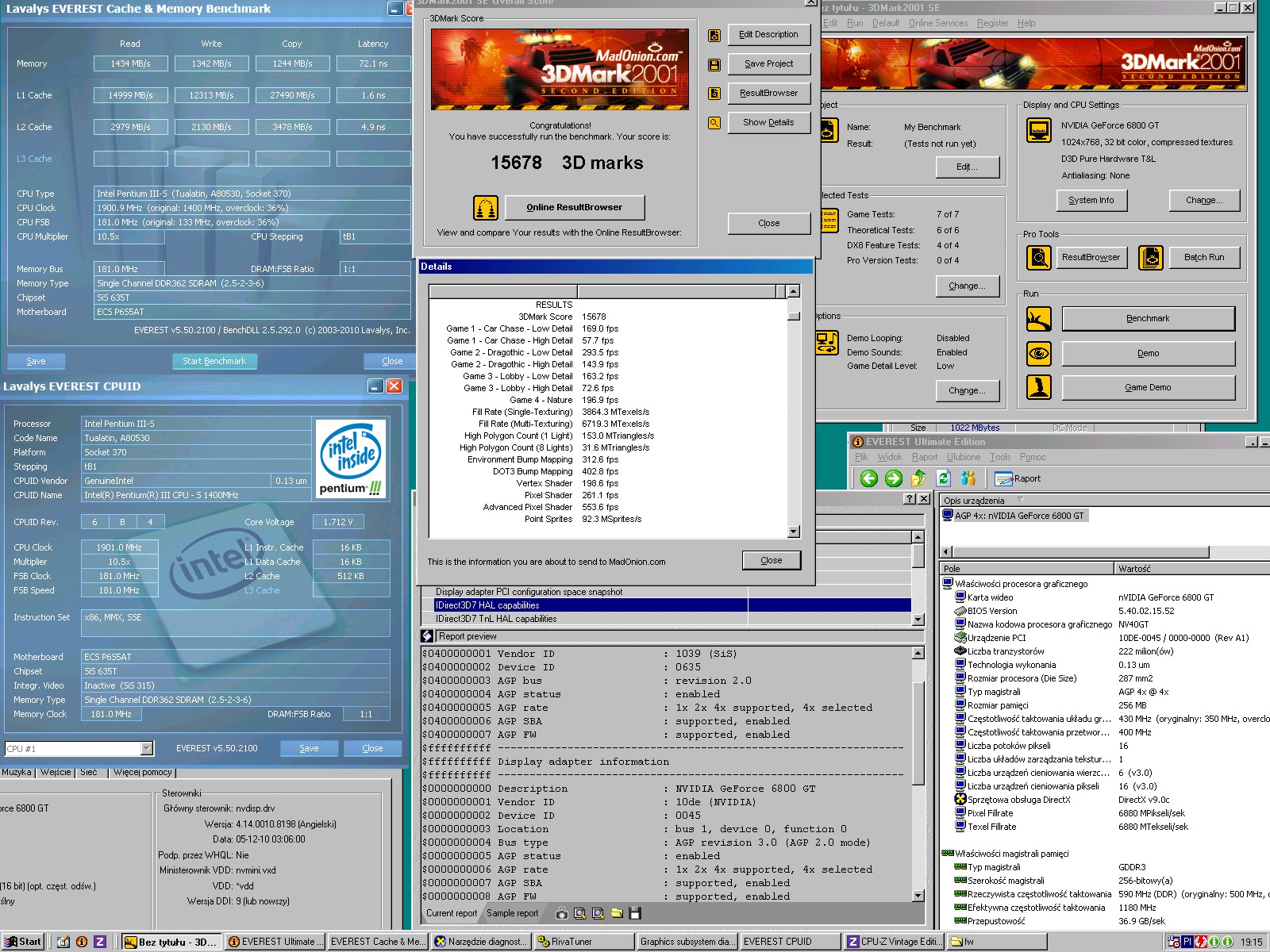
The board is the FASTEST but infamous ECS P6S5AT on SiS635T chipset.

TUALATIN CPU!
CPU SPEED: 1901 MHz (181 MHz FSB)

The tests were done on air, you can see the rest on the screenshots

3D Mark 2001SE @ GeForce 6800GT (OCed) : 15678 points
3Rozmiaroryginalny.jpg

3D Mark 2000 @ GeForce 4 Ti 4600 : 15036 points
333Rozmiaroryginalny.jpg

3D Mark 99 @ GeForce 6800GT : 15309 points
99provsyncoffrivatun.jpg

Let's hope that these results will improve if that mobo finally runs stable at 200 MHz

Best Tualatin Motherboard
ECS P6S5AT at 166 MHz
Overclocking Pentium III

Reply 52 of 56, by BX300A

User metadata
Rank Newbie
Rank
Newbie

VIA and SIS dominating the top results here is upsetting my 440BX apple cart and I don’t like it. Am I so out of touch?no it’s the chipsets who are wrong

386DX40, Amiga 600, Pentium 75, Celeron 300A, Pentium III-S 1.4, Athlon XP2400+, Pentium 4 I do not care for, Pentium M 780, Core 2 Q6600, i7 3770K

Reply 53 of 56, by PcBytes

User metadata
Rank l33t
Rank
l33t

Sorry for me being MiA. Life quite got in my way.

Anyways @BX300A, I should have a CUBX-L and Coppermine 1GHz ready. Will need to see what I can do. I sold the ST6 w/ the super-overclocked Tualatin (from 1.13GHz to 1.58GHz, an insane 185-ish MHz FSB)to help my elders financially.

Some of the ST6 results. No more results than 3DM99 unfortunately.

"Enter at your own peril, past the bolted door..."
Main PC: i5 3470, GB B75M-D3H, 16GB RAM, 2x1TB
98SE : P3 650, Soyo SY-6BA+IV, 384MB RAM, 80GB

Reply 54 of 56, by shevalier

User metadata
Rank Oldbie
Rank
Oldbie
BX300A wrote on Yesterday, 10:32:

VIA and SIS dominating the top results here is upsetting my 440BX apple cart and I don’t like it. Am I so out of touch?no it’s the chipsets who are wrong

Overclocking the Socket 370 for 3DMark is such an old and well-researched topic that, without a stable bus speed of 166+ MHz and AGP 4x (1.5 volts for including those Radeon HD 3850-class graphics cards with a transition bridge) – all you can do is take a seat in the auditorium and munch on popcorn.

What are you surprised about?

Aopen MX3S, PIII-S Tualatin 1133, Radeon 9800Pro@XT BIOS, Audigy 4 SB0610
JetWay K8T8AS, Athlon DH-E6 3000+, Radeon HD2600Pro AGP, Audigy 2 Value SB0400
Gigabyte Ga-k8n51gmf, Turion64 ML-30@2.2GHz , Radeon X800GTO PL16, Diamond monster sound MX300

Reply 55 of 56, by enaiel

User metadata
Rank Member
Rank
Member

I don't have a hot-rod machine, but this seemed like a good opportunity to use my very own VIAFSB tool to do some overclocking for a change, instead of just down-clocking.
Using my Boring Tualatin Win98 build, I was able to overclock the FSB to 145. Before I upgraded to CL2 RAM I was able to reach 150, but this RAM does not like 150.

  • Motherboard: QDI Legend Advance 10T [P6V694T/A10T]
  • Chipset: VIA PRO133T / 694T [VT82C694T + VT82C686B]
  • CPU: Intel Pentium III-S Tualatin 1.40GHz 512/133 [SL5XL]
  • RAM: 512MB PC133 133 MHz CL2 SDRAM
  • Video: MSI MS-8894 NVIDIA GeForce 4 Ti 4200 64MB AGP [Ti4200-VTD8X]
The attachment qdi_a10t_bench.png is no longer available

VIA C3 Ezra-T 1.0GHz / MSI MS-6368 / Voodoo2+ViRGE GX / SBPro2+YMF744+AWE64 / MT-32+SC-50
Pentium III-S Tualatin 1.40GHz / QDI A10T / Voodoo3 3000+GF4 Ti4200 / Audigy+AU8830

Reply 56 of 56, by VooDooMan

User metadata
Rank Member
Rank
Member
BX300A wrote on Yesterday, 10:32:

VIA and SIS dominating the top results here is upsetting my 440BX apple cart and I don’t like it. Am I so out of touch?no it’s the chipsets who are wrong

To be honest, what more could you expect from an old-school chipset from 1998? 😄 Sure, it gives legendary stability and unmatched memory latency(it beats even SiS635T....), but it also comes with a ton of drawbacks:
- AGP restrictions: Its AGP 1.0 port completely locks you out from running newer 1.5V / 0.8V cards (as mentioned by shevalier), which is a huge bottleneck.
- Picky RAM: You are strictly restricted to double-sided RAM sticks, which can really hold you back when picking hardware.
- CPU compatibility: It natively uses FC-PGA1. The lack of native Tualatin support can be problematic for some users who don't want to deal with modding or finding rare adapters.
- FSB ceiling: It is really hard to push iBX to a stable 166 MHz and beyond. Most boards will simply give up at around 155 MHz FSB. But even if you are lucky enough to push through that limit, there is the divider problem....
- The divider issue: While it has a proper 1/4 divider for the PCI bus at 133 MHz (keeping PCI at a safe 33 MHz), it completely lacks a proper 1/2 divider for the AGP bus. Therefore, this forces the AGP port to run at a heavily overclocked 89 MHz, which many high-performance graphics cards simply cannot handle. Furthermore, even if you miraculously manage to push this motherboard to 166 MHz+ FSB, the AGP port will lock you out from installing most top-tier cards (BTW, SiS chipset is the one to offer 1/5 and 1/6 dividers)
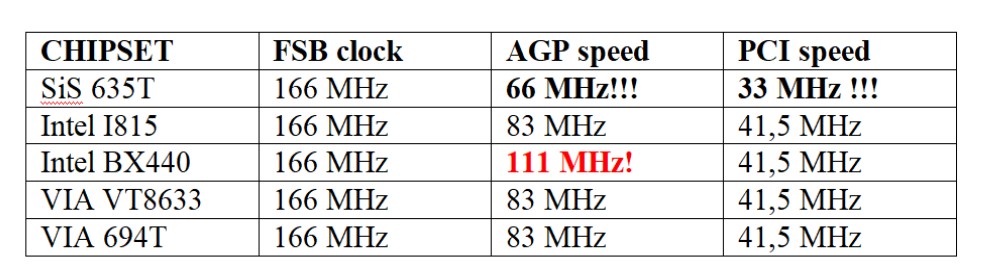
123123123123.jpg

Personally, I was able to run only a few tests with the iBX at 166 MHz FSB, but I tested only one motherboard, IIRC. You can find some info here:
Project "TualGOD": Pentium III-S 1,4 GHz @ 166 FSB = 1750 MHz - 5 chipsets comparison

PcBytes wrote on Yesterday, 11:31:

Sorry for me being MiA. Life quite got in my way.

Anyways @BX300A, I should have a CUBX-L and Coppermine 1GHz ready. Will need to see what I can do. I sold the ST6 w/ the super-overclocked Tualatin (from 1.13GHz to 1.58GHz, an insane 185-ish MHz FSB)to help my elders financially.

Some of the ST6 results. No more results than 3DM99 unfortunately.

Nice! But ST6 is capable of much more 😀

When it comes to the i815 chipset, it can easily go beyond 200 MHz. Most boards I've tested reach at least 210 MHz. The stable limit was something around 235 MHz:
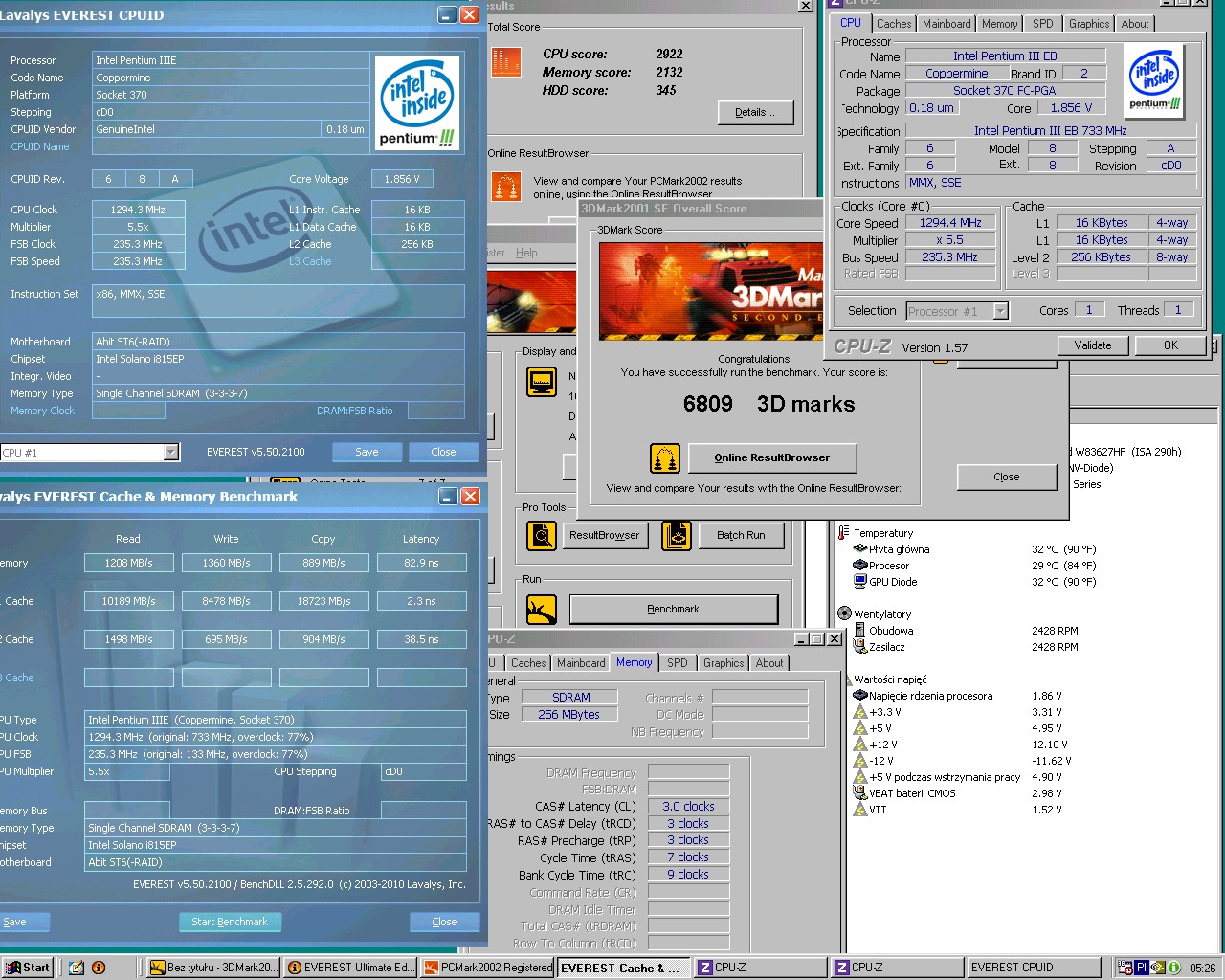
235.jpg

This is, of course, with a Coppermine CPU. Tualatins naturally won't go that high on air... So what you expect from a Tualatin core?

• 1133 MHz (tB1): Most of them will easily exceed 200 MHz FSB.
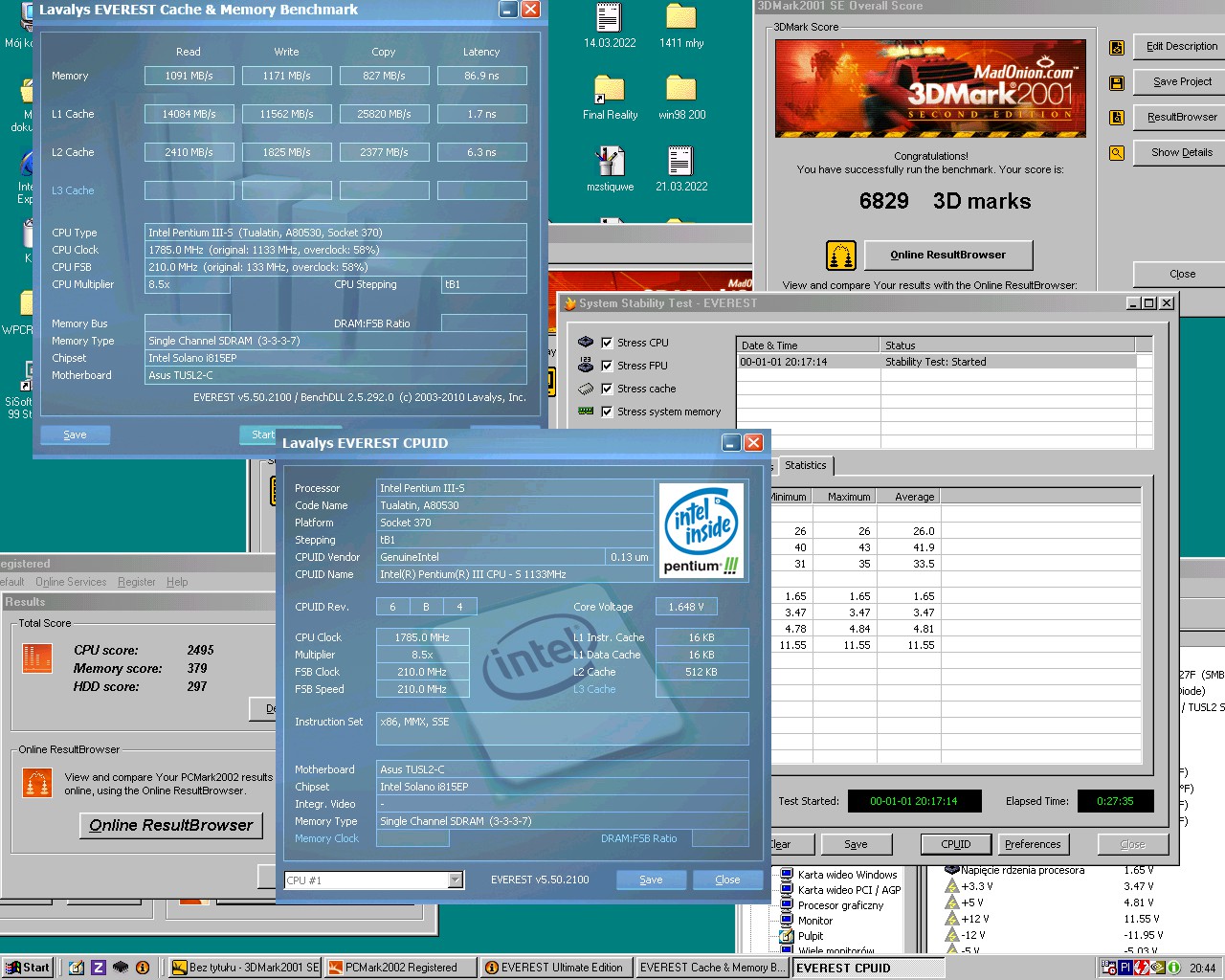
210stress.jpg

• 1266 MHz (tB1): 185/190 MHz should be achievable for most, but if you get really, really lucky, 200 MHz is possibile as well.
https://www.youtube.com/watch?v=SnS8KYfv7fg

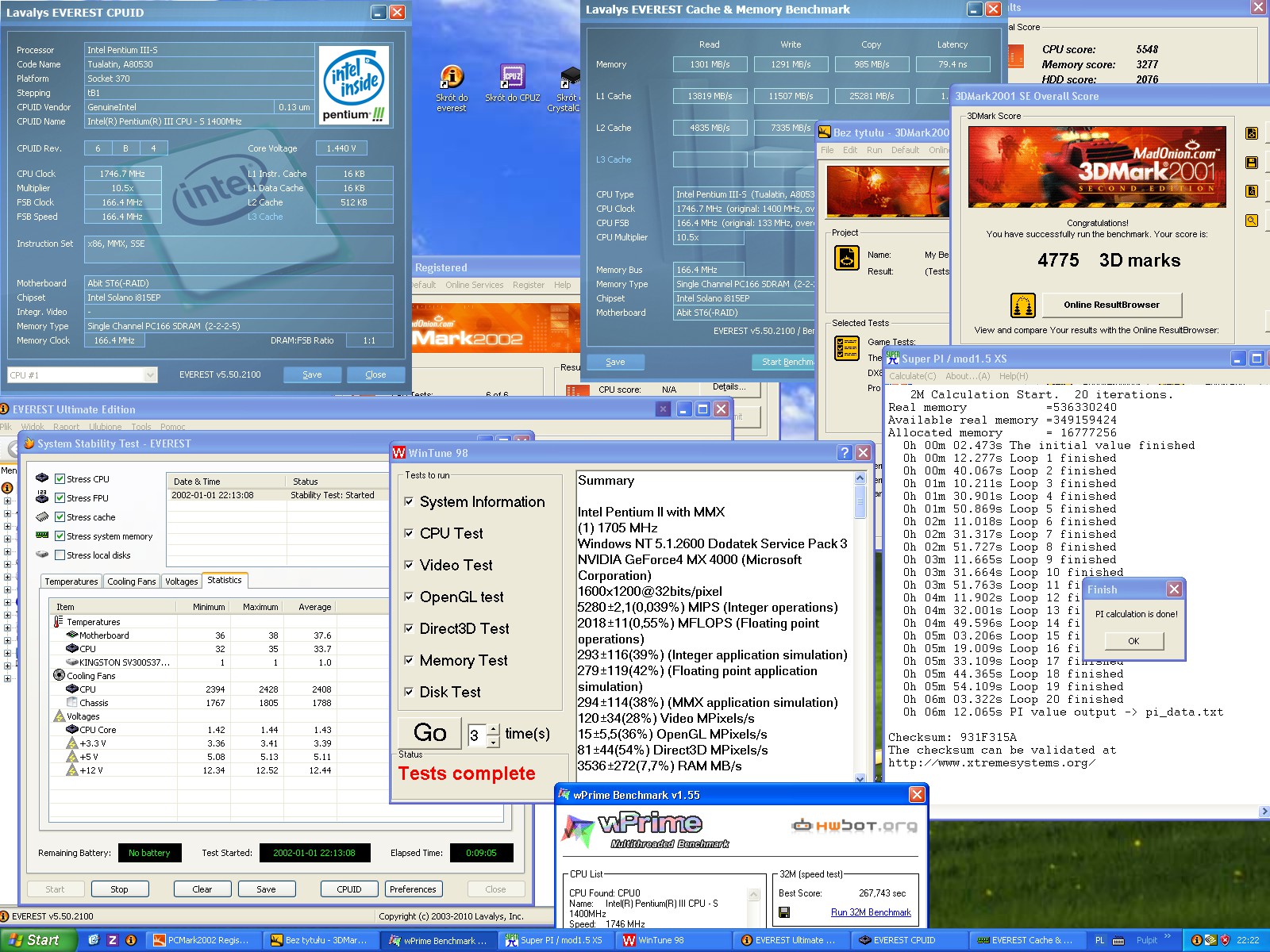
• 1400 MHz (tB1): This is the most interesting case. 😀 Most SL6BY CPUs hit a wall around 160–165 MHz. You have to do a lot of binning to find a truly unique one.
166na1400vOKRozmiaro.jpg
Nevertheless, a STABLE 166 MHz is possible EVEN AT DEFAULT VCORE as you can see 😀 I was able to reach stable 181 MHz at 1.75V Vcore maximum (after a delid)
https://www.youtube.com/watch?v=YGDogB2ueoc

enaiel wrote on Today, 04:08:
I don't have a hot-rod machine, but this seemed like a good opportunity to use my very own VIAFSB tool to do some overclocking f […]
Show full quote

I don't have a hot-rod machine, but this seemed like a good opportunity to use my very own VIAFSB tool to do some overclocking for a change, instead of just down-clocking.
Using my Boring Tualatin Win98 build, I was able to overclock the FSB to 145. Before I upgraded to CL2 RAM I was able to reach 150, but this RAM does not like 150.

  • Motherboard: QDI Legend Advance 10T [P6V694T/A10T]
  • Chipset: VIA PRO133T / 694T [VT82C694T + VT82C686B]
  • CPU: Intel Pentium III-S Tualatin 1.40GHz 512/133 [SL5XL]
  • RAM: 512MB PC133 133 MHz CL2 SDRAM
  • Video: MSI MS-8894 NVIDIA GeForce 4 Ti 4200 64MB AGP [Ti4200-VTD8X]
The attachment qdi_a10t_bench.png is no longer available

This is awesome 😁 I will try to test it on my boards 😉 Thank you!

Your results can be easily improved 😀 Please switch from SL5XL to SL6BY if you can find one, and your FSB will reach at least 160 MHz. 😉

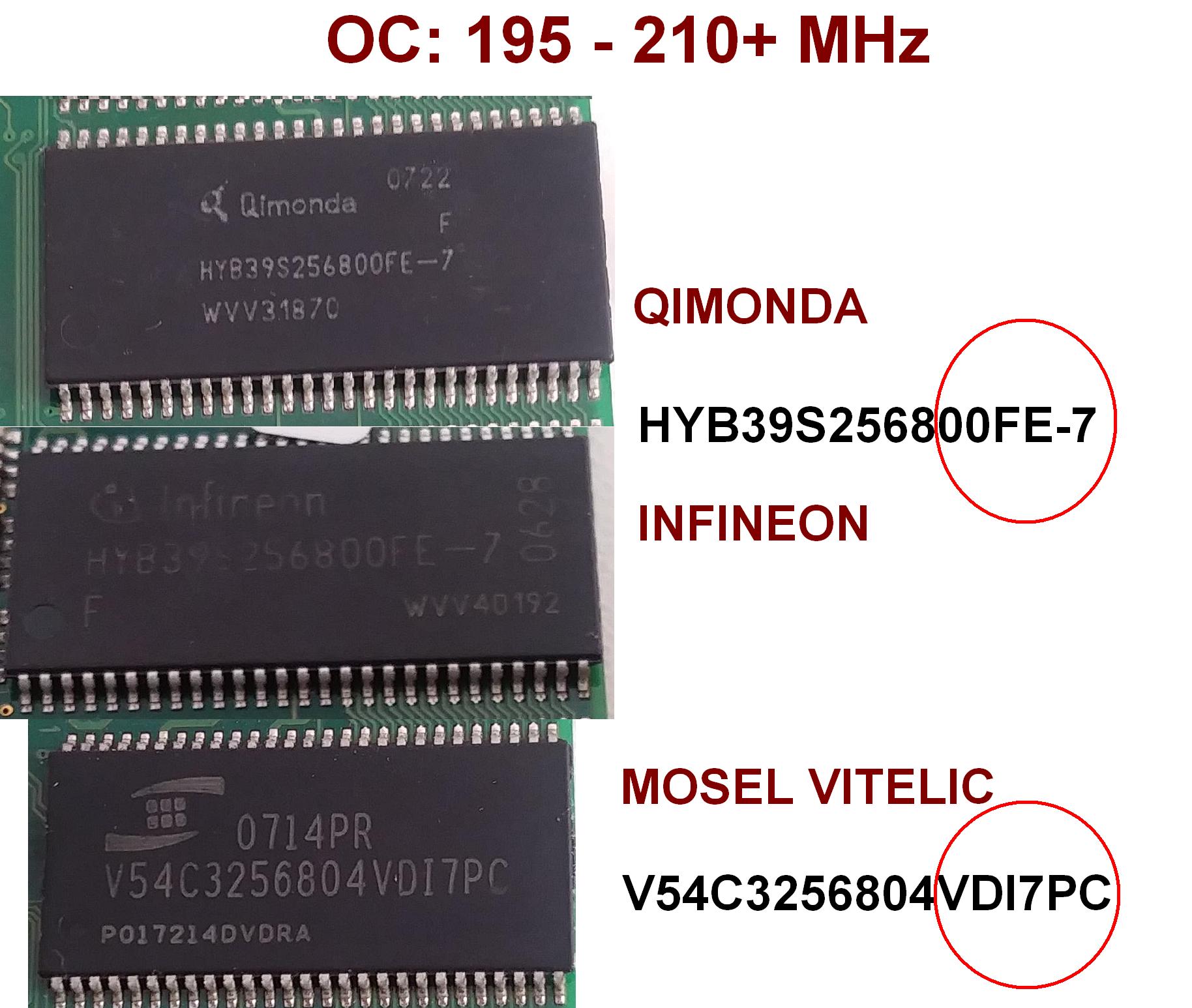
Also, look for those high-quality memory modules:
5kostkinaj.jpg

Then, you won't have to worry about CL2 even at the maximum FSB.
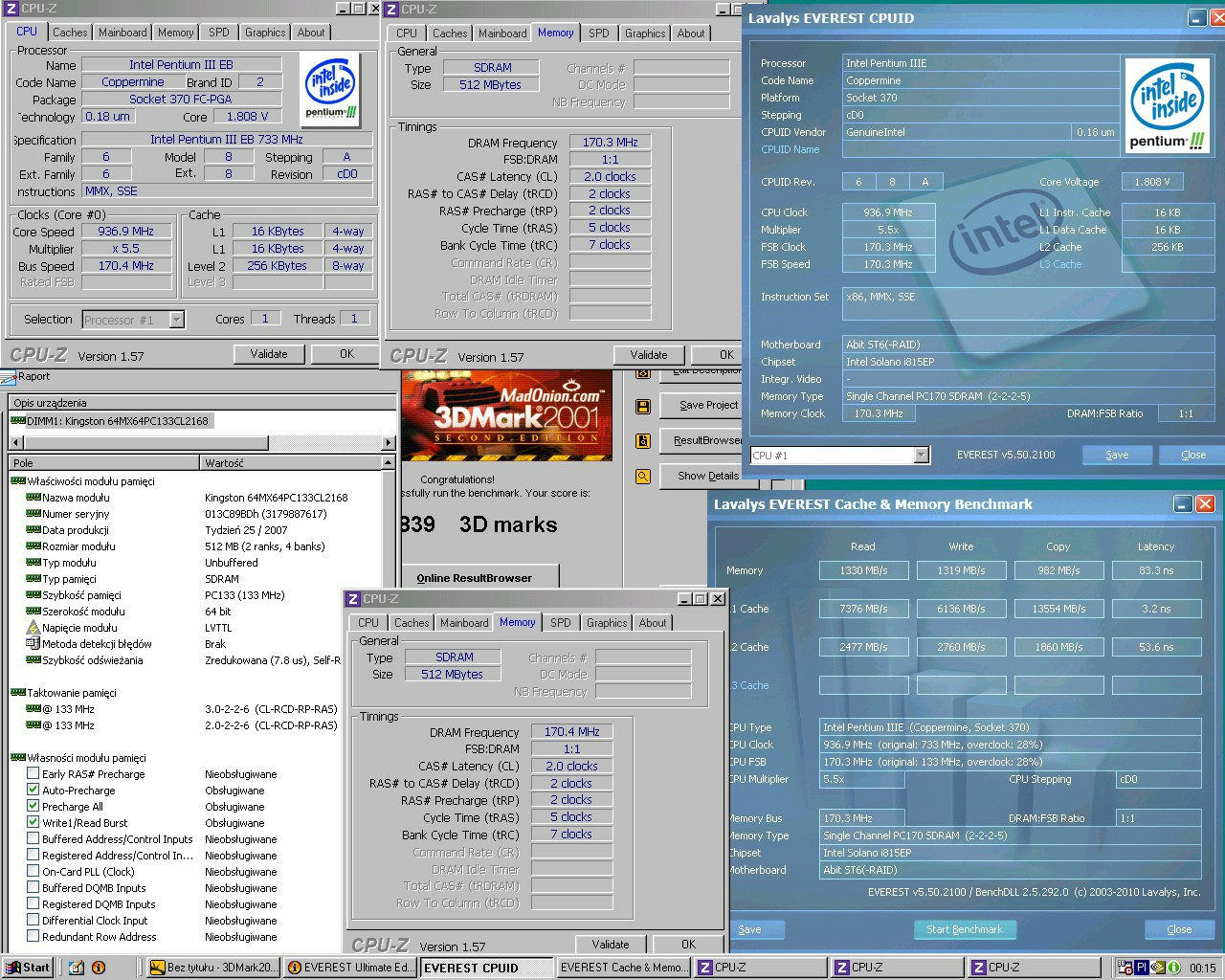
1702225.jpg

BTW @PcBytes are you gonna update the results on the first page? 😉

Last edited by VooDooMan on 2026-09-18, 08:31. Edited 1 time in total.

Best Tualatin Motherboard
ECS P6S5AT at 166 MHz
Overclocking Pentium III