VOGONS


First post, by vetz

User metadata
Rank l33t
Rank
l33t

As some of you may know Descent source code has been released since 1998. I decided I wanted to play around with it, but since my coding skills are limited, especially in C I'm putting a disclaimer that I have used AI assistance here. Still, the build I have now is working fine for me in DOSBOX, but I don't know enough of the minute details of the game to tell if there are other issues. Disclaimer: I did this patch for my own use as I want to use the original DOS version of Descent and not one of the modern source ports. It was not with initial intent to release, but I got so good results that I thought others may have a usecase for it.

This requires Descent registered fully patched to 1.5 version gamefiles.

FPS LIMITER
-----------
-maxfps <N> Frame rate cap (5-150)
Descent has an issue with running too fast on quicker CPUs. To prevent this, set a limit you desire. Recommended 60 or 70 (depending on monitor)
You can see your FPS during gameplay with -showfps flag

PHYSICS FIX for Homing missile
-----------
- Homing missile tracking decoupled from framerate
- Updates at ~30Hz regardless of render FPS (to match the "community standard" with behaviour at around 30 fps)
- Staggered per-missile for smooth visual appearance
- Original behavior preserved at <= 30 FPS

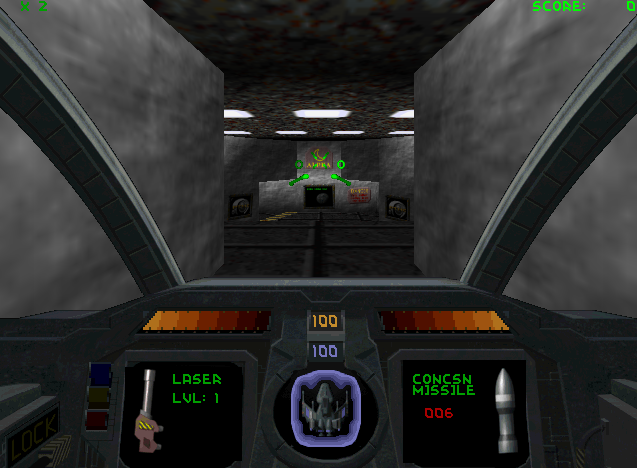
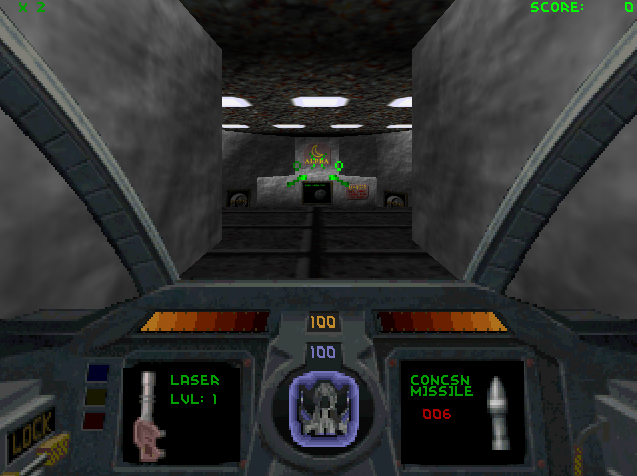
Cockpit HUD in 640x400 SVGA
-----------
- Scales up the cockpit HUD from 320x200 to also work in 640x400 (-640x400 flag)
- Uses the hi-res fonts from D2

BENCHMARK MODE
-----------
-benchmark (captures avg/min/1% low FPS during demo playback, writes BENCH.LOG in the game directory)

DESCENT BENCHMARK RESULTS
========================

Frames: 3058
Total time: 95.90 sec

Average FPS: 31.89
Minimum FPS: 7.36
1% low FPS: 16.86

Average frametime: 31.35 ms
Worst frametime: 135.78 ms
1% low frametime: 59.31 ms

Renderer: Software

In DOSBOX-X I sometimes notice sound clipping when playing demos, especially if CPU cycles is set high. I did some testing to the mixer and buffer, but I'm not 100% if it's making an effect, but I left it in there.
- Volume clamping to prevent mixer overflow/clipping
- Higher sample rate (22050 Hz) and larger DMA buffer (8192)

As the source is being compiled with Open Watcom 2.0 I added /5r to optimization for Pentium CPUs.

3D Accelerated Games List (Proprietary APIs - No 3DFX/Direct3D)
3D Acceleration Comparison Episodes

Reply 1 of 10, by drosse1meyer

User metadata
Rank Member
Rank
Member

Thanks this looks great!

P1: Packard Bell - 233 MMX, Voodoo1, 64 MB, ALS100+
P2-V2: Dell Dimension - 400 Mhz, Voodoo2, 256 MB
P!!! Custom: 1 Ghz, GeForce2 Pro/64MB, 384 MB

Reply 2 of 10, by vetz

User metadata
Rank l33t
Rank
l33t

Sneak peak of next version, 3DFX Glide DOS renderer with cockpit mode enabled! Its running fine with no glitches, just missing test on real 3DFX hardware.

The attachment image_2026-04-18_114115127.png is no longer available
The attachment image_2026-04-18_114239900.png is no longer available

3D Accelerated Games List (Proprietary APIs - No 3DFX/Direct3D)
3D Acceleration Comparison Episodes

Reply 3 of 10, by CkRtech

User metadata
Rank Oldbie
Rank
Oldbie

Hey vetz,

I have been looking for something like this for a long time. Being able to benchmark Descent is a welcome feature, imo, and it would be nice if this were adopted for various benchmarks done for systems and video cards as it evolves.

In addition to using it as a benchmark on real hardware, I wanted to drop a note of encouragement and thank you for sharing your modifications.

Here are the results running the first demo on Highest details on a 486DX4-100 with a Diamond Stealth 64 VLB (Vision868) -

DESCENT BENCHMARK RESULTS
========================

Frames: 1868
Total time: 96.19 sec

Average FPS: 19.41
Minimum FPS: 5.97
1% low FPS: 11.43

Average frametime: 51.49 ms
Worst frametime: 167.44 ms
1% low frametime: 87.47 ms

Renderer: Software

A few notes:
1: I saw what I believe was leftover debug output (40 column mode) written on top of the graphics at one point in menuing.
2: Imo, it would be nice if we had a bit more verbose output for the benchmark log for the purpose of reference. It mentions software rendering, but including the video resolution and mode would be nice. I mention "mode" (chained, unchained, VESA, resolutions, etc) in advance of #3 below -
3: I do wonder if Descent could be adapted to use other low resolutions such as Mode X and low res VESA modes. I am honestly not too familiar with the modes it supports - most of my experience with it was with plain Mode 13h running on the shareware version many years ago.

That said -

The graphics include in the source code does mention various modes. I assume they were part of the graphics library either created or used by the developers, but the math was designed around 320x200 and later 640x480 - at least for Descent 1.

The game does have separate 2D and 3D directories and perhaps separate graphics work for menuing versus gameplay. I am really not that familiar with it aside from a google search just a few minutes ago.

// Num Cols Rows Bpp Mode Pages Aspect
// --- ---- ---- --- ---- ----- ------
// 0 320 200 8 C 1.0 1.2:1
// 1 320 200 8 U 4.0 1.2
// 2 320 240 8 U 3.4 1.0
// 3 360 200 8 U 3.6 1.4
// 4 360 240 8 U 3.0 1.1
// 5 376 282 8 U 2.5 1.0
// 6 320 400 8 U 2.0 0.6
// 7 320 480 8 U 1.7 0.5
// 8 360 400 8 U 1.8 0.7
// 9 360 480 8 U 1.5 0.6
// 10 360 360 8 U 2.0 0.8
// 11 376 308 8 U 2.3 0.9
// 12 376 564 8 U 1.2 0.5
// 13 640 400 8 V 4.1 1.2 (Assuming 1 Meg video RAM)
// 14 640 480 8 V 3.4 1.0
// 15 800 600 8 V 2.2 1.0
// 16 1024 768 8 V 1.0 1.0
// 17 640 480 15 V 1.0 1.0
// 18 800 600 15 V 1.0 1.0

Reply 4 of 10, by vetz

User metadata
Rank l33t
Rank
l33t

Thanks for the feedback!

I have actually done some improvement in the benchmark output in the new build I'm working on, but I really like your suggestions to include more detail, so will take a look into it.

The engine can use alot of different resolutions, the main problem is the 2D assets as they were made for 320x200 and this require scaling and new x,y coordinates. I've done so now for 6400x400, 640x480 and 800x600 in preparation for the 3DFX Glide tenderer. The game works without Z buffer, so a Voodoo1 can run it in 800x600 and 1024x768 on a single Voodoo2.

The more you scale up the 2D cockpit assets the worse they look, so I'll see if I could backport some upgrades from Descent 2 (the main issue is that Descent 2 cockpit doesn't exactly match Descent 1)

3D Accelerated Games List (Proprietary APIs - No 3DFX/Direct3D)
3D Acceleration Comparison Episodes

Reply 5 of 10, by CkRtech

User metadata
Rank Oldbie
Rank
Oldbie
vetz wrote on 2026-04-26, 21:00:

I have actually done some improvement in the benchmark output in the new build I'm working on, but I really like your suggestions to include more detail, so will take a look into it.

Hey, I look forward to it. Hopefully other people are reading your thread and taking interest. I feel like benchmarking Descent is perhaps one of the best tools to use when building systems that push from early mid-90s into late mid-90s. I'd love to try it on my Pentium MMX 200 machine with a Voodoo 2 and see how that goes once you have a 3dfx-compatible build.

The engine can use alot of different resolutions, the main problem is the 2D assets as they were made for 320x200 and this require scaling and new x,y coordinates. I've done so now for 6400x400, 640x480 and 800x600 in preparation for the 3DFX Glide tenderer. The game works without Z buffer, so a Voodoo1 can run it in 800x600 and 1024x768 on a single Voodoo2.

Wow. Those resolutions. They'll be something to try...

The more you scale up the 2D cockpit assets the worse they look, so I'll see if I could backport some upgrades from Descent 2 (the main issue is that Descent 2 cockpit doesn't exactly match Descent 1)

Hmm. Perhaps the Descent 2 cockpit graphics could serve as a placeholder.

Reply 6 of 10, by NeoG_

User metadata
Rank Oldbie
Rank
Oldbie

I have noticed the 640x480 renderer in Descent 1.4 has some issues with texture mapping that don't exist in the standard 320x200 mode. They are most visible in the blue area just past the start in level 2. I want to try this version to see if they still occur.

98/DOS Rig: BabyAT AladdinV, K6-2+/550, V3 2000, 128MB PC100, 20GB HDD, 128GB SD2IDE, SB Live!, SB16-SCSI, PicoGUS, WP32 McCake, iNFRA CD, ZIP100
XP Rig: Lian Li PC-10 ATX, Gigabyte X38-DQ6, Core2Duo E6850, ATi HD5870, 2GB DDR2, 2TB HDD, X-Fi XtremeGamer

Reply 7 of 10, by NeoG_

User metadata
Rank Oldbie
Rank
Oldbie
vetz wrote on 2026-04-26, 21:00:

The more you scale up the 2D cockpit assets the worse they look, so I'll see if I could backport some upgrades from Descent 2 (the main issue is that Descent 2 cockpit doesn't exactly match Descent 1)

I was just thinking, the mac version of Descent has officially created high resolution art assets and fonts for the 640x480 display mode. It should be possible to extract those and use them with this patch? The high res assets even cover the mission briefing and planetary screens. The fan made 3DFX version for windows seems to use them for the menu and mission briefing, but not for in-mission.

On a side note (wishful thinking), it would be absolutely wicked if there was the ability to create a hybrid image with the PC DOS version and the Mac redbook soundtrack. With the mac assets, redbook soundtrack, frame consistency fixes, additional resolutions and 3d acceleration it would be the Ultimate DOS Edition (UDE)

Edit: I finally got to try this on my K6-2+/550 running DOS7 and unfortunately it can't start. I get the error "Can't run DOS/4G(W)" and the program quits. The 1.4a registered version works fine.

98/DOS Rig: BabyAT AladdinV, K6-2+/550, V3 2000, 128MB PC100, 20GB HDD, 128GB SD2IDE, SB Live!, SB16-SCSI, PicoGUS, WP32 McCake, iNFRA CD, ZIP100
XP Rig: Lian Li PC-10 ATX, Gigabyte X38-DQ6, Core2Duo E6850, ATi HD5870, 2GB DDR2, 2TB HDD, X-Fi XtremeGamer

Reply 8 of 10, by CkRtech

User metadata
Rank Oldbie
Rank
Oldbie

Can you pull a copy of DOS4GW from another directory and drop it into your Descent directory? You most likely have a copy floating around with another game.

Reply 9 of 10, by NeoG_

User metadata
Rank Oldbie
Rank
Oldbie
CkRtech wrote on Yesterday, 04:53:

Can you pull a copy of DOS4GW from another directory and drop it into your Descent directory? You most likely have a copy floating around with another game.

Thanks for the tip, I pulled a copy of DOS4GW from the Warcraft installation and the game launched. Everything seems to be OK, the HUD in 640x400 mode looks great actually.

I'm not sure if it's something specific to my hardware, the increased mix rate seems to be making the sound effects play at double the speed (and pitch). I tried with both GUS and SB16.

Last edited by NeoG_ on 2026-06-10, 08:28. Edited 1 time in total.

98/DOS Rig: BabyAT AladdinV, K6-2+/550, V3 2000, 128MB PC100, 20GB HDD, 128GB SD2IDE, SB Live!, SB16-SCSI, PicoGUS, WP32 McCake, iNFRA CD, ZIP100
XP Rig: Lian Li PC-10 ATX, Gigabyte X38-DQ6, Core2Duo E6850, ATi HD5870, 2GB DDR2, 2TB HDD, X-Fi XtremeGamer

Reply 10 of 10, by vetz

User metadata
Rank l33t
Rank
l33t
NeoG_ wrote on Yesterday, 03:43:
I was just thinking, the mac version of Descent has officially created high resolution art assets and fonts for the 640x480 disp […]
Show full quote
vetz wrote on 2026-04-26, 21:00:

The more you scale up the 2D cockpit assets the worse they look, so I'll see if I could backport some upgrades from Descent 2 (the main issue is that Descent 2 cockpit doesn't exactly match Descent 1)

I was just thinking, the mac version of Descent has officially created high resolution art assets and fonts for the 640x480 display mode. It should be possible to extract those and use them with this patch? The high res assets even cover the mission briefing and planetary screens. The fan made 3DFX version for windows seems to use them for the menu and mission briefing, but not for in-mission.

On a side note (wishful thinking), it would be absolutely wicked if there was the ability to create a hybrid image with the PC DOS version and the Mac redbook soundtrack. With the mac assets, redbook soundtrack, frame consistency fixes, additional resolutions and 3d acceleration it would be the Ultimate DOS Edition (UDE)

Edit: I finally got to try this on my K6-2+/550 running DOS7 and unfortunately it can't start. I get the error "Can't run DOS/4G(W)" and the program quits. The 1.4a registered version works fine.

I should have mentioned you need to provide DOS/4G on your own, this is due its not statically linked in this source port. I'll add support for DOS32/A as well (should provide some performance benefit).

Great tip on the Mac version assets. I'll look into it!

In the 3DFX version I have cockpit working in 640x480 and 800x600. 1024x768 also supported, but haven't done cockpit there yet, but should be doable. Cockpit assets do not render with bilinear filtering, but look the same as on the software version. The main issue on the 3DFX version is there is a very significant performance drop on large sprite drawings (explosions) which I haven't figured out yet.

3D Accelerated Games List (Proprietary APIs - No 3DFX/Direct3D)
3D Acceleration Comparison Episodes