VOGONS


Rust-DOS, a new DOS emulator

Topic actions

Reply 40 of 75, by Dividebysandwich

User metadata
Rank Newbie
Rank
Newbie

@The Solutor

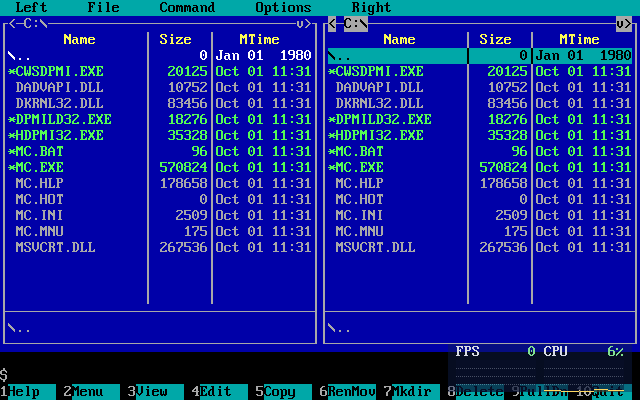
Ah, you need to have DKRNL32.DLL and DADVAPI.DLL from the HX runtime in the mc directory. CWSDPMI.EXE from your zip isn't actually used.
I got Midnight Commander to run but there's a problem in Rust-DOS' bios buffer not getting the queued key presses. This is fixable but I'll need to run more extensive tests because this is a bit of an invasive change in int16h and I don't fully know the consequences yet. But this is a good issue to improve emulator correctness.

Oh and also note this won't work with DPMI on yet, i'll need to implement support for 0504h in the DMPI host.

Reply 41 of 75, by The Solutor

User metadata
Rank Member
Rank
Member

But this is a good issue to improve emulator correctness.

Is what I thought as well.

It may be a bit of corner case, but you know, the world is plenty of corner cases 😀

Tanks for your interest and explanations anyway

P.S. I assume we are talking about the package called MC.ZIP, the other has issues even under windows, but includes the localization files, which work on the other (SET LANG=IT for italian and so on)

Reply 42 of 75, by Dividebysandwich

User metadata
Rank Newbie
Rank
Newbie

v1.0.0 time! -> https://github.com/dividebysandwich/rust-dos/ … ases/tag/v1.0.0

New in this version:

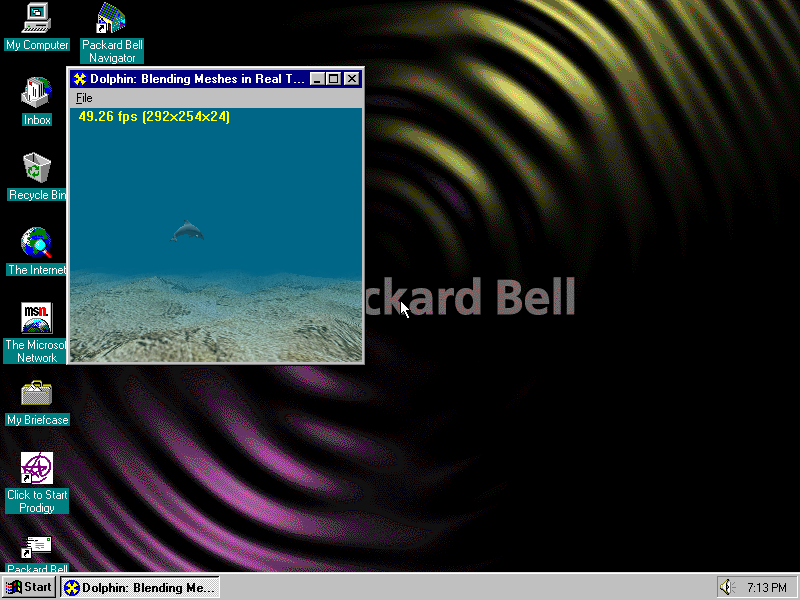
x) S3 Virge and Virge/VX emulation with Direct3D support in Windows 95

zfpmxz.png

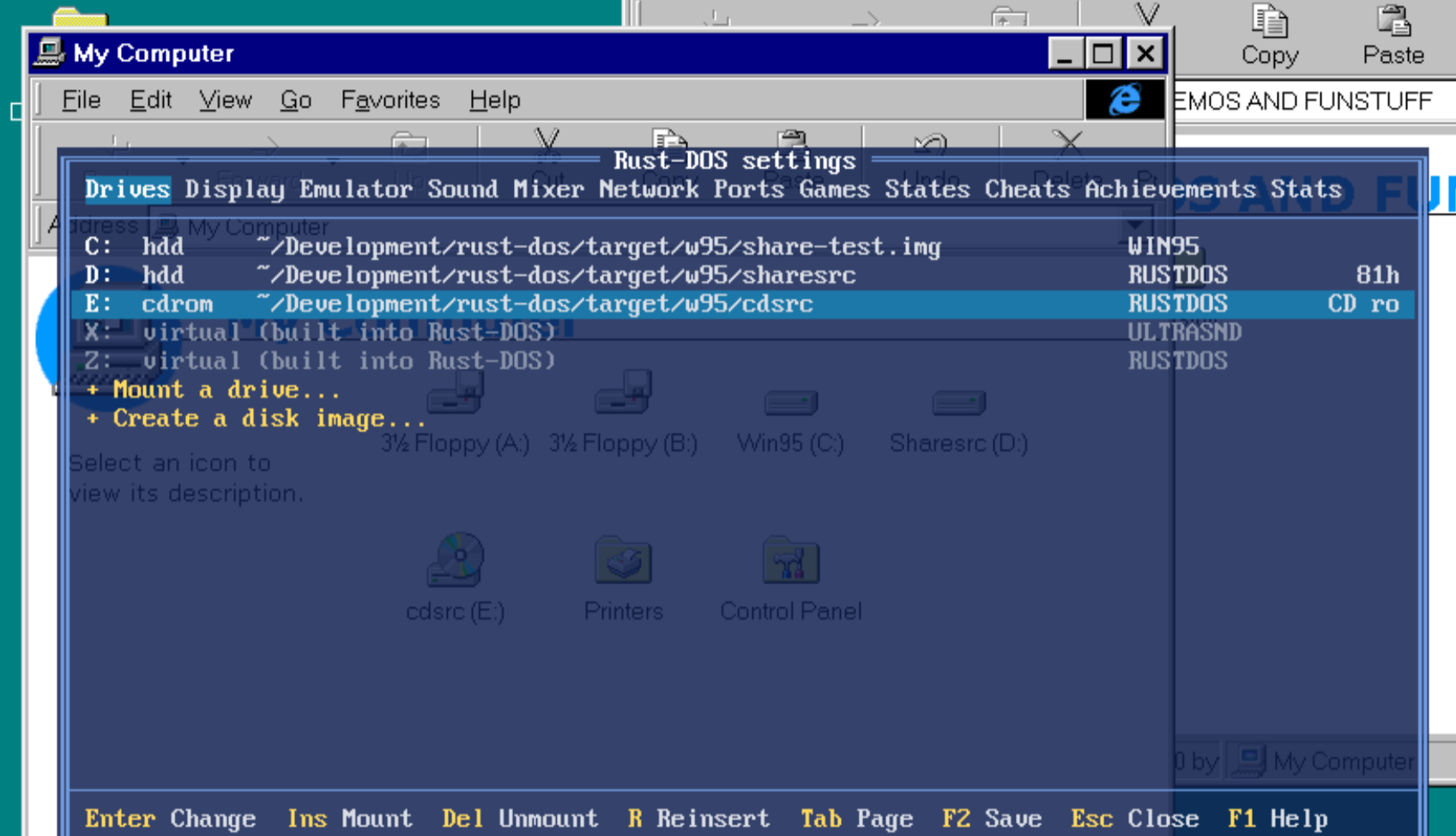
x) File exchange with Windows 95 via a virtual CD drive (readonly) and an in-memory disk (read+write) that has updates done by Win95 written to the actual filesystem on shutdown

0cyfqe.png

x) AWE 32 support
Note the ROM is not being distributed with Rust-DOS, but it will be automatically downloaded after user confirmation.

6jnx4i.png

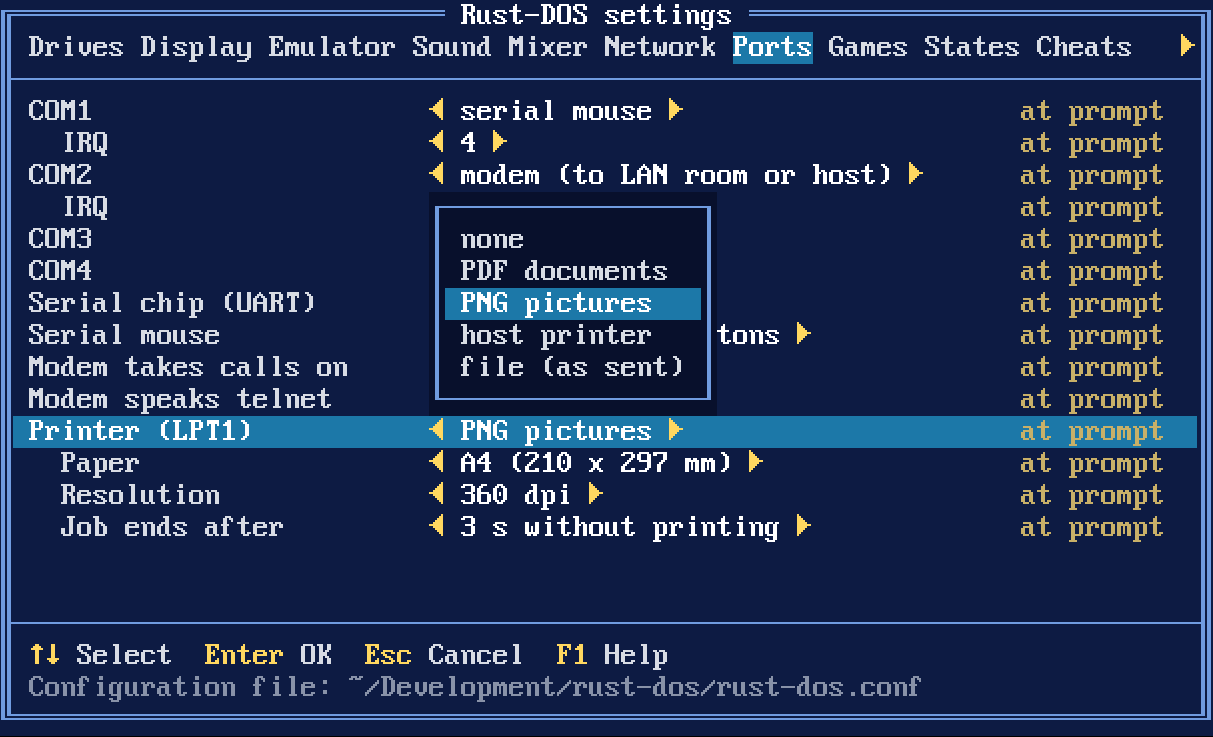
x) DOS Printing to file, PNG, PDF or a physical host printer

gltwey.png

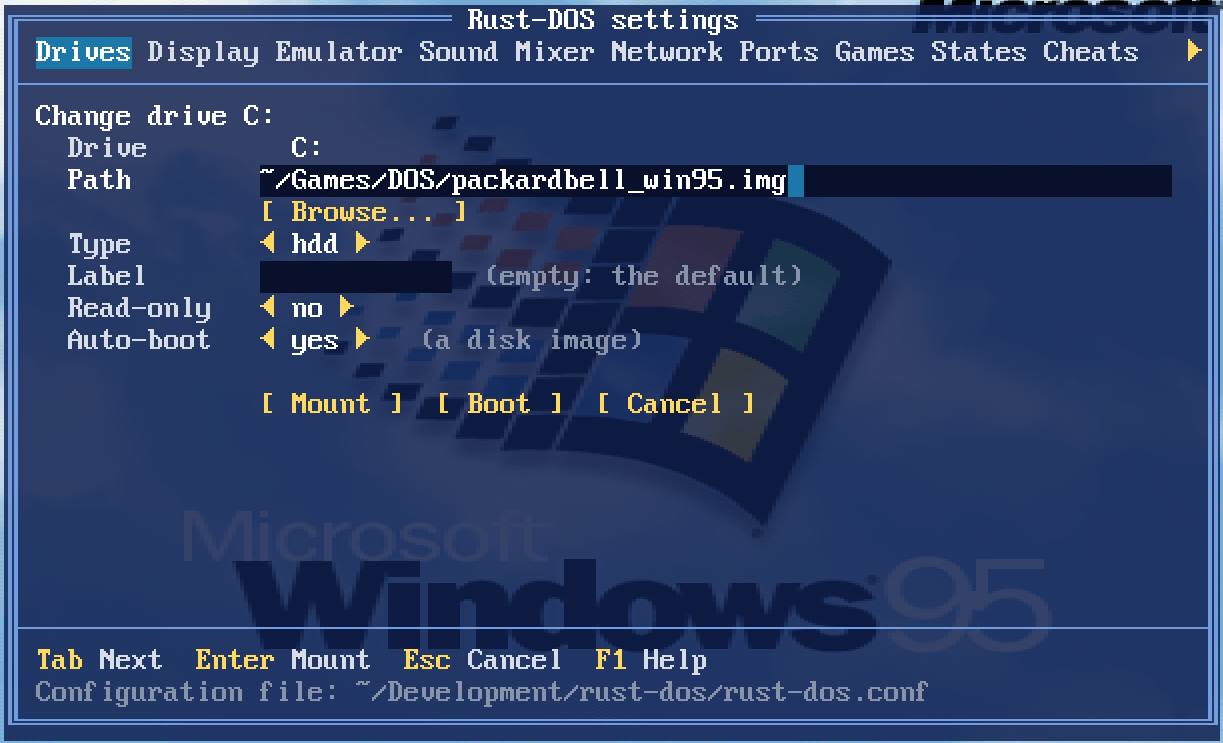
x) Booting mounted drives via the UI

olnhvm.png

x) A new "auto" cycle setting
This monitors the actual DOS render framerate and adjusts cycles to ensure maximum fps at minimum CPU load. It works a lot better than the usual dosbox approach of "grow to max in protected mode and use 3000 for everyone else". This actually enables playing a game like F117, and then playing Descent, both with good framerates and without touching settings at all. This is now the default.

x) Interpreter mode performance improvements
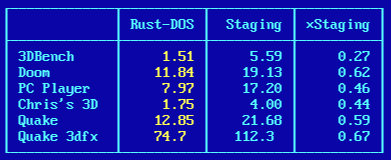
Rust-DOS should now be faster than Dosbox-X and Dosbox-Staging in realmode applications as well as protected mode applications.

z3rjjn.png

x) Larger memory configurations added - gated by processor type.

Last but not least:

x) Midnight Commander works now, both with and without DPMI=on 😀

Reply 43 of 75, by Mov AX, 0xDEAD

User metadata
Rank Newbie
Rank
Newbie

DOS kernel takes 76Kb of low memory, how to move DOS kernel to HMA or UMB ?

The attachment lowmem.PNG is no longer available

Reply 44 of 75, by The Solutor

User metadata
Rank Member
Rank
Member

Hi

Few things in no special order

1) Likely I'm doing something stupid but still I can't get MC working. The damn thing still says it can't run in dos mode.

2) Forgot to mention earlier that 3dfx, in OpenGL mode, regressed for me in 0.9, and nothing changed in 1.o.
I see a black screen, not even the 3dfx logo, BUT if I bring the menu using CTRL+F12, then exit the menu, I see a static image of the logo/game in that moment, it works like the strobo lights in a discobar.
Rust-DOS mode works OK.

3) Hopefully, sooner or later, you will implement a auto capture/release of the mouse, you know like using the vmware tools.
I understand it may be not straightforward, so take your time, and don consider this as a high priority request.

BUT

In the meantime, I found CTRL+F10 really awkward.
First: because those keys are meant to be pushed with the same hand that holds the mouse.
Second: because, personally, I'm really used to CTRL+ALT after 2+ decades of VMware usage, so I use the same shortcut in VBox and in all other similar situation, if possible..
Would be really nice to have that shortcut working also here but, if too complicate/not possible, I suggest something different than CTRL+F10, something usable with the left hand.

Thanks in advance

Reply 45 of 75, by Dividebysandwich

User metadata
Rank Newbie
Rank
Newbie
Mov AX, 0xDEAD wrote on 2026-10-01, 06:27:

DOS kernel takes 76Kb of low memory, how to move DOS kernel to HMA or UMB ?

Will be fixed in v1.1.0, there's actually no reason to take up all that lowmem space.

The Solutor wrote on 2026-10-01, 06:57:

Hi
1) Likely I'm doing something stupid but still I can't get MC working. The damn thing still says it can't run in dos mode.

I am on a different PC atm and downloaded the DLLs from somewhere else and here it also doesn't run. So you really HAVE to use the DLLs from dosbox-x or it won't work!
Then just run "HDPMI32.EXE", and then run "DPMILD32.EXE MC.EXE"

ufwa1w.png

The Solutor wrote on 2026-10-01, 06:57:

Hi
2) Forgot to mention earlier that 3dfx, in OpenGL mode, regressed for me in 0.9, and nothing changed in 1.o.
I see a black screen, not even the 3dfx logo, BUT if I bring the menu using CTRL+F12, then exit the menu, I see a static image of the logo/game in that moment, it works like the strobo lights in a discobar. Rust-DOS mode works OK.

Aye, my optimizations broke this. Will be fixed in v1.1.0.

The Solutor wrote on 2026-10-01, 06:57:

Hi
3) Hopefully, sooner or later, you will implement a auto capture/release of the mouse, you know like using the vmware tools.
Would be really nice to have that shortcut working also here but, if too complicate/not possible, I suggest something different than CTRL+F10, something usable with the left hand.

Done! The auto capture/release should even work properly in programs that use different mouse movement scaling, but this will need some more testing. I got F117's menu to only release the mouse cursor if the in-game cursor reached the edge, but it could well be that other games will misbehave. This will be part of v1.1.0 too.

Reply 46 of 75, by The Solutor

User metadata
Rank Member
Rank
Member

Very well, Thanks.

Reply 47 of 75, by The Solutor

User metadata
Rank Member
Rank
Member
Dividebysandwich wrote on 2026-10-01, 09:35:

I am on a different PC atm and downloaded the DLLs from somewhere else and here it also doesn't run. So you really HAVE to use the DLLs from dosbox-x or it won't work!
Then just run "HDPMI32.EXE", and then run "DPMILD32.EXE MC.EXE"

For the record I got MC running, both the versions, albeit the mc_95_nt-4.1.36 requires additionally msvcrt.dll (used one from NT4, but I guess the one from Win9x works as well)

I used the HX libraries I had which were OK, I just tried to use HXLDR32.EXE, which worked elsewhere, instead of DPMILD32.EXE, and HDPMI32.EXE isn't actually needed (frankly the whole matter is a bit of a mess)

The attachment mc.PNG is no longer available

I have no functional mouse anyway, not sure if I have to install ctmouse or similar driver, I'll experiment later on this detail.

Reply 48 of 75, by Dividebysandwich

User metadata
Rank Newbie
Rank
Newbie

v1.1.0 is here: https://github.com/dividebysandwich/rust-dos/ … ases/tag/v1.1.0

SC-55 emulation
iyqgjg.png

Rust-DOS now emulates the SoundCanvas with an implementation written in pure Rust. The ROMs are not shipped with the program, instead the user is prompted whether they want to download them from archive.org. This is the same mechanism as with the AWE32.

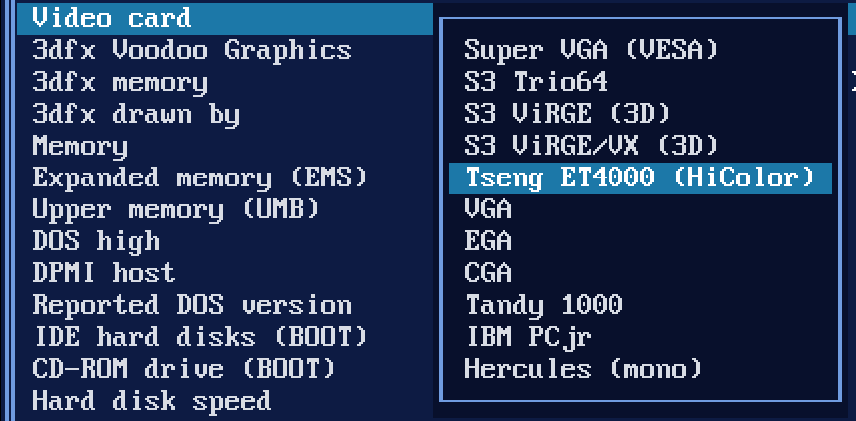
TsengLabs ET4000 support
8cxfnr.png

`machine=svga_et4000` is now a real Tseng ET4000AX with 1 MB and a Sierra HiColor DAC

VRR Frame Pacing
With the new `vrr` setting on, each frame is shown when the emulated video card would draw it, so a VRR display runs at the game's own rate. On a 144 Hz test display that measured 70.09 Hz in VGA text mode and 59.94 Hz in 640×480.

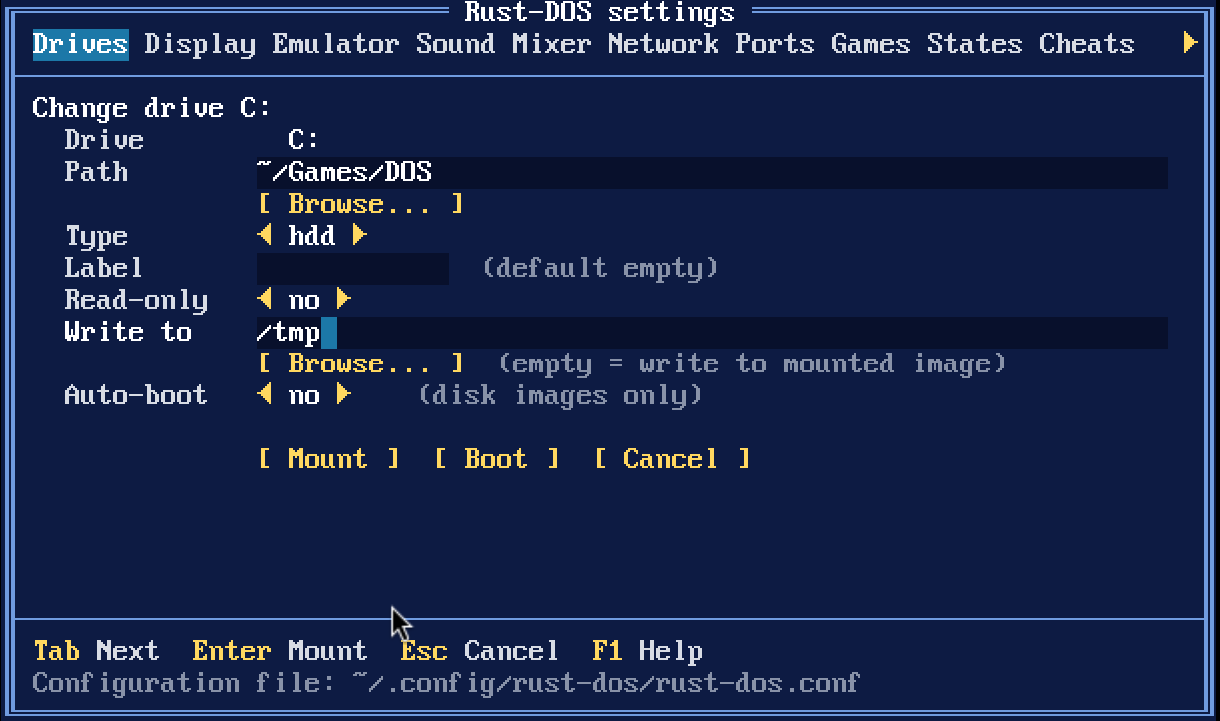
Write overlay
quoup1.png

* Any folder drive can take `-overlay DIR`, and DOSBox's `MOUNT C DIR -t overlay` works too. Imported DOSBox profiles keep their overlay folder.
* Files are copied into the overlay folder when first written. Deleted files are listed in `.rust-dos-deleted` inside it.
* Booted Windows 3.x/95 shared disks write their changes into the overlay as well.
* New and imported profiles get `overlay=true`, so changes go to `saves/<profile>/<drive letter>` next to the games folder. Existing profiles are unchanged until you add `overlay=true`.
* **R** on the Games page asks first, then deletes that folder, taking the game back to its install state.

ZIP/7z as drives
* ZIP, 7z and DOSBox Pure `.dosz` archives mount as drives. Stored zip files are read in place; compressed files are decompressed in memory on first open.
* An archive whose files are all in one folder uses that folder as the drive's root.
* An archive holding just a disk or CD image mounts the image.
* A `.dosz` stacks over the parent archive it names.
* Without an overlay an archive drive is read-only; game profiles always give their archives one.
* Dropping or loading an archive now creates a profile that plays it in place, instead of unpacking it. Games unpacked before keep their folders.
* The RetroAchievements hashing and the drives now share one zip reader. Hashing now reads through the libretro VFS too, so it also works for Android `saf://` content.

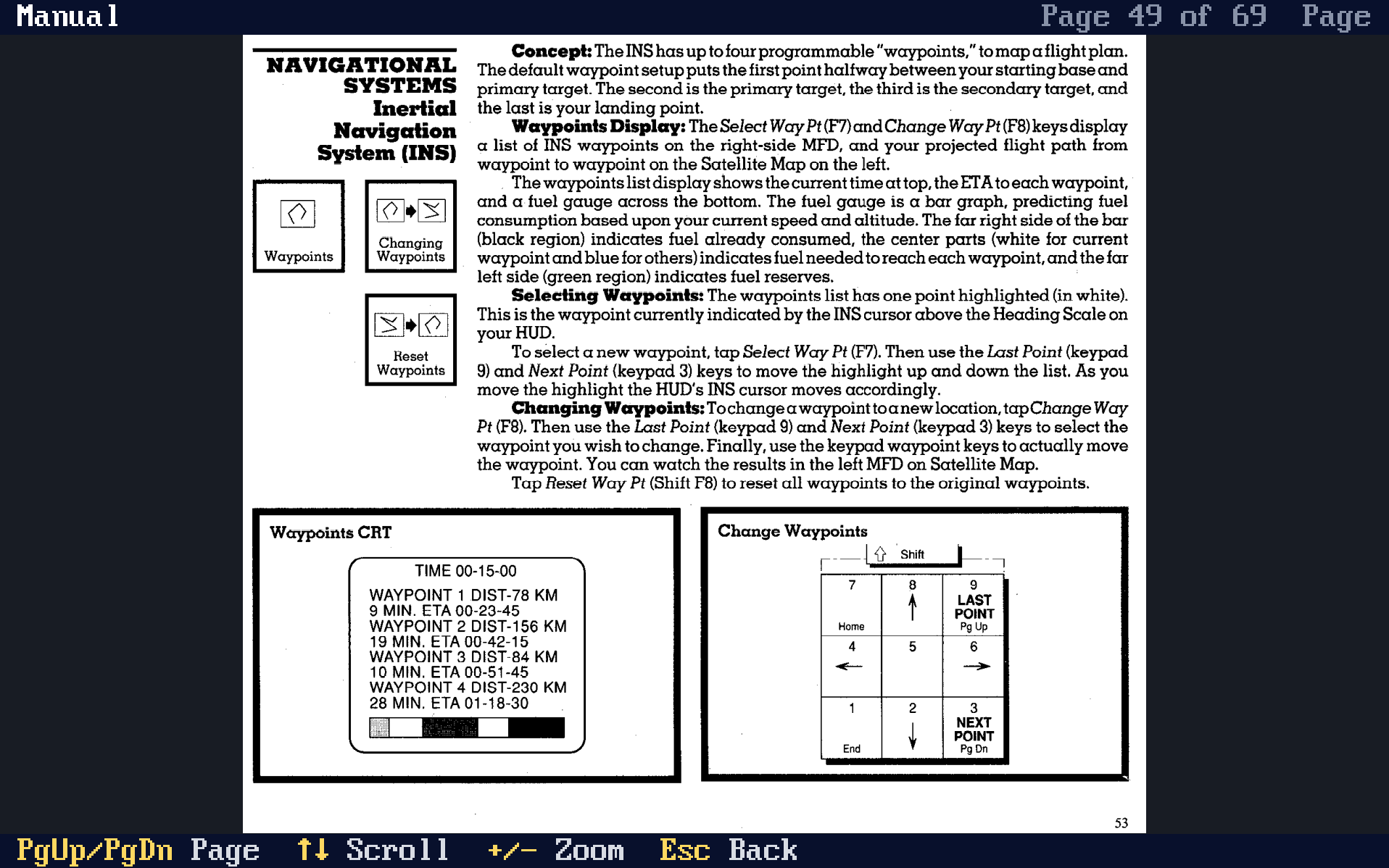
Manuals and extras viewer
rxfjgv.png

* With a game's profile defined, it is possible to set `[game] manual=path|Title` to specify the manual. Any files in `games/<profile>.extras`, are also used as manual, for example PDFs or PNG/JPEG/GIF pictures.
* **Ctrl+Shift+M** opens the running game's manuals; **M** on the Games page opens any game's. The game pauses while one is open.
* Keys: PgUp/PgDn turn pages, the arrows scroll, `+`/`-` zoom (whole page, width, 150%, 200%), Esc goes back. **Ins** in the list adds a file to the profile.
* The position in the manual is remembered during play so you can get back to the same page immediately.
* On desktop the page is drawn at the window's own resolution, so small print stays readable. In the libretro core it is drawn into the game's picture, with the same aspect correction.
* The browser build has no manuals: it has no host files to read them from.
* GAME-PACKAGES.md contains instructions on how to include manuals with your game.

VFS support
* The libretro core can now run content from Android's file picker (saf:// and content:// paths) through RetroArch's VFS.

Mouse Capture
* Automatic mouse cursor capture support
* Also works with games with different movement scaling (F117, etc)
* Ctrl+Alt added as shortcut to release mouse, like in VMWare

Dosbox compatibility
* Rust-Dos now imports dosbox and dosbox-pure packages: Inside it expects either a dosbox.conf at the package's root, or GAME.conf next to GAME.zip

Miscellaneous
* DOS HIGH support (defaults to on, see Emulation settings tab)

Bugfixes
* Fixed black screen in 3dfx emulation in OpenGL mode

Reply 49 of 75, by The Solutor

User metadata
Rank Member
Rank
Member

Yesss, thanks

Really cool, really fast

In the meantime I have another (maybe dumb) question

Assume I'm here, top lever of the R: drive, and I need to choose something located on the T: drive, how I'm supposed to change the drive?

Norton Commander & clones have Alt + F1/F2.... here?

Reply 50 of 75, by Dividebysandwich

User metadata
Rank Newbie
Rank
Newbie

Heh... Well you can type T: and then press browse.
But yeah, drive buttons would be more convenient. Can you tell I don't use Windows? 😉

BTW I found a bug with Duke3d and the Gravis Ultrasound. If you hear weird midi notes on the left speaker, that bug will be fixed in the next version.

Reply 51 of 75, by The Solutor

User metadata
Rank Member
Rank
Member
Dividebysandwich wrote on 2026-10-01, 22:30:

Heh... Well you can type T: and then press browse.

I know, but still my QC senses start tickling when I find a UX inconsistence. 😉

But yeah, drive buttons would be more convenient.

Yes, another option could be to start from an imaginary root \ and show the drive letters as if they were subfolders of that not really existent root directory.

A bit "unixy", but if you think, "My PC" in windows was an attempt of MS to do the same thing in Win95, a single starting point to access any folder no matter the drive.

Can you tell I don't use Windows?

Yes, being used to use MC on Linux, I have always to think twice when I have to change drive on WinDOS, so I perfectly understand what you mean.

BTW I found a bug with Duke3d and the Gravis Ultrasound. If you hear weird midi notes on the left speaker, that bug will be fixed in the next version.

Good to know, but I wasn't a special lover of Duke at the time, and I'm not today (Doom, Quake, TombRaider 1/2/3, Unreal, Half Life.... were my things...), so that bug has not big impact on me 😀

Last edited by The Solutor on 2026-10-02, 13:29. Edited 1 time in total.

Reply 52 of 75, by The Solutor

User metadata
Rank Member
Rank
Member

I compiled a reboot command from here https://github.com/irtygo/dos-reboot
(more because RetroOS than RustDOS)

The attachment reboot.zip is no longer available

it's said to work on Dosbox-X (and Real DOS).

But doesn't work on RustDOS (and RetroOS)

Not that compiling it is that complicate, but I attach it here for people who may find it useful

Not that it is a so essential feature, but a reboot/shutdown command would be a nice thing to have

Reply 53 of 75, by Dividebysandwich

User metadata
Rank Newbie
Rank
Newbie

v1.2.0 is available at https://github.com/dividebysandwich/rust-dos/ … ases/tag/v1.2.0

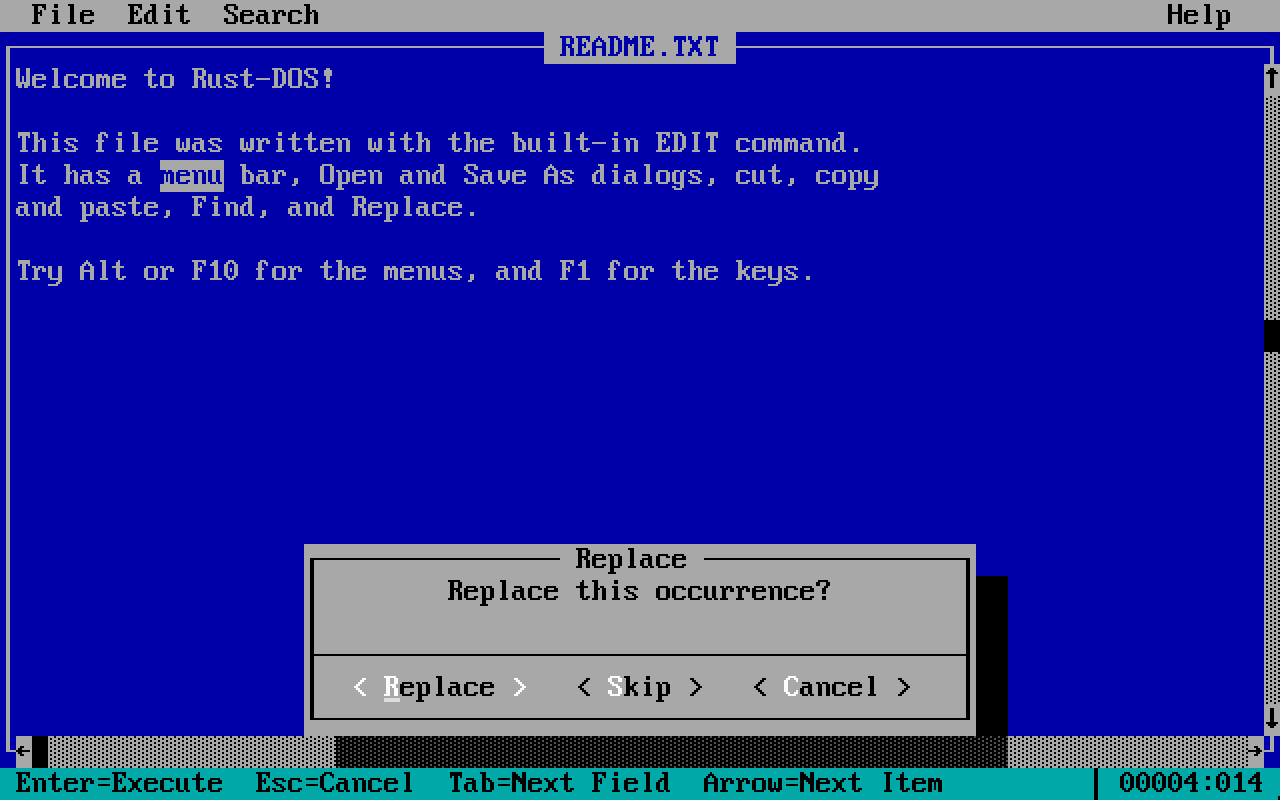
Built-in editor!

This is a pure rust implementation, provided for convenience.

n3cbdn.png

Overlay support for disk images

When mounting a readonly disk image with a write overlay, writes go to .rdelta files in 64kB blocks.
If the base image changes lateron, the delta files are refused.
If Rust-DOS is killed during writes, only that 64kB block is lost.

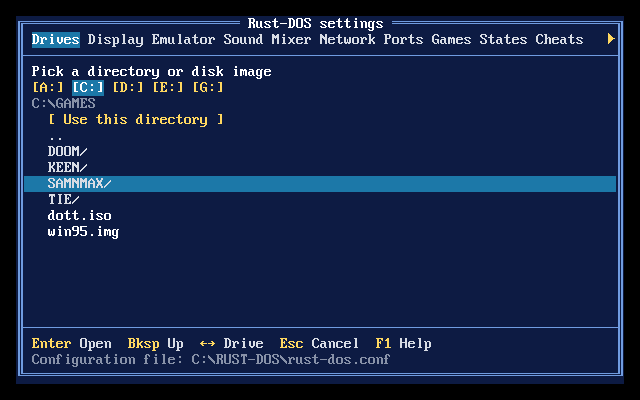
Drive selection buttons for Windows

d6iczw.png

Reboot

There's now support for the following reboot mechanisms:

  • port 92h
  • writing 06h/0Eh to port CF9h (new)
  • INT 19h
  • jumping to FFFF:0000
  • a triple fault
  • Ctrl+Alt+Del at the prompt (new)
  • a new debug server call, POST /api/control/reboot

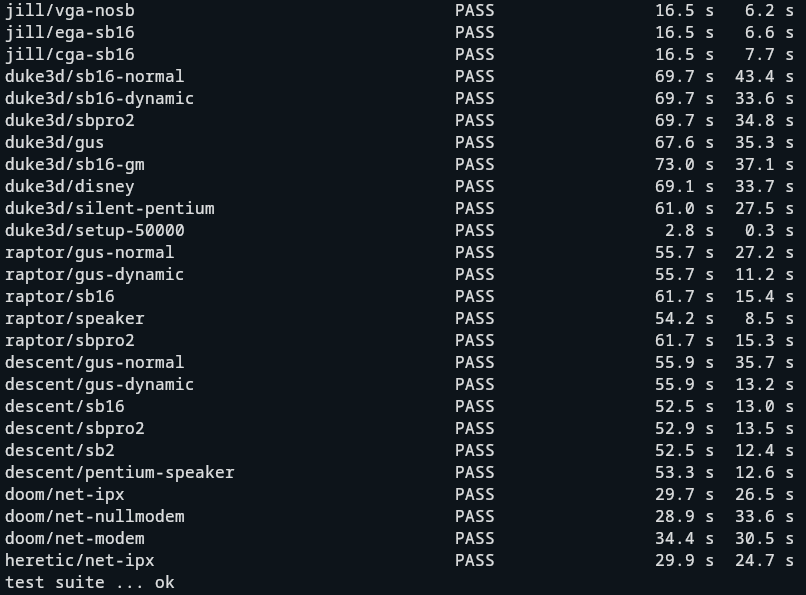
Automated Game Regression Test Suite

tnejfy.png

This suite downloads approx. 19 MB of shareware and freeware and runs a test suite with various scenarios and configurations.
Each scenario takes picture and sound hashes at fixed points and compares them against "golden" masters.
When a hash changes, the run saves the new picture or sound next to the previously recorded one in target/game_suite/, and writes report.md.
If changes are desired/expected, run with

GAME_SUITE_BLESS=1

to re-record new hashes.

Games tested:

Early PC games: Alley Cat, Digger, Sopwith, Rogue, Scorched Earth.
Real-mode games: Keen 1, Wolf3D, Jill (in CGA, EGA and VGA modes), Cosmo, Duke Nukum.
Protected-mode games: Doom, Heretic, Duke3D, Descent, Raptor.

How to run

cargo test --release --test game_suite -- --ignored --nocapture

Bugfixes

  • Fixed auto cycles failing to select sensible values in WASM
  • Fixed GUS audio problems in Duke3D
  • Fixed SB Pro / SB 2 panics due to wrongly assuming SB16 parameter support
  • Fixed SB2.0 crash in Descent
  • 7z was missing in the libretro supported extensions list
  • Fixed Sam'n'Max startup crash with DPMI=on
  • Stopped unit tests from leaving stray "layer15:" directories behind
  • Fixed shell saying "Syntax error " when processing ```IF ERRORLEVEL == 1 GOTO END```
  • Added support for DOS reboot

Reply 54 of 75, by The Solutor

User metadata
Rank Member
Rank
Member

Great!, now that you have nothing to do and you're bored 😜

If you ask me for something useful to add, I reply bash like persistent history.

Not sure if you know the little gem but Clink does that for modern windows

https://github.com/mridgers/clink (original, simpler, SW by mridgers)

https://github.com/chrisant996/clink (new, improved, more complex, fork by chrisant996)

Reply 55 of 75, by Dividebysandwich

User metadata
Rank Newbie
Rank
Newbie

v1.3.0 is available now! -> https://github.com/dividebysandwich/rust-dos/ … ases/tag/v1.3.0

Gamepad mappings and new action wheel
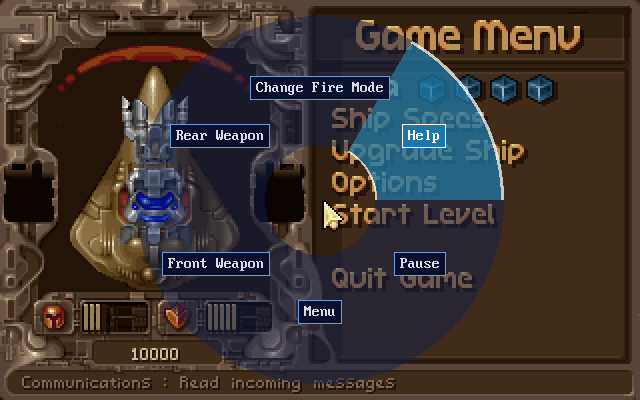
k9ux4c.png

* Games can now come with their own gamepad mapping: a `[gamepad]` section in the profile, or the `input_pad_*` / `input_wheel_*` lines of a package's DOS.YML.
* Each pad input (D-pad, A/B/X/Y, shoulders, triggers, L3/R3, Select/Start and the stick directions) can press up to four keys, mouse moves or clicks, or joystick moves and buttons, e.g. `start=leftctrl+f10 Open Menu`.
* An input bound to `wheel` opens a radial action wheel over the game while held. The left stick (or D-pad) picks a slice, and releasing the button triggers it.
* Mouse speed (`padmousespeed`, `mousespeed`, `mousexfactor`) and the host mouse wheel (`mousewheelup`/`mousewheeldown`) can be set per game.
* On desktop the first gamepad uses the game's mapping. In the libretro core, it applies to port 1 set to **Gamepad as keyboard**.
* **P** on the Games page lists a game's mapping.

Launch configurations
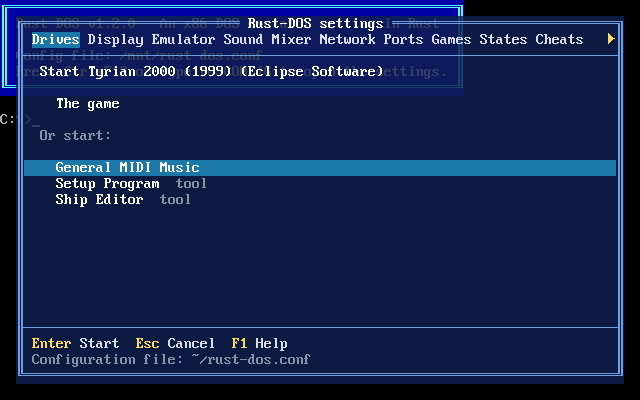
23c2pr.png

* A `.dosc` file's launch configurations (`[Setup Program]`, `[Ship Editor]`, `[General MIDI Music]`...) are offered in a chooser when the game is launched. Tools like the setup program are marked.
* Combined options such as `[MIDI + German]` are picked with Left/Right on the game's row.
* When a tool ends, the chooser opens again. All launch configurations share the game's saves.
* Works with the keyboard and mouse on desktop and with the gamepad in RetroArch.

.dosz / .dosc packages

* A `GAME.conf` next to `GAME.zip` or `GAME.dosz` is now used even if it only has an `[autoexec]` section.
* The package is mounted as C: before the conf's commands run, so `REMOUNT C D`, `SUBST C: X:\GAMEDIR` and mounting another C: work as these confs expect.
* A `.dosz`, or an archive with a `.conf` or `.dosc` of its name next to it, keeps the archive's root as C:, so `cd GAMEDIR` lines keep working.
* A `GAME.dosc` is layered over its game. Its DOS.YML sets CPU speed, CPU type, memory, video card, sound card, MIDI synth, the program to start, images to mount or boot, the keys pressed at startup and the gamepad mapping.
* IPS, BPS and VCDIFF (xdelta) patches in a `.dosc` are applied to the game's files. XOR patches are reported in the log and skipped.
* Loading or importing a `.dosc` loads its game.
* Package profiles now track what they were made from: when you edit the `.conf` (or add a `.dosc`), the profile is rebuilt the next time the game loads, keeping its saves.

Keys at startup

* `[game] input=` (or DOS.YML's `run_input`) types keys once the game's program has started, e.g. `input=(WAIT:200)(ENTER)(WAITMODECHANGE)`.
* Supports typed text, `(KEY)` presses, `(key:DOWN)`/`(key:UP)`, `(WAIT:ms)`, `(WAITMODECHANGE)` and `(DELAY:ms)`.
* Waits run in emulated time, and the machine fast-forwards through them. Pressing a key or pad button stops the sequence.

Operating system packages organized by name

* Hard disk images in `~/.config/rust-dos/os` (libretro: `system/rust-dos/os`) can be mounted by name: `IMGMOUNT C WIN98SE` or `REMOUNT WIN98SE C`. `REMOUNT` on its own lists them.
* `[rust-dos] os=win98se` in a game's conf boots the game inside that OS: the image is the first hard disk and the game is D:. Other emulators ignore that section, so one conf works in both.
* A new **Boot OS** core option in the libretro core does the same for packages without a conf.
* The OS image is never written: each game's changes go to its own delta file, so one install serves every game.

New commands

* `REMOUNT from to` moves a mounted drive to another letter. `REMOUNT C D` leaves C: empty for an OS image.
* `SUBST drive: path` makes a folder a drive of its own, and `SUBST drive: /D` removes it.

Clink-style prompt

r52g20.png

t1498t.png

* The DOS prompt now edits its line like clink: move and delete anywhere in the line, word keys, overwrite and undo.
* Colors for commands, programs, switches and arguments. `PROMPT` can use ANSI colors after `$E`, e.g. `PROMPT $E[1;33m$P$E[0m$G`.
* Suggests the rest of the line from history (Right or End accepts).
* Tab completes commands, PATH programs, files, directories and variables. Ctrl+Space lists the matches.
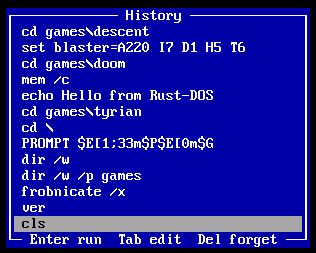
* History is kept between sessions. PgUp/PgDn/F8 search it by prefix, Ctrl+R/Ctrl+S search it incrementally, and F7 shows it in a window. The new `HISTORY` command lists or clears it.
* This feature is configurable in the new `[shell]` section of the config
* The settings window now has toggles for suggestions, colors and history - in case you prefer an authentic DOS experience over convenience

Miscellaneous

* OpenGL rendering is now behind a `gl` feature (on by default). Builds without it, e.g. on RedoxOS the SDL renderer is used.
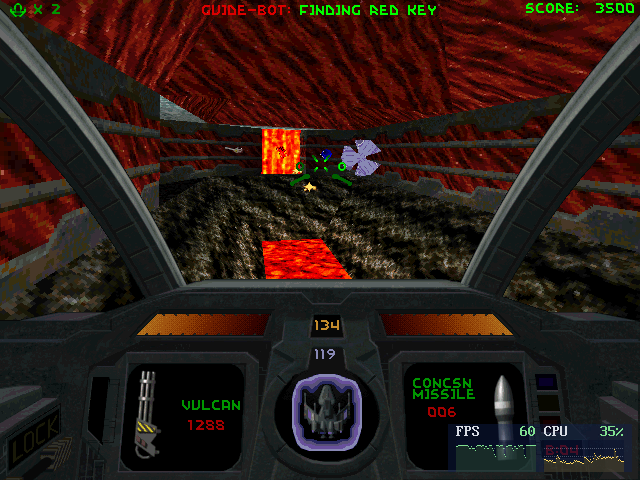
* Steam uses a different file extension for their cd image cue files. This is now supported as well. Tested with Steam's Descent 2 distribution - which works perfectly too btw 😉
r6me7m.png

Bugfixes

* Fixed a game's drives being swapped back (in RetroArch, to an empty `drive_c` folder) when its commands started no program
* When a game ends, every drive it changed is restored, including ones changed by REMOUNT or SUBST
* Fixed imported `BOOT C:` lines being treated as an image path
* Relative paths in a conf next to an archive are now also looked up in the archive's folder
* Fixed files in some DOS-made zips showing up as folders (Commander Keen 1's `INSTALL.EXE`)

Reply 56 of 75, by The Solutor

User metadata
Rank Member
Rank
Member

Great|

A minor thing that should be fixed. When in portable mode, things like the AWE ROMS are still downloaded in the user's profile.

I think that, in such condition, should be placed in Rust-DOS folder, or a subfolder of it...

Reply 57 of 75, by Dividebysandwich

User metadata
Rank Newbie
Rank
Newbie

v1.3.1 is out -> https://github.com/dividebysandwich/rust-dos/ … ases/tag/v1.3.1

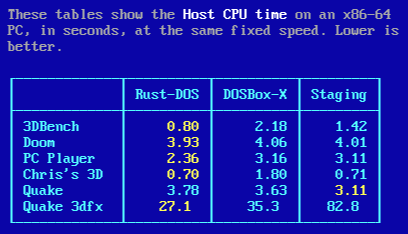
Big optimization push. The goal was not raw speed, but to lower the CPU effort needed for the same amount of work. Staging is still faster on some things like software rendered Quake, but overall Rust-DOS tends to be faster now.

f4jdyl.png

On Raspberry Pi, Rust-DOS is now significantly more efficient. Note that specific games and programs might still use more host CPU - also RustDOS is still very young and some programs may not work at all. So don't uninstall your Dosbox-X or Dosbox-Staging 😉

qia7es.png

Other changes:

x) Fast-FPU mode (trades f80 accuracy for speed)
x) Gravis Ultrasound patch corruption fixes
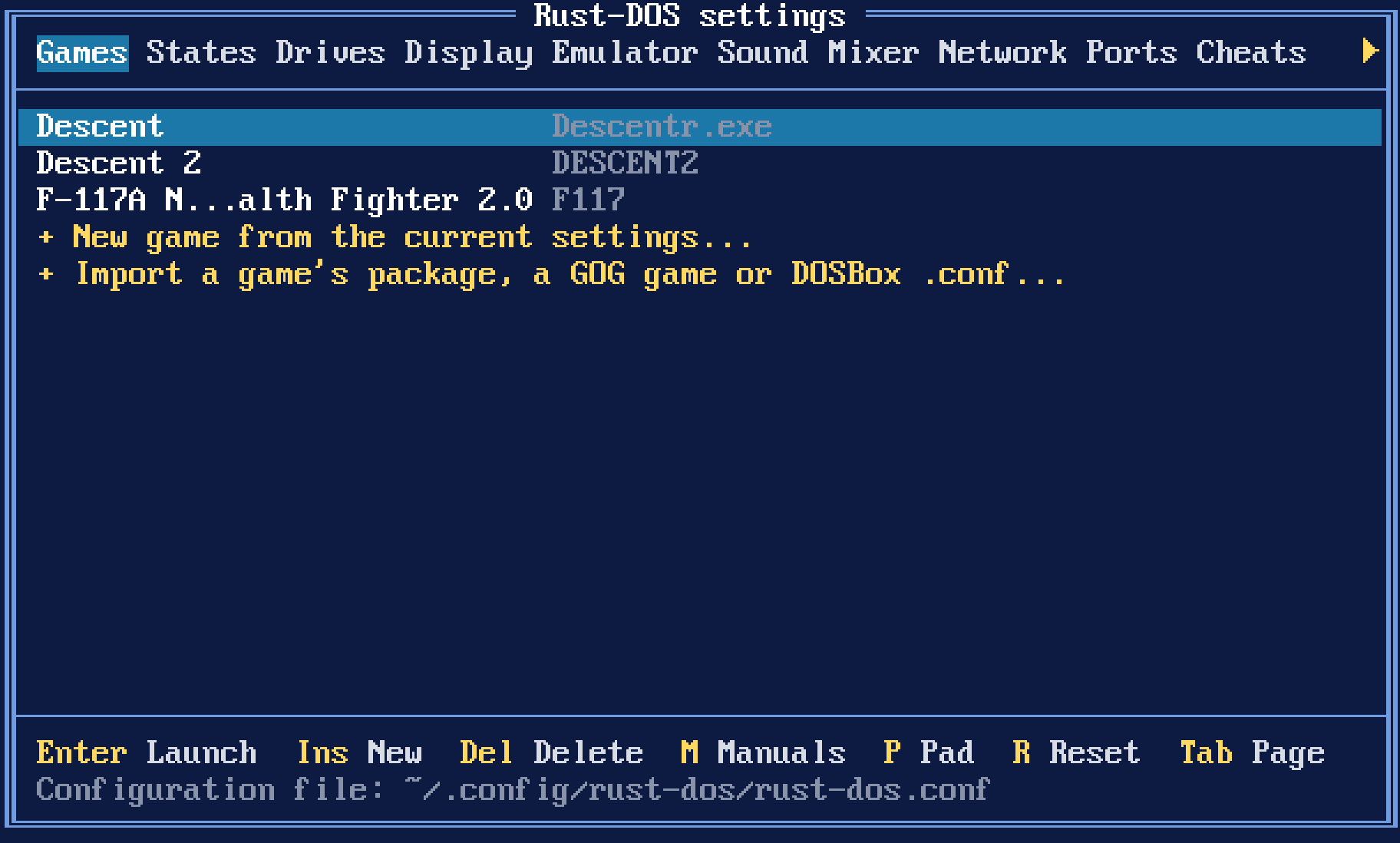
x) Settings UI tabs reordered - Games and States are now the first two tabs

612zvb.png

Reply 58 of 75, by The Solutor

User metadata
Rank Member
Rank
Member

@Dividebysandwich

Not exactly a RustDOS request, but given you ported the the Clink like feature in no time, would be hard for you to publish a standalone port that works on msdos, freedos. win9x and so on?

I'm sure a lot of people would appreciate it...

It's a drug style feature, use it once and you're addicted... 😁

Reply 59 of 75, by dosmax

User metadata
Rank Newbie
Rank
Newbie

Best emulator for hassle free statically linked 3Dfx games ever! I don't think I have seen EF2000 GFX+ running so buttery smooth at high resolutions without any stutter ever before.

I can't get dynamically linked ones like Tomb Raider or the second Descent II 3dfx patch (d2_3dfx.exe) working for some reason though (rust-dos 1.3.1). Tried various different glide2x.ovl versions from different Voodoo 1+2 driver packages, but none worked. Maybe someone can point me at a glide2x.ovl version that does the trick? Or did I miss something I have to do besides copying the .ovl into the game folder?

Thanks in advance. Any help would be much appreciated.

While I'm at it two feature suggestions:

1. A custom framerate cap for VRR mode (or in general if possible) would be great. More precise in terms of smooth output than tinkering with cycles count.
2. Antialiasing for Voodoo via OpenGL would be fantastic. Forcing AA through the nVidia control panel doesn't work unfortunately. Judging from past experience with fumbling that into a custom D2-XL build that may not be a one-line fix though, might require adding multisampled framebuffer support.